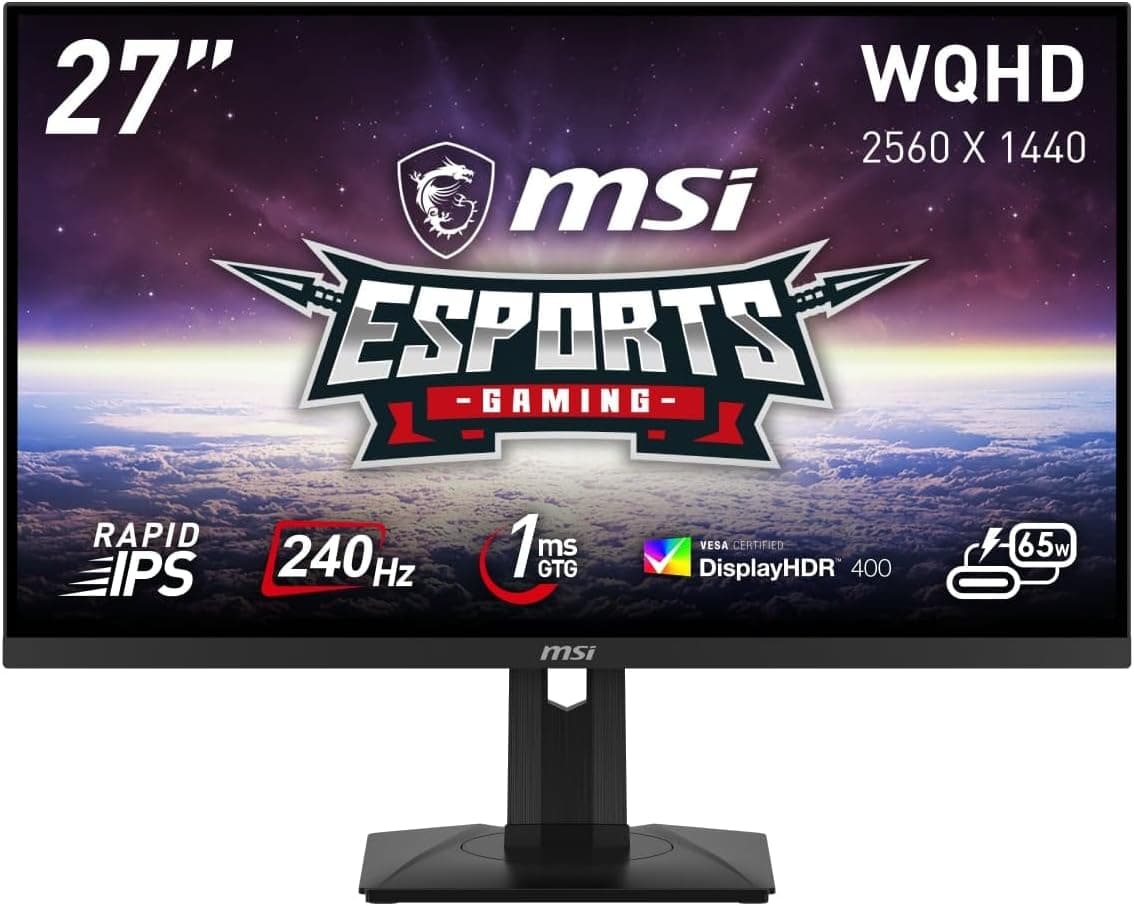
The MSI G274QPX is a 27-inch WQHD (2560×1440) gaming monitor built around a Rapid IPS panel running at 240Hz. This article goes past the spec sheet to answer the questions buyers actually have: how it differs from other 27-inch 240Hz panels, whether your PC or laptop can exploit it, and where you'll need to compromise.
Overview
The G274QPX combines Rapid IPS, WQHD, 240Hz, and a 1ms (GTG) response time in a conventional 27-inch chassis. In short: it targets people who can't justify an OLED but find 144Hz limiting, and who want one panel for both competitive shooters and daily work.
Two things define its character. First, the color coverage — sRGB 99%, AdobeRGB 97%, DCI-P3 98%, with roughly 1.073 billion displayable colors.
That's a wide-gamut configuration, not a gaming-only panel. Second, connectivity: the USB Type-C port supports DP Alt Mode and up to 65W power delivery, so a laptop can run video and charging over a single cable.
HDR, however, stops at DisplayHDR 400 certification. That tier does not require local dimming, so if you're buying for cinematic black levels you will be disappointed.
Treat DisplayHDR 400 as an entry-level badge meaning "accepts and displays an HDR signal without breaking" rather than a true HDR experience.
Connectivity & Compatibility
The official compatibility notes state two things: G-Sync Compatible means NVIDIA GPUs are recommended, and USB-C operation requires DP Alt Mode support on the laptop. Most real-world problems cluster around those two points.
Choosing a video input. The rear panel offers two HDMI 2.0b, one DisplayPort 1.4a, one USB Type-C (DP Alt Mode, 65W PD), and two USB 2.0 Type-A downstream ports.
Note that HDMI is 2.0b, not 2.1.
Its 18Gbps of bandwidth means DisplayPort 1.4a or USB-C is the safe route for WQHD at a full 240Hz.
If HDMI is your only free port, plan for a possible refresh-rate ceiling. That is part of why MSI bundles both a DisplayPort and a USB-C cable.
Consoles. Because of the HDMI 2.0b limitation, this is not the monitor for driving a current-generation console at its highest modes.
Buy it as a PC display; if console use is the main goal, look for an HDMI 2.1 model.
GPU requirements. 240Hz is the monitor's ceiling, not a promise your games will reach it.
Sustaining 200+ fps at WQHD takes a capable GPU even in esports titles. Valorant-class games are realistic; heavyweight titles at max settings are a different conversation.
VRR works via G-Sync Compatible certification with NVIDIA GeForce cards. Adaptive-Sync commonly works on Radeon and Arc too, but only G-Sync Compatible is certified here — verify on the product page before committing to an AMD build.
Single-cable laptop use. 65W is enough for an ultrabook and not enough for a gaming laptop.
Machines with a high-TDP CPU plus a discrete GPU typically ship with 150W–230W adapters; on 65W they may fail to charge under load or drain slowly. Your laptop's USB-C port must also support DP Alt Mode — some ports still don't carry video.
Check your exact model number first.
Desk space and arms. The chassis measures roughly 614×403×197mm and weighs about 5.95kg.
That 197mm depth includes the stand, so shallow desks get cramped. The stand covers 130mm of height adjustment, ±45° swivel, -5° to 20° tilt, and 90° pivot, which is a full set.
Mounting is VESA 75mm using the included spacer screws. Most aftermarket arms assume 100×100mm, so confirm 75mm support or plan for an adapter plate — this is the detail people discover after the box is open.
Product Info
| Item | Value |
|---|---|
| Screen size | 27 inches |
| Resolution | WQHD (2560×1440) |
| Panel | Rapid IPS |
| Refresh rate | 240Hz |
| Response time | 1ms (GTG) |
| Max colors | approx. 1.073 billion |
| Color gamut | sRGB 99% / AdobeRGB 97% / DCI-P3 98% |
| Viewing angle | 178°/178° |
| HDR | DisplayHDR 400 |
| USB PD | up to 65W |
| Dimensions | approx. 614×403×197mm |
| Weight | approx. 5.95kg |
WQHD at 27 inches lands near 109ppi, which is the classic "usable at 100% scaling" density. A 27-inch 4K panel effectively forces you into display scaling; WQHD gives you meaningfully more room than 1080p without that hassle.
Pricing was ¥32,670 on Amazon.co.jp as captured on 12 June 2026.
Monitor prices move constantly with stock and sales, so always check the current figure on the product page — this is a snapshot, not a standing price. The eBay data returned only "See listing," so there is no usable marketplace figure to cite.
User reviews sit at 3.9 out of 5 stars across 63 reviews (captured 4 June 2026).
That deserves an honest read: it is not a standout score for a 240Hz gaming monitor. With only 63 reviews, a handful of dead-pixel or shipping-damage reports can drag the average down — but equally, this is not a display with a rock-solid consensus behind it.
Read the low-star reviews yourself and see which complaints repeat.
The monitor launched around June 2024 and carries a 3-year manufacturer warranty. In the box: a 110W power adapter, a DisplayPort cable, a USB Type-C cable, and a quick-start guide.
Plenty of gaming monitors ship with one or two years of coverage, so three years is a quiet advantage.
How It Compares
The 27-inch 240Hz IPS category is crowded, with models such as the ASUS ROG Swift PG27AQN and LG 27GP850-B on the same shelf. What sets the G274QPX apart at this price is packing 240Hz, WQHD, wide gamut, and USB-C power delivery into one unit.
That 65W USB-C port is frequently omitted on competing gaming monitors, and whether you need it largely settles the comparison.
- By panel technology — OLED wins on black level and response, at the cost of burn-in risk and price. IPS is the easier choice for a bright room and long desk sessions.
- By refresh rate — 360Hz-class panels exist, but reaching those frame rates is a GPU investment. 240Hz is close to the practical ceiling most builds can actually feed.
- By size and shape — ultrawides and 31.5-inch panels chase immersion; 24.5-inch models minimize eye travel. 27-inch WQHD is the most flexible middle ground.
Real-World Setup Notes
A 1ms (GTG) figure is achieved with overdrive engaged. On most panels the most aggressive overdrive setting introduces overshoot — inverse ghosting that looks like a bright halo behind moving objects.
Start from a middle overdrive step rather than the fastest and judge it with your own eyes.
Also remember that 240Hz must be selected in both the OS and the GPU driver. Leaving Windows at 60Hz after plugging in a high-refresh monitor is the single most common setup mistake.
If you want VRR, enable G-Sync (Adaptive-Sync) in the GPU control panel too.
Best Use Cases
- Competitive FPS players — if your rig can push high frame rates in Valorant or Apex Legends, 240Hz and 1ms translate directly into what you see.
- People combining gaming with work or creative output — the WQHD workspace plus sRGB 99% / DCI-P3 98% coverage is genuinely usable for photo and video editing. The one-panel-does-everything argument is strongest here.
- Thin-and-light laptop owners — DP Alt Mode plus 65W PD makes this a workable single-cable dock for a mobile machine, and an easy switch point between a desktop and a laptop.
- Anyone working in a bright room — wide 178°/178° viewing angles and IPS behavior mean less fussing than an OLED demands.
Before You Buy
This is where the decision actually gets made. Any of the following should give you pause.
1. Don't buy it for HDR. DisplayHDR 400 is an entry tier without local dimming.
If HDR content matters, aim for DisplayHDR 600 or higher, or OLED. Otherwise your reaction to enabling HDR will be "everything just looks washed out."
2. It won't host a gaming laptop. 65W falls short of what a high-performance notebook draws.
Buying for single-cable convenience and then still needing the AC brick is a common disappointment. Check your laptop's original adapter wattage first.
3. Not for HDMI 2.1 use cases. If you need high-refresh console output, or HDMI is your only free port, you won't extract full performance.
DisplayPort or USB-C availability is effectively a prerequisite.
4. VESA is 75mm. Most monitor arms are built around 100×100mm.
Confirm 75mm compatibility or an adapter plate before buying an arm, and note that mounting uses the included spacer screws.
5. The review score isn't stellar. 3.9 out of 5 from 63 reviews (as of June 2026) is not a ringing endorsement.
Verify that the recurring complaints are ones you can live with.
6. Treat the listing metadata with suspicion. Amazon product pages sometimes carry manufacturer names, model numbers, or spec claims that don't match the actual item, and monitor families often have near-identical variants with different panels or refresh rates sharing a page.
Confirm from the title and product photos that you're looking at the G274QPX, and treat MSI's official product page as the authoritative source if anything conflicts with what you read here.
7. 240Hz is your GPU's job. Swapping monitors doesn't raise frame rates.
If you're currently capped near 100fps, upgrading the GPU will do more for how the game feels.
FAQ
Q. Do I need DisplayPort for 240Hz? A.
For reliable WQHD 240Hz, use DisplayPort 1.4a or USB Type-C with DP Alt Mode.
The HDMI ports are 2.0b, so bandwidth may cap the refresh rate.
The bundled DisplayPort cable is the safest path.
Q. Does VRR work with an AMD GPU? A.
The certification is G-Sync Compatible, and the compatibility notes recommend NVIDIA GPUs. Adaptive-Sync commonly works on other vendors, but that isn't guaranteed here — check the manufacturer's product page if you're on AMD.
Q. Can I run my laptop over one cable? A.
Yes, if its USB-C port supports DP Alt Mode. Power delivery tops out at 65W, which is fine for a thin-and-light and insufficient for a gaming laptop.
Q. Is text too small at 27-inch WQHD? A.
Around 109ppi, it's the density most people use at 100% scaling — noticeably roomier than 1080p without the scaling headaches of 27-inch 4K.
Q. Can I use a monitor arm? A.
It's VESA 75mm and mounts with the included spacer screws. Since most arms assume 100mm, verify 75mm support or an adapter plate first.
Q. How long is the warranty? A.
Three years from the manufacturer — longer than many gaming monitors, which matters if you plan to keep it a while.
Product Disclosure (Amazon)
- ASIN: B0CYSF13MW
- Note: This article covers a manufacturer-made product based on Amazon listing details.