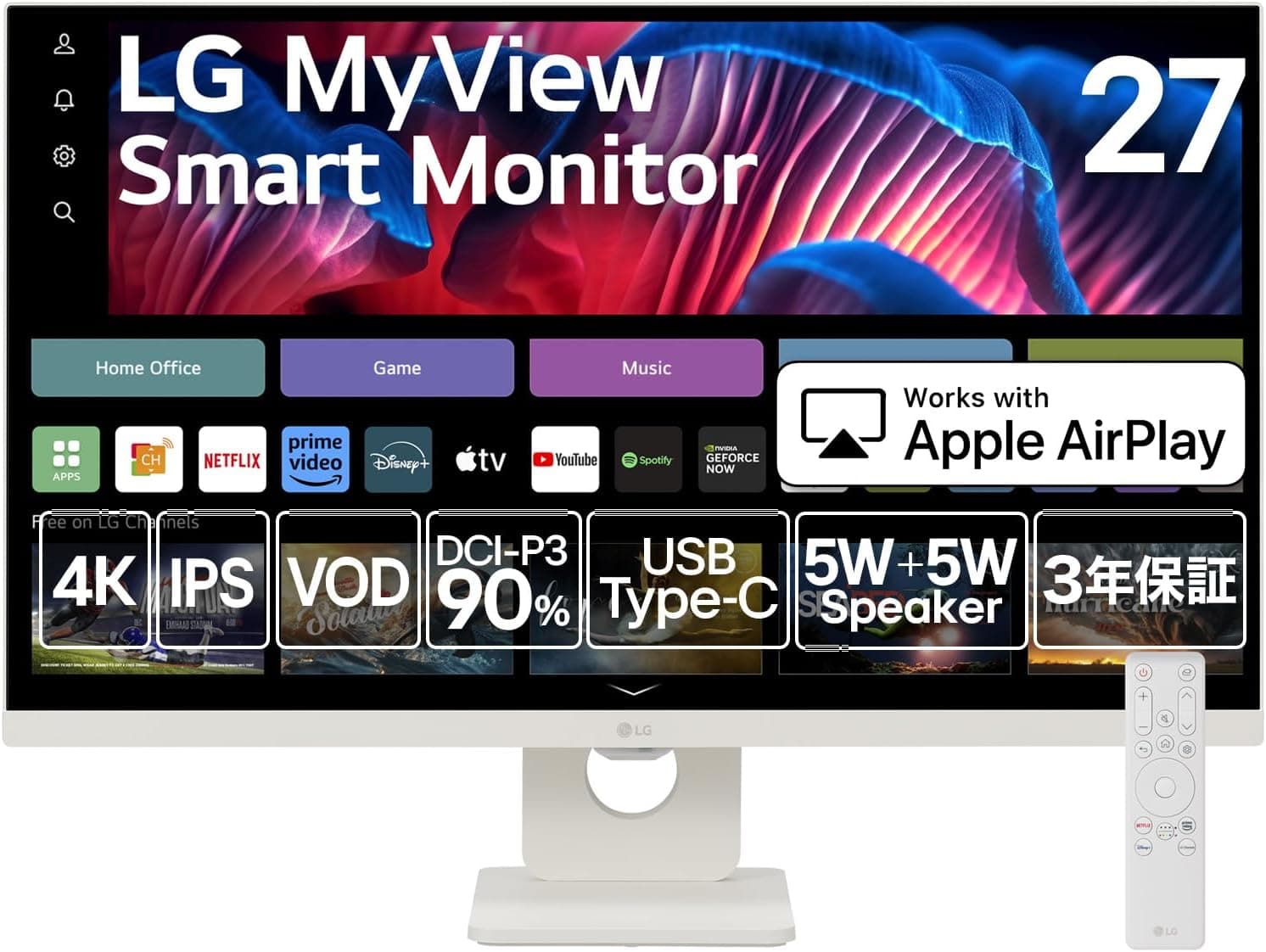
Overview
The LG 27SR73U-W is a 27-inch 4K UHD (3840×2160) IPS smart monitor that runs webOS 23, the same operating system LG ships on its TVs. The short version: this is not a gaming monitor and not a color-managed creator display — it is a product for building a desk that works with nothing but a laptop and a remote.
You can open Netflix, YouTube, or Prime Video from the remote without booting a PC, and a single USB-C cable carries both 4K video and 65W of charging power.
The flip side is that it is not aimed at people chasing high refresh rates or absolute color accuracy. The panel is rated at DCI-P3 90% with roughly 1.07 billion colors (8bit+FRC) — good enough for viewing and light editing, but not a spec sheet written for calibrated production work.
This article spells out exactly where those compromises land.
Compatibility Guide
LG's stated requirement is simple: a laptop that supports USB-C PD 65W charging. MacBook Air/Pro and most USB-C-charging Windows laptops qualify.
In practice, though, three things trip people up.
- Does your laptop's USB-C port support DisplayPort Alt Mode? USB-C ports look identical but can be charge-only or data-only.
When no image appears, the port spec — not the cable — is often the culprit. 2.
Is 65W enough for your machine? It comfortably covers a MacBook Air or a 13–14-inch thin-and-light.
On a 16-inch class laptop or a gaming notebook with a discrete GPU, the battery can still drain under heavy load. That's power math, not a defect.
Plan on keeping the original adapter around. 3.
Cable spec. The box includes a power cable and an HDMI cable; confirm on the product page whether a USB-C cable is included.
If you supply your own, use one rated for video plus 100W (5A). A thin charge-only cable will not carry an image.
Video inputs total three: USB-C (DisplayPort Alt Mode) and two HDMI ports. With two HDMI inputs you can leave a laptop on USB-C and a console or set-top box on HDMI permanently.
Wirelessly, AirPlay 2 and Miracast cover iPhone/iPad casting and Android/Windows mirroring. Audio runs through 5W+5W built-in speakers or the 3.5mm output.
One gap worth naming: refresh rate, HDR certification, and VESA mounting are not listed in the spec data available here. If you plan to use a monitor arm, verify VESA support and pitch on the product page before buying. Tilt is -5° to 15° only, with no documented height adjustment, so arm compatibility matters more than usual.
What the Specs Mean in Daily Use
The anti-glare (matte) coating is an underrated win. A webOS-equipped monitor tends to end up in a living room or a bright room, and a glossy panel would be unusable in daylight reflections.
Conversely, if deep cinematic blacks are your priority, matte IPS is the wrong direction — blacks will look lifted.
At 29.4W, power draw is low for a 27-inch 4K panel.
Eight hours a day, 22 days a month still adds up to very little, which makes it well suited to always-on secondary-display duty or bedroom viewing.
| Spec | Value | What it means in use |
|---|---|---|
| Size / Resolution | 27" / 3840×2160 | ~163ppi. Text is small at 1:1; plan on 150–200% scaling |
| Panel / Depth | IPS / 1.07B (8bit+FRC) | Stable color and viewing angles; contrast trails VA |
| Color gamut | DCI-P3 90% | Fine for video and light photo work; not for print proofing |
| USB-C PD | 65W | Thin laptops charge continuously; big laptops may drain under load |
| Speakers | 5W+5W | "Sound exists" tier. Add external speakers for media |
| Tilt | -5° to 15° | No documented height adjustment; plan a riser or arm |
The left columns are quoted from the spec sheet; the right column is my reading. The key point: 27-inch 4K hits you with "text is tiny" before it delivers "more workspace." Budget for 150% scaling on Windows or scaled resolutions on macOS.
Product Info
The listed price was ¥54,300 including tax on Amazon.co.jp as captured on June 12, 2026. Monitor pricing swings hard, and sales move it by thousands of yen.
Treat that figure as a reference point and check the product page for the current price. Note that the reference data also shows the same ¥54,300 Japanese listing under an "Amazon US" label, so it is no guide to overseas pricing; the eBay entry is a search link with no confirmed price.
Amazon reviews sit at 3.6/5 from 30 ratings (about 72%).
That is a thin sample for a 27-inch 4K monitor, and the average isn't outstanding. With only 30 ratings, a handful of extreme scores moves the number substantially.
Read several recent review bodies rather than trusting the star average — smart monitors split opinion on things no spec sheet captures, like webOS responsiveness and remote usability.
It launched around mid-2024. The chassis and stand are matte white with a three-side bezel-less design.
In the box: remote, power cable, HDMI cable, quick setup guide. Coverage is a 3-year manufacturer warranty plus a zero-bright-dot guarantee — arguably worth more than the price tag suggests, since 4K panels pack enough pixels that dead-pixel luck matters.
Market position: mid-to-high tier among smart monitors. Against ordinary 4K monitors at the same price, the two real differentiators are standalone webOS operation and 65W USB-C PD.
How It Compares
Around the ¥50,000 mark you have three alternatives:
- A conventional 4K monitor — no webOS, no remote, but the same budget may buy a height-adjustable stand, a USB hub, or a higher refresh rate. If a PC is always attached, this is the simpler choice.
- A 4K gaming monitor of the same size — built for refresh rate and latency. The 27SR73U-W isn't competing there.
- A small 4K TV — cheaper for pure viewing, but worse for PC text rendering, scaling, and with no USB-C power delivery.
This monitor fits the space between all three: you use a PC, and you also want to watch things without booting one. If that isn't you, one of the three categories above will likely make you happier.
Best Use Cases
- Remote and hybrid workers — one USB-C cable for 4K output and charging, with no cable pile. Not re-plugging before every meeting matters more day-to-day than it sounds.
- Heavy streaming viewers — Netflix and YouTube from the remote, no PC boot required. Works as a bedroom or living-room second screen.
- MacBook owners — 65W covers normal workloads on a MacBook Air or 13–14-inch Pro, and AirPlay 2 makes iPhone/iPad casting natural.
- People who don't want another device — the monitor runs on its own, so the "boot the PC just to watch something" habit disappears.
Before You Buy
Don't buy this primarily for gaming. The spec data available lists no refresh rate, response time, or adaptive sync support, and the product simply isn't tuned for competitive titles.
For FPS or fighting games, a high-refresh gaming monitor at the same budget will serve you far better.
It's also wrong for color-critical work. DCI-P3 90% is fine for viewing and light photo edits, but print proofing or client deliverables call for a calibratable display.
"4K" does not mean "production grade."
Ergonomics are a compromise. Tilt is -5° to 15° with no documented height adjustment.
Over long sessions, a screen at the wrong height becomes a neck problem. Budget for a riser or an arm — and confirm VESA support first, as noted above.
Don't expect much from the speakers. 5W+5W means sound comes out; it doesn't mean you'll enjoy a film.
The 3.5mm output is there, so plan for external speakers from day one.
Understand what 65W actually buys you. "USB-C charging supported" does not mean every laptop charges under every load.
A powerful notebook running hard will lose battery. That's expected behavior, not a fault.
Check the listing details yourself. Amazon pages are partly auto-linked, and specs or prices from other products occasionally bleed in — in the data behind this article, the overseas price field simply repeated the Japanese listing.
Confirm the images, the title, and the model number 27SR73U-W match before ordering.
Factor in the small review count. Thirty ratings averaging 3.6 is a thin basis for a decision.
Skim recent reviews for mentions of early failures or support experiences before committing.
FAQ
Q. Can it work without a PC? A.
Yes. With webOS 23 built in, power and a network connection are enough to stream Netflix, YouTube, and other services via the remote.
That's the headline feature.
Q. Can a MacBook run on one cable? A.
With USB-C PD 65W, a MacBook Air or 13–14-inch MacBook Pro can charge during normal work while driving 4K output. A 16-inch class machine under heavy load may exceed 65W.
Q. Can I connect a game console? A.
Two HDMI inputs make the connection straightforward. Refresh rate and low-latency mode details aren't in the available spec sheet, so check the product page if frame rate matters to you.
Q. Is text too small on a 27-inch 4K? A.
At 1:1 most people find it small. Plan on ~150% scaling on Windows or a scaled resolution on macOS; text then reads comfortably and looks sharper than 1080p.
Q. What about dead pixels? A.
A 3-year manufacturer warranty plus a zero-bright-dot guarantee applies. Confirm the exact terms with the retailer or LG before purchase.
Q. Will it work on a monitor arm? A.
VESA support isn't listed in the spec data available here. If arm mounting is essential, verify the VESA standard and pitch on the product page first.
Product Disclosure (Amazon)
- ASIN: B0D8TN69X4
- Note: This article covers a manufacturer-made product based on Amazon listing details.