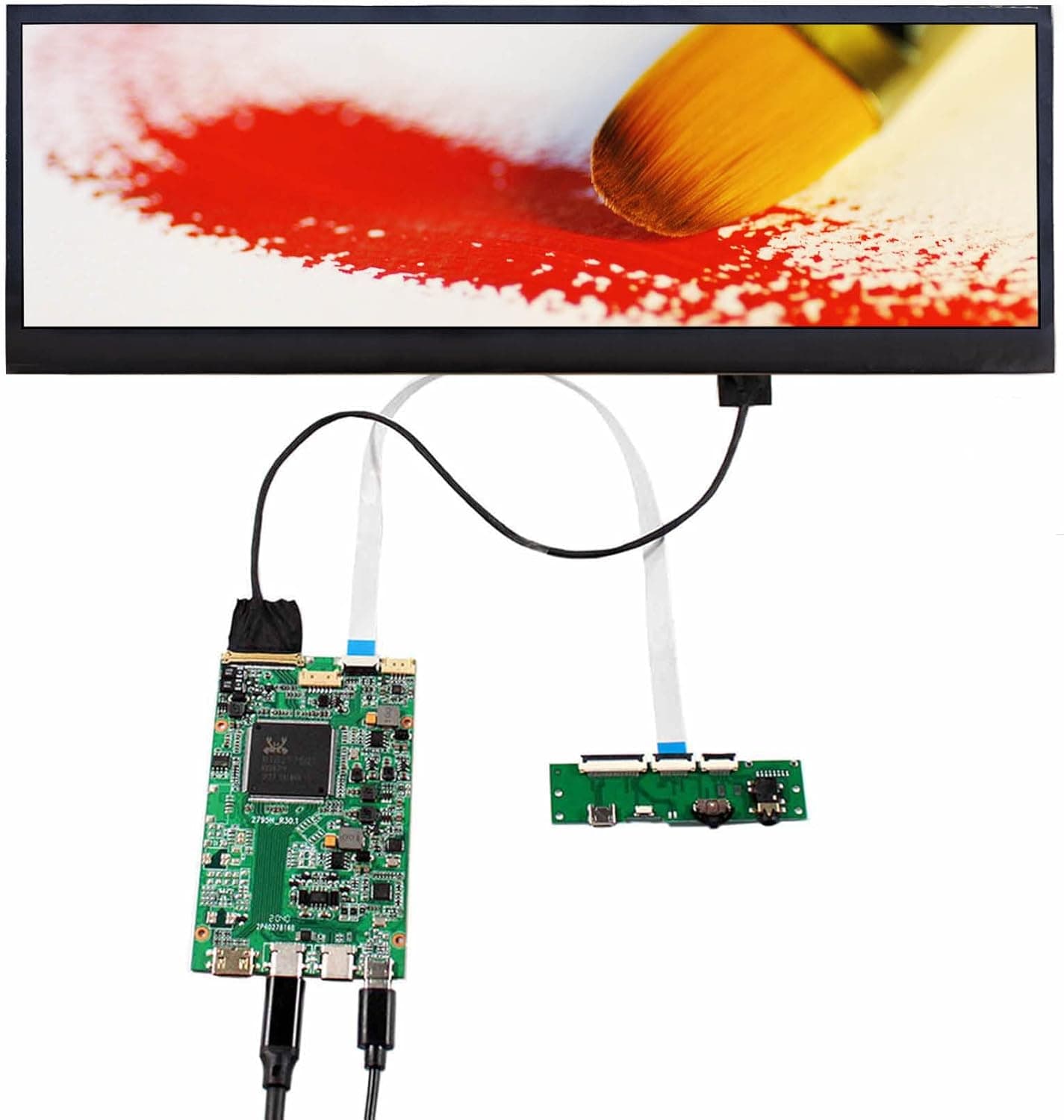
The VSDISPLAY 14-inch 3840x1100 4K IPS stretch bar LCD is not a finished monitor. It is a panel kit: an IPS bar panel, a USB-C controller board, and a tempered glass cover.
This article looks at what actually happens when you put it on a desk, what your host machine must support, and where buyers most often get caught out.
Overview
The kit pairs a 14-inch 3840x1100 IPS panel with the VS-RT2795T4K-V5 USB-C controller board and a tempered glass front. Because it ships as a panel plus board rather than a boxed display, you are expected to supply the stand, the mount, and any enclosure yourself.
The short verdict: this is not a product for people who simply want a second screen. It is for people who specifically need a wide, very short strip of screen — chat, transport controls, tickers, server metrics, stream tools — the kind of information that wants width and almost no height.
The panel offers 178-degree viewing angles, 300 cd/m² brightness, a 1000:1 contrast ratio, and a 60Hz refresh rate. Those are office-IPS numbers, not HDR or high-refresh numbers.
What matters more for this shape is that IPS keeps colours stable when the panel sits off-axis, tucked under a main monitor or on a shelf above it.
Reading the 3840x1100 Number
The "4K" in the name refers to the horizontal pixel count. At 3840x1100 the panel has roughly 4.22 million pixels, about half of a standard 3840x2160 UHD display.
It is not lower quality — it is simply half the height, and mistaking one for the other is the fastest route to disappointment.
Pixel density matters even more. The active area is 344.218 x 98.604 mm, so 3840 pixels across 344.218 mm works out to roughly 283 ppi.
A 24-inch 1080p monitor sits near 92 ppi, so text here renders about a third of the size at 100% scaling. In practice you will want 150–200% display scaling on Windows, or the equivalent on macOS; at 200% the logical workspace is close to 1920x550.
Buying this expecting to use all 3840x1100 as usable desktop space will not match reality.
The aspect ratio is roughly 3.5:1 — more extreme than 21:9 ultrawide.
Outer dimensions are 350.52 x 118.65 x 2.5 mm, and that 2.5 mm is effectively the bare panel, so budget extra depth for the controller board and cabling.
Compatibility Guide
Video arrives over a single USB-C cable, so the host port must support DisplayPort Alt Mode. This is the single most common failure point: a USB-C connector that only carries data and power will not drive the panel.
On laptops, check the vendor spec sheet for a port marked as supporting DisplayPort output or Thunderbolt 3/4. On desktops, rear-panel USB-C video output depends on the chipset and board wiring; more often you will need a graphics card with a USB-C output, which only some models have.
Power is specified as USB-C PD, 5V DC, 18W. If the host port can supply that alongside video, one cable is enough; if not, add a separate USB-C power source — 18W is well within the range of an ordinary phone charger.
When something does not work, suspect the cable first: thin charge-only USB-C cables do not carry a video signal.
The controller board is a 4-lane eDP design rated up to 4096x2160 at 60Hz. That is the board's ceiling, not the panel's resolution, which remains 3840x1100.
The kit includes tempered glass, the controller board, a signal cable, and a keyboard cable for the OSD, which handles brightness, contrast, and volume. A 3.5mm audio output is available for speakers or headphones.
| Check | Requirement |
|---|---|
| Host USB-C | DisplayPort Alt Mode required |
| Power | USB-C PD 18W (external supply if short) |
| Cable | USB-C cable rated for video |
| Mounting | Stand or mount is on you |
| OS setup | Scaling adjustment effectively mandatory |
There is little hardware difficulty here, but the prerequisites are unforgiving — verify your USB-C port spec before ordering.
Product Info
rmation
Key specs: 14-inch IPS panel, 3840x1100 resolution, 300 cd/m² brightness, 1000:1 contrast, 60Hz refresh, 350.52 x 118.65 x 2.5 mm outer dimensions, 344.218 x 98.604 mm active area, USB-C PD 5V DC 18W input, and a controller ceiling of 4096x2160 at 60Hz.
On Amazon.co.jp the listing showed ¥72,915 as captured on 31 May 2026.
Prices in this category move with stock, currency, and sales, so treat that figure as a snapshot and check the product page for the current price. Listings also appear on overseas marketplaces such as eBay, where pricing varies per seller.
Bar panels are built in small volumes and rarely get cheap; the same money buys a capable 27-inch 4K monitor, so the real question is whether the form factor itself is worth the premium to you.
The rating is 4.7 out of 5 (about 94%), but it comes from only 5 reviews.
That is a sample size which tells you a handful of buyers were happy, not that reliability or defect rates are established.
Compared With an Ordinary Second Monitor
If you just want more screen, a finished 1080p or 4K monitor is cheaper and arrives with a stand and a warranty. The reason to choose a bar panel is the shape of the space you have: under a main monitor, behind a keyboard, or on one shelf of a desk riser, where only about 100 mm of height exists.
Without that physical constraint, a conventional monitor is the better value.
Also note there is no stand and no rear cover. You will be mounting this with tape, acrylic, a 3D-printed frame, or something similar, and whether that reads as fun or as a chore largely decides how you feel about the purchase.
Recommended Users
- Streamers: keep chat, alerts, and stream software status visible without giving up main-screen space. A wide, short layout suits chat logs and notification bars.
- Monitoring and trading: server metrics, scrolling logs, and tickers that want to sit there permanently.
- Music and video production: park a timeline, mixer, or transport bar on a separate surface. Treat it as a control surface rather than a colour-critical display — brightness is 300 cd/m² and no gamut figure is published.
- Builders and modders: anyone planning to embed the panel into a case front or a custom enclosure. The less you expect a finished product, the happier you will be.
Before You Buy
The biggest pitfall is that ~283 ppi density. At 100% scaling text is effectively unreadable, so scaling is mandatory — and mixed-DPI setups on Windows can leave some applications blurry or mis-laid-out when a window moves to this screen.
That is an OS behaviour, not a defect.
Second, 3840x1100 is a non-standard resolution. Most applications cope, but full-screen games and some presentation software may not offer this ratio or may stretch to fit.
Between that, the 60Hz refresh, and the 14-inch diagonal, this is explicitly not a primary or gaming display.
Third, it is a kit. Stand, VESA holes, rear protection, and cable routing are your problem, and the exposed controller board deserves care around static and shorts.
Decide how you will mount it and hide the board before you order.
Finally, listing data. Panel kits like this sometimes carry manufacturer names, model numbers, or accessory lists on the retail page that do not match the item, and price varies sharply between variants.
Before ordering, confirm from the product images and title that you are buying the 14-inch 3840x1100 version with the USB-C board — the same page may also offer an HDMI-input variant.
FAQ
Q. Will it work with my laptop? A.
Yes, if the USB-C port supports DisplayPort Alt Mode or Thunderbolt 3/4. A data-and-charge-only port cannot drive it over a single cable.
Check the vendor spec sheet for that specific port.
Q. Do I need a separate power adapter? A.
The spec is USB-C PD 5V, 18W. If your host port supplies video and power together, one cable is enough; otherwise add a USB-C supply.
18W is within reach of a normal phone charger.
Q. Is this the same as a 4K monitor? A.
It matches 3840 pixels horizontally but has 1100 vertically, roughly half the total pixels of 3840x2160. It is sharp, but the vertical information it can show is very different.
Q. Is the text too small? A.
At roughly 283 ppi, yes at 100%. Plan on 150–200% scaling on Windows; at 200% the logical area is around 1920x550.
Q. Can I game on it? A.
Refresh is 60Hz, no response-time figure is published, and many titles will not offer a 3840x1100 mode. Use it for secondary information, not gameplay.
Q. Does it include a stand? A.
The bundle is tempered glass, the LCD controller board, a signal cable, and a keyboard cable for the OSD. Mounting hardware is not included.