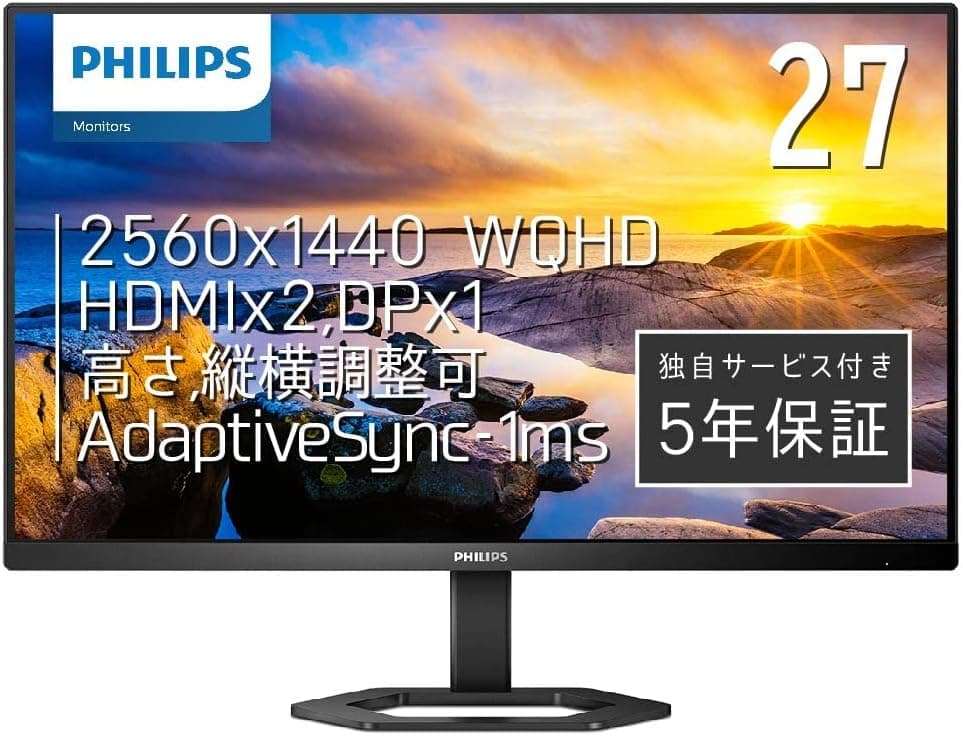
Overview
The PHILIPS 27E1N5500E/11 pairs a practical 27-inch WQHD (2560×1440) IPS panel with something rare at this price: a fully adjustable stand offering 130mm of height travel and 90-degree pivot. The verdict up front — this is not a gaming monitor, it is a monitor for people who stare at a screen eight hours a day. The 75Hz refresh rate and 4ms response time (MPRT 1ms) handle casual gaming fine, but this panel was never designed for competitive play.
On Amazon.co.jp it carries a 4.4 out of 5 rating across 566 reviews (roughly 88% positive, as fetched on 9 June 2026).
That combination of volume and score is a reasonable signal that quality control and DOA rates are not a systemic problem.
Where It Sits in the Market
2560×1440 across 27 inches works out to about 109 ppi. In practice that means text at 100% scaling in Windows is small but readable, and most users settle on 100% or 125%.
Coming from a 24-inch Full HD panel (roughly 92 ppi), text gets slightly finer while usable desktop area grows by about 1.8x.
| Criteria | 27E1N5500E | 27" Full HD | 27" 4K |
|---|---|---|---|
| Resolution | 2560×1440 | 1920×1080 | 3840×2160 |
| Approx. pixel density | ~109 ppi | ~82 ppi | ~163 ppi |
| Typical scaling | 100–125% | 100% | 150% assumed |
| GPU load in games | Moderate | Light | Heavy |
At 27 inches, WQHD is the resolution that lets you stop thinking about scaling. 4K is sharper but demands more GPU and still forces scaling headaches in older applications; Full HD at 27 inches shows visibly coarse pixels.
If you are shopping for a 27-inch panel, WQHD is the safe default.
Plenty of similarly priced 27-inch monitors offer Full HD at 144Hz or higher. This model takes the opposite approach — capping refresh at 75Hz and spending the budget on resolution and stand mechanics instead.
Neither is objectively right, but buying whichever spec sheet looks flashier will leave a productivity-focused user disappointed.
Compatibility Guide
Video inputs are two HDMI 1.4 ports plus one DisplayPort 1.2 — three sources total.
The single most important caveat: the HDMI ports are version 1.4. That bandwidth is tight for 2560×1440 at 75Hz, and some setups will be capped at 60Hz over HDMI.
If you want 75Hz and Adaptive-Sync reliably, use DisplayPort. The bundled 1.8m DP cable does the job out of the box.
Adaptive-Sync is supported, so pairing with a compatible GPU (AMD FreeSync cards, and NVIDIA cards running in G-SYNC Compatible mode) reduces tearing. Just remember the variable-refresh window tops out at 75Hz — treat it as smoothing out fluctuations, not as a performance feature.
Laptop users should read carefully: there is no USB-C input. You cannot run video, power delivery, and a hub over a single cable.
A laptop with only USB-C output needs a USB-C to HDMI or USB-C to DisplayPort adapter, and the DisplayPort route is the better choice for avoiding refresh-rate limits.
For mounting, VESA 100×100mm is supported, so monitor arms and wall mounts work. But bolting it to an arm throws away the 130mm height range and 90-degree pivot that justify this model's price.
If an arm is already part of your plan, a model that spends nothing on its stand makes more sense. When using pivot, check that your desk depth and rear cable routing allow rotation — cables pulling taut against connectors during rotation is a common and avoidable mistake.
There are no built-in speakers. Plan on external speakers or headphones.
Trivial to solve, but people who assume "HDMI carries audio so the monitor will make sound" are caught out on delivery day.
Product Info
Key specifications: 27 inches, 2560×1440 (WQHD), IPS, 75Hz, 4ms (MPRT 1ms), 300 cd/m² brightness, 178°/178° viewing angles. Inputs are HDMI 1.4×2 and DisplayPort 1.2×1, with VESA 100×100mm mounting.
The stand provides 130mm height adjustment, -5° to 20° tilt, and 90° pivot. HDMI, DisplayPort, and power cables (1.8m each) are included, so nothing extra is needed on day one.
300 cd/m² is plenty for typical office and home lighting, but it is not an HDR-capable brightness level. Near a sunlit window, reflections will bother you before brightness does.
The 178-degree IPS viewing angle matters more than it sounds: it keeps color shift minimal when someone leans in to look, and when the panel is rotated into portrait orientation.
Pricing: ¥23,800 on Amazon.co.jp as captured on 12 June 2026. Prices move frequently with stock and sales, so always confirm the current figure on the product page before ordering.
At that level, the combination of WQHD, IPS, and a fully ergonomic stand is genuinely competitive. A 5-year warranty adds confidence for a monitor you expect to keep for years — verify the exact warranty terms for your purchase channel, as they can vary.
What Actually Matters Day to Day
With a desktop monitor, satisfaction hinges less on panel specs than on whether you can put the top of the screen at eye level. 130mm of height travel is a genuinely useful range given how much chair heights and desk thicknesses vary between people.
Escaping the stack-of-books approach alone recoups the price difference.
The 90-degree pivot earns its keep with long documents, code review, social feeds, and checking portrait photos. The catch is that rotated, your horizontal space is only 1440 pixels — bad news for tools that need horizontal scrolling.
Treat pivot as something you use when needed, not a permanent orientation.
The frameless design narrows the visible seam between two panels side by side. But frameless does not mean borderless: a few millimeters of inactive area remain around the panel edge.
Expect a thin seam, not none at all.
Best Use Cases
- Office and remote workers — WQHD desktop area and a height-adjustable stand directly serve a workflow of spreadsheet, browser, and chat all open at once. Coming from Full HD, the reduction in window-juggling friction is immediately obvious.
- Photo editing, DTP, and coding — Territory where IPS viewing angles and portrait rotation pay off. If you need strict color accuracy, budget for calibration separately.
- Anyone building a dual-monitor desk — The frameless bezel and VESA support suit matched-pair setups. If you already own a PHILIPS sibling such as the 24E1N5500B, sharing the same OSD conventions is a bonus.
- People with neck and shoulder strain — Height, tilt, and pivot let you fit the screen to your body. It is the most overlooked factor in monitor shopping and the one with the largest daily payoff.
Things to Know Before Buying
Buy this for gaming and you will be underwhelmed. 75Hz beats 60Hz, but it is a different world from 144Hz or 240Hz.
If FPS or fighting games are your focus, look at a high-refresh gaming panel instead. Also note that MPRT figures like "1ms" are typically measured with backlight-strobing style assistance and do not directly represent real-world response in normal use.
HDMI may not give you 75Hz. As covered above, this is an HDMI 1.4 bandwidth limitation, not a defect.
Before panicking that 75Hz is missing from the settings, switch to DisplayPort and explicitly select the refresh rate in Windows advanced display settings.
No USB-C input and no USB hub. If your plan was single-cable laptop docking, this monitor cannot do it.
That use case requires a USB-C Power Delivery model.
No speakers, no HDR. If this is meant to be your main video or console display, sort out audio separately.
And 300 cd/m² is not a brightness level intended for HDR content.
Do not trust the listing metadata blindly. Amazon product pages sometimes bundle variant model numbers onto one listing, or carry metadata belonging to a different product.
This article covers the 27-inch 27E1N5500E. Check the product images and the size in the title before ordering so you do not confuse it with the 24-inch 24E1N5500B, and confirm that any size, color, or bundle variant selector is set correctly.
Reconsider if you are set on a monitor arm. The stand engineering baked into this price becomes dead weight.
If arm mounting is a given, a model that puts its entire budget into the panel will serve you better.
FAQ
Q. Will I get 75Hz over HDMI? A.
It depends on your setup. HDMI 1.4 has limited bandwidth for 2560×1440 at 75Hz and may cap you at 60Hz.
Use the included DisplayPort cable to be sure.
Q. Can I connect a PS5 or Nintendo Switch? A.
Video works over HDMI, but there are no speakers, so you need a separate audio solution. This is also not a panel that showcases console high-frame-rate modes.
For console-first use, consider an HDMI 2.1 generation monitor.
Q. Does it work with a MacBook? A.
Yes, via a USB-C to DisplayPort or USB-C to HDMI adapter. Since there is no USB-C power delivery, you still need your laptop charger.
Q. Is the text too small? A.
27-inch WQHD lands near 109 ppi, which some people find small at 100% scaling. Setting Windows display scaling to 125% gives you roughly Full-HD-sized text while keeping the extra working area.
Q. Can it go on a monitor arm? A.
Yes, VESA 100×100mm is supported — just be aware you give up the height adjustment and pivot that define this model.
Q. Is the color accurate? A.
The IPS panel shows little color shift across viewing angles and is fine for general photo work and document creation. For print-critical color management, plan on using a calibrator.
Product Disclosure (Amazon)
- ASIN: B0BD7CYZJN
- Note: This article covers a manufacturer-made product based on Amazon listing details.