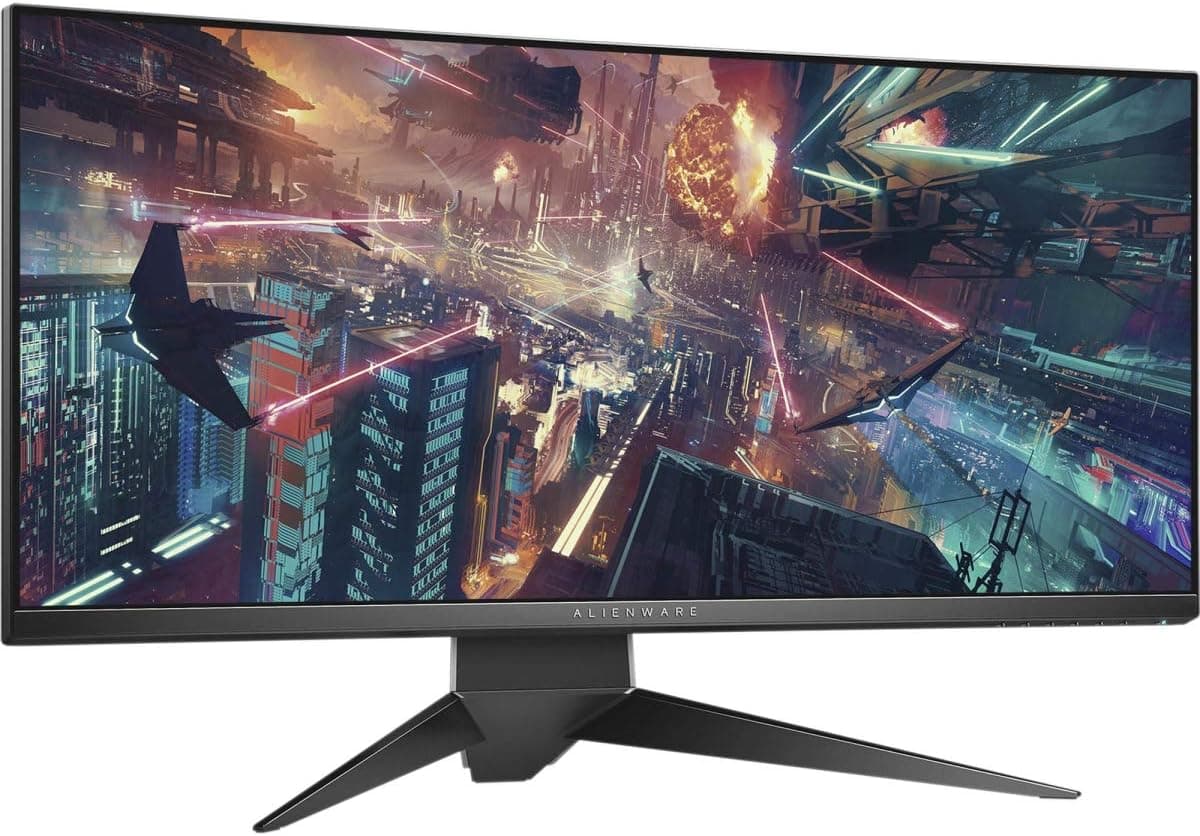
The Dell AW3418HW Alienware 34-inch curved monitor fits one specific buying pattern: you want a wide, immersive canvas and you are willing to give up refresh rate to get it. This article works through where it fits, where it does not, and what to verify before you pay.
Overview
The AW3418HW is a 34-inch curved IPS display listed at 2560x1080 with a 60Hz refresh rate and a 4ms response time. In short, it suits movies, office work, and single-player games, where a wide field of view matters more than frame pacing.
It is not a panel for competitive shooters or racing sims.
A 34-inch diagonal at 2560x1080 means relatively low pixel density. That cuts both ways.
Text renders large without scaling tweaks, which many people find easier during long document or coding sessions, but detailed photo retouching and fine illustration work will show the coarseness. Decide your use case first, then decide on this monitor.
Released around 2018, new stock is thin today. Most units come from clearance, used listings, or parallel imports, which means the seller and the condition grade influence your satisfaction more than the spec sheet does.
Connectivity & Compatibility
Video inputs are one DisplayPort and one HDMI, which covers typical desktops, laptops, and consoles. A DisplayPort cable is included, so a PC with a DisplayPort output needs no extra purchase.
Confirm that your PC can actually output 2560x1080. Some GPUs and drivers default to 1920x1080 on first connection, leaving black bars on each side; set the resolution explicitly and switch GPU scaling to full-screen if needed.
Laptop HDMI outputs vary by generation and may not support ultrawide modes, so check the output spec beforehand.
The stand offers height, tilt, and swivel adjustment, and VESA 100x100mm mounting is supported. A 34-inch panel is heavy, so pick an arm with headroom on its load rating; running an arm at its limit is the classic mistake at this size, and the panel gradually droops.
Desk depth matters too, since a curved 34-inch display sits uncomfortably close on desks shallower than about 60cm.
There is no built-in USB hub. Plan on a separate hub if you want peripherals routed through the display.
Product Info
Key specs: 34-inch screen, 4ms response time, 60Hz refresh rate. The spec sheet lists a 16:9 aspect ratio, but 2560x1080 is a 21:9-class resolution, so those two entries do not line up.
Treat the aspect ratio field as unverified and confirm the panel's actual proportions on the retailer's product page.
As captured on 2026-06-01, the Amazon.co.jp rating is 4.3 out of 5 stars across 38 reviews, an 86% positive equivalent.
With only 38 samples this is a weak statistic, but 4.3 suggests buyers who knew the specs were dated were generally satisfied.
Complaints, where they appear, tend to concern refresh rate, pixel density, or the condition of used units.
Pricing needs care. A figure of 578,800 yen was captured on 2026-06-01, which is an implausible order of magnitude for a 2018 34-inch monitor and most likely a collection error or an extreme marketplace listing.
This article does not treat that number as a street price. The eBay US listing captured on 2026-07-15 shows $599.99, but that is a single used listing, and condition, warranty, shipping, and duties change the real cost.
Prices move a lot here, so check the current product page.
Versus the Alternatives
The usual rival at a similar budget is a 27-inch curved Full HD gaming monitor running 144Hz to 200Hz. Those feel clearly better in fast games.
What the AW3418HW wins on is horizontal working area and immersion: wide spreadsheets, long editing timelines, or code plus browser plus terminal side by side.
| Primary use | AW3418HW (34", curved, 60Hz) | 27" high-refresh panel |
|---|---|---|
| Competitive FPS / fighting | Poor fit | Good fit |
| Single-player RPG / exploration | Good fit | Acceptable |
| Movies and streaming | Good fit | Acceptable |
| Many windows side by side | Good fit | Cramped |
| Fine photo / illustration detail | Poor fit | Depends |
The decision reduces to one axis: do you need speed, or do you need width? If you need both, skip this and look at a high-refresh ultrawide instead.
What You Notice in Daily Use
60Hz is visible on the desktop, not just in games. Coming from a 144Hz setup, cursor movement and scrolling will feel sluggish at first.
Coming from any 60Hz display, you will notice nothing. Reviews split largely along that line.
A curved panel keeps the distance to the screen edges more even, and the benefit grows with size, so 34 inches is where it starts to pay off. The trade-off shows up in work with long straight lines, such as drawings, UI rectangles, or wide table rules, where some people find the subtle bowing distracting.
Before You Buy
Start with the price listing. As noted, a captured reference price of 578,800 yen is an implausible order of magnitude for this product.
Listing data and registered specs on product pages do contain errors, so do not judge by price alone: confirm that the images, title, and model number (AW3418HW) all match. The same caution applies to the 16:9 aspect ratio field alongside a 2560x1080 resolution.
You will meet the same inconsistency on the product page, so it is worth knowing in advance.
Next, the used-market risk. Panels this old can show backlight dimming, color uniformity drift, dead pixels, or a loose stand.
Check the return window and warranty before ordering, and prefer listings that state tested condition and a warranty period. For overseas marketplaces, budget the shipping, duties, and return-shipping cost of a failure into the total.
Accept the functional limits too. 60Hz and 4ms are clearly behind current gaming monitors.
If shooters, fighting games, rhythm games, or competitive racing are your main use, buy something else. There is also no USB hub, and adaptive sync support cannot be confirmed from the supplied spec data, so verify that on the product page if it matters to you.
Finally, plan the desk. A curved 34-inch display eats both width and depth.
Aim for at least 100cm of desk width and roughly 70cm of viewing distance. If your desk is already full, budget for a monitor arm at the same time.
Best Use Cases
At the right price, this is worth considering if you are:
- A frequent movie or streaming viewer who wants wide-format content on a large screen.
- An office worker who keeps documents, a browser, and chat visible at once.
- A video editor or developer who wants a long timeline or code beside a preview.
- A single-player gamer in RPGs and simulations, where field of view beats frame rate.
- Someone who likes the Alienware look and wants ultrawide-class working area on a budget.
It is a poor fit if competitive gaming is your priority, if you retouch photos or illustrations at pixel level, or if you need the monitor to act as a USB hub. In those three cases, look elsewhere.
FAQ
Q. Can I connect a PS5 or Xbox Series X? A.
Yes, via HDMI. However, if the console does not support 2560x1080, you may get side bars or a 1920x1080 output.
Check supported resolutions if console use is your main purpose.
Q. Is 60Hz still enjoyable for games? A.
For RPGs, adventure, strategy, and simulation titles, yes. For online shooters and fighting games, no - the gap against high-refresh panels can affect outcomes.
Q. Can I use a monitor arm? A.
Yes, VESA 100x100mm is supported. Choose an arm with load headroom for a 34-inch panel, and check your desktop thickness against the clamp range.
Q. How is it rated? A.
4.3 out of 5 across 38 reviews as captured on 2026-06-01.
The sample is small, so also read the individual seller's feedback.
Q. Can I still buy one new? A.
Availability is limited for a 2018-era model. Expect used, clearance, or parallel-import stock, and confirm warranty and return terms.
Q. Why is the listed price so high? A.
Product pages sometimes carry incorrect price or spec data. Confirm the model number and images match, and compare across several sellers before deciding.
![MSI GeForce RTX 2080 Ti GAMING X TRIO グラフィックスカード [日本国内正規品]](/_next/image?url=https%3A%2F%2Fm.media-amazon.com%2Fimages%2FI%2F61tiTeCn2JL._AC_SL1000_.jpg&w=1920&q=75)