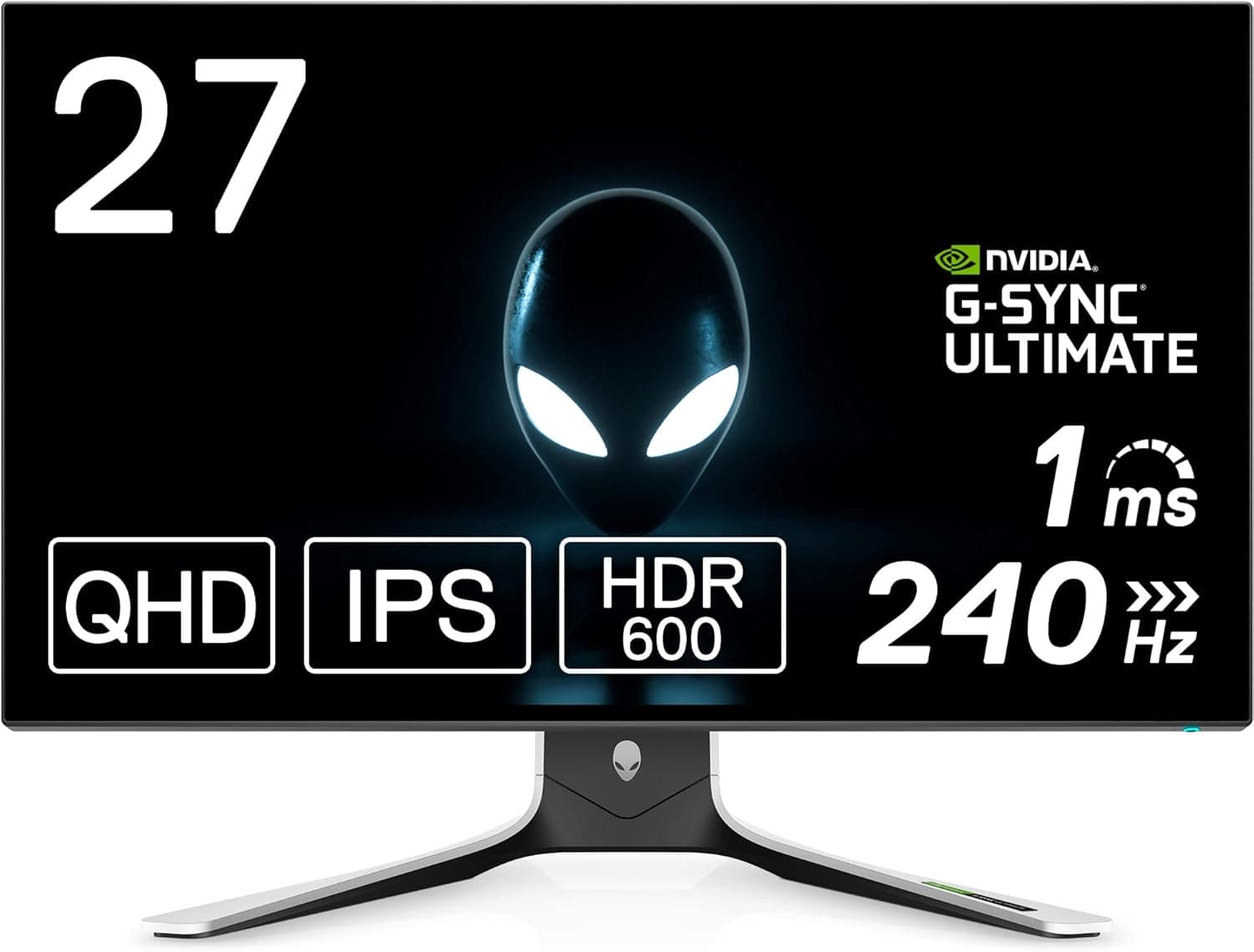
The Dell ALIENWARE AW2721D is a 27-inch QHD monitor built around a 240Hz IPS panel and a real NVIDIA G-SYNC Ultimate module. This article goes past the spec sheet: what you actually need to reach 240Hz, where the compromises are, and who should not buy it.
Overview
The AW2721D pairs a 27-inch QHD (2560×1440) IPS panel with a 240Hz refresh rate and a 1ms response time in Extreme mode. It carries VESA DisplayHDR 600 certification and covers 98% of DCI-P3, so it aims at both competitive speed and good-looking single-player titles from one screen.
NVIDIA G-SYNC Ultimate support adds variable refresh rate (VRR), which reduces tearing and stutter when your frame rate fluctuates.
Positioned simply: it fills the gap between "1080p esports panel is not enough" and "4K 144Hz or OLED is out of budget." At 27 inches, QHD gives noticeably more desktop area than FHD without the GPU cost jump that 4K brings.
If your use case is purely competitive shooters, or purely color-critical content work, better-targeted options exist.
Fit by Use Case
| Use case | Fit | Why |
|---|---|---|
| Competitive FPS / esports | Excellent | 240Hz plus 1ms Extreme mode |
| Story-driven AAA games | Good | DCI-P3 98%, DisplayHDR 600, IPS viewing angles |
| Console-first setups | Conditional | HDMI 2.0 caps at 144Hz, no 4K input |
| Professional color work | Conditional | Wide gamut, but per-unit accuracy is not guaranteed |
| Office and long text work | Good | Matte IPS, QHD workspace, full-motion stand |
The pattern is consistent: this monitor peaks with a PC, an NVIDIA GPU, and a DisplayPort cable. The further you drift from that combination, the smaller the share of what you paid for that you can actually use.
Compatibility Guide
The single most important detail: 240Hz is available over DisplayPort only. Video inputs are one DisplayPort 1.4 and two HDMI 2.0 ports, and HDMI tops out at QHD 144Hz.
Plug in over HDMI and you own a 240Hz monitor running at 144Hz. After setup, verify the refresh rate in Windows display settings or the on-screen menu — many systems do not auto-select the maximum rate on first connection.
Use the bundled DisplayPort cable, or one explicitly rated for DisplayPort 1.4.
Older or heavily extended cables may not carry the bandwidth QHD 240Hz needs, which shows up as flicker, black screens, or a missing 240Hz option. "I thought the panel was defective, and it was the cable" is the most common failure at this bandwidth.
On the GPU side, G-SYNC Ultimate requires a compatible NVIDIA card. AMD and Intel GPUs can drive the display, but variable refresh behavior is not guaranteed, so check official compatibility for your specific card before buying.
Also remember that 240Hz is a panel ceiling, not a promise your games will run that fast. Holding 200+ fps at QHD takes a serious GPU; if yours cannot, the practical benefit narrows to VRR smoothness.
For mounting, VESA 100×100mm is supported, so an arm or wall mount is straightforward. The included stand offers height, tilt, swivel, and pivot, so most people can start with it and move to an arm only when desk space or a dual-monitor layout demands it.
ALIENWARE stands tend to extend rearward, so measure your depth clearance if you want the panel flush against a wall. A built-in USB 3.0 hub (1 upstream, 4 downstream) consolidates keyboard and headset dongles — just remember it needs a separate USB upstream cable to the PC.
Product Info
Key specs: 27 inches (68.6cm), QHD 2560×1440, 240Hz over DisplayPort (144Hz over HDMI), 1ms in Extreme mode, matte IPS panel, VESA DisplayHDR 600, DCI-P3 98%, DisplayPort 1.4 ×1 and HDMI 2.0 ×2, USB 3.0 hub, VESA 100×100mm, and NVIDIA G-SYNC Ultimate.
Warranty is 3 years and includes zero-bright-pixel coverage — an explicit stuck-pixel exchange policy is not common, and for buyers worried about panel lottery it is a genuine decision factor.
On pricing, Amazon JP was recorded at ¥40,909 as captured in May 2026. Prices move often with stock and sales, so check the product page for the current figure before ordering.
A second, overseas marketplace listing carried an amount clearly out of scale for this product class; that is far more likely to be an accessory, a parts-only listing, or an unclear used unit than the monitor itself, so this article does not treat it as a reference price. If you see an unusually cheap overseas listing, confirm what is actually being sold first.
User ratings stood at 4.2 out of 5 from 32 reviews (about 84% positive) as captured in May 2026.
With only 32 reviews, the average moves easily on a handful of low scores and is not statistically stable. Reading what individual reviews are about — DOA units, backlight bleed, menu usability — tells you more than the number does.
Setup Notes That Matter
That 1ms figure applies to Extreme mode. Pushing overdrive to its strongest setting commonly introduces overshoot — inverse ghosting visible at high-contrast edges.
Start at the middle setting and only move to Extreme if you can see trailing. The highest number on the menu is not automatically the best picture.
On HDR, treat DisplayHDR 600 as a solid entry point rather than a black-level solution. Edge-lit IPS panels generally cannot match OLED or mini-LED in dark-scene contrast.
Bright outdoor scenes and emissive effects benefit clearly; dim indoor maps often show little difference. Toggling HDR per title beats leaving it on permanently.
Finally, G-SYNC must be enabled explicitly in the NVIDIA control panel, and it works best alongside sensible in-game v-sync and frame cap settings that keep you inside the VRR window. When a new setup feels less smooth than expected, the cause is usually configuration, not the panel.
How It Compares
The 27-inch class now includes QD-OLED panels and higher refresh ceilings. OLED wins on black levels and response, but brings burn-in caution that suits static UI and long desktop sessions less well.
An IPS LCD like the AW2721D remains the easier choice if the same screen handles gaming and work.
Stepping above 27-inch QHD generally means 4K, where holding high frame rates raises GPU demands another tier — the "upgraded the monitor, now I need a new GPU" chain is real. Confirm your current GPU sustains high frame rates at QHD before shopping higher.
Against FHD 240Hz panels, the AW2721D clearly wins on pixel density and workspace at the same refresh rate.
Best Use Cases
- Competitive FPS players on NVIDIA GPUs — the configuration where 240Hz and G-SYNC Ultimate pay off most, assuming a DisplayPort connection.
- One-screen gaming and work setups — matte IPS, QHD workspace, and a full-motion stand handle long desk sessions well.
- Players who care about color — DCI-P3 98% and DisplayHDR 600 hold up in visually driven titles.
- Buyers worried about dead pixels — the 3-year zero-bright-pixel exchange coverage has real practical value.
- Anyone planning an arm or dual-monitor layout — VESA 100×100mm keeps future rearrangement easy.
Before You Buy
First, this is a poor fit for HDMI-centric setups. HDMI 2.0 caps at QHD 144Hz, so a console-first user extracts almost none of the 240Hz value.
If consoles lead and the PC follows, an HDMI 2.1 display is the better spend.
The same applies if your GPU has no free DisplayPort output.
Second, 240Hz is wasted if your GPU cannot feed it. Sustaining high frame rates at QHD takes real horsepower; if you average around 100fps, the gap versus a 144Hz panel narrows considerably.
Measure your actual fps in the games you play before deciding whether the monitor or the GPU should be upgraded first.
Color professionals should also be careful. DCI-P3 98% describes gamut coverage, not guaranteed per-unit accuracy.
If your work involves print or client delivery, plan on calibration or choose a display built around color accuracy instead. Wide gamut for gaming and verified accuracy for production are different claims.
Overexpecting HDR is another common regret. DisplayHDR 600 is respectable for the class, but it structurally cannot produce OLED-like black depth.
Buying it expecting cinematic blacks will disappoint.
Finally — not a fault of the monitor itself — retail listing data is sometimes wrong. Model numbers, manufacturer fields, accessory descriptions, and suspiciously low listed prices should always be checked against the product images and title.
In the data behind this article, an overseas marketplace entry carried a price out of scale for this product class; accessory or parts listings genuinely do get attached to the same page. Confirm what a listing actually contains before buying on price alone.
Also keep in mind this is not a new release. As stock becomes clearance-driven, prices can swing in either direction, so compare it directly against current-generation options at the same budget.
FAQ
Q. What do I need to reach 240Hz? A.
A DisplayPort 1.4 connection and the refresh rate set correctly in Windows.
HDMI caps at 144Hz. Actually rendering near 240fps also requires a capable GPU.
Q. Does it work with AMD GPUs? A.
It will display an image. G-SYNC Ultimate is an NVIDIA technology, and VRR behavior with other vendors' GPUs is not guaranteed — check official compatibility for your card first.
Q. What is the zero-bright-pixel warranty? A.
Coverage for exchange if a permanently lit pixel appears, included within the 3-year warranty. Terms and claim procedures vary by sales channel, so confirm with your seller.
Q. Can I use a monitor arm?
A. Yes — VESA 100×100mm is supported. Check that the arm's weight rating leaves headroom for this panel.
Q. Is it usable for office work and video? A.
Yes. The matte IPS panel and QHD workspace suit documents and spreadsheets.
But 240Hz and G-SYNC only pay off in games, so a cheaper QHD monitor may cover a work-first requirement.
Q. What does it cost now? A.
Amazon JP was recorded at ¥40,909 as captured in May 2026, but pricing moves frequently — check the product page for the current figure.