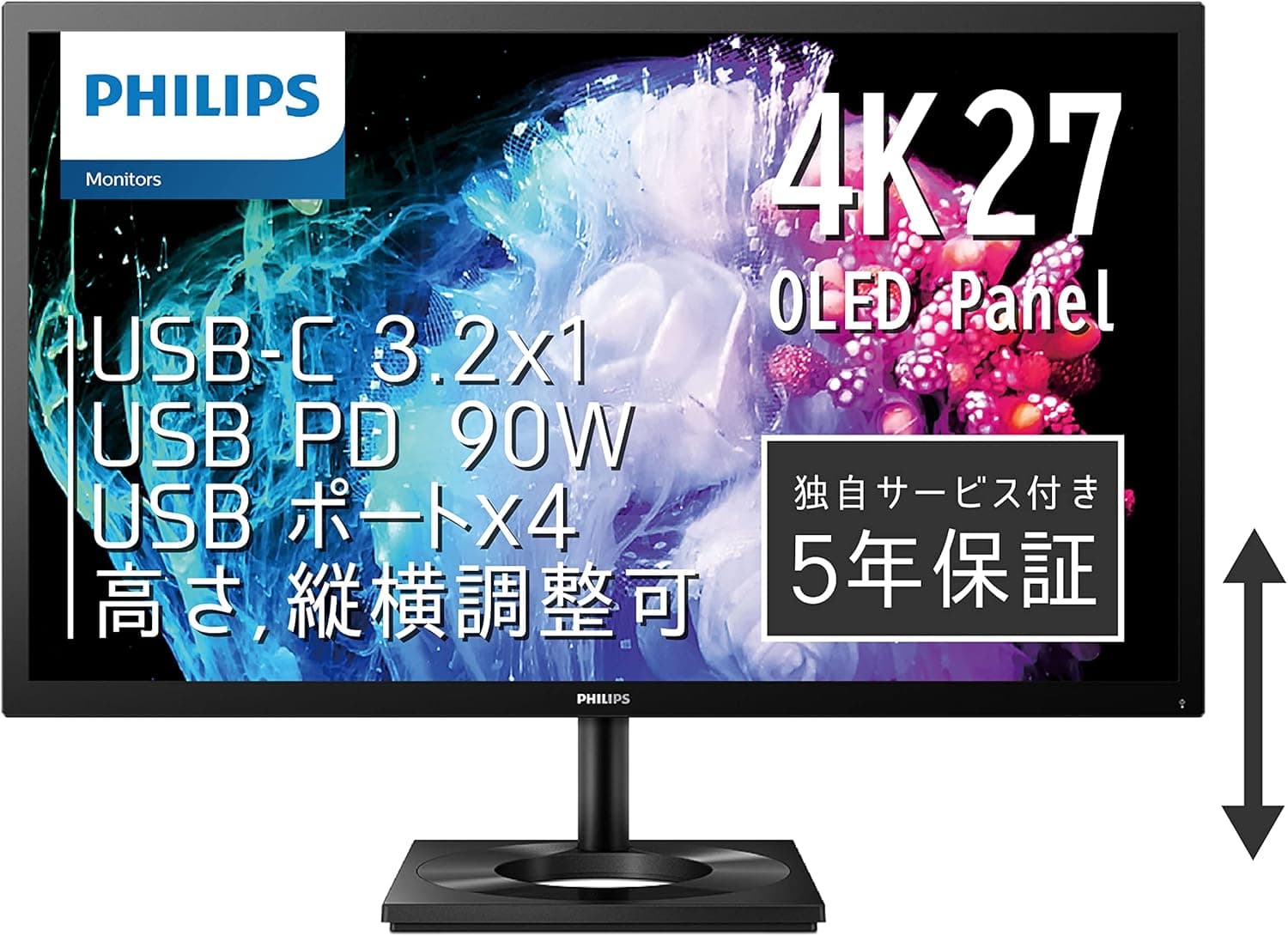
The PHILIPS 27E1N8900/11 is a 27-inch 3840×2160 OLED monitor. The combination of Adobe RGB 99.6% coverage, a 0.1ms response time, 540 cd/m² peak brightness, and a non-glare surface gives it a clear character among 27-inch 4K OLED panels.
This article works through the supplied specs, pricing, and review data to explain who it fits and where you have to compromise.
Overview
In short, this is a monitor for people who need color to be right and blacks to be black. Adobe RGB 99.6% is wider than sRGB and targets print-oriented and RAW-editing photo and design work.
Because OLED is self-emissive, black areas simply stop emitting light, which gives it an advantage in shadow detail and local contrast over backlit LCDs.
The second defining trait is the non-glare surface. Many OLED monitors use a glossy finish, trading reflection control for the deepest possible black.
This one goes matte, so lights and windows are far less likely to show up on screen in a bright office or a daytime home desk. The "wet black" look of glossy panels is softened somewhat, but most people will find the matte finish easier to live with for long sessions.
The chassis measures 626×536×218 mm. The stand supports height adjustment and pivot (portrait rotation), so you can turn it vertical for long documents or code.
The 218mm depth includes the stand, so measure your desk if it is shallow.
Compatibility Guide
Video inputs are HDMI 2.0 ×2, DisplayPort 1.4 ×1, and USB Type-C ×1.
The key constraint is HDMI 2.0 bandwidth: HDMI 2.0 generally tops out at 4K/60Hz.
Over HDMI you should not expect above 60Hz at 4K. The supplied specs do not list a refresh rate, so no firm claim can be made here — if high refresh rate matters to you, plan around DisplayPort 1.4 or USB Type-C and confirm the rated figure on the product page.
USB Type-C carries both video and power delivery. With a USB-C-equipped laptop or tablet, one cable can handle display, charging, and the USB hub, so you may not need a separate dock.
The wattage is not listed in the supplied specs, so if you plan to charge a power-hungry creator laptop under load, check the delivery figure on the product page first.
Four USB 3.2 ports let you consolidate keyboard, mouse, card reader, and external SSD at the monitor.
That pays off most when combined with the single-cable USB-C setup.
VESA mounting is 100×100mm — the size nearly every arm and wall bracket supports, so your options are wide. Just confirm the panel weight fits your arm's load rating (weight is not listed in the supplied specs).
Included cables are HDMI 1.8m, USB Type-C to C 1.8m, an AC adapter, and a 1.5m power cable.
No DisplayPort cable is included. If DP is your intended connection, buy a DisplayPort 1.4 cable separately.
Note also that the AC adapter is external, which matters for cable management.
| Connection | Best for | Note |
|---|---|---|
| DisplayPort 1.4 | Desktop PCs, maximum bandwidth | Cable not included |
| USB Type-C | One-cable laptop docking | Video + power + USB hub together |
| HDMI 2.0 ×2 | Consoles, secondary PCs | Generally 60Hz max at 4K |
Product Info
The spec highlights: 27 inches, 3840×2160 (4K UHD), OLED, non-glare, 0.1ms response, 540 cd/m² peak brightness, 178°/178° viewing angles, Adobe RGB 99.6%.
The 178° figure is standard for OLED and means colors hold up when several people view the screen together. Treat 540 cd/m² as a peak number — OLED brightness drops as the white area grows, so a full-white screen will not hold that level continuously.
Pricing was ¥84,600 on Amazon.co.jp as captured on June 7, 2026.
Prices move a lot with sales and exchange rates, so always check the current figure on the product page. No concrete marketplace figure was captured, and overseas listings swing widely with availability.
The review score is 4.6 out of 5 (92% positive), but from only 32 reviews.
The rating is high, yet an average built on a small sample is easily skewed by unit variance and reviewer bias, so it cannot be read with the same confidence as a product with thousands of reviews. Use it as a hint and verify image quality and defect reports across multiple sources.
It launched around 2023 and sits in the mid-to-high tier. The 5-year full warranty covering panel and backlight (send-back service) is a genuine strength: OLED is the technology most associated with brightness decay and burn-in, so long-term panel coverage directly affects the buying decision.
How It Compares
27-inch 4K and 32-inch 4K aim at different users. At 27 inches, 4K works out to roughly 163ppi, so the assumption is OS scaling (150–200% on Windows) to make text crisp.
If you want raw desktop area at 100%, a 32-inch 4K is the more natural choice; most people find 27-inch 4K unscaled far too small.
For gaming, the same price bracket is full of LCDs leading with high refresh rates. This panel leans toward color and black level instead, so frame-rate-first players are better served elsewhere.
If you edit video or photos and also game, its priorities line up well.
Things to Check Before Buying
Reconsider if HDMI is your main path. HDMI 2.0 generally caps at 4K/60Hz.
If you plan to connect consoles or multiple PCs over HDMI, buy with that limit understood.
Accept OLED burn-in risk as a premise. Taskbars, pinned tool panels, and always-on dashboards are exactly the static-image patterns OLED handles worst.
Shorten your screen-off timer, auto-hide the taskbar, and rotate wallpapers to reduce the risk. For signage-style use where one fixed screen runs all day, do not choose OLED at all.
Wide gamut can backfire if handled wrong. Displaying sRGB content in a non-color-managed app leaves it looking oversaturated.
For photo work, switch to the monitor's sRGB mode when appropriate or build a properly color-managed workflow. Buying on the assumption that "wide gamut makes everything look better" leads to disappointment.
Bright-room visibility has limits. The matte surface controls reflections, but 540 cd/m² is a peak value.
This is not the monitor for maximum HDR punch next to a sunlit window.
No DisplayPort cable in the box is easy to miss — buy one alongside if you need it.
Verify the listing itself. Retail product pages sometimes carry manufacturer details, model numbers, or prices that belong to a different product.
Before buying, confirm the product images and the model number (27E1N8900/11) match, and that the seller is the one you intend. The price quoted here is a snapshot from the capture date, not a guarantee of the current price.
FAQ
Q. Can it run above 60Hz at 4K? A.
The supplied specs do not list a refresh rate, so this cannot be stated definitively. HDMI 2.0 generally caps at 4K/60Hz, so anything higher would require DisplayPort 1.4 or USB Type-C.
Confirm on the product page.
Q. Can I connect a laptop with a single cable? A.
Yes — USB Type-C carries video and power delivery, and the four USB 3.2 ports let the monitor act as a hub.
The wattage is not listed, so check it if your laptop has demanding charging requirements.
Q. How much should I worry about burn-in? A.
Even in ordinary desktop use, persistent elements like the taskbar are a risk factor. Make short screen-off timers and auto-hiding the taskbar a habit.
The 5-year warranty including the panel is more reassurance than most OLEDs offer.
Q. Will it work on a monitor arm? A.
Yes, it supports VESA 100×100mm, so standard arms and wall mounts fit. Just check the panel weight against your arm's load rating.
Q. Is it a good gaming monitor? A.
The 0.1ms response and OLED black level help, but its strengths are gamut and shadow detail.
For competitive titles where frame rate comes first, compare against monitors that state a high refresh rate.
Best Use Cases
- Photo and video editors who need color accuracy. Adobe RGB 99.6% suits print and web production; the more color-managed your workflow, the more value you get.
- Movie and drama viewers in a dark room. OLED blacks and contrast show their advantage most clearly in dark scenes.
- Anyone working long hours in a bright room. The matte panel is a decisive difference if glossy OLED reflections have frustrated you before.
- Single-laptop setups. One USB-C cable covers display, charging, and hub duty, so no separate dock is needed.
- Buyers who value warranty coverage. Five years including panel and backlight is meaningful reassurance for an OLED purchase.
It is a poor fit for all-day static-image business use, frame-rate-first competitive gaming, and anyone who wants maximum unscaled desktop area.