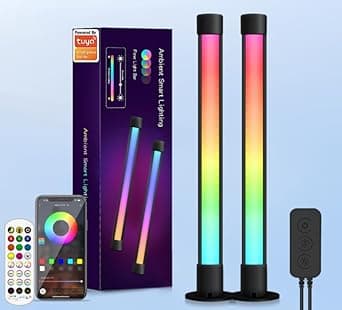
The Haloak Smart Gaming Light Bar is a USB-powered LED ambient light that sits behind your monitor or on your desk. Its defining feature is a built-in microphone (sound sensor) that picks up ambient audio and shifts color and brightness in real time.
As of the June 8, 2026 data capture, it held 28 reviews on Amazon.co.jp with a 4.1/5 average (roughly 82% positive) — a small sample, but a consistent one.
Overview
This is not a device that mirrors what is on your screen. It is a light that reacts to sound and sets a mood around your desk.
Getting that straight up front eliminates almost all post-purchase disappointment. Power comes from a single USB (5V) connection, and control is available three ways: a dedicated app (iOS/Android), an IR remote, and a physical button on the USB cable.
Color and brightness can be adjusted per segment.
The unit is light and compact, using a non-slip stand plus a counterweight so it stands on its own even in the tight space behind a monitor. No screws or adhesive tape are needed, so moving it to another screen or rearranging your desk is trivial.
The housing combines plastic and metal with a matte black painted finish — an unremarkable but genuinely useful detail for a device that lives on your desk unlit most of the day.
It suits people who want more immersion during games, streamers who want motion in the background, and anyone who wants to try RGB lighting cheaply first. It does not suit people who need color to match the picture on screen, or who want the light folded into an existing smart-home ecosystem.
Compatibility Guide
The compatibility requirement is simple: a USB port that can supply 5V. A USB-A port on your PC, a monitor's built-in USB hub, a console (PS5/Xbox/Switch dock), a TV's USB port, or a phone charger all work.
There is no driver or OS dependency, so Windows, macOS, and Linux are all fine — as is a setup with no PC at all.
Three things trip people up in practice:
- Your power source changes the behavior. Powered from the PC, the bar turns off when the PC sleeps or shuts down.
If you want it to stay on as room lighting, use a USB wall adapter (1A or higher). If you want it to switch off with the PC, the PC port is the right choice.
Neither is wrong — decide which you want first. 2.
TV USB ports can be current-limited. Older TVs sometimes cap USB output near 0.5A, which can cause dimming or flicker at full brightness.
If you see that, switch to a wall adapter. 3.
The IR remote needs line of sight. Tucked fully behind a monitor or hidden behind desk clutter, the receiver will miss the signal.
Remote-first users need a visible receiver; app-first users can place it anywhere.
Placement differs between arm-mounted and stand-footed monitors. With a stand foot, clearance behind the panel is limited, so offsetting the bar slightly to the side and washing the wall usually spreads light better than aiming straight back.
Roughly 10–15cm between the wall and monitor helps the light diffuse so the edges are not obvious.
Product Info
Core specs: LED light source, USB (5V) power, three control paths (app, IR remote, onboard button), and music sync via a built-in sound sensor (microphone). The housing and shade combine plastic and metal, the finish is painted matte, and the color is black.
LED draw is minimal — running it continuously is not something you need to budget electricity for.
Pricing needs a caveat. The price data referenced here is an eBay search result captured on July 13, 2026, and it carries no fixed figure — the listing shows "See listing" rather than an amount.
Light bars in this class swing widely by sales channel and promotion, so this article deliberately states no specific price. Check the product page for the current figure before buying. Numbers quoted in other reviews can be off by thousands of yen from actual street price.
On reviews: as of the June 8, 2026 capture, 28 total reviews averaging 4.1/5 (about 82%).
Twenty-eight reviews is enough to say this is not an obvious dud, but not enough to say anything statistical about unit variance or failure rates. It should not carry the same confidence as a product with tens of thousands of ratings.
How It Compares
| Method | Examples | What it syncs to | Hub required |
|---|---|---|---|
| Mic sync | This product | Room audio | No |
| Screen capture | Philips Hue Play + HDMI Sync Box | On-screen color | Yes |
| Software integration | Nanoleaf, vendor RGB ecosystems | App/game hooks | Varies |
The key point: this is a mic-sync product, and it does not track on-screen color. An explosion that turns the screen orange will not necessarily turn the bar orange.
It pulses and shifts within your chosen palette when the audio gets louder. Buying it expecting Ambilight-style video sync guarantees disappointment.
The mic approach has real upsides, though. Nothing is inserted into the HDMI chain, so there is zero added latency and no risk of degrading HDR or high refresh rates. For anyone running 240Hz or HDR who does not want extra hardware in the video path, that is a genuine advantage.
Anything that makes sound — PC, console, TV, a turntable — becomes a valid sync source, with no bridge or hub. Plug in USB and you are done.
Setup Tips
Confirm it lights up with the physical button first, then build scenes in the app — that order avoids rework. Sensitivity is the setting that matters most for music sync: set too high, it reacts to keystrokes and air-conditioner hum and never settles.
For work sessions, lower the sensitivity or switch to a fixed color.
In games, quiet exploration-heavy titles (horror, adventure) give a slower, moodier pulse, while rhythm games and FPS titles with constant audio leave it flickering nonstop. For long sessions, drop brightness to roughly 30–50% so it drifts at the edge of vision rather than demanding attention.
For streaming, angle it so light does not hit your face, or your camera's white balance will chase it.
Best Use Cases
- Gamers testing RGB cheaply — no hub, no bridge, one USB cable. A good entry point before committing to a full ecosystem.
- Anyone protecting their video chain — nothing goes into HDMI, so HDR and high refresh rates are untouched.
- Streamers — adds motion and color depth to an otherwise flat background wall.
- Bedroom or living-room mood lighting — powered from a wall adapter it runs without a PC at all.
- People who rearrange often — the stand needs no tape, so monitor swaps do not mean re-mounting.
Before You Buy
1. It does not sync to your screen. Sync here means audio picked up by a microphone.
If you expected HDMI Sync Box or Ambilight behavior, this product will not meet that requirement. This mismatch is the single most common complaint with this product class.
2. Mic sync misfires. The microphone does not distinguish sources, so conversation, voice chat, and mechanical noise all trigger it.
If the light jumping every time you speak on Discord bothers you, plan to switch to a fixed color during calls.
3. Decide your power source first. As noted, PC port versus wall adapter determines what happens when the PC sleeps.
Re-routing cables after installation is tedious — decide before you set it up.
4. The price data is unresolved. The pricing reference used here (captured July 13, 2026) is an eBay search with no fixed amount, which is why no figure appears in this article.
Do not trust numbers quoted elsewhere; check the listing right before you buy.
5. Listing metadata can disagree with the product. Marketplace entries for this class of product sometimes carry manufacturer names, model numbers, or categories that do not match the actual item, and the category field in this article's source data does not match what the product actually is.
When you open the listing, verify the product from the images and title rather than the registered attribute text. Whether a remote is included and how long the USB cable is can vary between listings.
6. Only 28 reviews. A 4.1/5 average is good, but that sample size says nothing reliable about durability or failure rates.
If warranty length and build robustness matter to you, a established brand is the safer purchase.
7. Do not expect much brightness. A minimal-draw USB LED will not replace room lighting.
Treat it as accent lighting that works in a dim room.
FAQ
Q. Will it match the colors on my screen? A.
No. It responds to audio captured by the built-in microphone and never reads the video signal.
For video sync, you need an HDMI capture-based product.
Q. Can I use it with just a TV or console, no PC? A.
Yes. Any USB port or USB wall adapter powers it, and because sync is audio-based, it works without a PC involved.
Q. Is powering it from my monitor's USB port fine? A.
Usually yes, but some monitor hubs cut power when the PC sleeps. Use a wall adapter if you want it to run independently.
Q. Do I need the app? A.
No — basic on/off and color changes work via the remote and the inline button. The app is for detailed scene customization and timers.
Q. Will it strain my eyes? A.
Lower the brightness and place it so the LEDs are not directly in view (bouncing light off the wall from behind the monitor). Done that way it reduces the contrast between screen and background.
Avoid full brightness aimed at your face.