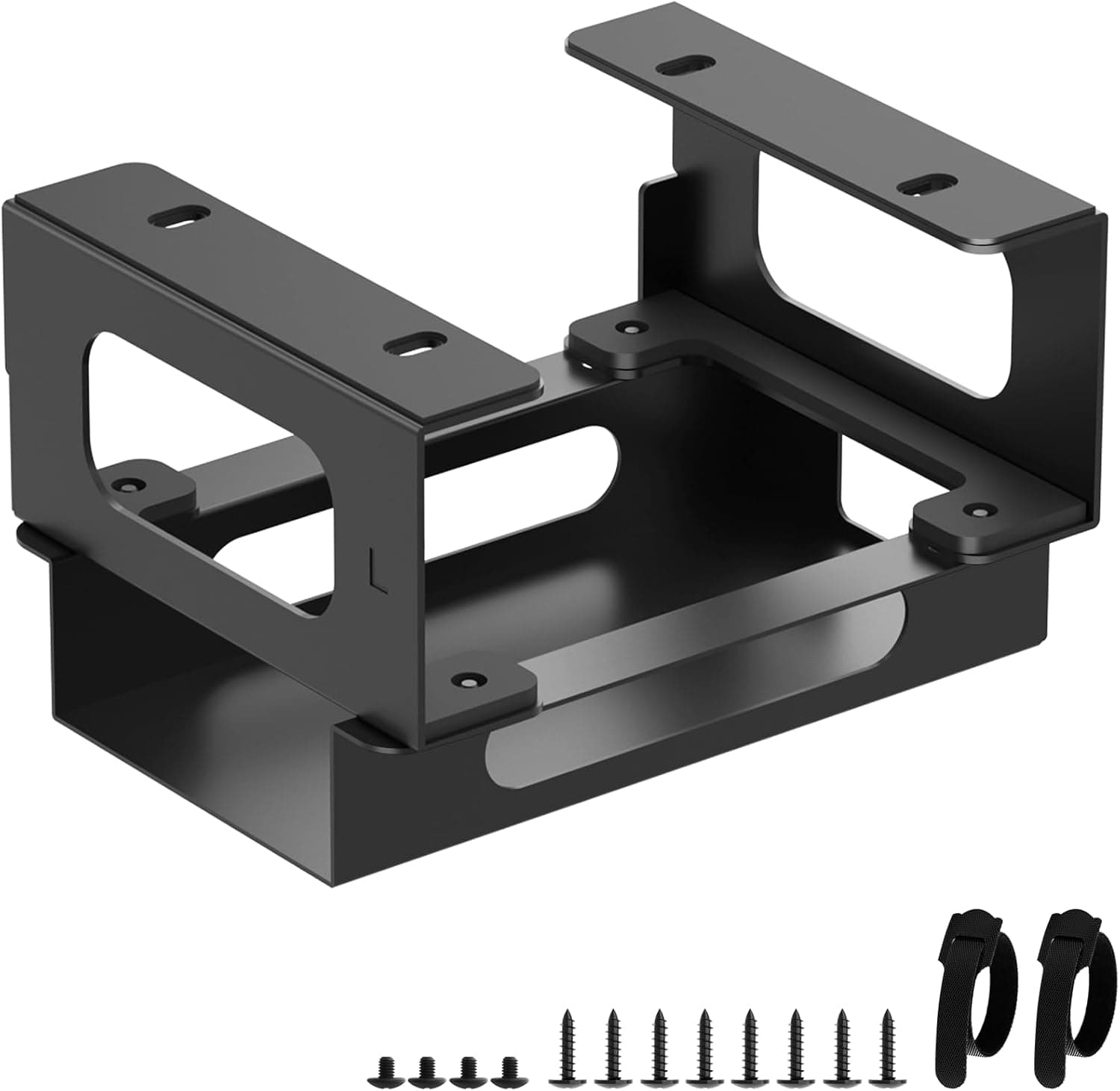
Overview
The Motiexic under-desk mount is a purpose-built bracket for securing a CalDigit Thunderbolt dock (TS3 Plus, TS4, or TS5) to the underside of your desk. It is not a universal tray: the metal frame is sized around these three chassis, uses an adjustable width to clamp them, and adds cable straps to bundle the wiring.
The short verdict is that it pays off if your dock lives permanently connected and you are bothered by both the desk footprint and the dozen cables spilling over the edge. If you just want to move the dock somewhere else for no particular reason, the installation effort outweighs the gain.
The real question with this category of accessory is not dock performance but the trade-off between how the cabling looks and how easy the ports are to reach. Moving the dock underneath cleans up the desk dramatically, but front-port access gets meaningfully worse.
Before buying, count how many times a day you actually plug something into the dock — that number decides it.
Compatibility Guide
Compatibility is limited to the CalDigit TS3 Plus, TS4, and TS5. The manufacturer states plainly that other docks are not supported.
Other CalDigit lines such as Element Hub or SOHO Dock use different chassis shapes and fall outside that list, as do universal Thunderbolt 4 docks from Anker, Belkin, OWC, or Dell. The adjustable width invites the thought that any dock might fit, but purpose-built brackets assume specific clamp points and thickness; forcing a different unit in tends to leave it loosely held.
In practice, the harder compatibility question is your desk, not your dock. Check three things:
- Is the underside flat and will screws bite? Screw-mounted brackets do not hold well in veneer, thin MDF, or honeycomb tops with hollow interiors. Some lightweight flat-pack tops and thin sit-stand surfaces are risky here.
- Obstructions under the top. Sit-stand frames, cross beams, cable trays, and drawer rails all get in the way. Electric standing desks in particular often run a thick beam near the center, which sharply limits where the bracket can go.
- Knee clearance. You lose the thickness of the dock plus the bracket from your legroom. On shallow desks, dry-fit the position and check your knees before drilling anything.
Because the dock holder and the power-brick bracket can be mounted separately, you can put the dock near the front edge and the adapter further back. Since power bricks run warm, keeping the two apart is the safer layout.
Measure These Before You Drill
The most painful mistakes are the ones you discover after making holes. Moving a dock under the desk changes the required length of every cable attached to it, so measure first.
| What to measure | Why it matters |
|---|---|
| Desk top thickness | Whether the supplied screws will punch through, or be too short |
| Height from underside to floor | Remaining knee clearance after dock plus bracket |
| Distance to the host computer | Thunderbolt cables face real length constraints |
| Distance to each peripheral | Displays, ethernet, and audio commonly no longer reach |
Passive Thunderbolt 3 and 4 cables are generally limited to fairly short runs if you want full bandwidth. Discovering that your existing cable no longer reaches after the move is a common outcome, so budget for cables as well as the bracket.
If you do need more length, choose a certified or active cable rated for the standard.
Product Info
Key specifications:
| Item | Detail |
|---|---|
| Brand | Motiexic |
| Compatible docks | CalDigit TS3 Plus / TS4 / TS5 |
| Material | Metal |
| Mounting type | Under-desk |
| Cable straps | Yes |
| Adjustable width | Yes |
| Ventilation holes | Yes |
The price was ¥4,465 on Amazon as captured on 7 June 2026. Prices move, so confirm the current figure on the product page before ordering.
A markedly different price also appears on an overseas marketplace listing; because it is hard to confirm that listing is the same item, this article does not treat it as a price — if you consider it, match the seller and product photos carefully.
Reviews stood at 12 ratings, 4.1 out of 5 (roughly 82% favorable) as of June 2026.
The score is respectable, but twelve reviews is a small sample and should be read as such: it is not enough to judge defect rates or long-term durability. Rather than the average, look for individual reviews that state which desk and which dock model the writer used.
The metal construction is a sensible choice at this price. Plastic tray-style holders can sag over time under a heavy metal-bodied dock like the TS4.
The open, vented frame is likewise reasonable — CalDigit docks run warm, so a design that does not seal them into a box genuinely matters.
Alternatives Worth Considering
A dedicated bracket is not the only route, and the options differ in character.
- Generic under-desk trays or mesh baskets — cheaper, and they hold power strips and hubs as well as the dock. The downside is a looser fit that shifts when you plug cables in, and a less tidy result.
- Hook-and-loop tape straight to the underside — cheapest, no drilling. But adhesive failures under summer heat plus the weight of a metal dock are a real risk; hard to recommend for this use.
- A dedicated bracket like this one — narrow compatibility, but the positioning is decided for you and the finish is the cleanest. If you later upgrade from TS3 Plus to TS4 or TS5, the same mount carries over.
If you plan to stay on CalDigit, the dedicated bracket wins. If you might switch dock brands, a generic tray is the more flexible purchase.
That single question decides it.
Best Use Cases
- Creators and remote workers running displays, ethernet, audio, and storage through a permanently connected Thunderbolt dock — the group that benefits most from clearing the dock off the desk.
- Anyone who photographs their desk or has it on camera during streams and wants a clean look.
- Users planning to move from TS3 Plus to TS4 or TS5 who want to reuse the mount.
- People worried about heat who do not want to hide the dock in a sealed drawer or enclosure.
Conversely, if you carry a laptop in and out daily and unplug the dock repeatedly, leaving it on the desk is more pleasant. Under the desk becomes a place you fumble for ports by feel.
Things to Check Before Buying
1. Port access will get worse. Some CalDigit docks put USB and an SD card slot on the front face.
Mounted underneath, that face points down and away, and you end up inserting cards blind. If you read SD cards daily, this product is not for you.
2. It assumes you will drill your desk. Rented or built-in desks and expensive tops you do not want to mark may rule it out entirely.
Once you pick a position, tape it in place temporarily, live with it for a few days to confirm knee clearance and cable reach, then commit.
3. Take the narrow compatibility seriously. Nothing beyond TS3 Plus, TS4, and TS5 is supported.
Switch dock brands and the mount becomes useless, so factor that into the cost if your setup changes every few years.
4. Small review sample. Twelve ratings is not enough to predict variance.
When it arrives, check the screw hole alignment and any burrs immediately, and use the return window if something is off.
5. Listing details can be wrong. On marketplaces, manufacturer names, model numbers, and compatibility fields sometimes disagree with the physical item.
This article covers the Motiexic under-desk mount for CalDigit docks. Confirm from the product images and title that you are looking at the same item, and verify your own dock model (TS3 Plus, TS4, or TS5) before ordering.
The price above is a captured snapshot and may differ from the current one.
6. Don't forget cable costs. As noted, relocating the dock changes your cable-length requirements.
Budget for extensions alongside the bracket itself.
FAQ
Q. Will it work with a non-CalDigit dock? A.
The manufacturer specifies TS3 Plus, TS4, and TS5 only. The width adjustment exists, but retention with other brands is not guaranteed.
If you need flexibility, look at a generic under-desk tray.
Q. Can I install it without drilling? A.
It is designed to be screwed in using the included hardware. Non-screw methods are not advisable for retention.
If drilling is off the table, a clamp-on or free-standing alternative is more realistic.
Q. Will the dock overheat? A.
The open, vented frame is designed not to obstruct cooling. That said, air moves slowly under a desk, so avoid packing items around it and mount the power adapter away from the dock body.
Q. Will a heavy dock like the TS4 make it sag? A.
The metal frame is better placed than a plastic tray, but retention ultimately depends on your desk material. Honeycomb or thin tops may not hold the screws and can loosen over time.
Q. What does it cost?
A. ¥4,465 on Amazon as captured on 7 June 2026. Prices change, so check the product page at the time of purchase.
Q. How long does installation take? A.
Around 30 minutes including positioning and pilot holes. Most of the effort goes into routing cables, so plan to tidy the whole run in one sitting.
Product Disclosure (Amazon)
- Manufacturer: Motiexic
- Seller: Amazon US
- Fulfilled by: Amazon US
- ASIN: B0FD9VRSJ2
- Note: This article covers a manufacturer-made product based on Amazon listing details.