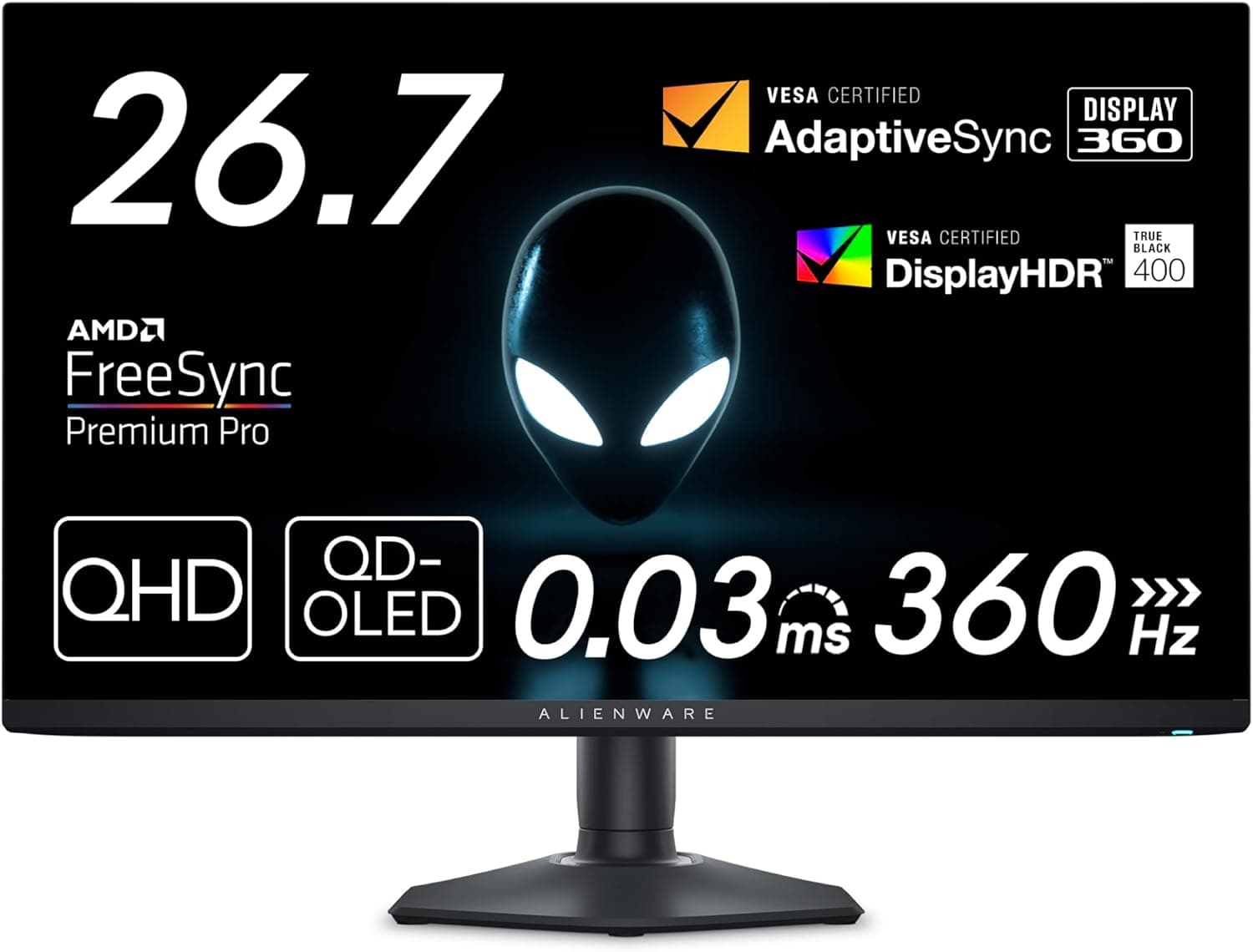
The Dell AW2725DF is a 27-inch QD-OLED gaming monitor in the Alienware lineup. It combines a competitive-grade spec sheet — QHD (2560×1440), 360Hz, 0.03ms GtG — with the deep blacks only an OLED panel delivers.
This article walks through what it actually does well and what you have to accept, based strictly on the listed specs, pricing, and review data.
Overview
The short version: this monitor is for people who refuse to choose between speed and image quality at 27 inches. The QD-OLED panel is rated at an effectively infinite contrast ratio, carries VESA DisplayHDR True Black 400 certification, and covers 99.3% of DCI-P3 — wide enough to be useful for video and photo work, not just games.
It is not, however, a universal recommendation. A 27-inch QHD panel gives you less desktop real estate than a 32-inch 4K display, which matters if spreadsheets and code are your priority.
And 360Hz only pays off if your GPU can actually push frame rates near that figure over DisplayPort 1.4.
This monitor doesn't make your PC faster; it lets an already-fast PC show what it's doing.
As captured on 2026-05-31, the Amazon.co.jp listing showed 118 reviews averaging 4.4 out of 5 stars (88% positive).
That's a healthy sample for a high-end 27-inch OLED, and the average reads like a typical OLED distribution: few serious flaws, with points lost to the format's well-known caveats covered below.
Compatibility Guide
Start with the video inputs: two DisplayPort 1.4 ports and one HDMI port.
The full 360Hz signal is available over DisplayPort 1.4 only — HDMI is capped at 144Hz.
If your setup is HDMI-only (some laptops, adapter chains, consoles), you simply cannot access the headline refresh rate. This is the most common way buyers get disappointed.
On the GPU side you need a graphics card with DisplayPort 1.4 output.
Cables matter too: uncertified DisplayPort cables can drop the link at high refresh rates, showing up as intermittent black flashes. Start with the bundled DisplayPort cable, and stick to certified cables if you swap or extend.
For variable refresh rate, the monitor supports AMD FreeSync Premium Pro and VESA AdaptiveSync, so frames below 360fps still render without tearing.
Mounting uses the VESA 100×100mm standard, so monitor arms and wall mounts work. The included stand handles height, tilt, swivel, and pivot, which covers most dual-monitor angling without an aftermarket arm.
Be a little cautious about running an OLED in permanent portrait orientation, since static UI elements tend to sit in the same place for long stretches.
There is no built-in USB hub. If you were planning to consolidate keyboard and mouse dongles at the display, budget for a separate hub.
A headphone output is provided, so you can pull audio from the DisplayPort or HDMI stream to a headset.
| Use case | Connection needed | What you get |
|---|---|---|
| Competitive FPS (high fps) | DisplayPort 1.4 | QHD 360Hz / 0.03ms |
| HDR single-player | DisplayPort 1.4 | True Black 400 shadow detail |
| Consoles / HDMI devices | HDMI | 144Hz max (no 360Hz) |
| Arm or wall mounting | VESA 100×100mm | Stand is replaceable |
Your connection choice sets the ceiling on the experience. If your setup is HDMI-centric, much of the reason to buy this particular monitor disappears.
Product Info
The Amazon.co.jp listing showed ¥75,500 as captured on 2026-05-31.
Monitor pricing moves a lot with sales, exchange rates, and model transitions, so check the product page for the current figure before buying. An overseas marketplace listing (eBay US) showed $290.99 at its capture time, but condition (new, used, or returned stock) and warranty eligibility differ enormously from a domestic purchase, so the two are not directly comparable.
If the 3-year zero-bright-dot warranty is part of why you're buying, purchase through official domestic channels.
In prose, the spec sheet reads: QD-OLED panel, 27-inch class (26.7-inch viewable), 2560×1440 QHD, 360Hz refresh, 0.03ms GtG response, DCI-P3 99.3% coverage, VESA DisplayHDR True Black 400, infinite contrast ratio, two DisplayPort 1.4 inputs plus one HDMI, VESA 100×100mm mounting, and a 3-year warranty including zero-bright-dot replacement.
That warranty deserves more attention than it usually gets. OLED buyers worry about dead or stuck pixels and long-term brightness decline, and a three-year zero-bright-dot policy is worth more than a modest price gap.
Warranty terms vary widely between QD-OLED models, so compare coverage length and scope alongside panel specs.
In the box: a power cable, DisplayPort cable, USB cable, and quick setup guide. Since there's no USB hub, treat the bundled USB cable as a service or software-integration connection rather than a peripheral solution.
Competitive Comparison
At this size, the real fork is between fast LCDs and image-quality-first OLEDs. IPS and VA panels at similar prices win on brightness in sunlit rooms, static-content tolerance, and worry-free all-day desktop use.
The AW2725DF wins on black depth, response speed, and color vibrancy. Which one is correct depends almost entirely on how bright your room is and how long you leave a static image on screen.
On size and resolution, something like the 32-inch 4K Alienware AW3225QF is the other obvious direction. 4K at 32 inches gives more workspace and sharper detail, but demands far more GPU headroom for the same frame rate.
Competitive players chasing stable high fps should stay at 27-inch QHD; immersion-first players may prefer the larger 4K panel.
If you're comparing against a 27-inch 1080p 165Hz monitor costing a fraction as much, the deciding question is whether your GPU can realistically exceed 240fps in the games you play. If it can't, most of the premium here goes unused.
Best Use Cases
- Competitive FPS and racing players with a GPU that can genuinely feed 360Hz, who want the reduced motion smear that 0.03ms GtG provides.
- Players who want one monitor for both roles — competitive during the week, cinematic AAA titles on weekends. True Black 400 shadow handling shows up in dark dungeons and night scenes.
- People who occasionally work with color. DCI-P3 99.3% is adequate for video editing and illustration checks, though dedicated creator displays are still better for strict color-managed workflows.
- Buyers who want OLED with a safety net, thanks to the 3-year zero-bright-dot replacement warranty.
Conversely, if you do long office sessions in a bright room, connect mainly via HDMI, or run a GPU that can't push high frame rates, this price is hard to justify.
Before You Buy
1. HDMI won't give you 360Hz. The spec caps HDMI at 144Hz.
Full refresh requires a DisplayPort 1.4 GPU and a DisplayPort connection — no setting works around it.
Verify that any laptop output or USB-C dock in your chain actually carries DisplayPort 1.4-class bandwidth.
2. Treat burn-in mitigation as part of normal operation. Any OLED, QD-OLED included, can retain a luminance difference where bright static elements sit for very long periods.
Auto-hiding the taskbar, short screensaver timers, running the panel refresh routine, and avoiding parked static images all reduce the risk substantially. If your main use is a streaming layout or spreadsheet displayed ten hours a day, an LCD suits that pattern better.
3. Text renders differently from an LCD. QD-OLED subpixel layout differs from typical LCDs, and some people notice color fringing on thin glyphs.
It's a non-issue for games and video, but if you read small type all day, try to see one in person first.
4. Don't overestimate 27-inch QHD workspace. Coming from 4K it will feel tighter; coming from 1080p the sharpness gain is obvious.
5. No USB hub. Cable-management consolidation isn't part of this monitor's design — factor in a separate hub if that was the plan.
6. Verify the listing details and price yourself. Retail pages change price frequently, and listing metadata (model numbers, manufacturer fields) occasionally doesn't match the physical product.
Parallel-import and overseas marketplace listings in particular may differ on warranty eligibility and power specs. Cross-check the product images, title, seller, and warranty text before ordering.
FAQ
Q. Can I get 360Hz over HDMI?
A. No. HDMI is limited to 144Hz; 360Hz requires DisplayPort 1.4.
Q. Will it burn in? A.
The possibility isn't zero with any OLED, but standard precautions — avoiding parked static images, auto-hiding the taskbar, and running the panel maintenance routine periodically — keep everyday risk low. For gaming-focused use it isn't something to obsess over.
Q. What does the 3-year zero-bright-dot warranty cover? A.
The spec lists a 3-year warranty with zero-bright-dot replacement. Check the seller's page and the manufacturer's warranty terms for exact conditions and how they apply to your purchase channel.
Q. Can I use a monitor arm? A.
Yes — it supports VESA 100×100mm. The bundled stand also offers height, tilt, swivel, and pivot adjustment if you'd rather not buy one.
Q. Is it worth buying if my GPU only manages around 60fps? A.
You'd leave most of the 360Hz value unused. The QD-OLED contrast and wide gamut still apply at any frame rate, so it can make sense as an image-quality purchase — but if speed is the goal, upgrading the GPU first will feel like a bigger jump.
Q. Does it work as a USB hub?
A. No, there's no USB hub function. It does have a headphone output.