Overview
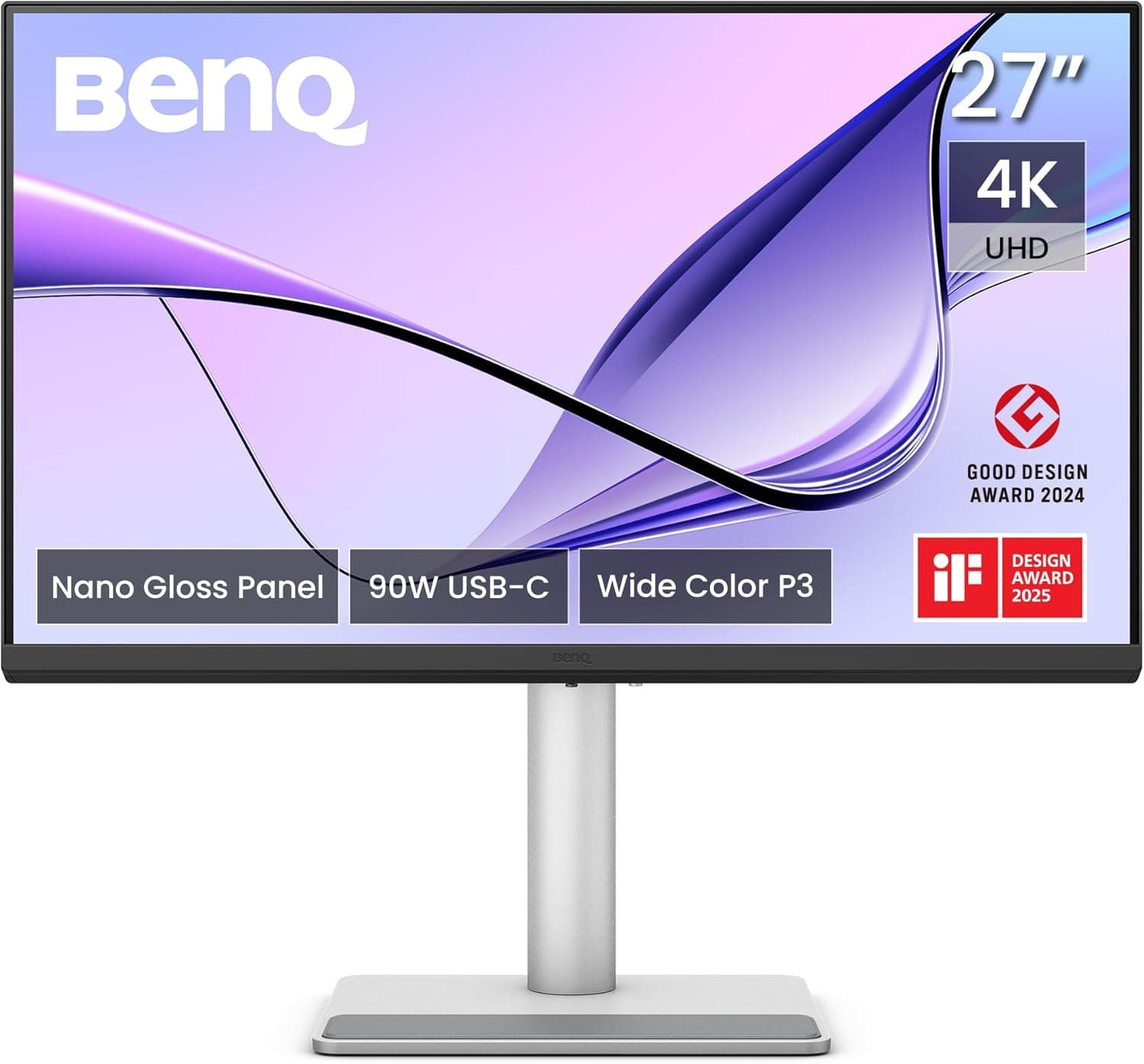
The BenQ MA270UP is a 27-inch monitor with a 4K UHD (3840×2160) glossy panel. The short version: this is not a high-refresh gaming display.
It is a viewing device for people who edit photos, video, or design work at a desk whose lighting they control. At 27 inches, 4K works out to roughly 163 ppi, so text and image edges stop resolving as individual dots.
That is the core value. If your goal is simply more desktop area rather than more detail, a 31.5-inch 4K panel in the same budget range may serve you better.
BenQ Japan sells the unit with a 3-year warranty against manufacturing defects. As captured on 6 June 2026, the Amazon.co.jp listing showed 21 reviews at 4.4 out of 5 (about 88%).
Twenty-one reviews is a small sample: read it as "no major complaints reported yet," not as statistical proof of reliability.
What Choosing a Glossy Panel Actually Means
The single spec that defines this monitor's character is not the resolution — it is the glossy surface. Miss this and your satisfaction will swing hard in either direction.
A glossy (glare) panel has no diffusion layer, so light leaves the panel and reaches your eye unscattered. Blacks sink deeper, colors look more saturated, and fine contrast stands out.
That is why retouchers and film watchers often prefer gloss over matte. For exactly the same reason, the panel mirrors whatever light source sits behind or beside you.
Facing away from a window, sitting directly under a ceiling light, or working in a white-walled room means seeing your own reflection during dark scenes.
So gloss is not better or worse — it is a panel type with strict demands on your room. If you can draw a curtain, switch to indirect lighting, or turn the desk, you get the upside with none of the cost.
If you cannot, a matte panel will let you judge color more accurately in practice.
Compatibility Guide
The compatibility data for this product has no socket or PCIe entries, which is normal for a monitor. What actually goes wrong with monitors comes down to three things, all of which you can check on your own side before ordering.
1. Can your output do 4K at 60Hz? Driving 3840×2160 at 60Hz requires HDMI 2.0 or later, or DisplayPort 1.2 or later.
Older laptops, mini PCs limited to HDMI 1.4, and some passive adapters will display 4K but drop to 30Hz.
At 30Hz the cursor visibly stutters and the display is not usable for real work. After connecting, always verify the refresh rate in your OS display settings.
2. If you are counting on USB-C, confirm the spec first. The port list for this model is not included in the supplied data.
If you want one-cable video, power delivery, and a USB hub, check the product page for the connector list and the PD wattage. Whether it can charge your specific laptop varies widely by model — a USB-C port does not automatically mean charging.
3. VESA mounting and stand adjustment. If you plan to use a monitor arm or wall mount, confirm VESA 100×100mm support.
The same applies to height adjustment, tilt, swivel, and pivot — none of that is in the supplied data. For dual-monitor setups or long sessions at a proper eye level, height adjustment matters more than most buyers expect.
On the OS side, both Windows and macOS handle 4K without issue. A 27-inch 4K panel is designed around display scaling; at 100% the text is genuinely small.
Around 150% on Windows, or a legibility-leaning setting on macOS, is a realistic starting point. Conversely, if you want more physical workspace rather than sharper pixels, 31.5-inch 4K is easier to run near native.
Product Details
| Item | Value |
|---|---|
| Screen Size | 27 inches |
| Resolution | 4K UHD (3840×2160) |
| Aspect Ratio | 16:9 |
| Panel Surface | Glossy |
| Warranty | 3 years |
Pricing was ¥83,000 on Amazon.co.jp as captured on 6 June 2026, and $584.79 on the eBay marketplace listing as captured on 14 July 2026.
Monitor prices move with new model launches and sale periods, so treat both numbers as snapshots and check the product page for the current figure.
That places it in the mid-to-upper range for 27-inch 4K. At this budget you generally trade refresh rate against resolution.
Prioritize display quality and detail work, and 4K like this makes sense; prioritize motion smoothness, and a high-refresh WQHD panel is the better spend.
Note that refresh rate, panel technology (IPS/VA/OLED), color gamut coverage (sRGB / DCI-P3), peak brightness, HDR support, and built-in speakers are all absent from the supplied data. This article will not guess at them.
Gamut and brightness are central to creative buying decisions, so verify them yourself on the product page spec sheet.
How It Compares
Different goals mean different axes matter. As a quick answer:
| Goal | Axis that matters | Fit |
|---|---|---|
| Photo/video editing, print color checks | Resolution, gamut, gradation | Excellent (verify gamut) |
| Documents, code, spreadsheets | Resolution, text legibility | Good (depends on reflections) |
| Competitive FPS / fighting games | Refresh rate, response time | Poor (assume 60Hz) |
| Films and streaming | Contrast, black depth | Good (gloss helps) |
| Bright offices, near windows | Anti-glare | Poor (choose matte) |
The table alone does not decide it, so here is the interpretation: at this price, 27-inch 4K and high refresh rate essentially do not coexist. Getting both in one panel pushes the price up sharply, so for most people the practical move is deciding which use case dominates.
If your work is editing and gaming means a weekend RPG, prioritizing 4K is rational. If you spend weeknights in competitive titles, dropping resolution for refresh rate will make you happier.
Before You Buy
Assume 60Hz. The refresh rate is not in the published data.
Creative-oriented monitors at this resolution and price are typically 60Hz, so decide based on whether 60Hz is acceptable to you. Coming from a 144Hz display, you will clearly notice the difference in cursor movement and window scrolling.
Some people adapt; some never do.
Reflections are hard to fix after the fact. As covered above, gloss is picky about its room.
"I will just turn the desk when it arrives" often runs into outlet placement and floor plan reality. Before ordering, sit where you will sit and look at what is behind you. A window, a lamp, or a white wall in that space is a strong argument for a matte panel instead.
The review count is low. Twenty-one reviews (June 2026) is too small a sample to read anything into defect rates or dead-pixel tendencies.
Rather than leaning on the 4.4-star figure, treat the 3-year warranty and a retailer with a clear DOA policy as your actual insurance.
Check the listing details with your own eyes. Amazon product data is partly auto-populated, and seller, fulfiller, and model number fields do sometimes disagree with the actual product.
Even in this article's own source data, the price entry is labeled "Amazon US" while pointing at the Japanese page in yen — an example of a collection-side label being wrong. Before ordering, confirm the product and model number from the listing images and title. Trailing model-number differences between sibling models are especially easy to miss.
Do not assume the bundled cable is enough. Box contents are not in the supplied data.
Reliable 4K/60Hz needs a cable that meets the standard, so if you plan to reuse an old HDMI cable, suspect it first if you end up stuck at 30Hz.
Best Use Cases
A good fit if you
- Work mainly in photo editing, video editing, illustration, or DTP, where detail and color matter
- Can control desk lighting with blackout curtains or indirect light
- Want 4K multi-window layouts with docs, editor, and browser side by side
- Watch films and streaming in a darkened room (gloss makes blacks look better)
- Value a longer 3-year support window
A poor fit if you
- Play competitive games regularly — buy a high-refresh panel instead
- Sit by a window or in a bright office you cannot change
- Need factory calibration measurement data for print-production work
- Simply want maximum workspace — 31.5 inches and up suits that goal better
FAQ
Q. Can I game on it? A.
For RPGs, simulations, and adventure titles where frame rate does not decide outcomes, the 4K detail pays off. For FPS and fighting games, the refresh rate makes it the wrong tool.
Q. Will it work with a Mac? A.
Any Mac capable of 4K output will drive it. If you are counting on single-cable USB-C connection or charging, check the port list and power figures on the product page — that information is not in the supplied specs.
Q. Is a glossy panel tiring to look at? A.
Reflections and brightness settings matter far more than the gloss itself. In a room with no reflections, and with brightness matched to the ambient light, it is no more fatiguing than matte.
With reflections present, you unconsciously shift posture and gaze, and that is what wears you out.
Q. Can I connect a PS5 or Switch? A.
Physically yes if there is an HDMI input, but the port configuration is not published in the supplied data. If consoles are your main use, confirm the number of HDMI ports and supported standards before buying.
Q. Is text too small on a 27-inch 4K panel? A.
At native scaling, quite small. Plan on roughly 150% on Windows or a legibility-oriented setting on macOS.
Even scaled, the letterforms stay smooth — that is the perceptible gain over Full HD or WQHD.
Q. What does the warranty cover? A.
Three years against manufacturing defects. Dead-pixel policies vary by maker's criteria, so if that concerns you, read the warranty terms before purchase.
Product Disclosure (Amazon)
- Manufacturer: ベンキュージャパン
- Seller: ✔Prime 未来ホーム
- Fulfilled by: ✔Prime 未来ホーム
- ASIN: B0G2Y5RCNY
- Note: This article covers a manufacturer-made product based on Amazon listing details.