Overview
The Guiheng wired keyboard and mouse combo pairs a full-size 104-key wired keyboard with an optical mouse rated up to 1200 DPI. The honest summary: this is not a product you choose for performance, it is one you choose so you never have to think about it again.
Plug it into a USB Type-A port and it works — no drivers, no pairing, no batteries.
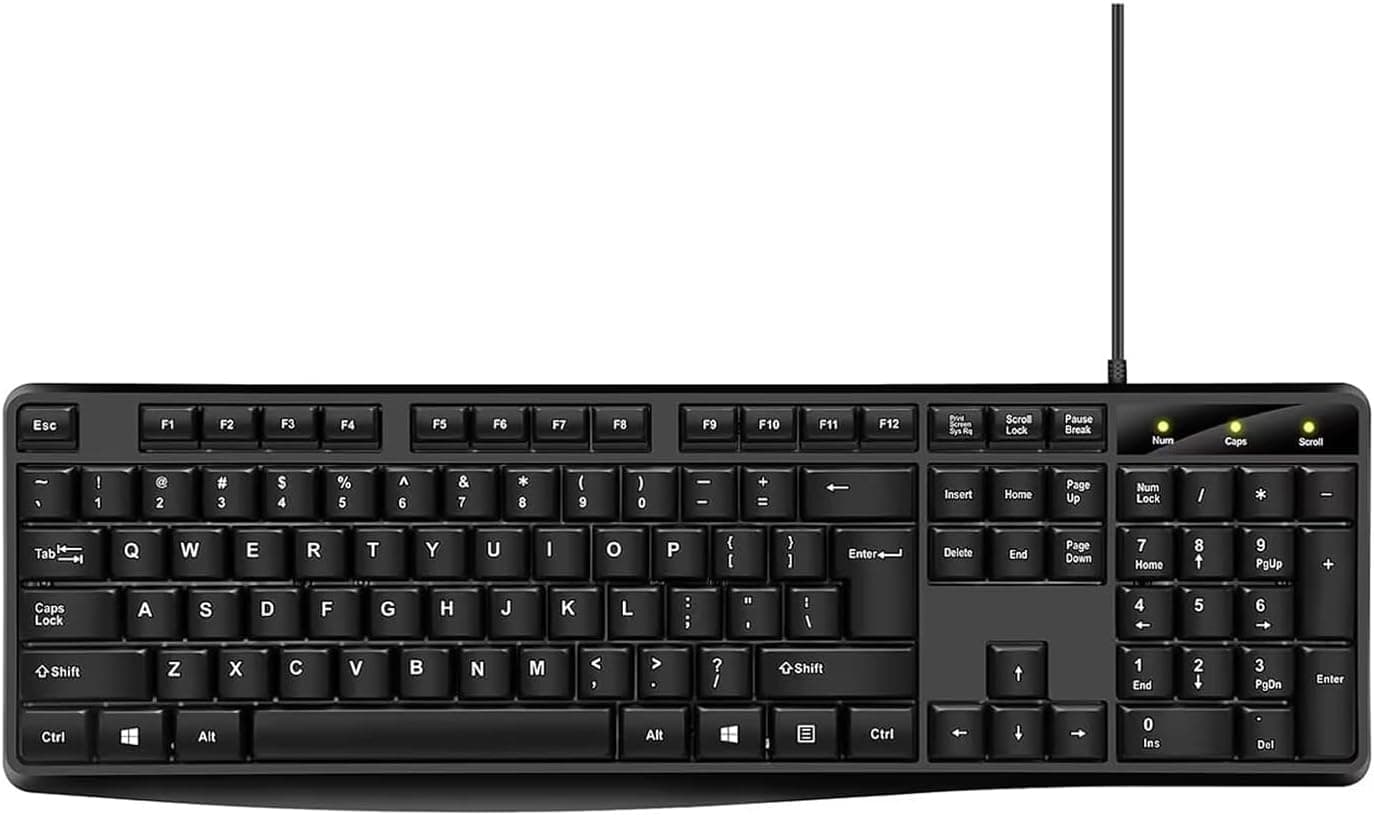
The spec sheet is short: 104-key full-size layout with a numeric keypad, wired USB connection, a 1200 DPI optical sensor, and stated support for Windows 2000/ME/XP/Vista/7/8/10 and Mac OS. There is nothing beyond that.
No mechanical switches, no macros, no backlighting — none of which should surprise anyone at this price tier.
Buyer feedback as of late May 2026 stood at 4.6 out of 5 across 43 reviews, a 92% positive rate.
Keep in mind that 43 is a small sample; individual unit defects hide easily inside an average that size. Read it as "most buyers got what they expected from a budget input set," not as proof of long-term reliability.
Where This Sits in the Category
Keyboard-and-mouse combos split into roughly three tiers. Budget bundles that come with a PC or get bought as a stopgap; wireless silent sets chosen for a clean desk; and mechanical or gaming gear bought for feel and response.
This product belongs firmly in the first tier. That means the right comparison set is other wired combos, not silent wireless kits or mechanical boards.
The questions that matter are whether it keeps working, whether the layout is conventional, and whether it demands any configuration.
| Criterion | Where this combo lands |
|---|---|
| Setup effort | Plug into USB-A. No drivers, no pairing |
| Power management | None needed — nothing to recharge |
| Key layout | Full-size 104 keys with numeric keypad |
| Mouse precision | Up to 1200 DPI. Fine for office work, short for gaming |
| Customization | Effectively none; no remapping software implied |
Its strength is concentrated in one column: low effort. If you are torn between this and a silent wireless set, the deciding factor is not noise or looks — it is whether recharging fits your routine.
If it does not, wired is still a rational choice.
Compatibility Guide
The interface is wired USB Type-A, and the supported form factors are desktop and laptop PCs. The manufacturer's compatibility note simply says it works with most computers that have a USB Type-A port.
The real failure points here are physical, not technical.
The biggest one is USB Type-A availability. The keyboard and mouse consume two USB-A ports.
On thin laptops or MacBooks that only expose USB-C, neither device connects without an adapter or hub — budget for that cost and desk space. On desktops, check that the cable reaches if your front ports are already occupied.
Cable length is not published, so confirm it on the product page if you have a deep desk.
The listed OS support stops at Windows 10. That almost certainly reflects stale listing copy rather than an actual limitation: standard HID-class keyboards and mice generally run on the operating system's built-in drivers, so Windows 11 is unlikely to be a problem.
Since it is not officially stated, however, confirm with the seller or buy where returns are possible if you need certainty.
Mac use deserves a more practical warning. Because the physical layout is a Windows-oriented 104-key board, the Command and Option key positions are swapped relative to an Apple keyboard.
You can remap modifiers in macOS keyboard settings, but the printed legends stay Windows-style. If you look at your keys while typing, that mismatch is more irritating than it sounds.
Mac-specific brightness and volume media key behavior is also not guaranteed.
The keyboard has non-slip feet and foldable stands for angle adjustment. A full-size 104-key board always spends width on the numeric keypad, so measure your desk or keyboard tray before ordering.
This is a compatibility question about whether it fits, not whether it runs.
Product Info
The captured price was ¥6,178 on Amazon.co.jp (ASIN: B0FLCT43VL) as of 31 May 2026.
Prices move often and can drop further during sales, so always check the current figure on the product page. A second channel, an eBay search, is listed but returned no concrete price — just "see listing." That channel mixes parallel imports and variants, so verify the model and appearance before buying there.
One note on the source data: the price entry is labeled "Amazon US" while the actual page is Amazon.co.jp priced in Japanese yen.
That looks like a labeling inconsistency, but confirm which regional storefront you are actually on before checking out.
Published specifications are the 104-key full-size layout, the up-to-1200 DPI mouse, wired USB, and the OS list above. 1200 DPI is generally comfortable for documents, spreadsheets, and browsing at 1080p, but on 4K or large high-resolution displays you will be sweeping the mouse further to cross the screen.
There is no stated DPI toggle button, so check the product page if adjustable sensitivity matters to you.
The mouse is ambidextrous in shape, so left-handed users are not disadvantaged by the grip — though you will still need to swap buttons in the OS. The keyboard uses low-profile keys, giving a shallow laptop-like stroke rather than a defined mechanical click.
That helps noise, but it is tuned away from tactile feedback.
Warranty and returns depend on the seller. Here both the sale and fulfillment are handled by Takumido, so defect claims go through the seller.
For inexpensive input devices, replacement is more realistic than repair, so check the return window before ordering.
Recommended Users
This set is a good fit for:
- Office and document-focused users. The numeric keypad suits data entry, and a conventional layout matters more than key feel.
- Anyone equipping a secondary or shared machine. Family PCs, a parent's computer, a reception or warehouse terminal — places where "cheap enough not to worry about" is the actual feature.
- People done with batteries and pairing. Wired devices simply work when plugged in; they cannot die minutes before a meeting.
- Anyone setting up a PC for a less technical user. Driver-free, configuration-free hardware is a gift to whoever provides support.
- People who want a spare on the shelf. A dead keyboard stops work instantly, and at this price a backup set is a reasonable purchase.
If you care about typing feel, want fewer cables on the desk, or need precise pointer control for gaming or video editing, a different category will serve you far better.
Before You Buy
This is the section that matters most, so here it is bluntly.
First, do not read too much into the word "ergonomic." The product name includes it, but the only supporting features visible in the published specs are foldable angle-adjustment stands and non-slip feet.
There is no split layout, no integrated palm rest, no contoured shape that changes your wrist angle. If you are addressing genuine wrist strain, a split keyboard or a proper wrist-rest product matches that goal better.
Second, 1200 DPI is not enough for gaming. Fast-aim titles need more from both the sensor and the DPI ceiling.
With no macro support or remapping software, MMO and MOBA key-binding optimization is off the table too. Plan on a separate gaming mouse.
Third, USB-C-only machines require extra spending. As noted, this takes two USB-A ports.
Going through a hub can introduce recognition issues depending on hub quality — including the classic problem of a hub-connected keyboard not working in BIOS/UEFI. If you plan to use this while building a PC, reserve a USB-A port directly on the motherboard.
Fourth, verify the key layout and legends from the product photos. At this price, US (ANSI) and JIS layouts both circulate.
The spec says only "104 keys," which is the standard US-layout count. If your Japanese input workflow depends on the dedicated conversion keys found on JIS boards, a US-layout unit will change your daily habits.
Zoom into the listing images and read the keycap legends.
Fifth, listing metadata itself is sometimes wrong. Marketplace product data is partly auto-linked, and mismatched manufacturer names, model numbers, or categories are not rare.
In this product's own data the channel label read "Amazon US" while pointing at a yen-priced Amazon.co.jp page.
Before ordering, do not trust the registered text alone — confirm the product from the images and the title. Catching a mismatch there is much cheaper than catching it after delivery.
Sixth, mind the small review base. 92% positive across 43 reviews (late May 2026) is a decent number, but it cannot be read with the same confidence as a product with thousands.
If even one or two negative reviews describe dead-on-arrival units or failure after a few months, read them carefully. With cheap input devices, the real risk is not day-one usability — it is durability six months in.
Product Disclosure (Amazon)
- Manufacturer: Guiheng
- Seller: Takumido
- Fulfilled by: Takumido
- ASIN: B0FLCT43VL
- Note: This article covers a manufacturer-made product based on Amazon listing details.
FAQ
Q. Does it work on Windows 11? A.
The listed OS support stops at Windows 10, which most likely reflects outdated listing text. Standard HID keyboards and mice normally run on built-in OS drivers, so it very likely works.
It is not officially stated, though, so ask the seller or buy with a return option if you need certainty.
Q. Can I use it on a Mac? A.
It connects and types, but Command and Option sit in Windows positions. Remapping modifiers in macOS settings solves it functionally; the printed legends remain Windows-style.
Q. Is it usable for games? A.
Fine for browser games and slow-paced simulation titles. For shooters or competitive play, 1200 DPI is not enough — use a dedicated gaming mouse.
Q. Is typing quiet? A.
The low-profile keys are quieter than a mechanical board, but this is not a silent-rated product. If late-night or on-call typing noise matters, choose a set that explicitly advertises silent switches.
Q. Can I replace just the keyboard or just the mouse? A.
They are not sold separately, but both are generic USB devices, so you can swap in any replacement for the failed half. That flexibility is an advantage over wireless sets tied to a proprietary receiver.
Q. What does it cost? A.
¥6,178 as captured on 31 May 2026. Prices fluctuate and change during sales, so check the product page for the current figure.