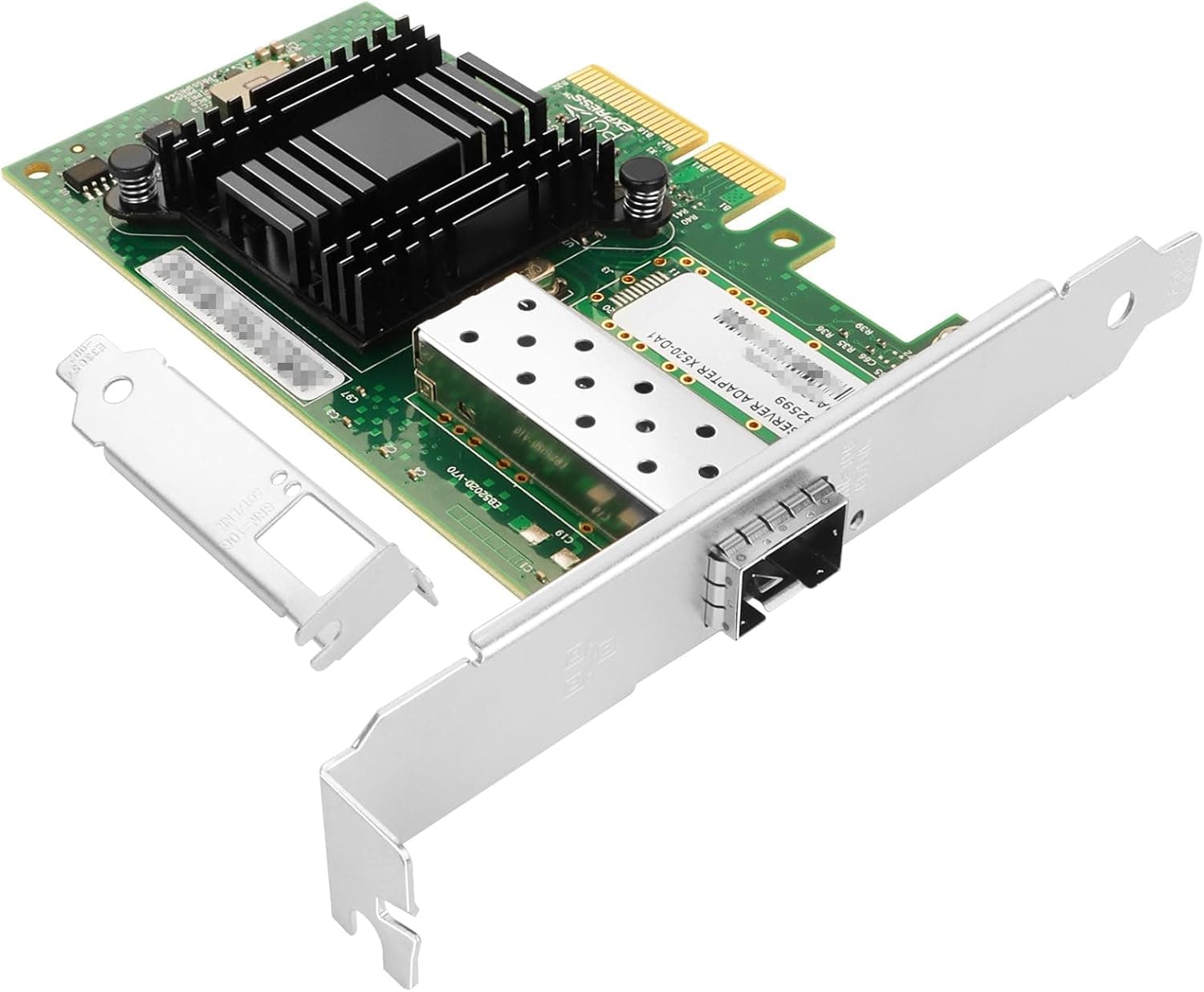
Overview
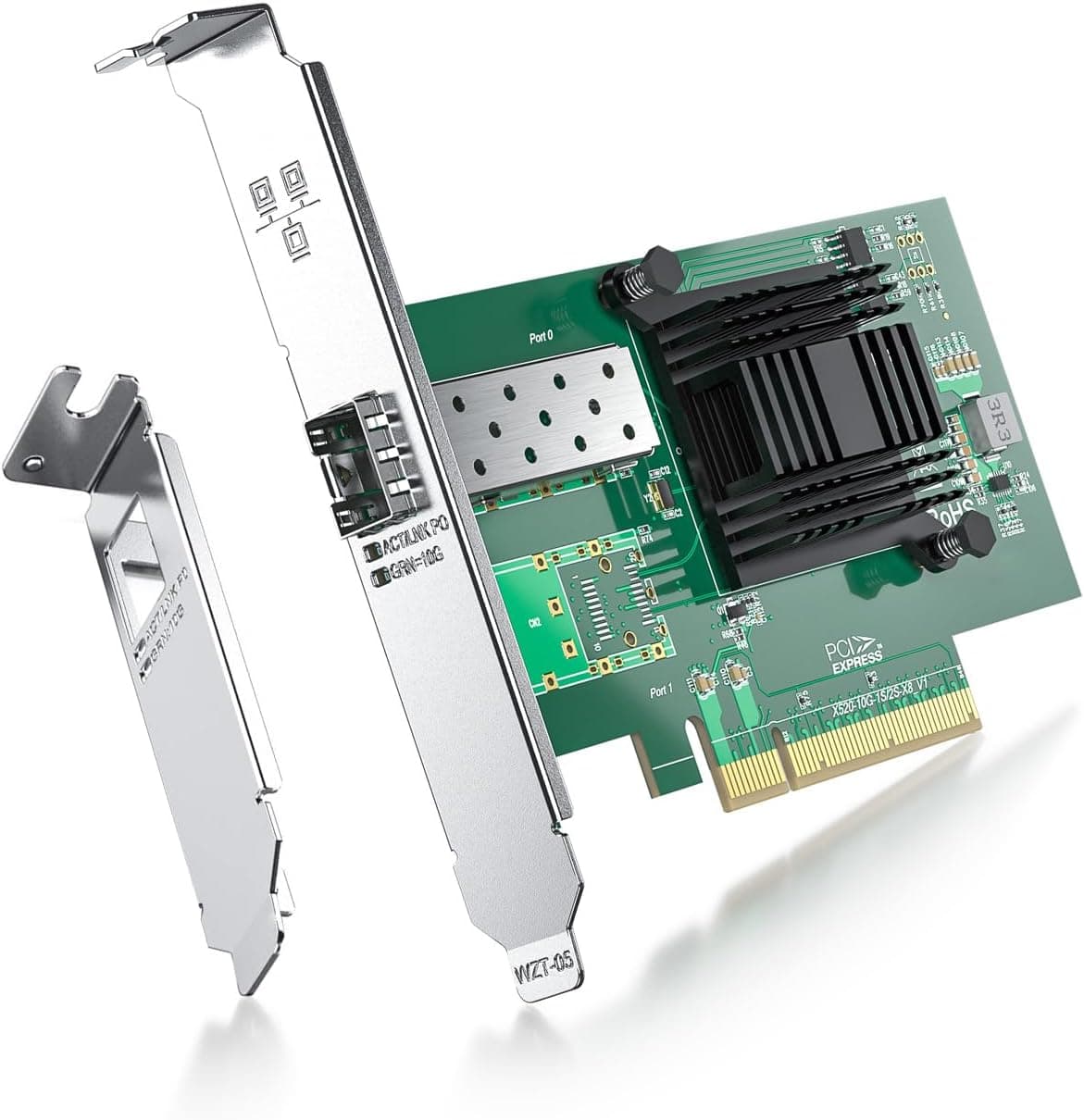
The Vogzone 10Gb PCI-E NIC is a single-port SFP+ 10 Gigabit Ethernet adapter built on the Intel 82599EN controller. The short verdict: this is a card for people who want exactly one 10GbE link at the lowest possible cost, and who can supply the rest of the chain themselves — an SFP+ module or DAC cable, plus something on the other end with a 10G port.
If you can't supply those, this is the wrong card.
It uses a PCI Express 2.0 x4 interface and auto-negotiates 100Mbps, 1Gbps, and 10Gbps.
The box contains the card and a low-profile bracket only; SFP+ modules are sold separately. As captured on 27 May 2026, the Amazon.co.jp listing showed 14 reviews at 4.7 out of 5 (94% positive).
That's a good score, but 14 is a small sample — read it as "no widespread early-failure reports" rather than as proof of long-term reliability.
How It Differs From a First-Party Intel Card
Cards like this pair a genuine Intel controller with a third-party board and firmware. Because the standard OS drivers and Intel's ixgbe family generally load without modification, once it works the OS sees essentially the same device as a retail Intel adapter.
That's where the price gap comes from.
Three differences do matter in practice. First, module lock-in: Intel's X520 family is known for rejecting non-Intel SFP+ optics via a firmware whitelist, and compatible cards can behave the same way.
On Linux the ixgbe allow_unsupported_sfp option often works around it; on Windows your options are limited. Second, thermals: 82599-series silicon runs hot, and stability suffers when no air passes over the heatsink.
Third, support: the 3-year warranty, 30-day free returns, and lifetime technical support are handled through the seller rather than Intel.
Compatibility Guide
The specified slot is PCI Express 2.0 x4, and it also works in x8 and x16 slots.
PCIe 3.0 and 4.0 boards are backward compatible.
On bandwidth: PCIe 2.0 x4 delivers roughly 16Gbps of usable throughput after 8b/10b encoding, which is comfortably enough to saturate one 10G port.
The real bottleneck is usually storage or CPU, so verify your NAS's actual read/write speed before worrying about lane counts.
The most common physical failure is "the spec says x4 but it won't fit." Cards of this type often use an x8 physical edge connector, so a closed-end x1 or x4 slot on your motherboard will physically block installation.
Leaving an x16-shaped slot free — even one wired electrically at x4 — is the safe plan. The included low-profile bracket suits 2U servers and slim cases, but those chassis only work if you can guarantee airflow.
OS support spans Windows, Windows Server, Linux (RHEL, SUSE, Ubuntu), FreeBSD, VMware ESX/ESXi, and UEFI environments. Windows 11 may not install a driver automatically and is documented as requiring manual driver setup.
For ESXi, newer releases may flag 82599-series devices as unsupported, so check the HCL for your target version before buying.
| Item | Value | What to check |
|---|---|---|
| Interface | PCI Express 2.0 x4 | Open-ended or x16-shaped slot available |
| Port | SFP+ × 1 | Module or DAC purchased separately |
| Controller | Intel 82599EN | Driver availability, ESXi support status |
| Dimensions | 22.4 × 15 × 2.8 cm (package) | Case clearance and airflow |
| Weight | approx. 198 g | — |
| Included | Card, low-profile bracket | No SFP+ module in the box |
As the table shows, nearly every real-world snag comes down to slot shape or the module.
Choosing an SFP+ Module or Cable
An SFP+ cage connects to nothing on its own. For short runs — same rack, or a switch on the desk, roughly 1–7 m — a DAC (Direct Attach Copper) cable is cheapest and most reliable, since cable and transceiver are one unit and there's less to be incompatible.
For longer runs, pair an SFP+ optical module (multimode SR is the common choice) with fiber. If you must reuse existing Cat6 runs, 10GBASE-T SFP+ modules exist, but they draw more power, run hotter, and aren't supported by every card.
When choosing, assume vendor-code checking is in play. Intel-coded modules are generally the safest bet.
If the far end is a switch, that switch may enforce its own coding rules, so you need a module both ends will accept. Asking the seller which modules they have verified is usually the cheapest form of research.
Product Info
As captured on 27 May 2026, the Amazon.co.jp price was ¥12,221.
That sits near the floor for a 10GbE NIC and well below comparable first-party Intel adapters. Prices in this category move frequently with sales, exchange rates, and stock, so treat that figure as a point-in-time reading.
Budget several thousand yen more for an SFP+ module or DAC cable — that's part of the real cost. The eBay entry resolves only to a search page with no captured price, so it isn't usable for comparison.
Specifications: 100MbE / 1GbE / 10GbE data rates, PCI Express 2.0 x4 interface, one SFP+ port, Intel 82599EN controller, approximately 198 g (7 oz).
The listing states a 3-year warranty, 30-day free returns, and lifetime technical support. Review data was 14 reviews at 4.7 out of 5 as of 27 May 2026.
Best Use Cases
The clearest fit is a home or small-office user running a single 10GbE link to a NAS or file server. Video editors working with 4K/6K footage stored on a NAS, and anyone pushing hundreds of gigabytes of backups regularly, will feel the biggest jump moving off 1GbE (around 110 MB/s in practice).
The second fit is the home-lab admin running ESXi or Proxmox. SFP+ with DAC draws less power and produces less heat than 10GBASE-T, which makes it the natural choice for short in-rack links.
The third is anyone testing the waters: connect a PC and a NAS directly with a DAC cable and you can evaluate 10GbE without buying a switch at all. A cheap single-port card is a sensible way to run that experiment.
Points to Consider Before Buying
Don't treat the separate module as a footnote. The card may be about ¥12,000, but your out-of-pocket cost includes a module or DAC.
You also need a 10G port on the other end — if your NAS lacks SFP+, add a switch or a second card to the budget. Buying this expecting "card equals 10G" leads straight to a second shopping trip.
Cooling deserves genuine attention. 82599-based cards get seriously hot, and installing one where no case airflow reaches it can cause link instability or throughput loss during long sustained transfers.
Low-profile support does not mean it belongs in an airflow-starved slim case. Leave slot spacing around it, or plan on aiming a fan at the heatsink.
Expect friction from module compatibility and Windows 11 drivers. Beyond the whitelist behavior above, Windows 11 is documented as needing manual driver setup.
If you're not comfortable installing drivers by hand, this is where you'll stall. And to actually use 10GbE you'll want SMB Multichannel, jumbo frames (MTU 9000), and storage at both ends capable of roughly 1 GB/s.
Install this in front of a single-HDD NAS and the link will read 10G while real throughput barely moves.
Weigh the small review count. A 94% positive rate is good, but 14 reviews can't tell you much about long-term failure rates or unit-to-unit variance.
Given the 3-year warranty and 30-day return window, the practical defense is to run sustained real-transfer load tests immediately on arrival so any defect surfaces while returns are still open.
Verify the listing details yourself. Amazon product pages not uncommonly carry manufacturer, model, or spec entries that don't match the actual item, and this article draws on that same page — we can't validate the listing side.
Before ordering, confirm from the product images and title that you're getting the single-port SFP+ model and not the dual-port X520-DA2.
FAQ
Q. Is an SFP+ module included? A.
No. You get the card and a low-profile bracket only.
Add a DAC cable or an SFP+ optical module to suit your run length.
Q. Will my generic budget SFP+ module work? A.
It might, but X520-series cards are known for vendor-code module restrictions, so there's no guarantee. Intel-coded modules or ones the seller has verified are the safer choice.
On Linux, a driver option can sometimes bypass the check.
Q. Can PCIe 2.0 x4 sustain a full 10Gbps? A.
Yes, bandwidth is not the limit — PCIe 2.0 x4 provides roughly 16Gbps usable, ample for one 10G port.
If throughput disappoints, look at storage or your MTU/SMB settings first.
Q. Can I use it without a 10G switch? A.
Yes. Connect the PC and NAS directly with a DAC cable for a point-to-point 10G link.
You'll need to set static IPs manually, but for pure high-speed transfers that's sufficient.
Q. Does it work on Windows 11? A.
It does, but the driver may not install automatically and manual setup can be required. Locate the driver source before you install the card.
Q. I'd rather use RJ45 / Cat6 than fiber. A.
Then pick a 10GBASE-T card with a native RJ45 port instead. A 10GBASE-T SFP+ module is possible but worse on heat and compatibility.
Product Disclosure (Amazon)
- Manufacturer: Vogzone
- Seller: 夢みる商会
- Fulfilled by: 夢みる商会
- ASIN: B0DP8DNHTR
- Note: This article covers a manufacturer-made product based on Amazon listing details.