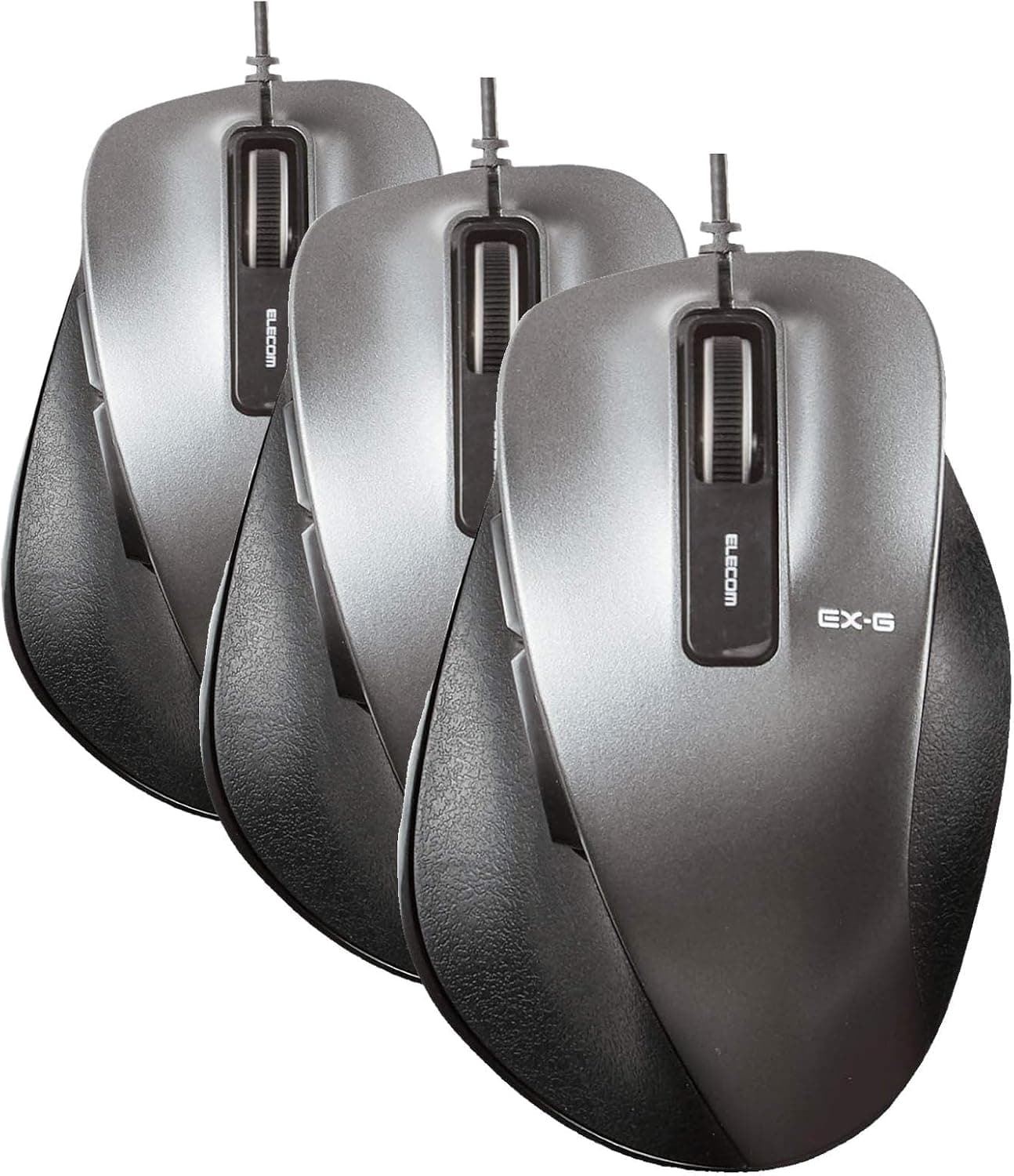
A closer look at the ELECOM EX-G M-XGM10UBBK wired mouse, based on its published specs and the pattern of its Amazon reviews. Cheap wired mice all look alike on paper, but satisfaction with this category is decided by three things: hand size fit, cable routing, and whether you bought a single unit or a multi-pack.
Overview
The M-XGM10UBBK is a USB wired, five-button, medium-sized mouse with an ergonomic shell shaped so your palm stays in contact rather than hovering. The short verdict: this is not a mouse for fast gaming aim.
It is a mouse for someone who spends six to eight hours a day in a browser and an office suite and wants less fatigue plus dedicated back/forward keys. If you came looking for a lightweight gaming mouse, this is the wrong product from the start.
The specs are roughly 92g, a cable of about 1.5m, a USB Type-A interface, a BlueLED sensor, and a gun metallic finish.
BlueLED uses a shorter wavelength than a red LED, so it tracks more reliably on matte wood desks, cloth pads, and lightly textured surfaces — useful if you prefer working straight on the desk without a mousepad.
As captured on 12 July 2026, the Amazon rating was 4.1 out of 5 across 2,337 reviews (82% positive equivalent).
Over two thousand reviews is a healthy sample for a mouse in this class, enough that individual unit defects average out. Read the 4.1 honestly: it means "reasonable for the price," not "outstanding." Set expectations there.
Compatibility Guide
The connection is USB Type-A only, so any PC, tablet, or console with a Type-A port will generally work as-is. Officially supported operating systems are Windows, macOS, and Chrome OS, and no driver installation is required.
Linux is not on the official list, but a standard HID mouse is normally recognized without setup — verify first if the environment is critical.
The real stumbling block is not the OS, it is port shape and count. Many thin laptops and MacBooks now ship with USB Type-C only, and in that case you need a Type-C adapter or a hub.
No adapter is included. Even on desktops, front panels are increasingly Type-C only, so decide where you will plug it in before buying.
| Environment | Works? | Notes |
|---|---|---|
| Windows PC with Type-A | Yes | Plug and play |
| Type-C-only laptop | Adapter needed | Not included |
| macOS | Yes | Back/forward is app-dependent |
| Chrome OS | Yes | No driver required |
| Via a KVM / USB switch | Mostly | Occasional detection delay |
The ~1.5m cable is plenty if you plug into a desktop on the desk or a monitor hub, but it gets tight when routed to the back of a floor-standing tower.
With a 70cm desk and a PC on the floor, the real cable run approaches 1.3–1.5m, leaving almost no slack.
If that is your setup, plan on a monitor USB hub or a desk hub.
The back and forward buttons are sent as standard OS-level buttons, so they work in Windows browsers and File Explorer with no configuration. On macOS, some applications ignore them.
If the Mac is your main machine, do not assume the side buttons will always fire.
Product Info
Key specs: 5 buttons (left, right, wheel, back, forward), BlueLED sensor, medium size class, gun metallic color, approximately 92g for a single unit, a cable of about 1.5m, USB Type-A, and support for Windows, macOS, and Chrome OS.
At ~92g the mouse sits in the normal-to-slightly-light range for a wired mouse, and it feels distinctly more planted than a 55g ultralight. For long sessions of small, precise cursor work, that extra mass helps steady the hand.
Prices are point-in-time captures. Amazon showed ¥4,497 as captured on 12 July 2026, and Rakuten (Eito Shop) showed ¥1,949 as captured on 13 August 2026.
That is roughly a 2x gap, but this model circulates as both a single unit and a three-pack, and street prices are reported around ¥1,500 for one unit up to about ¥4,500 for a three-pack. Most of the gap is therefore likely a difference in quantity, not in the product.
Confirm on the listing whether you are buying one or three. Both figures are captures and will move with sales and stock.
The model is listed as released around 2024, with a 6-month manufacturer warranty and only the mouse plus a quick manual in the box. Six months is on the short side for a mouse market where one year is common.
At this price the practical policy is replacement rather than repair — and if you buy a multi-pack, the spare in your drawer is effectively your warranty.
Comparison With Alternatives
Three things compete with it: a similarly priced wireless mouse, a 55g-class lightweight gaming mouse, and a slim Bluetooth travel mouse. Against wireless, this mouse wins on no batteries, no pairing drops or latency, and no receiver to lose.
On shared or company-issued machines where you cannot leave a dongle plugged in, wired is simply the cleaner answer.
Against a gaming mouse, it clearly loses on DPI granularity, polling rate, switch endurance, and software-driven button remapping. For wide, fast swipes in an FPS, 92g plus cable drag works against you.
If gaming is the priority, buy a dedicated device.
For travel, a cable is just an annoyance. If the mouse rides in a bag every day, a slim Bluetooth model fits better.
Treat this as a product optimized for living permanently on one desk.
Real-World Feel
The EX-G shell is built around a palm grip, with a hump that does not suit claw or fingertip grips. The medium size targets hands roughly 17–19cm long; larger hands tend to drag the pinky on the desk, and smaller hands struggle to reach the thumb buttons comfortably.
Size fit is almost the entire story, and the 4.1 average is best read as a mix of people it fits and people it does not.
BlueLED is forgiving about surfaces, but glass tops and high-gloss finishes can still confuse it. On a glass desk, plan on using a pad.
Best Use Cases
- Office and remote workers at a desk all day — the palm-grip shape and grippy side finish keep the hand from locking up over long sessions, and back/forward pay off most in browser-and-Explorer heavy work.
- People switching between PCs on a KVM — wired needs no re-pairing and responds immediately after a switch.
- Anyone outfitting several machines — the three-pack makes it easy to run identical mice at home, at the office, and as a spare.
- Users who skip the mousepad — the BlueLED sensor handles bare desk surfaces well.
Things to Check Before Buying
Check the quantity first. The same model number is sold as a single and as a three-pack side by side, and most of the price gap comes from that.
"I thought it was cheap and got one" and "I did not need three" are the two most common regrets here. Look at the quantity field and any "3-pack" wording before you check out.
A wrong-size ergonomic shell is worse than a plain one. Ergonomic shaping only works when the hand lands where the designer intended; if it does not fit, it can fatigue you more than a symmetrical mouse.
Smaller hands (under roughly 17cm) and fingertip-grip users should look at a small or low-profile model instead.
Do not underestimate cable routing. About 1.5m leaves almost nothing spare when reaching the back of a floor-standing PC, and a wired mouse transmits cable spring back into the feel.
Pinching the cable on the desk edge or fixing it at a sharp bend creates snagging. You do not need a bungee — one strip of tape at the back of the desk changes the feel.
Accept the limits for multi-button and gaming use. Five buttons, no DPI toggle, and no profile management.
If you lean on macros or per-app button assignments, start with a multi-button model.
The warranty is six months. Click chatter is a wear-related failure that can appear on inexpensive mice from any brand, and after six months it means replacement.
If downtime hurts your workflow, a spare unit is the cheaper insurance.
Do not take the listing metadata at face value. Amazon pages often bundle color, size, and pack variations together, so the images, model number, and quantity shown may not match the variant you have actually selected.
Before ordering, confirm the model number (M-XGM10UBBK) and the quantity against both the product image and the title.
FAQ
Q. Is the mouse itself identical in the single and the three-pack? A.
If the model number matches, yes. The price difference reflects quantity — which is also the likely reason for the gap between ¥4,497 on Amazon (captured 12 July 2026) and ¥1,949 on Rakuten (captured 13 August 2026).
Check the quantity before ordering.
Q. Do the back/forward buttons work on a Mac? A.
In some apps. Safari and Finder generally behave, but third-party apps may ignore them.
If you need them reliably on macOS, plan on a remapping utility.
Q. Can I use it on a Type-C-only laptop?
A. Yes, with a Type-A to Type-C adapter or a USB hub. No adapter is included.
Q. Is it a silent-click model? A.
No, this model is not marketed as silent. If click noise matters in your environment, choose one of ELECOM's silent-switch models instead.
Q. Can I game with it? A.
Browser games and slower MMO play are fine; fast, wide FPS aiming is not its job. The ~92g weight is not the problem — cable drag and the non-gaming sensor and switch spec are.
Product Disclosure (Amazon)
- Manufacturer: エレコム(ELECOM)
- Seller: Amazon.co.jp
- Fulfilled by: Amazon.co.jp
- ASIN: B0H8DV1VC5
- Note: This article covers a manufacturer-made product based on Amazon listing details.
![Razer DEATHADDER ESSENTIAL 有線ゲーミングマウス [並行輸入品] ホワイト](/_next/image?url=https%3A%2F%2Fm.media-amazon.com%2Fimages%2FI%2F51cHuN2U12S._AC_SL1396_.jpg&w=1920&q=75)
![Logitech G502 HERO ゲーミングマウス 有線 [並行輸入品]](/_next/image?url=https%3A%2F%2Fm.media-amazon.com%2Fimages%2FI%2F31wmn8oGVxL._AC_SY355_.jpg&w=1920&q=75)