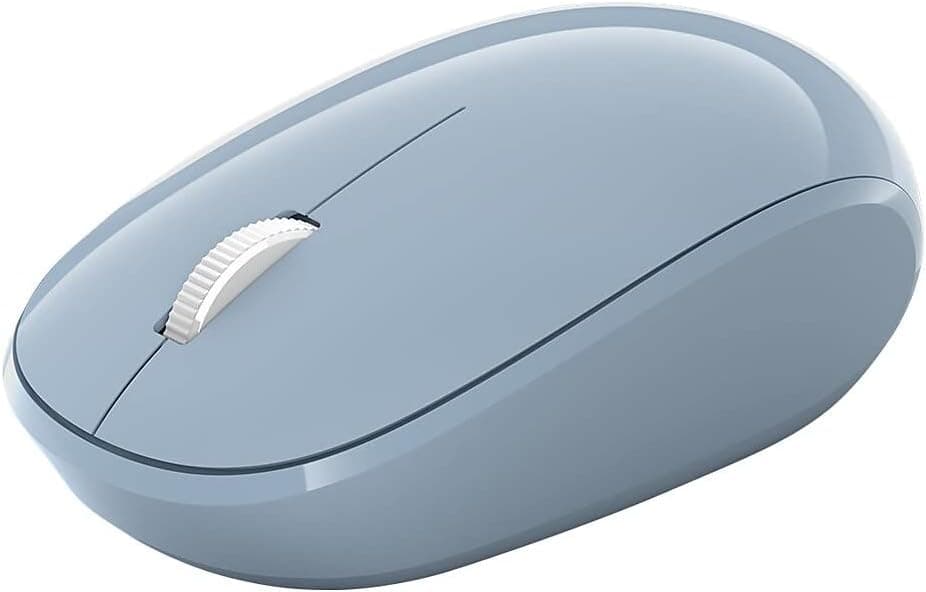
Overview
The Microsoft RJN-00013 Bluetooth Mouse (Pastel Blue) connects directly over Bluetooth 5.0 LE, with no USB dongle involved.
The short version: this is a mouse you keep in a laptop bag as a replacement for the trackpad — not a primary desktop mouse, and not a gaming mouse. Its real value is up to 12 months of battery life and a receiver you can never lose because there isn't one.
On Amazon.co.jp it holds 4.5 stars across 1,453 reviews (90% positive) as of the July 2026 capture.
At that review volume, a 4.5 average means this is not a product that collapses under connection problems or early failures.
It is, however, a product with a very clear list of things it cannot do.
Compatibility Guide
Connectivity is Bluetooth 5.0 LE.
Because no dongle is required, it consumes zero ports on a thin laptop or tablet that only has two USB-C connectors — a clear advantage over 2.4GHz dongle mice.
Officially it works with Windows 10/11, macOS, iOS, and Android devices that support Bluetooth 5.0 LE.
Three practical checks before you buy:
| Check | Where to look | Common trap |
|---|---|---|
| Does the machine have Bluetooth? | Device Manager / System Information | Many desktops ship without it |
| Bluetooth version | Driver properties, spec sheet | Pre-4.0 hardware can be unstable |
| BLE support | "Bluetooth Smart"/LE in the spec sheet | Classic-only radios may fail to pair |
Desktop and business PCs are the main risk. If the machine has no built-in Bluetooth you will need an adapter — and if you end up occupying a USB port anyway, a 2.4GHz dongle mouse is the more reliable choice.
Pairing is done by pressing the button on the underside and adding the device from your OS Bluetooth settings. Note that Bluetooth mice generally do not work in BIOS/UEFI or during OS installation, because the Bluetooth stack isn't running yet.
Keep a wired mouse around if you plan to reinstall Windows. That limitation applies to every Bluetooth mouse, not just this one.
Product Info
| Item | Value |
|---|---|
| Connection | Bluetooth 5.0 LE |
| Detection | Laser |
| Battery Life | Up to 12 months |
| Color | Pastel Blue |
The laser sensor matters in comparison to LED optical units. Laser tracking generally copes better with glossy desks and dark surfaces where LED sensors struggle.
On a cloth mousepad the difference is negligible, and clear glass is still a problem surface — use a pad there.
Power comes from a replaceable battery, shipped in the box along with a quick start guide; confirm the exact cell type on the product page. Since it isn't rechargeable, you never carry a cable, but you do want a spare cell on hand.
"Up to 12 months" is a manufacturer estimate and drops with heavy daily use.
On pricing: Amazon.co.jp showed ¥1,575 at the 19 August 2026 capture.
Listings for this model vary widely by seller, and prices well into five figures in yen have appeared on the same ASIN. Verify the seller and product name if you see a figure far off the norm, and treat the product page as the source of truth.
Warranty is the standard one-year manufacturer coverage.
How It Compares
- 2.4GHz dongle mice — more forgiving connection, works in BIOS, plug-and-play. Costs you a USB port, and losing the dongle bricks the mouse.
- Multi-device Bluetooth mice — switch between PC, tablet and phone with one button. The RJN-00013 has no such feature; if you juggle devices, that alone justifies stepping up.
- Silent-click models — increasingly common at this price. This one uses conventional switches with a normal click sound.
What the RJN-00013 wins on is narrow and specific: no receiver, roughly yearly battery changes, and a plain, light shape. If those three aren't near the top of your list, something else will make you happier.
Best Use Cases
- Laptop users who travel — no port used, no dongle to lose.
- People who want zero configuration — no DPI switch, no extra buttons, no macros. Left click, right click, wheel.
- A spare or family mouse — a year of battery means it's likely still alive when you finally need it.
- Tidy-desk types — the pastel blue pairs well with white and silver laptops, and there's no cable.
Before You Buy
No multi-device pairing. You cannot register several hosts and switch between them.
Moving between a PC and a tablet all day means re-pairing every time, which gets old fast. This is the single clearest reason to spend more elsewhere.
The clicks are not silent. Libraries, live meetings, and shared bedrooms are where you'll notice.
Buy a model explicitly marketed as silent if that matters.
Not for gaming. No side buttons, no DPI adjustment, no polling-rate control, and Bluetooth is at a latency disadvantage versus 2.4GHz wireless or wired.
For FPS-grade input, get a dedicated lightweight gaming mouse instead.
It may be small for large hands. The compact travel shape leaves palm-grip users with fingers hanging off the front, which tires the hand over long sessions.
Treat it as a mobile secondary, not an eight-hour daily driver.
Battery death arrives without warning. With no reliable charge indicator, carry a spare cell on travel days.
Watch the listed price. The same ASIN has shown anything from the high hundreds to over ten thousand yen depending on seller and timing.
If the figure looks wrong, confirm the seller, title and images match the product you actually want — marketplace listings sometimes attach near-identical model numbers to the same page.
FAQ
Q. Will it work on a desktop PC? A.
Yes, if the PC has Bluetooth (ideally BLE). Many desktops don't, so check first; otherwise you'll need an adapter.
Q. Does it work in BIOS or during Windows setup? A.
Generally no — the OS Bluetooth stack has to be running first. Keep a wired mouse for reinstalls.
Q. Does the battery really last 12 months? A.
"Up to 12 months" is a manufacturer estimate. Heavy use and cheaper cells shorten it.
Think in months, not a guaranteed year.
Q. Does it track on glossy tables? A.
Laser sensors handle gloss reasonably well, but clear glass remains difficult. Use a pad if tracking stutters.
Q. Is it usable left-handed? A.
The near-symmetrical shape and absence of side buttons make it fine for left hands; swap the buttons in your OS settings.
Q. How is it reviewed? A.
4.5 stars from 1,453 reviews (90% positive) on Amazon.co.jp as of the July 2026 capture — solid for an entry-level mouse.
Product Disclosure (Amazon)
- Manufacturer: マイクロソフト
- Seller: S1102S
- Fulfilled by: S1102S
- ASIN: B07Y41ZZ93
- Note: This article covers a manufacturer-made product based on Amazon listing details.