Overview
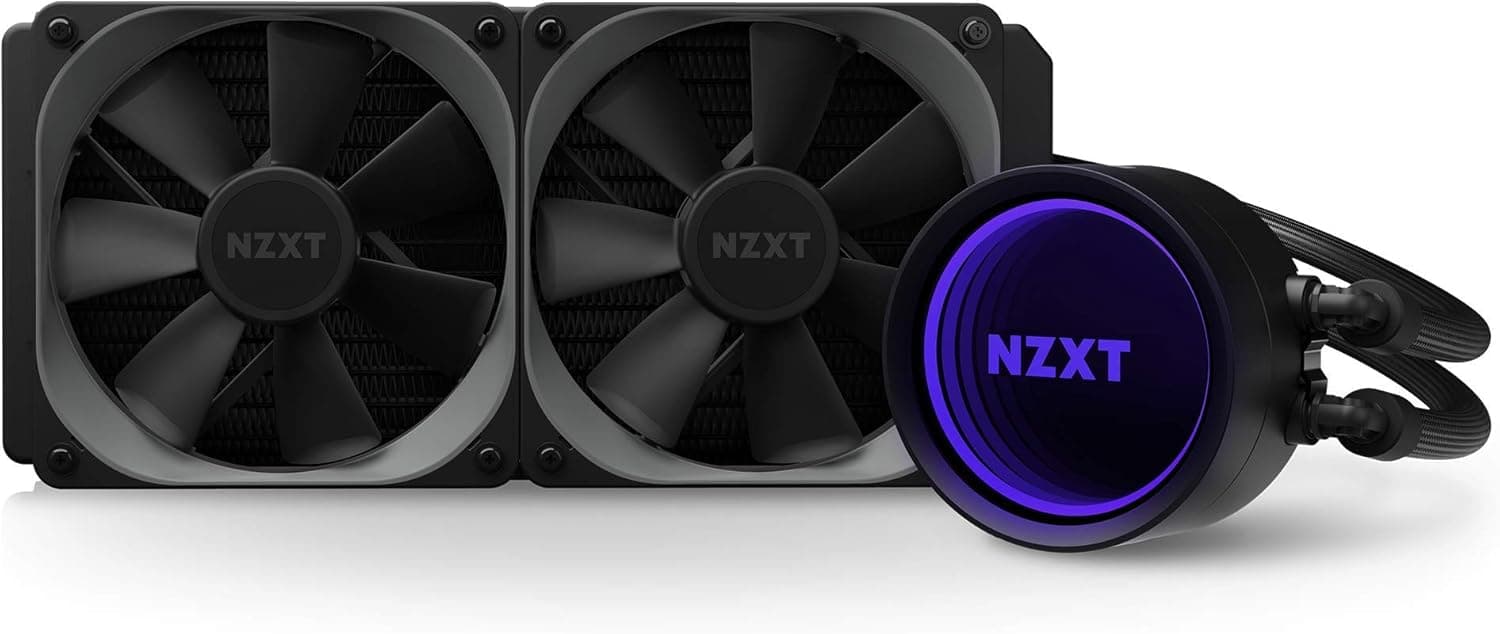
The NZXT KRAKEN X53 is an all-in-one (AIO) liquid CPU cooler built around a 240mm radiator with two 120mm fans. The honest verdict up front: this is not a cooler you buy for raw thermal headroom.
You buy it for the pump head's illuminated ring, the rotatable head that lets you align the logo in any orientation, and the ability to manage fans and lighting from one piece of software. Its natural home is a mid-to-upper-mid CPU (roughly up to the 125W TDP class) inside a tempered-glass case.
If that visual payoff means nothing to you, a large dual-tower air cooler or a bigger radiator is the more rational purchase. This article covers both sides — why someone would still choose it, and who should walk away.
What Choosing 240mm Actually Means
AIO radiators come in 120 / 240 / 280 / 360mm sizes, and dissipation scales roughly with area. 240mm is the lowest-common-denominator size: nearly every mid-tower can mount it front or top.
280mm needs 140mm fan mounts, and 360mm frequently collides with drive cages, VRM heatsinks, or tall memory.
Set expectations correctly: a 240mm AIO performs roughly on par with a good 120mm-class dual-tower air cooler, with a modest edge in cases with poor internal airflow. Do not expect a 10°C drop from switching.
The real, reliable benefit is that CPU heat exits the case directly, which tends to lower VRM and memory temperatures around the socket.
Compatibility Guide
Four things decide whether this cooler works in your build: socket support, radiator space, tube routing, and headers. Note that the compatibility data attached to this article is empty or refers to an unrelated interface, so always confirm the current socket list on the manufacturer or retailer page. In general terms:
- Socket: The Kraken X-3 generation shipped supporting Intel LGA115x / 1200 / 2066 and AMD AM4. LGA1700 and AM5 support depends on which bracket is in the box, and that varies by production run and region. Confirm before you buy — discovering a missing bracket on build day stops the job cold.
- Radiator: You need a 240mm mount. With fans attached, budget around 50mm of thickness. For top mounts, physically measure clearance to VRM heatsinks and tall memory heat spreaders — this is the single most common installation failure.
- Front vs top: Front intake favours CPU temperature; top exhaust favours GPU and overall case temperature, since front-mounted radiators dump warmed air inside.
- Tube orientation: Mount so the tubes exit low, or at minimum so the pump is not the highest point in the loop. A pump sitting at the top collects air over time, which causes gurgling. This is AIO physics, not a product defect.
- Headers: You need a pump header (CPU_FAN or AIO_PUMP), PWM for the fans, and an internal USB 2.0 header for control and lighting. Check that a USB header is actually free — builds with RGB controllers or VR kits often run out.
Product Info
rmation
An important disclosure: the product data attached to this article contained the specifications, model number, and ASIN of a completely different product — a USB Bluetooth adapter. For that reason, none of those specs, the domestic listing price tied to that identifier, or its review counts appear anywhere in this article.
Publishing a wrong number is worse for readers than publishing one fewer number.
On pricing, the marketplace entry shows $65.00 as captured on 14 July 2026 on eBay.
That is secondary-market pricing covering used and parallel-import units of varying condition and seller. The X53 is past its prime retail window, so new stock is thinning and prices vary widely per listing.
Always check the current price, condition, and warranty status on the product page itself.
Regarding warranty: NZXT liquid coolers ship with a comparatively long coverage period, but the exact term depends on region and purchase date. Used and parallel-import units are unlikely to carry valid manufacturer coverage. Because an AIO contains a moving pump, warranty matters more here than it does for an air cooler — price accordingly.
Competitive Comparison
| Alternative | How it stacks up against the X53 |
|---|---|
| Other current 240mm AIOs | Broadly equivalent cooling. Differences show up in software, fan acoustics, warranty, and availability |
| 360mm AIO | Clearly better under sustained all-core loads, but fits far fewer cases |
| Large dual-tower air cooler | Equal or better cooling with no pump to fail — but tall, and prone to memory and side-panel conflicts |
| LCD-screen AIOs | More visual payoff, at a higher price tier |
The decision reduces to one question: are you willing to accept a failure-prone moving part in exchange for looks and an unobstructed view inside the case? If the answer is no, buy air.
If a giant heatsink hiding your GPU is unacceptable, an AIO is the only answer and this one is a reasonable shape of that answer.
Installation Notes and Real-World Use
Mounting pressure and paste application matter more than most people expect. Tighten the screws diagonally and gradually rather than fully seating one side first; an uneven cold plate can cost several degrees.
Do not leave the default fan curve alone. Because the coolant provides thermal mass, an AIO does not need to ramp as aggressively as air.
Holding low RPM up to around 60°C and ramping after that dramatically reduces everyday noise. The pump also does not need to run flat out — a moderate fixed speed is sufficient in most builds, since pump RPM stops paying dividends well before it stops adding noise.
Finally, treat any AIO as a consumable. Coolant permeates out through the tubing very slowly, so performance drifts downward over years.
Around the five-year mark, watch for rising temperatures or new noises and plan for replacement.
Best Use Cases
- Builders using a tempered-glass case who care how the finished machine looks. The ring lighting and rotatable head exist for exactly this.
- Cases that cannot fit a tall air cooler. If memory or side-panel clearance ruled out air, an AIO is the practical fix.
- Mid-to-upper-mid CPUs run quietly day to day. This suits idle-to-moderate load quietness more than maximum full-load cooling.
- Anyone consolidating fan and RGB control into one utility, especially existing users of the same ecosystem.
Conversely, for 24/7 all-core rendering workloads or serious overclocking, 240mm is simply the limiting factor. Step up to 360mm or go with a high-end air cooler instead.
Things to Check Before Buying
Start with the listing itself. The source data for this article mixed in the model number, ASIN, and specifications of an unrelated USB Bluetooth adapter.
The same mismatch happens on real retail pages. Before you order, confirm that the title, the photos, and the model number all describe a 240mm liquid cooler. If the review count looks implausibly high, suspect that reviews from a different product have been merged onto the listing.
Ten seconds of checking prevents the whole problem.
Next, the risk inherent to AIOs: the pump is a moving part and will eventually fail. An air cooler with a dead fan still has a large heatsink acting as thermal mass; an AIO with a dead pump loses cooling almost immediately.
Enable the BIOS fan-stop warning and keep pump RPM on your monitoring list. Leak probability is very low but not zero — if you cannot accept that, buy air.
On used units specifically: the X53 has been on the market for years, so secondary-market samples have likely already run for a long time. Since coolant slowly depletes, a used AIO is buying into an unknown remaining lifespan. If a current-generation new unit costs only slightly more, take the new one.
Lastly, the expectation gap. "Switching to liquid will drop my temps dramatically" is the most common source of post-purchase disappointment.
A 240mm AIO lands near a good large air cooler, so expect improvements measured in a few degrees. If the secondary benefits — appearance, internal visibility, direct heat exhaust — still appeal, it is a good buy.
Frequently Asked Questions
Q. Will it fit my motherboard socket? A.
The X-3 generation centres on Intel LGA115x / 1200 / 2066 and AMD AM4. LGA1700 and AM5 depend on which bracket is included, which varies by production run and region.
Check the retailer's socket list before ordering, and ask if it isn't stated. Don't guess on this one.
Q. Should I mount the radiator in the front or the top? A.
Front intake if CPU temperature is the priority; top exhaust if overall case and GPU temperature matter more. Top mounts conflict with tall memory and VRM heatsinks, so measure for roughly 50mm of radiator-plus-fan thickness first.
Q. Is the pump noisy? A.
Some water-flow noise for the first hours or days is normal as trapped air circulates and settles. If it persists beyond that, or if you hear a clearly abnormal sound, check that the pump is not the highest point in the loop.
Q. How long will it last? A.
Treat it as a consumable. Coolant depletes gradually, so watch for degradation or noise around the five-year mark and replace as needed.
If you want years of zero-maintenance operation, air cooling suits you better.
Q. Can I swap the fans later? A.
Yes — the radiator takes standard 120mm fans, so higher-static-pressure replacements fit. Expect to lose lighting cohesion, and note that mounting location and fan curve influence temperatures more than the fan model does.