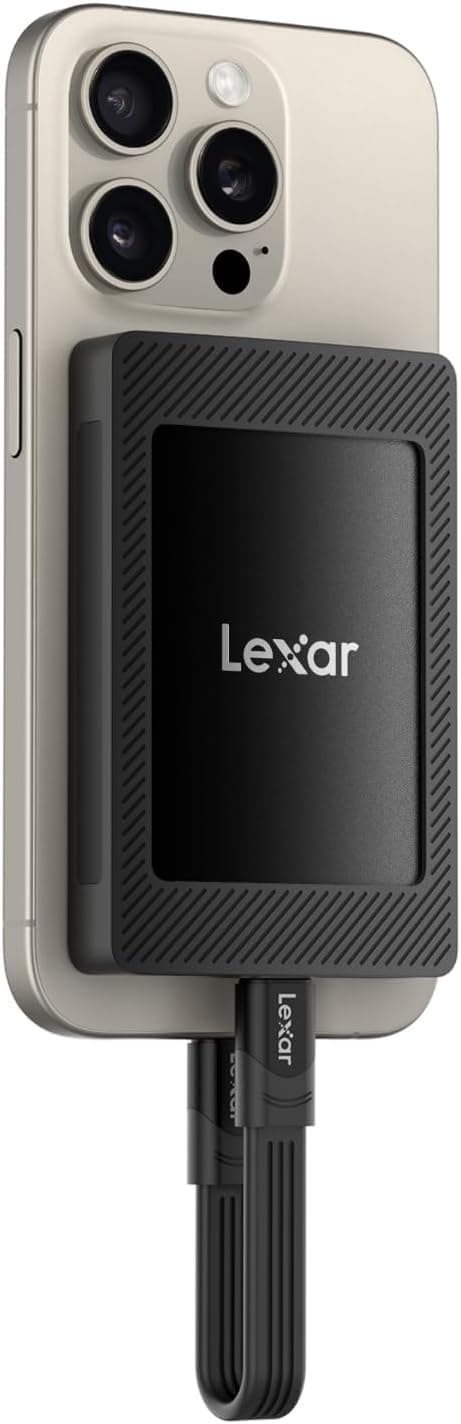
The Lexar SL500 is a palm-sized portable SSD built around the USB 3.2 Gen 2x2 (20Gbps) interface.
This article looks at the 4TB magnet-bundle version: how to read its rated numbers, what your setup actually needs to hit 20Gbps, and who should skip it.
Overview
The Lexar SL500 4TB targets creators and business users who move large data sets around. Rated sequential read is up to 2000MB/s and write up to 1800MB/s over USB 3.2 Gen 2x2.
On Amazon.co.jp it holds 4.5 out of 5 stars across 357 reviews (90% positive, captured May 2026), which is a steady result for this class.
Its value comes from combining 4TB of capacity with 20Gbps-generation speed in something that fits in a pocket. If you don't need both at once, it is plainly overkill.
The 2000MB/s figure only becomes something you feel when you shuttle tens of gigabytes between a laptop and the drive on a daily basis.
The bundled magnet set lets you stick the drive to a metal surface — under a desk, on a monitor arm, on a laptop lid. It tidies cable routing, but it is an accessory, not a performance feature.
If the magnet version costs meaningfully more, the plain model loses you almost nothing.
Reading the Specs
| Item | Value | What it means in practice |
|---|---|---|
| Capacity | 4TB | Tens of hours of 4K footage, or RAW photos in the six figures |
| Interface | USB 3.2 Gen 2x2 (20Gbps) | Still a minority port on the PC side |
| Sequential read | Up to 2000MB/s | Close to the ceiling of a 20Gbps link |
| Sequential write | Up to 1800MB/s | Only while the cache is holding |
Write speed is the most misread number here. Portable SSDs generally reach their rated figures by running part of the flash in a fast SLC cache mode.
Copies that fit inside that cache run near the rated speed; sustained writes of several hundred gigabytes exhaust it and then slow down. This is normal behavior for the design, not a defect.
A 4TB model has a correspondingly larger cache and holds up longer than smaller capacities, but assume the back half of a full-drive fill will be slower.
The 2000MB/s read figure also assumes a 20Gbps link. On a USB 3.2 Gen 2 (10Gbps) port the theoretical ceiling halves, so real-world throughput tops out around 1000MB/s.
That is still an order of magnitude past a hard drive, but the gap between what you paid for and what you get is worth understanding beforehand.
Compatibility Guide
The drive connects over USB Type-C and supports USB 3.2 Gen 2x2, Gen 2, and Gen 1.
Thanks to backward compatibility there is almost no machine it won't attach to — Windows, macOS, iPadOS, and Android all work, and a USB-A adapter covers older PCs.
The real catch is how rare USB 3.2 Gen 2x2 ports are.
The standard was never adopted by Thunderbolt or USB4 controllers, so support is limited to certain motherboards, add-in cards, and some AMD-based platforms. Macs do not support it at all: plug into a Thunderbolt or USB4 port and you run at 10Gbps.
"Newer port must be faster" simply does not hold here. Check your machine's spec sheet for the words "USB 3.2 Gen 2x2" or "20Gbps".
If it says "Gen 2" or "10Gbps", expect half speed.
Cables matter too. Hitting 20Gbps requires a cable rated for USB 3.2 Gen 2x2.
Swapping in a phone charging cable will still power the drive but can gut data throughput. Use the bundled cable, and if you lose it, buy one explicitly rated for 10Gbps or higher.
On consoles: the PS5 cannot run PS5-generation games directly from external USB storage — it is a store-and-archive target for those titles (PS4-generation games do run directly). The Xbox Series X|S is similar, requiring its dedicated expansion card for current-gen titles.
Neither console exploits 20Gbps, so buying this drive purely for console use is hard to justify.
Product Info
4TB capacity, USB 3.2 Gen 2x2 (20Gbps) interface, rated sequential read up to 2000MB/s and write up to 1800MB/s.
It is a portable-class enclosure running on USB-C bus power alone, with no external adapter needed. This SKU ships with the magnet set, so check the box contents if you are comparing against the standard version.
Pricing needs a caveat. The listed Amazon price captured on 24 May 2026 is far out of line with the going rate for a 4TB portable SSD, which points to a data-collection error or a temporary anomaly.
For that reason this article does not quote a figure. Check the product page for the current price before buying and compare against other capacities and competing drives — external SSDs swing widely during sales.
How It Compares
Portable SSDs fall into roughly three groups. First, the USB 3.2 Gen 2x2 (20Gbps) generation the SL500 belongs to: fast, but hampered by scarce port support.
Second, USB4/Thunderbolt models, which beat it on compatible machines and also run fast on Macs, at a higher price. Third, the established 10Gbps class: about half the speed, but cheaper and indifferent to which port you have.
The SL500 wins in one specific case — a Windows machine with a genuine 20Gbps port, plus a real need for capacity. Outside that, a cheaper 10Gbps drive or a USB4 model for Mac users gives better value.
Interface speed is not "buy the fastest"; it is "buy the one that matches your port".
Best Use Cases
It suits video and photo professionals moving tens to hundreds of gigabytes of source material between machine and drive every day. On a 20Gbps host, editing 4K footage directly off the drive without proxies is realistic.
It also suits business users carrying project data. Bus-powered, no adapter, small footprint, and the magnet lets you park it on a metal surface at a client site — setup is quick.
Third, anyone consolidating a photo and video archive. 4TB pulls together data spread over several external hard drives, with no moving parts to worry about in transit.
That said, never let a single SSD be the only copy of anything important.
Things to Consider
The most common mistake is buying it for a machine without a 20Gbps port and getting half the rated speed. Confirm your port spec first — "it's USB-C" proves nothing.
Gen 2x2 support is genuinely rare on laptops, and without it the case for this drive largely evaporates.
Second, long sustained writes bring slowdowns and heat. Once the SLC cache fills, write speed drops, and a small chassis has limited surface area to shed heat, so the body gets notably warm under continuous access.
If you plan multi-terabyte transfers, leave it in open air rather than sealed in a bag.
Third, don't over-trust the magnet. It only grips metal — not wood or plastic — and magnetic hold is convenience, not a mounting solution.
Avoid relying on it in a vibrating environment or a moving vehicle. The drive itself isn't harmed by magnets, but keep the magnet set away from magnetic-stripe cards.
Fourth, question the capacity. Check how much data you actually hold.
Larger capacities usually win on cost per terabyte, but if the difference between this and a 2TB model would buy a second drive for backup, that is the better use of the money. SSDs fail with little warning — no clicking noises to tip you off — so keep a second copy elsewhere or in the cloud.
Finally, be skeptical of the listing itself. The price we captured was implausible for this product class, and retail listings do sometimes carry another product's data in the price, manufacturer, model number, or bundle fields.
Before ordering, confirm from the images and title that you are getting the 4TB model with the magnet set.
FAQ
Q. Will I get 2000MB/s on a Mac? A.
No. Macs do not support USB 3.2 Gen 2x2; even a Thunderbolt or USB4 port runs the drive at 10Gbps, so expect roughly 1000MB/s at best.
Fast enough, but not a reason to buy this specific drive.
Q. Can I install and play PS5 games on it? A.
PS5-generation titles cannot run directly from external USB storage; you can store and move them. PS4-generation titles do run directly.
Q. Do I need to reformat it? A.
It works out of the box in most environments, but consider matching the filesystem to your use: exFAT for mixed Windows/Mac use, NTFS for Windows only. Reformatting erases data, so do it before you load the drive.
Q. Why do large copies slow down partway through? A.
The internal fast cache has been exhausted. This is normal for portable SSDs and not a fault; it shows up more the larger the sustained write.
Q. Can I use a different cable? A.
It will power up and mount, but speed drops — badly so with charge-only cables. Stick with the bundled cable or one rated for 10Gbps or higher.
Q. Can I password-protect it? A.
The dependable route is OS-level encryption — BitLocker To Go on Windows, an encrypted format on macOS. Bundled software varies over time, so check the product page.
![AHD650-4TU31-CBK [4TB 耐衝撃ポータブルHDD DashDrive Durable HD650 USB3.0対応 ブラック]](/_next/image?url=https%3A%2F%2Fm.media-amazon.com%2Fimages%2FI%2F610LAzju4jL._AC_SL1000_.jpg&w=1920&q=75)

![Google Pixelbook Go - 軽量Chromebookノートパソコン - 最大12時間のバッテリー寿命[1] - タッチスクリーン - ジャストブラック。](/_next/image?url=https%3A%2F%2Fm.media-amazon.com%2Fimages%2FI%2F81sDDc7rKqL._AC_SL1500_.jpg&w=1920&q=75)
