This article looks at a carrying case for 2.5-inch hard drives and small accessories, focusing on what you should verify before buying it.
Overview
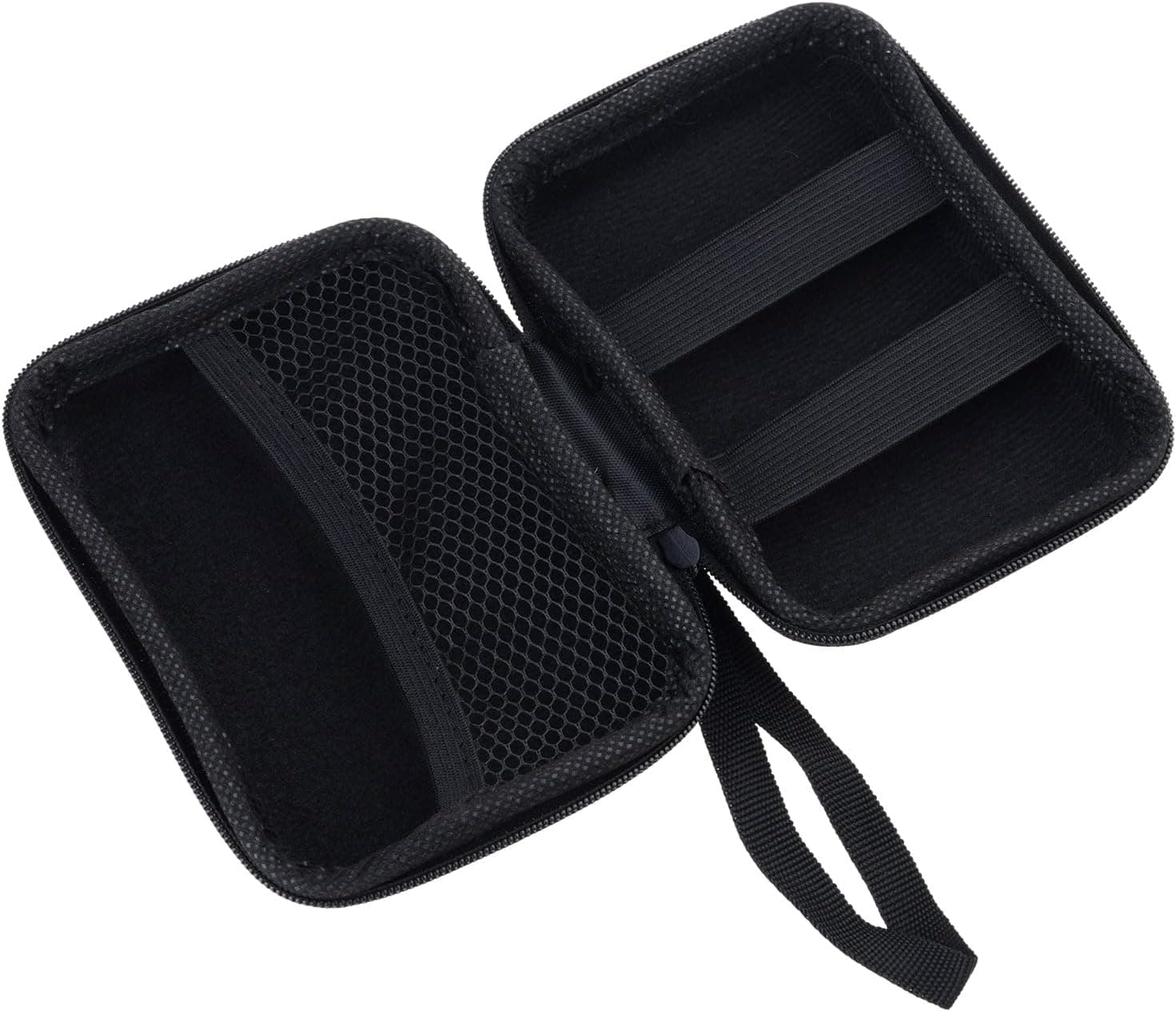
This is a storage pouch designed to carry a 2.5-inch HDD or SSD together with cables and other small items.
The interior is padded to absorb everyday knocks — a drive bumping against other contents in a backpack, or sliding off a desk. The exterior uses a durable fabric and is listed as water resistant.
It sits firmly in the entry class. As captured in May and June 2026, the reference price was ¥539, roughly what a single USB cable costs.
That framing matters: treat this as an organizer that stops a bare drive from rattling around in your bag, not as insurance that guarantees your data survives a drop.
Compatibility Guide
The case fits 2.5-inch HDDs and SSDs.
The compatibility data is explicit: 2.5-inch drives only, 3.5-inch not supported, small accessories can be stored alongside.
A 3.5-inch desktop drive — the kind that ships with an AC adapter — will not physically fit.
Check your drive's form factor first; this is the single most common mismatch.
Thickness varies within the 2.5-inch class.
Typical SSDs and slim HDDs are 7mm, while high-capacity portable HDDs come in 9.5mm and 15mm.
Interior dimensions are not published for this case, so we cannot confirm that a 15mm-thick portable HDD fits comfortably. If you own a thicker drive, check the listing's measurements and photos before ordering.
Beyond the drive itself, the interior is meant to hold USB and USB-C cables, a charging adapter, earphones, or SD cards. Note that "custom-fit interior" also implies fixed dividers — if the layout doesn't match what you carry, you have less freedom in how you pack it.
Electrical interfaces are irrelevant here. SATA or NVMe, it fits as long as the enclosure matches the 2.5-inch footprint.
Bare M.2 SSDs are a poor match, though: put them in a plastic case or an anti-static bag first rather than dropping an exposed PCB into fabric.
Product Info
Published specifications are minimal — compatible drive size (2.5-inch) and water resistance (yes).
The manufacturer is listed as Huchenwang. Material details, interior and exterior dimensions, weight, and zipper type are not in the available data, so this article does not assert them.
On pricing: Amazon.co.jp showed ¥539 when captured on 23 May 2026, and ¥539 again on 2 June 2026.
These are captured-at prices and may differ from what you see today. Items in this price band move by a few hundred yen with stock and sales, so confirm the current figure on the product page.
One pricing entry carries the label "Amazon US" while its URL, currency, and yen price all point to Amazon Japan — read that label as a collection inconsistency and verify the actual seller on the listing.
The eBay entry is a search-results link rather than a specific listing, with price shown as "See listing." Generic cases like this often appear from multiple sellers, so an eBay price is not guaranteed to refer to the same item.
Best Use Cases
For its price, it earns its place if you are:
- Someone whose external drive knocks around loose in a backpack. Even a plain padded pouch cuts down on scuffs and connector stress.
- Someone who wants drive and cable kept as one kit. Arriving on site and realizing the USB cable is at home is a failure a single pouch prevents.
- Someone storing a spare drive in a drawer. It works as a dust and static shield even if you never travel with it.
- Someone testing cheaply. At ¥539 as captured, the downside of it not suiting you is small.
Alternatives Compared
There is more than one way to move a 2.5-inch drive safely.
| Approach | Best for | Weakness |
|---|---|---|
| Generic carrying case like this one | Keeping the drive you already own | Protection varies widely by maker |
| External HDD with integrated case | When you're due for a replacement anyway | You must buy the drive too |
| Rugged shock-rated portable HDD | Field work and outdoor use | Much higher unit price |
| SSD enclosure | Swapping the internal drive | Different purpose entirely |
The key point: a carrying case does not substitute for the drive's own shock tolerance. Spinning HDDs are especially vibration-sensitive, so avoid carrying one while it is powered.
If the data genuinely matters, invest in a second backup copy before investing in a pouch.
Things to Check Before Buying
1. 3.5-inch drives do not fit. Worth repeating, because it is the most common disappointment.
Anyone searching for an "external HDD case" may be picturing a desktop drive; those are out of scope here.
2. No protection figures are published. "Shockproof" appears in the name, but no drop height or load rating is in the available data.
Do not assume the rigidity of a molded EVA hard shell. At this price, expect foam-style cushioning that can deform under real weight.
3. Water resistant is not waterproof. No IP rating is stated.
Assume it sheds light rain and splashes, and do not plan on submersion or long exposure. If it does get wet, open it and check the contents.
4. Measure your drive, since interior dimensions are unpublished. 15mm portable HDDs, or drives still wearing a rubber bumper sleeve, are the usual cases where things don't fit as expected.
Measure the drive as you actually carry it.
5. Listing metadata is not always reliable. For no-name and newer brands in this price band, manufacturer, model number, and photos on the product page sometimes belong to a different item.
Even in this article's source data, one price entry is labeled "Amazon US" while quoting a yen price. Before buying, confirm the product through the listing images, the title, and customer review photos rather than the registered attribute fields.
6. Not for carrying several drives. If you routinely move three or four drives, individual sleeves inside a larger divided case is the more practical setup.
This one is built around a single drive plus accessories.
FAQ
Q. Will a 3.5-inch external HDD fit? A.
No. Only 2.5-inch HDDs and SSDs are supported.
For 3.5-inch drives, choose a case that explicitly states that size.
Q. Can I store an M.2 SSD in it? A.
It will fit dimensionally, but don't store a bare PCB in fabric. Use a plastic M.2 case or an anti-static bag inside the pouch.
Q. How many cables fit? A.
Interior dimensions aren't published, so no exact count. One or two USB cables plus a charger is a realistic estimate; check the listing's interior photos.
Q. Will my drive survive a drop? A.
No guarantee. Padding softens impact, but an HDD has moving parts and can fail from a fall at height.
Keep a separate backup of anything important.
Q. What does it cost? A.
¥539 on Amazon.co.jp as captured on 23 May and 2 June 2026.
Prices change often, so confirm on the product page at purchase time.
Q. Can I take it on a plane? A.
It's small enough for a carry-on with no issue, and external drives are generally best kept in carry-on rather than checked baggage. Check your airline's current rules.