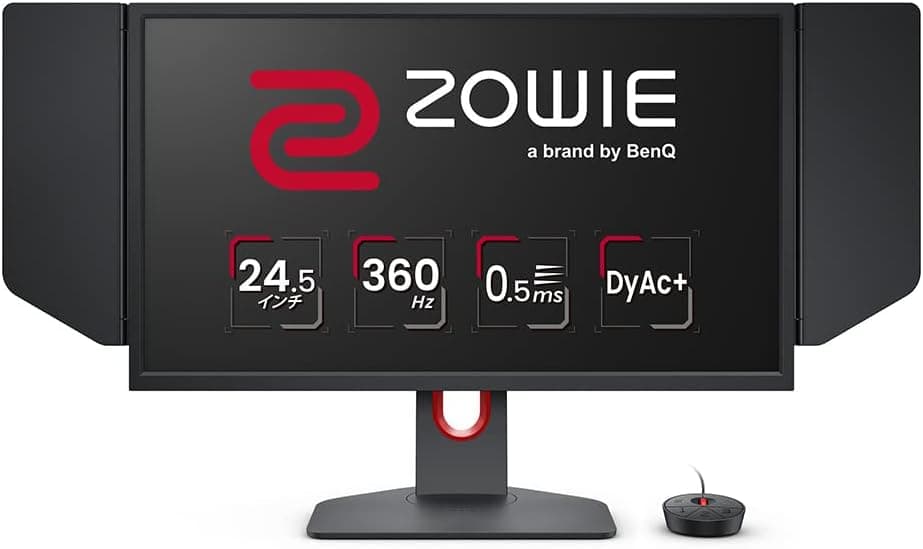
This article covers ベンキュージャパン BenQ ZOWIE XL2566K ゲーミングモニター(24.5インチ.
Overview
The BenQ ZOWIE XL2566K is a 24.5-inch TN gaming monitor purpose-built for professional esports players. With a 360Hz refresh rate and 0.5ms GtG response time, it sits at the very top of the competitive gaming monitor segment. The proprietary DyAc+ technology reduces motion blur to an absolute minimum, making fast-paced action appear crisp and clear. Beyond raw speed, the monitor includes Black eQualizer for enhanced visibility in dark scenes and Color Vibrance for customizable color saturation. The bundled S.Switch controller provides one-touch access to OSD settings, allowing rapid adjustments during tournaments.
Connectivity & Compatibility
Input options include two HDMI 2.0 ports and one DisplayPort 1.4. Full 360Hz operation is available over DisplayPort, while HDMI 2.0 is limited to 240Hz (or 120Hz on consoles). The monitor supports VESA Standard Adaptive-Sync, enabling tear-free variable refresh rate gameplay with compatible GPUs. For mounting, the XL2566K uses a 100×100mm VESA pattern. The included stand offers height, swivel, and tilt adjustments, and features a compact base that minimizes desk footprint.
Product Info
Released in 2022, the BenQ ZOWIE XL2566K carries a street price around ¥90,000 in Japan. It comes with a three-year manufacturer warranty. Accessories include the S.Switch, a monitor cover (eye shield), and cables (HDMI, DisplayPort, USB). This monitor is firmly in the high-end esports tier. By choosing a TN panel, BenQ prioritizes speed and responsiveness over color accuracy and viewing angles, making it a specialized tool rather than an all-around display.
Best Use Cases
The XL2566K is ideal for competitive FPS titles such as Counter-Strike 2, VALORANT, and Apex Legends, where every millisecond counts. The combination of 360Hz and DyAc+ gives players a noticeable edge in tracking fast-moving targets. Team environments also benefit: the XL Setting to Share feature allows players to download and apply pro configurations easily. The handle on the top edge and the cable management hole make it practical for LAN events and frequent transport. However, this monitor is not suitable for content creation or color-critical work. Users who need good color reproduction or wide viewing angles should consider an IPS alternative instead.

![Dell 27 LED backlit LCD Monitor SE2719H IPS Full HD 1080p 1920 x 1080 at 60 Hz HDMI VGA[並行輸入]](/_next/image?url=https%3A%2F%2Fm.media-amazon.com%2Fimages%2FI%2F81nSaeP3AvL._AC_SL1500_.jpg&w=1920&q=75)