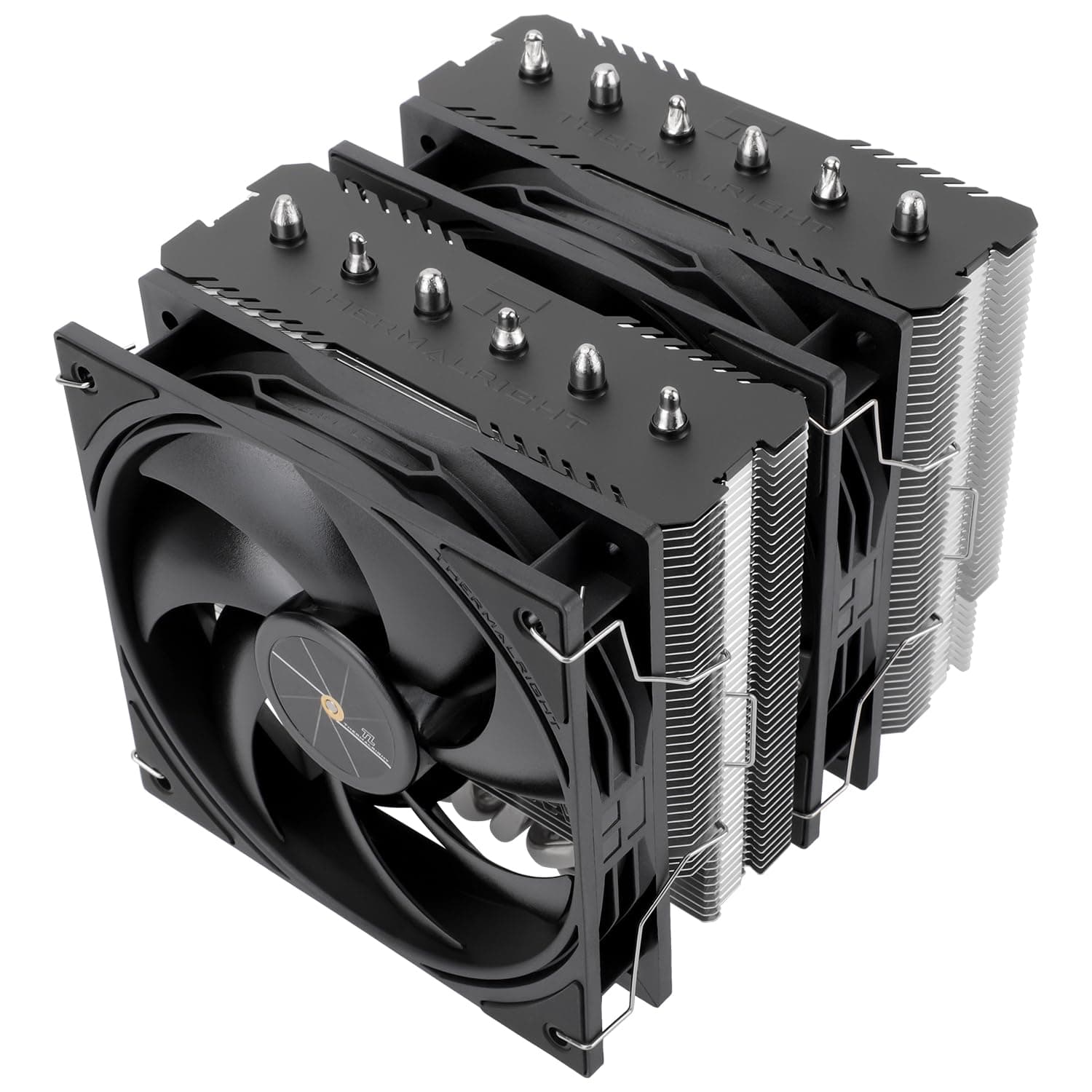
This article covers the Thermalright Peerless Assassin 120 SE V3 CPU cooler in depth, from reading its spec sheet to the trade-offs you actually accept when you buy it.
Overview
The Thermalright Peerless Assassin 120 SE V3 is a dual-tower air CPU cooler with six heat pipes and two 120mm PWM fans. The short verdict: if you want to avoid liquid cooling entirely, this is one of the best price-to-performance air coolers currently available.
This third-generation model incorporates AGHP (Anti-Gravity Heat Pipe) technology to maintain performance regardless of mounting orientation. The nickel-plated copper base and aluminum fin stack provide efficient heat dissipation for high-TDP CPUs.
Its 155mm height ensures compatibility with a wide range of PC cases. The heatsink measures 12.5×13.5×15.5 cm, which is modest in both width and depth for a dual-tower design.
The fans are rated at 2000 RPM, 70.84 CFM and 29.8 dBA — a quiet-leaning fan tuned toward the higher end of the RPM range.
On Amazon.co.jp the cooler holds 4.7 stars from 40 reviews (roughly 94% positive, captured May 2026): not a huge sample, but consistently good.
Compatibility Guide
The cooler supports a broad range of sockets: Intel LGA1851 / LGA1700 / LGA1200 / LGA115X (1150/1151/1155/1156) and AMD AM4 / AM5. LGA1851 support matters, because it means you can carry the cooler over to Intel's latest platform without buying an extra bracket.
On AM5 motherboards, it uses the stock backplate, so you can often install it without pulling the board out of the case.
In practice, physical clearance causes more failed builds than socket support does. Check three things:
- Case CPU cooler height limit: against a 155mm heatsink, you want a case rated for 160mm or more. Mini-towers and slim cases rated around 150mm will not let the side panel close. Always check the "max CPU cooler height" line in your case's spec sheet first.
- Memory (DIMM) height: dual-tower designs tend to overhang the DIMM slots with the front fan. With tall RGB memory you must raise the front fan on its clips, and that pushes total height above 155mm. Tall memory plus a marginal case is the riskiest combination.
- VRM and M.2 heatsinks: large VRM heatsinks and decorative shrouds on high-end boards can collide with the tower. Check clearance around the CPU socket area before ordering. Older cases with optical drive bays deserve the same check.
The PWM fans connect via standard 4-pin headers, enabling automatic speed control. You can run them on separate headers or combine them onto CPU_FAN with a splitter; combining them onto one control source is easier to manage, since a fan stuck at a fixed speed creates uneven temperatures.
Reading the Cooling and Noise Numbers
The 29.8 dBA figure is a manufacturer measurement.
In a real build, what you hear is two fans and the airflow noise passing through the fin stack. As a general rule for dual-tower air coolers, moderate loads only need roughly 1000–1200 RPM and feel quiet, while a full load approaching 2000 RPM is clearly audible.
If silence is the priority, cap the fan curve at 70–80% in BIOS and accept a few degrees higher CPU temperature.
The key point is that air cooling is judged less by peak performance than by sustained load. An AIO has the coolant's thermal mass and handles short bursts well, but under long renders or encodes the contest comes down to radiator versus fin surface area.
A six-pipe dual-tower like this one holds up well in exactly that sustained regime.
How It Compares
The natural rivals are single-tower air coolers at the same price and 240mm-class AIOs. Against a single tower (a Hyper 212-class cooler, for example), the extra fin area and second fan generally mean lower temperatures at the same noise level, or less noise at the same temperature — at the cost of width, weight, and a higher chance of memory interference.
Against an AIO, the advantages are no pump, no coolant, no leak risk, and no pump whine developing years later; once installed, the only wear item is a fan. On the other hand, if you want visual flair (this model is a plain, non-RGB design), a tidy socket area, or you regularly sustain well over 200W, an AIO is the more natural fit.
A white ARGB version of the Peerless Assassin 120 SE also exists if lighting matters to you.
Product Info
Key specifications:
| Item | Value |
|---|---|
| Heat pipes | 6 |
| Fan size | 120mm × 2 |
| Max fan speed | 2000 RPM |
| Noise level | 29.8 dBA |
| Airflow | 70.84 CFM |
| Heatsink dimensions (W×D×H) | 12.5×13.5×15.5 cm |
| Heatsink height | 155 mm |
| Fan connector | 4-pin PWM |
Positioned as a mid-range to upper-mid-range air cooler, the Peerless Assassin 120 SE V3 offers strong price-to-performance value. It launched from late 2024 onward.
As captured on 25 May 2026, the Amazon.co.jp listing showed ¥5,079. On the overseas marketplace side, an eBay US listing at $45.99 was captured on 1 June 2026, but that is a third-party import listing with different shipping and duty conditions.
Prices move often and drop during sales, so always confirm the current price on the product page before buying.
The package includes mounting kits for both Intel and AMD platforms, fan clips, and thermal grease. Since grease is bundled, no extra purchase is needed to finish the build.
Warranty coverage follows Thermalright's standard terms; with fans as the only moving parts, the design holds up over long service.
Best Use Cases
This cooler is ideal for gamers and PC builders who want high-performance air cooling without the complexity of liquid cooling. It handles modern CPUs like Ryzen 9000 and Intel 14th Gen while keeping noise reasonable.
Specifically, it suits:
- First-time builders on a roughly ¥5,000 budget who want a clear step up from the boxed cooler; installation is straightforward and hard to get wrong.
- Compact-case builds where an AIO radiator does not fit, or where you would rather not agonize over radiator placement.
- Long-term users who do not want to inherit pump wear or leak risk several years down the line.
- Intermediate users chasing stable light overclocks or PBO without spending much.
Before You Buy
155mm means "fits most cases," not "fits every case." Mini-towers and cube cases frequently cap CPU cooler height near 150mm, and skipping that check is the single most common failure — the side panel simply will not close.
Because raising the front fan to clear tall memory adds height, budget roughly 155mm plus 10mm of headroom.
Do not expect looks. This is a plain, non-RGB cooler with a simple heatsink cover.
In a tempered-glass showcase build it will underwhelm. If lighting matters, the ARGB variant or an AIO will make you happier.
Weight is a real trade-off. Dual-tower coolers are heavy, which makes them a poor match for machines you move often.
If you plan to transport the PC, remove the cooler or support it with padding.
Both "air is always worse" and "AIOs are pointless" are overstatements. Against 240–360mm AIOs, differences appear when you sustain over 200W for long stretches.
For ordinary gaming-led use, this class of air cooler rarely leaves you wanting. Decide based on whether your load is bursty or continuous.
One note on the listing itself. Amazon product pages sometimes mix manufacturer names, model numbers, and socket lists across generations.
This cooler has several variants (plain, ARGB, white), so confirm from the product image and title that you are ordering the "120 SE V3" — the white ARGB model in particular has a very similar name.
FAQ
Q. Do I need to buy thermal paste separately? A.
No. Thermal grease is included, so you can install it straight out of the box.
Using your own paste is fine, but the bundled tube is enough for the first mount.
Q. Do I have to remove the backplate on AM5? A.
No. AM5 installation reuses the motherboard's stock backplate, which makes it easier to mount inside an assembled system.
Intel mounting does require a backplate, so make sure you can either remove the board or reach it through the case cutout.
Q. Will it work with tall memory? A.
Yes, if you raise the front fan on its clips — but doing so pushes total height past 155mm. With a tight case limit, choose low-profile memory or run a single fan (accepting lower cooling performance).
Q. Can both fans share one header? A.
Yes. With 4-pin PWM fans, a splitter onto CPU_FAN is standard, as long as you stay within the header's current rating.
On separate headers, set both to the same fan curve.
Q. Is it enough for hot CPUs like 14th Gen Core or Ryzen 9000? A.
For gaming and general use, yes. If you routinely run long all-core renders or encodes, expect the fans to sit at high RPM and decide whether that noise and your temperature ceiling are acceptable.
Product Disclosure (Amazon)
- Manufacturer: THERMALRIGHT(サーマルライト)
- ASIN: B0DMVZ3YQ7
- Note: This article covers a manufacturer-made product based on Amazon listing details.