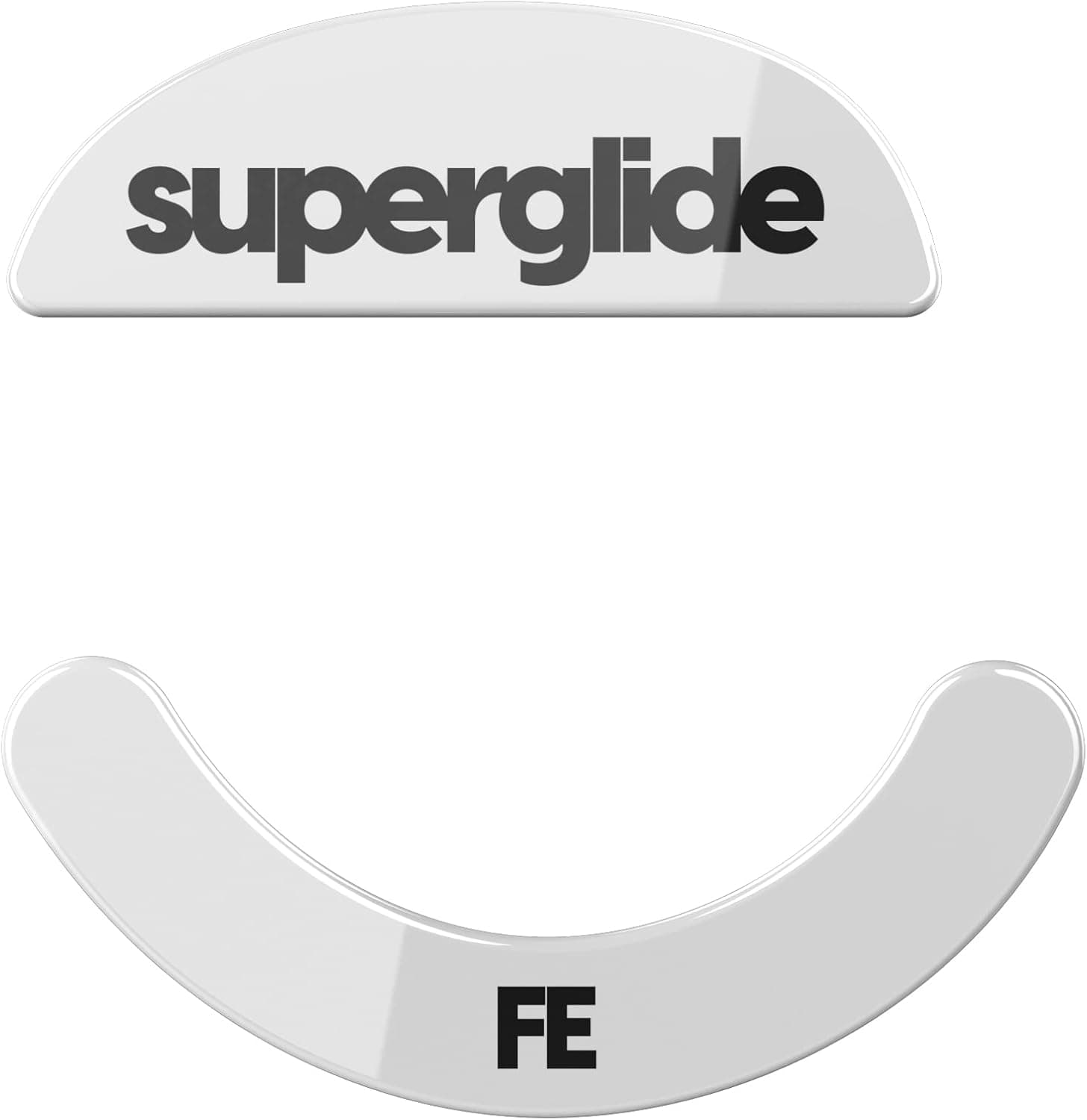
The Superglide (Type S) mouse skates for the Pulsar Xlite Wireless are a replacement part that fundamentally changes how the mouse glides. This article covers which models actually fit, the pitfalls specific to glass skates, and — just as importantly — who should not buy them.
Overview
Superglide Type S is a tempered glass mouse foot set made by Pulsar Gaming Gears for the Pulsar Xlite series. The short version: this part exists to make the mouse glide faster, not to make it quieter or easier to stop.
Amazon.co.jp shows 371 reviews averaging 4.2 out of 5 (84 on a 100-point scale, captured 2026-06-02), which is a strong score — but the dissenting reviews cluster around "it slides too much" and "you only get one shot at placing it," which are consequences of the design rather than defects.
Think of it as the natural next step for an Xlite owner whose stock PTFE feet have worn down. It changes the feel of the mouse for far less than a new mouse costs, but it is close to a one-way trip: once the stock skates are peeled off, they are not realistically reusable.
The low-2,000-yen range is typical for tempered glass skates.
How It Differs From PTFE
Glass and PTFE behave very differently even though both are just "the mouse's feet." No official measured figures were provided, so read the table below as general material tendencies rather than published specs.
| Aspect | Stock PTFE | Superglide Type S (tempered glass) |
|---|---|---|
| Initial glide | Normal, slight breakaway resistance | Extremely light; moves the instant you push |
| Stopping | Easier — the friction helps you brake | Harder; braking depends on your arm and pad |
| Wear | Edges round off in months, feel drifts | Wears slowly, feel stays consistent |
| Noise | Quiet | A noticeable scraping sound is common |
| Pad match | Almost anything | Cloth/soft pads assumed; hard glass pads not recommended |
| Cost | Cheap, treated as a consumable | Low-2,000-yen range, replaced far less often |
The key point is that faster is not automatically better. With a lighter glide, the same DPI and sensitivity will overshoot, and you will lose fights for the first few days.
The flip side is that it suits low-sensitivity, full-arm play very well: large flicks require noticeably less force. Knowing which side your aim errs toward is the single best predictor of whether you will like this product.
The other practical benefit is longevity. PTFE feet roughen as they wear, and the feel does not return until you replace them.
Glass barely wears, so the "why does my mouse suddenly feel heavy" moment largely disappears. If you find yourself retuning sensitivity every time you swap skates, that stability is worth more than the raw speed.
Compatibility Guide
Supported models are the Pulsar Xlite Wireless, Xlite V3, Xlite V3eS, Xlite V2, and Xlite V2 Mini — five in total, all sharing the Type S shape. Even the smaller V2 Mini is covered, because Pulsar keeps the skate seating area consistent across the line.
That does not mean any Pulsar mouse will fit. Superglide is sold in many shapes for many different mice, and fitting a Type S set to anything outside the Xlite family will leave it overhanging or rocking.
When ordering, confirm both "Type S" and "for Pulsar Xlite" in the product name. If you own a newer Xlite revision, check your exact model against the five listed above on the product page before buying.
Pad compatibility matters just as much. Pairing glass skates with glass or ceramic hard pads is not recommended: hard against hard causes unexpected wear, unpleasant high-frequency noise, and scratches on the pad.
Assume cloth or soft control/speed pads. For plastic hard pads, follow the pad maker's guidance.
One physical detail is easy to miss: the sensor ring around the bottom sensor opening. On mice where the stock skate and ring are a single piece, replacing only the skates changes whether that ring is present.
Since sensor height affects how lift-off distance feels, test your lift-off behaviour once after installing.
Product Info
| Item | Value |
|---|---|
| Material | Tempered glass |
| Unit count | 1 |
| Compatible models | 5 |
| Edge processing | Rounded edge |
| Series support | Pulsar Xlite Wireless / V3 / V3eS / V2 / V2 Mini (Type S shape only) |
The rounded edge sounds minor but it is the heart of the design. Unlike PTFE, glass never "beds in" — a sharp edge stays sharp and catches on pad fibres, making the mouse feel heavier in some directions than others.
Rounding the edges keeps resistance uniform in every direction. That machining quality is essentially what you are paying for, and it is why very cheap glass skates so often feel wrong.
As of 2026-06-02, the listed price on Amazon.co.jp was ¥2,209.
Prices move with sales and stock, so check the product page for the current figure. The marketplace (eBay search) entry only shows "See listing" with no confirmed amount.
The package contains one set of white skates and no extra accessories. Warranty terms vary by retailer and generally amount to initial-defect coverage.
Reviews and Real-World Feel
371 reviews at 4.2 out of 5 (captured 2026-06-02) is a lot of feedback for a niche accessory, which says something about how widely the Xlite series is used and how routinely people replace stock skates.
A 4.2 average is the classic shape of "most people are happy, a meaningful minority is not."
The positive reviews are consistent: the glide is light and it stays light. The negatives fall into three buckets — it slides past the target, a slightly misaligned application causes rocking, and it is louder than stock.
None of these are defects; they are the trade-offs stated plainly. Decide before buying whether you can live with them.
Installation and Common Mistakes
The job takes five minutes, but it is hard to undo, so follow the order. Peel the stock skates slowly, starting from one edge with a fingernail or a thin card — never yank them off.
Then clean every trace of old adhesive off the base. Skipping this leaves uneven thickness and an unstable stance.
A small amount of a plastic-safe solvent such as anhydrous ethanol works; let it dry completely.
Placement is everything. Glass skates are harder than PTFE and lose noticeable tack if repositioned.
Turn the mouse upside down, visually line each skate up with the seat edge before pressing, then apply even pressure from the centre outward. Afterwards, slide the mouse on a flat desk and check that all corners contact evenly and nothing catches on one side.
If the glide feels sluggish later, wipe both the skates and the pad with a dry cloth. Avoid damp cloths and water: the glass tolerates it, but moisture reaching the adhesive layer causes lifting.
Most "it stopped gliding" cases are skin oil and dust on the pad, so clean the pad first.
Best Use Cases
The clearest fit is an Xlite owner who plays FPS or TPS regularly — especially low-sensitivity players who swing from the arm, and anyone who wears through stock skates several times a year. Both the lighter glide and the longer life pay off.
The low-2,000-yen price also matches the motivation of changing how the mouse feels without replacing the mouse.
The second good fit is the advanced user who cares about fine feel. Because wear no longer quietly shifts your effective sensitivity, you can lock in settings and refine them over a long period.
If you use a cloth pad and are willing to clean it regularly, performance holds up well.
Who should skip it: anyone on a glass or ceramic hard pad, anyone bothered by scraping noise late at night or on stream, and anyone whose priority is stopping precisely. If you brake by pressing the mouse into the pad, a lighter glide makes your life measurably harder.
Things to Check Before Buying
The biggest trap is assuming faster equals better aim. Glass lowers the breakaway force, and it lowers deceleration by exactly the same logic.
If your current misses are overshoots, this product amplifies them; if your misses come from not swinging far enough, it helps. Plan on dropping sensitivity by 10–20% and giving yourself a week to adapt.
Second is the cost of going back. Stock skates lose their adhesive once peeled and are not realistically reusable, so the true trial cost includes buying replacement stock feet if you dislike the change.
If you are unsure, wait until your current skates are genuinely worn out and try it then.
Third is pad wear. A hard glass surface can accelerate fuzzing on soft cloth pads at the contact points.
If you want an expensive pad to last, factor that in — along with the extra noise, which is real in a quiet room or near an open mic.
Fourth, be careful with the listing itself. In the collected data for this product, the price appears as ¥2,209 in Japanese yen while the store label points at an overseas storefront — a mismatch between the label and the actual sales region.
Mouse skates come in a huge number of shape variants, and trusting the listing metadata alone can land you the wrong one. Before ordering, verify with your own eyes that the images and title both say "Type S" and "for Pulsar Xlite." If the currency or seller labelling looks inconsistent, stop and re-check rather than pushing through.
FAQ
Q. Do the Xlite V2 and V2 Mini use the same skates? A.
Both are covered by Type S, along with the Wireless, V3, and V3eS — five models total. Other Pulsar mice and other brands need a different shape.
Q. Can I use these on a glass mousepad? A.
Not recommended. Hard-on-hard causes noise, unexpected wear, and scratches on the pad.
Use a cloth or soft pad instead.
Q. How long do they last? A.
No official lifespan figure is published. Tempered glass wears far more slowly than PTFE and holds its feel, but actual life depends on your pad and hours of use, so no firm number can be given.
Q. The glide got heavier — what now? A.
Wipe the skates and the pad with a dry cloth. Usually the cause is oil and dust on the pad, not the skates.
Avoid wet cleaning near the adhesive.
Q. My aim got worse after installing. Did I make a mistake? A.
Nearly everyone experiences this at first. Lower your sensitivity slightly, give it a week, and if you still cannot stop on target, the product simply does not match your style.
Q. Can I reposition them? A.
Physically yes, but tack drops noticeably, so treat it as a one-attempt job. Clean the adhesive and check alignment before pressing down.
Product Disclosure (Amazon)
- Manufacturer: Pulsar Gaming Gears
- ASIN: B09MHK2J2X
- Note: This article covers a manufacturer-made product based on Amazon listing details.
![Logitech G502 HERO ゲーミングマウス 有線 [並行輸入品]](/_next/image?url=https%3A%2F%2Fm.media-amazon.com%2Fimages%2FI%2F31wmn8oGVxL._AC_SY355_.jpg&w=1920&q=75)