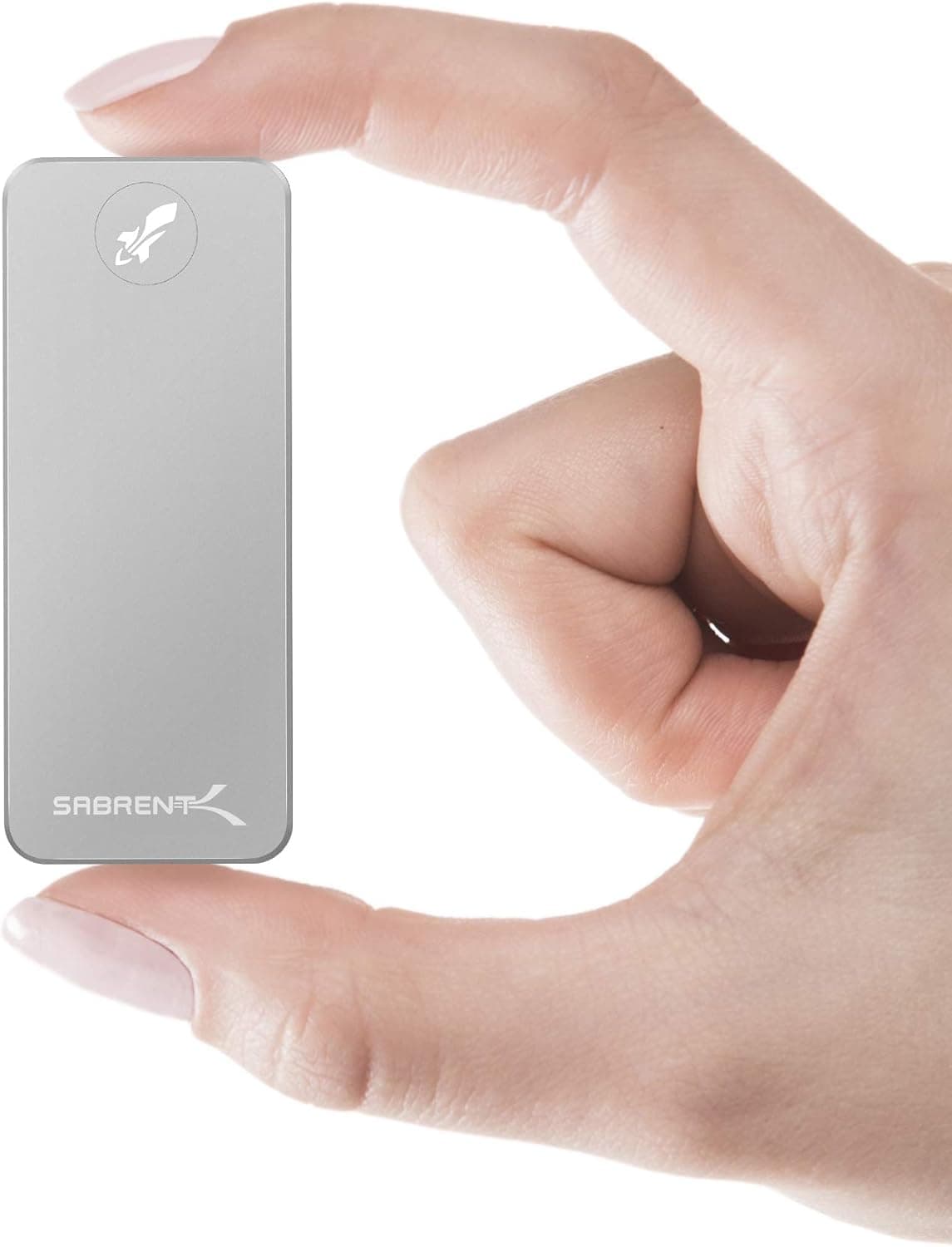
The SABRENT SB-2TB-NANO is a 2TB portable external SSD using USB 3.2 Gen 2 (10Gbps) and rated at up to 1000MB/s.
This article goes past the spec sheet to cover what the numbers actually mean in practice: which ports deliver full speed, what the PS5 can and cannot do with it, and where you should expect to compromise.
Overview
This drive occupies a clear position: 2TB of portable storage with minimal setup friction. USB 3.2 Gen 2, up to 1000MB/s read, an aluminum alloy enclosure, driver-free plug-and-play operation, and support for Windows, macOS, PS5, and PS4 make for a complete, conventional package.
On Amazon.co.jp it holds 4.3 out of 5 stars from 189 reviews (captured 29 May 2026), a stable if not enormous sample.
What it is not is cutting edge. USB 3.2 Gen 2 sits in the middle of today's external SSD landscape, above it are Gen 2x2 (20Gbps) and USB4/Thunderbolt drives.
Whether 1000MB/s is enough for you is the single question that decides this purchase.
Quick Answer by Use Case
| Use case | Fit | Why |
|---|---|---|
| Carrying photo/video projects | Excellent | 2TB holds several 4K project sets |
| Expanding laptop working space | Good | 1000MB/s matches or beats internal SATA |
| PS5/PS4 game storage | Partial | PS4 titles play directly, PS5 titles store only |
| Editing 4K/8K footage directly | Partial | Fast in bursts, but no Thunderbolt headroom |
| Always-connected backup box | Partial | A desk-bound HDD wins on cost per TB |
The drive is at its best when it moves. If it never leaves your desk, a 4TB external HDD at a similar budget gives you more capacity per yen.
You are paying for speed and portability here.
Compatibility Guide
The connection requirement is simple: any device with a USB-C or USB-A port works. The bundled USB-C cable and USB-A adapter cover everything from current laptops to older desktops.
TRIM and UASP support mean write performance holds up better over time and command queueing stays active on supporting systems.
Speed is where most misunderstandings start. The 1000MB/s figure assumes the host port is also USB 3.2 Gen 2 (10Gbps).
On a USB 3.0 / 3.2 Gen 1 (5Gbps) port the theoretical ceiling is halved, so expect roughly 400-450MB/s in practice.
On USB 2.0 you drop to around 40MB/s.
Most "it feels slow" reports come down to the port generation, not the drive. If you cannot tell which port you have, check Device Manager or your machine's spec sheet for a "USB 3.2 Gen 2 / 10Gbps" designation.
Cables carry the same trap. Spare USB-C cables in a drawer are often charge-only or USB 2.0 class, and either will cripple throughput or prevent detection entirely.
Use the included cable, and if you replace it, buy one explicitly rated for 10Gbps data.
On the OS side, the drive may arrive formatted for Windows in exFAT or NTFS. If you share it between macOS and Windows, exFAT is the safe choice; use APFS for Mac-only and NTFS for Windows-only.
Reformatting erases everything, so decide before you start filling it.
How It Actually Works on PS5 and PS4
PS5/PS4 compatibility is real, but the PS5 side comes with an important limit. On PS5, PS4 titles can be launched and played directly from a USB drive, while PS5 titles can only be stored on it and must be moved back to internal storage to play.
Playing PS5 games from expanded storage requires an NVMe SSD in the console's internal M.2 slot, not a USB external drive.
The drive is still useful there. Parking 50-150GB titles and restoring them later beats re-downloading, and the slower your connection, the bigger that win.
For PS4 owners the story is simpler: moving games to an SSD produces load-time improvements you can feel immediately.
Product Info
The core specs are 2TB capacity, a USB 3.2 Gen 2 (10Gbps) interface, up to 1000MB/s read, an aluminum alloy enclosure, Windows and macOS support, and PS5/PS4 console support, in a 2.5-inch class portable form factor.
The metal shell is not just cosmetic: it spreads heat from the controller across the body, acting as a heatsink. Plastic-bodied drives often throttle during long sustained writes, and metal helps here.
The flip side is that the drive itself gets warm to the touch after heavy transfers, which is expected behavior.
Pricing on Amazon.co.jp was ¥34,999 as captured on 29 May 2026.
Prices move frequently with sales and revisions, so always check the product page for the current figure; the number here is a snapshot of that moment. Review data from the same capture shows 4.3 out of 5 stars across 189 reviews - a modest sample size but a solid average for external storage.
Per the original listing details, the product launched around 2020 with a standard 2-year manufacturer warranty, and ships with a USB-C cable, USB-A adapter, and quick start guide. Warranty terms and bundled accessories can vary by batch and region, so confirm the exact terms on the product page before buying.
How It Compares
External SSDs compete on three axes: speed class, cost per TB, and durability. At 10Gbps / 1000MB/s this drive is comfortably fast but not the fastest.
A 20Gbps drive can approach 2000MB/s, but only if your host supports Gen 2x2, which most machines still do not. If your PC lacks Gen 2x2, the premium for a faster drive buys you nothing today.
On cost per TB, HDDs win outright. The same budget buys 4TB or 5TB of external hard drive, which is the smarter choice for desk-bound bulk backup.
You choose SSD for speed, silence, and resistance to drops and vibration - and if the drive lives in a bag, that last point matters a great deal.
There is also the DIY route: an enclosure plus your own M.2 SSD can cost less.
It also means checking protocol compatibility, managing heat, and assembling it yourself. A finished product like this one is worth the premium precisely because it removes that work.
Before You Buy
1. "1000MB/s" is a ceiling, not a guarantee. A 5Gbps host halves it.
The rating also refers to sequential reads; copying tens of thousands of small files will be far slower on any SSD. That is not a defect.
2. Sustained writes can slow down. Most consumer SSDs use a fast SLC cache, and once it is exhausted write speed drops.
If you routinely dump hundreds of gigabytes in one go, plan for that. Everyday file transfers never hit it.
3. You cannot play PS5 games directly from this drive. This is the most common post-purchase disappointment.
PS5 titles need an internal M.2 NVMe SSD to run from expanded storage.
This drive plays PS4 titles and archives PS5 titles.
4. Do not make it your only copy. SSDs can fail abruptly with less warning than hard drives, and a portable unit can also be dropped, lost, or stolen.
Keep anything important in a second location as well - another drive or cloud storage.
5. Do not assume hardware encryption. Nothing in the provided specs mentions encryption.
If protected data leaves your desk, use OS-level encryption (BitLocker To Go on Windows, an encrypted format on macOS) or buy a drive that explicitly advertises the feature.
6. Verify the listing yourself. The Amazon manufacturer name (SABRENT) matches this article's subject, but marketplace listings do sometimes carry stale model numbers or metadata from other products.
External SSDs in particular often bundle several capacities under one page with a selector, so the displayed price may not be the one you intend to buy. Before ordering, confirm from the images, title, and selected option that you are looking at the 2TB model.
Best Use Cases
Creative and business users who carry large files. Moving RAW photos and video footage between locations is exactly what this drive is for.
2TB covers multiple 4K projects, and the aluminum shell handles heat from long writes reasonably well.
PS4 owners, and PS5 owners managing a library. On PS4 the SSD upgrade translates directly into shorter load times.
On PS5 the value is archiving titles you are not playing to free internal space without re-downloading later.
People who move between Windows and Mac. No drivers are needed on either platform, so formatting as exFAT gives you a drive that works everywhere - useful if work is Windows and home is Mac.
It is a poor fit if you want bulk desk-bound storage (an HDD costs less per TB), you own a Gen 2x2 or Thunderbolt machine and want maximum speed, or you expect to play PS5 titles from expanded storage.
FAQ
Q. Will it work on a USB 3.0 PC?
A. Yes. USB 3.0 (5Gbps) halves the ceiling, so expect around 400-450MB/s. It works fine, just slower.
Q. Can I play PS5 games directly from it? A.
PS4 titles yes, PS5 titles no. PS5 games can be stored here but must be moved back to internal storage to play.
Q. Should I reformat it first? A.
If you know your environment, yes. exFAT for Windows/Mac sharing, APFS for Mac only, NTFS for Windows only.
Reformatting erases data, so do it before you load files.
Q. It gets warm - is that a problem? A.
The aluminum body is designed to move heat outward, so warmth after big transfers is normal. If it becomes too hot to touch or disconnects mid-transfer, plug it straight into the PC instead of through a hub.
Q. Can I use a different cable? A.
Yes, but it must be rated for 10Gbps data. Charge-only or USB 2.0 class cables will slow it down or prevent detection.
Q. How is it reviewed? A.
4.3 out of 5 stars from 189 reviews on Amazon.co.jp as captured on 29 May 2026 - a modest sample, but a good average.
Product Disclosure (Amazon)
- Manufacturer: SABRENT
- Seller: Store4PC-Japan
- Fulfilled by: Amazon
- ASIN: B07ZWLYX5W
- Note: This article covers a manufacturer-made product based on Amazon listing details.

![WD20EFZX [WD Red Plus(2TB 3.5インチ SATA 6G 5400rpm 128MB CMR)]](/_next/image?url=https%3A%2F%2Fm.media-amazon.com%2Fimages%2FI%2F81Azd8UAViL._AC_SL1500_.jpg&w=1920&q=75)