Overview
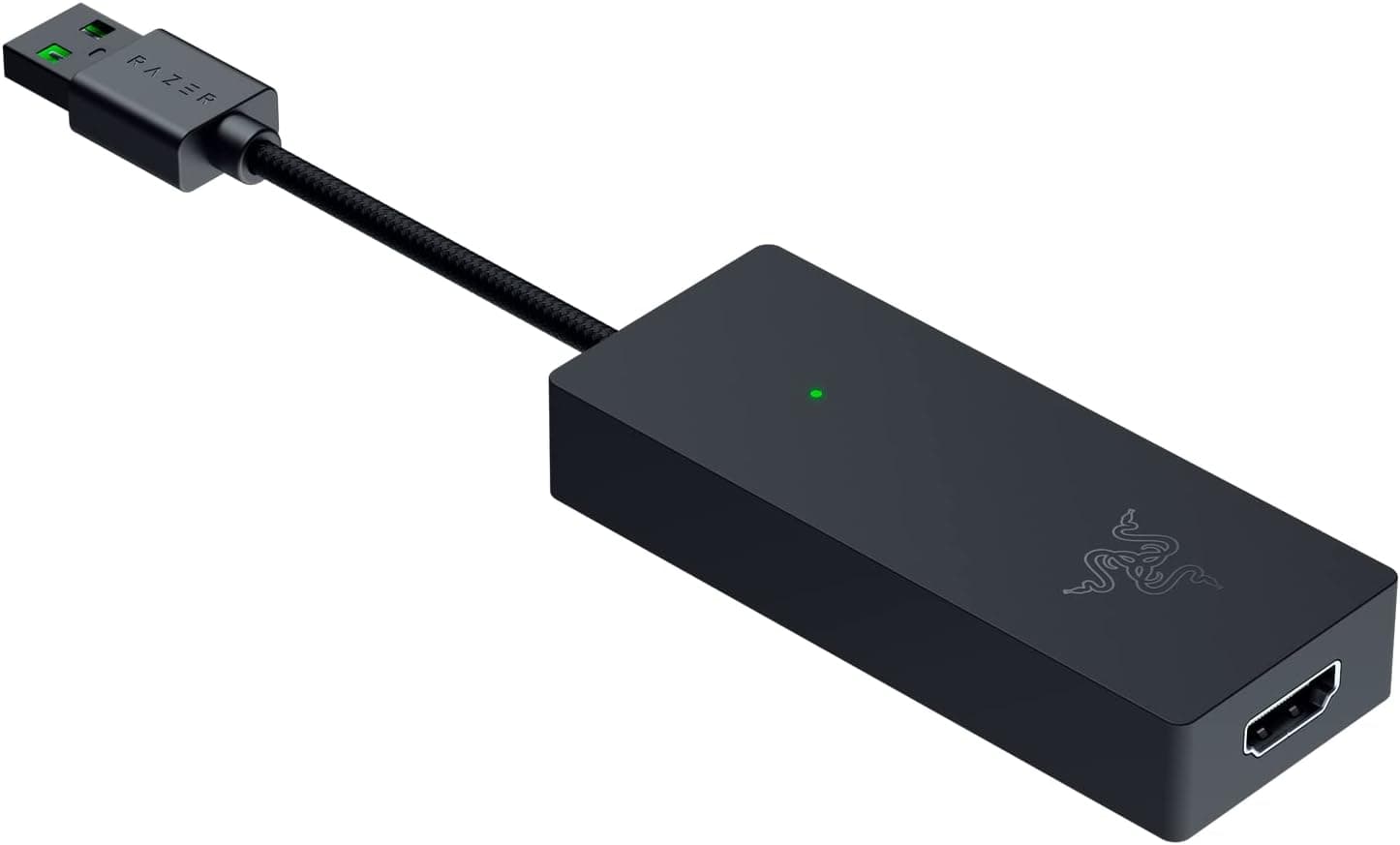
The Razer Ripsaw X is an external capture card with an HDMI 2.0 input and a USB 3.0 Type-A connection to the host PC.
It captures up to 4K (3840x2160) at 30fps, or 1080p at 60fps, which places it squarely in the "turn my camera into a high-quality webcam" and "start streaming without a complicated rig" bracket. It runs on USB bus power, so no AC adapter is required — a real advantage for laptop-based, portable setups.
What it is not is a top-tier streaming solution. 4K capture tops out at 30fps, and as discussed below, the supplied spec sheet lists no HDMI passthrough output.
Its Amazon.co.jp rating sits at 3.8 out of 5 across 26 reviews (76% on a 100-point scale) — respectable, but not a universally loved classic.
This article works through what those numbers actually mean in practice, who will be happy with this device, and who should look elsewhere.
Key Specs and How to Read Them
| Item | Value | What it means in practice |
|---|---|---|
| Max capture resolution | 4K (3840x2160) @ 30fps | Good for archival and video production; weak for fast games |
| Max frame rate | 4K30 / 1080p60 | 1080p60 is the real working mode for live streams |
| Interface | USB 3.0 Type-A | Needs a genuine USB 3.0 port; USB 2.0 lacks the bandwidth |
| Input | HDMI 2.0 | An HDMI 2.0-rated cable is required for 4K30 |
| Supported OS | Windows 10 | No macOS listed — verify before buying |
| Power | USB bus-powered | No AC adapter, but port quality affects stability |
The most important line is "4K30 / 1080p60". The marketing headline says 4K, but for game streaming you will almost always be working in 1080p60.
4K30 is genuinely useful for video production footage, camera archives, and low-motion content such as presentations or work streams. For shooters or fighting games where a single frame matters, 30fps in 4K will feel insufficient.
The USB 3.0 Type-A requirement also deserves attention.
On a thin laptop with only USB-C ports you will need an adapter or hub, and a bandwidth-starved connection causes dropped frames even at 1080p60. Bus power does not mean "works anywhere" — it means the quality of your host USB port directly becomes the stability of your capture.
Compatibility Guide
The listed supported OS is Windows 10. The device is plug-and-play, with no separate driver install assumed, and it works with mainstream streaming software including OBS Studio and Streamlabs, where you add it as a Video Capture Device source.
Windows 11 and macOS support are not stated in the spec sheet, so we will not claim them — check the product page and the manufacturer's support information if you plan to use anything other than Windows 10.
Three PC-side issues cause most real-world failures. First, the USB port: connect directly to a USB 3.0 port (blue, or marked SS).
Unpowered hubs and monitor- or keyboard-integrated hubs frequently cause unstable detection. Second, the HDMI cable: 4K30 needs an HDMI 2.0-rated cable, and older cables often produce flicker or no signal at all.
Third, HDCP: copy-protected output from some consoles and streaming apps cannot be captured. That is common to capture devices in general, not a flaw specific to this product.
On the input side, essentially anything with an HDMI output works — DSLRs, mirrorless cameras, camcorders, consoles, or a second PC. For webcam use, the deciding factor is whether your camera offers clean HDMI output (no shooting-info overlay).
That is a camera-side feature, so check your camera's manual before you buy.
Product Info
The recorded price was ¥14,170 as captured on 25 May 2026. Prices move frequently with sales and stock levels, so always confirm the current figure on the product page.
Note that the price entry is labelled "Amazon US" while the link points to Amazon.co.jp and the currency is JPY — likely a labelling inconsistency in the source data, so trust the currency and the live page display over the label.
The other reference is an eBay search page rather than a fixed price, listed as "See listing".
On ratings, Amazon.co.jp shows 26 reviews averaging 3.8 out of 5 as of 25 May 2026 — 76 out of 100.
With only 26 reviews, that average can swing considerably, but it does indicate this is not a unanimously praised staple. Competing cards in the same category offer 4K60 or PCIe connectivity, and how you feel about the 4K30 ceiling largely determines your satisfaction here.
The box contains the unit and a USB 3.0 cable — nothing more.
Since no additional driver install is assumed, the path from unboxing to a working source in your streaming software is short. The manufacturer is Razer, and the product dates from around 2021, sitting in the entry-to-mid tier of external capture hardware.
How It Compares
Within USB external capture devices, three axes decide everything: (1) what frame rate you get at 4K, (2) whether there is a passthrough output, and (3) USB versus PCIe.
- You want 4K60, or zero-latency passthrough play — the Ripsaw X's 4K30 does not meet that. Look at cards that explicitly state 4K60 and passthrough.
- 1080p60 is enough and cost matters — the Ripsaw X has headroom to spare, but cheaper 1080p-only devices also meet the requirement. You are choosing between brand/support and price.
- You want a permanent internal install — a USB device adds two cables to your desk. If the rig never moves, an internal PCIe card is tidier.
- You only want to use a camera as a webcam — this is where the Ripsaw X is at its most natural. One HDMI input, bus power, plug-and-play: plug it in and you have a high-quality video input.
On paper 4K30 looks weak, but if your final output is 1080p60 the difference barely registers. Work backwards from the resolution and frame rate you actually publish at, rather than chasing the 4K label.
Setup Notes and Real-World Use
Setup is simple: HDMI from the source into the Ripsaw X, USB 3.0 into the PC, then add a Video Capture Device source in OBS Studio.
When you get a black screen, the cause is usually on the input side rather than the PC. Work through the camera's HDMI output setting, the console's resolution setting, HDCP, and the HDMI cable rating, in that order — that resolves most cases.
Decide how you will handle audio up front. Game or camera audio arrives embedded in the HDMI signal, so you will always end up balancing it against your microphone in your streaming software.
Doubled audio or complete silence right after adding the device is almost always a mixer setting, not a cabling fault.
On heat: small bus-powered capture devices generally get warm during long continuous sessions. Avoid running it buried in a bag or inside a bundle of cables, and give it some airflow.
Best Use Cases
The strongest fit is anyone who wants to feed an existing DSLR, mirrorless camera, or camcorder into a PC as a high-quality video source. The plug-and-play design plus HDMI 2.0 input lets you upgrade image quality using gear you already own.
For online classes, webinars, and corporate remote meetings, the improvement over a standard webcam is immediately visible.
Second, it suits anyone starting out at 1080p60. Taking a console or second PC over HDMI into your streaming software is exactly what the 1080p60 capture path is for.
Treat 4K30 as a bonus for low-motion material and archival recording rather than the headline feature.
Third, it works well for portable production setups. Because it is bus-powered and needs no AC adapter, you can arrive on site with just a laptop, a camera, an HDMI cable, and the unit.
One less power outlet to find is a genuine practical benefit at events and on location.
Things to Check Before Buying
The biggest compromise is that 4K is capped at 30fps. The "up to 4K" headline leads people to assume 4K60; the spec sheet says 4K30 and 1080p60.
If you want high-frame-rate 4K recording of fast-moving games, this card cannot do it, and you should be looking at a different class of product.
Do not assume passthrough. The supplied spec sheet lists only an HDMI 2.0 input — there is no passthrough output listed.
If you intend to play a console lag-free while streaming, passthrough is make-or-break. Verify the port layout on the product page yourself before purchasing.
Assuming a feature that is not in the spec sheet is the single most common capture-hardware mistake.
Supported OS is listed as Windows 10 only. There is no information about macOS, Linux, or Windows 11 in the spec sheet.
Do not assume "it's USB, so it will work" if you are on a Mac.
HDCP restrictions apply. Copy-protected output — some console system screens, most video streaming apps — cannot be captured.
That is expected behaviour, not a defect.
Read the review distribution, not just the average. As of 25 May 2026 the Amazon.co.jp rating is 3.8/5 from 26 reviews.
With that few reviews the average is volatile, but it is fair to say this is not an unconditionally universal recommendation. Look for review text from users whose camera, OS, and connection setup resemble yours.
Finally, be a little skeptical of the listing metadata itself. The collected price entry is labelled "Amazon US" while linking to Amazon.co.jp with a JPY figure, and mismatched or mixed-up listing data is not rare on retail sites generally.
When you open the page, check the price, currency, seller, and above all the product image and title to confirm you are buying an actual Razer Ripsaw X.
FAQ
Q. Can it record 4K at 60fps?
A. No. The spec ceiling is 4K30. For 60fps, 1080p is the maximum.
Q. Does it work on a Mac? A.
The only OS listed in the spec sheet is Windows 10. There is no macOS information, so check the product page and manufacturer support for the current status.
Q. Is there an HDMI passthrough output? A.
The supplied specs list only an HDMI 2.0 input; no passthrough output is stated.
If lag-free play while streaming matters, confirm the port layout before buying.
Q. Do I need to install drivers? A.
It is plug-and-play, with no separate driver install assumed. In OBS Studio or Streamlabs you add it as a Video Capture Device.
Q. Will it work on USB 2.0 or through a hub? A.
The interface is USB 3.0 Type-A.
For both bandwidth and power reasons, connect directly to a USB 3.0 port on the PC itself.
Hubs and USB-C adapters are a common source of dropouts and detection failures.
Q. Does it need external power?
A. No — it is bus-powered, so no AC adapter is needed. A weak port can still cause instability.
Product Disclosure (Amazon)
- Manufacturer: Razer(レイザー)
- Seller: Amazon.co.jp
- Fulfilled by: Amazon.co.jp
- ASIN: B09QLTVT9X
- Note: This article covers a manufacturer-made product based on Amazon listing details.