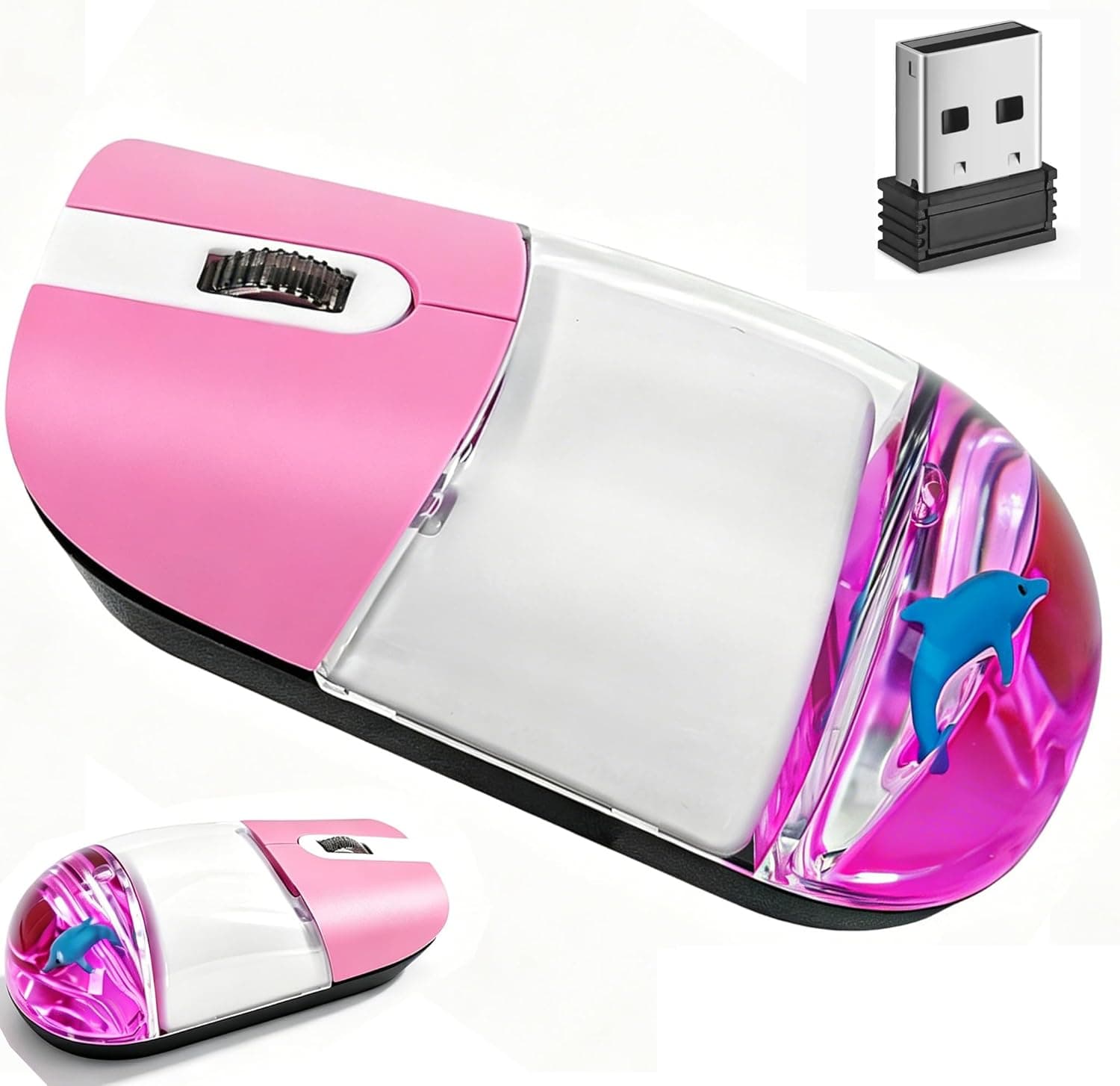
A dolphin drifting inside a clear, liquid-filled shell — the SHARE SUNSHINE Aqua Water Mouse is the kind of product people choose with their eyes before they read a spec sheet. This article works through what is actually published about it, where it holds up, and who should walk away.
Overview
This is a 2.4GHz wireless mouse with a transparent enclosure containing liquid and a floating dolphin ornament.
It uses silent click switches and an optical sensor, and works on both Windows and Mac by plugging in the bundled USB receiver. The honest summary: you are buying quiet operation and desk aesthetics, not sensor performance.
The color is pink, the intended audience is kids, students and gift buyers, and it shines in libraries, open-plan offices, and late-night rooms where click noise carries.
Only five specifications are published — connection type, sensor type, silent click, OS support, and color. DPI, polling rate, weight, dimensions and battery type are all absent.
That gap is the single most important thing to understand before ordering.
Reading the Spec Sheet
| Item | Listed value | What it actually means |
|---|---|---|
| Connection | 2.4GHz USB receiver | One USB-A port stays occupied. No Bluetooth |
| Sensor | Optical | Fine on cloth and wood; likely poor on glass |
| Silent click | Yes | One of the two real selling points |
| OS support | Windows 98–10, Mac OS X | Dated wording; Windows 11 is not named |
| Color | Pink | Paired with the clear shell and floater |
The OS row deserves a second look. "Windows 98 through 10" is boilerplate that circulates across generic HID mice, and Windows 11 simply is not mentioned.
In practice, 2.4GHz receiver mice usually enumerate as standard HID devices and run on the OS's generic driver, so Windows 11 will most likely work — but that is a reasonable expectation, not a manufacturer guarantee.
If Windows 11 is non-negotiable for you, confirm it on the product page or buy through a channel that accepts returns.
The missing DPI figure matters too. Budget optical mice in this class commonly sit around a fixed 800–1600 DPI with no DPI toggle, but this model's real value is not disclosed.
On a 4K or high-resolution display, plan on compensating with your operating system's pointer speed setting.
Compatibility Guide
The supplied compatibility note reads: Windows 98–10 and Mac OS X, USB-A port required, no Bluetooth. Here is what that implies in practice.
You need a USB-A port. This is the most realistic pitfall.
Recent MacBook Air and MacBook Pro models expose only USB-C / Thunderbolt ports. The listing title says "Macbook," but direct plug-in only applies to older machines with a rectangular USB-A port.
On current hardware you will need a USB-C adapter or a hub, and the same applies to thin Windows ultrabooks. Physically look at the side of your laptop before ordering.
No Bluetooth has consequences. Lose or break the receiver and the mouse is finished.
2.4GHz receivers usually ship pre-paired per unit, and a third-party dongle will not substitute.
Tablets may recognize it through an OTG adapter on some models, but that is environment-dependent and not a supported use case. If a tablet is your main device, buy a Bluetooth mouse instead.
Surface matters. Optical sensors struggle on glass tabletops, mirrored finishes, and featureless glossy white surfaces.
Nothing is published about bundled pads, so glass-desk users should assume a mousepad is required. Cloth pads, wood grain and ordinary office desks are fine.
About the liquid. Because fluid is sealed inside the shell, avoid extreme heat or cold, hard impacts, and any attempt to open it.
Bubble size and appearance vary noticeably between units. Treat cabin luggage and hot parked cars with care.
Product Info
Published specs cover five points: a 2.4GHz USB receiver connection, an optical sensor, silent click support, Windows 98–10 and Mac OS X compatibility, and a pink colorway.
The design hook is the sealed liquid chamber with a dolphin floater that sways as you move the mouse — an experience feature, not a functional one.
On price: the collected data lists ¥8,740 as of May 2026, but that figure is far too high for a novelty wireless mouse of this class and most likely reflects a data-collection mismatch. This article therefore avoids drawing any conclusion from it.
Check the current price yourself on the product page before buying. If it really does land in the high thousands of yen, remember that established brands sell mice at that level with published sensor specs, button counts and battery life.
The value here is the design, and how much that design is worth is your call.
Battery type, warranty length, weight and dimensions are not disclosed in any reliable form. Check the product page's specification section if those matter to you.
How to Read the Review Score
As of May 2026 the listing shows 6 reviews averaging 3.5 out of 5 stars, roughly a 70% positive score. Handle that number carefully.
Six reviews tell you almost nothing statistically. Three five-star reviews, two two-star reviews and one three-star review also average about 3.5.
You cannot distinguish "decent product" from "wildly inconsistent product" at this sample size. What the number does say is that it is not a universally praised item — 3.5 sits well below the 4.5-plus averages of popular staples.
Aesthetic novelty products often split exactly this way: happy with the looks, unhappy with the click feel or tracking.
The practical move is to ignore the average and read the low-star review text directly. "Cute but ordinary to use" is expected.
Multiple reports of "stopped responding after a few weeks" or "receiver not detected" carry far more weight than any average.
Where It Sits Against Alternatives
Among 2.4GHz wireless mice generally, entry models from major brands publish DPI values, battery life estimates, and current OS support.
This one does not. So the correct framing is not "wins on specs" but "chosen because no major brand makes this look."
If silence is your priority, put a major-brand silent-switch mouse on the shortlist too. If the priority is the moment someone opens the gift box, a clear shell with a dolphin floating in liquid is a genuine advantage no spec table captures.
And if your laptop is USB-C only, a Bluetooth model may simply be the better branch.
Best Use Cases
Recommended without hesitation for:
- People who want a desk that feels fun — the clear shell and floating dolphin do something no utilitarian mouse does.
- People working in quiet spaces — libraries, open offices, or a bedroom while the household sleeps.
- Gift buyers shopping for kids or students — plenty for documents and web browsing, with real unboxing appeal.
- Anyone wanting a light second mouse — a bag-friendly spare alongside a serious primary mouse.
Before You Buy
This is the section that matters most.
1. Not for gaming or precision work. DPI and polling rate are unpublished and there is no mention of a DPI toggle.
Expect it to fall short in FPS titles and in pixel-level photo editing or CAD. That is a design choice, not a defect.
2. Current MacBooks cannot take it directly. The word "Macbook" in the title misleads here — the requirement is a USB-A port.
USB-C-only models need an adapter or hub. Confirm your port shape visually before ordering.
3. Losing the receiver ends the product. With no Bluetooth fallback, a lost dongle is unrecoverable.
If you plan to carry it, check whether the receiver stows in the body (not stated for this model); if it does not, leaving it permanently in the host PC is the safer habit.
4. Watch for price mismatches. The collected data attached ¥8,740 to this product, which is implausibly high for its class and may belong to a different item.
Do not be surprised if the page shows something quite different. Verify the current price yourself and decide whether it is worth it. Listing metadata — manufacturer, OS support, included accessories — can also be wrong; confirm what you are actually buying from the product images, the title, and recent review text.
5. Dated OS wording. "Windows 98–10" omits Windows 11.
Generic HID operation makes it likely to work, but that is not confirmed information. Ask the seller or buy with return options if Windows 11 is required.
6. The liquid ages. Sealed-fluid accessories tend to accumulate bubbles or slow down over long use.
Treat this as something to enjoy for a while, not a lifetime tool.
7. Only six reviews. There is little evidence about unit-to-unit consistency. Favor a seller who handles early failures well.
FAQ
Q. Does it work on Windows 11? A.
Official wording covers Windows 98–10 and Mac OS X only. 2.4GHz receiver mice typically run on generic HID drivers, so it will most likely work, but this is not guaranteed.
Confirm on the product page if it matters.
Q. Can I connect over Bluetooth?
A. No. It works only with the bundled 2.4GHz USB receiver, which occupies one USB-A port.
Q. Will it work with a current MacBook Air or Pro? A.
On USB-C-only models you need a USB-C adapter or hub. Through an adapter it behaves normally.
Q. What is the DPI? A.
Not published, and no DPI toggle is listed, so it is presumably fixed. Adjust cursor speed in your OS pointer settings.
Q. Is it truly silent? A.
It has silent switches, not silence. Such switches replace the sharp click with a low, muted thud — much less noticeable to a neighbor, but not zero.
Q. Can I use it on a glass desk? A.
Optical sensors generally track poorly on transparent or mirrored surfaces. Assume you will need a mousepad.
Q. What batteries does it use?
A. Not disclosed in any reliable form. Check the specification section of the product page.
Product Disclosure (Amazon)
- Manufacturer: SHARE SUNSHINE
- Seller: Takumido
- Fulfilled by: Takumido
- ASIN: B0F31Z6DYS
- Note: This article covers a manufacturer-made product based on Amazon listing details.

![Logicool MK700MX MX KEYS mini コンボ for Business [ MX1700BGR + KX700BGR ] bluetooth logi bolt Unifying非対応国内正規品グラファイト](/_next/image?url=https%3A%2F%2Fm.media-amazon.com%2Fimages%2FI%2F61XN21V1WdL._AC_SL1500_.jpg&w=1920&q=75)