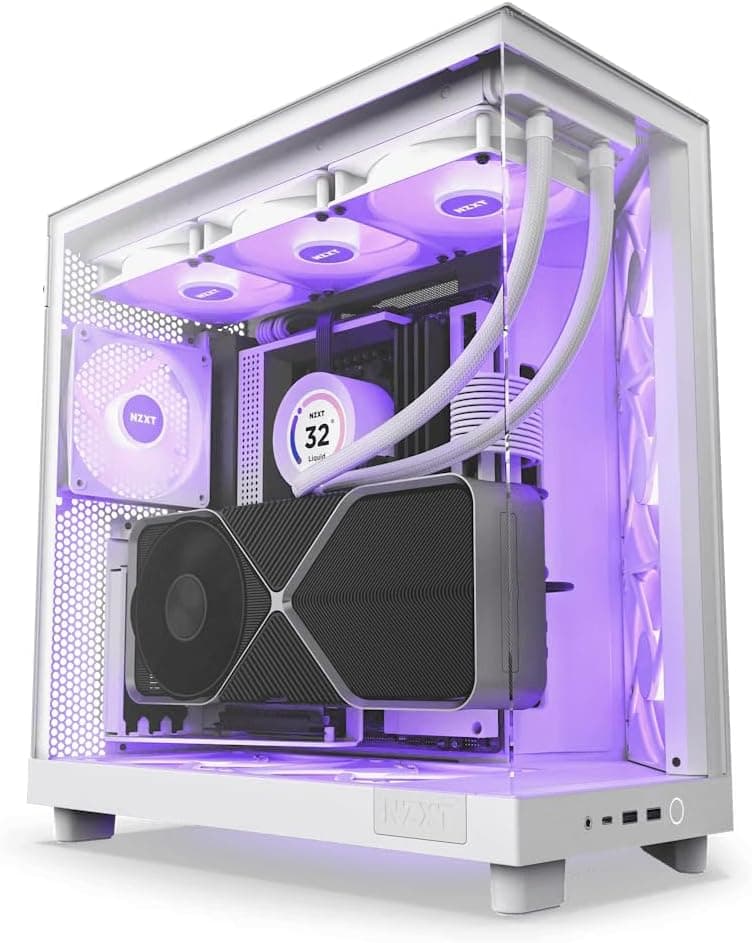
The NZXT KRAKEN X73 White (model RL-KRX73-RW / FN1616) pairs a 360mm radiator with an infinity-mirror LED pump head, aiming at both cooling and looks. This article focuses on the three questions buyers actually stumble over: will it fit my case, does it really work on AM5 and LGA1700, and is it worth the money versus a good air cooler.
Overview
The NZXT Kraken X73 White is a 360mm all-in-one liquid CPU cooler featuring an infinity mirror LED pump head. Designed for high-performance CPUs, it offers excellent thermal management for gaming and creative workloads.
The cooler supports Intel LGA1700/1200/115x and AMD AM5/AM4 sockets, making it compatible with the latest processors. Its three Aer RGB 2 fans provide vibrant lighting and efficient airflow.
The short version: this cooler suits people who already own a case that swallows a 360mm radiator and who want a white, RGB-coordinated build. If your only goal is maximum cooling per yen, other options exist at the same price.
At least half of the X73's value sits in the pump cap design and the white chassis — an investment in how the build looks. Whether that matters to you is essentially the buying decision.
As captured on 28 May 2026, the Amazon.co.jp listing showed 141 ratings averaging 4.2 out of 5 (about 84% positive).
That is not a huge sample, but it is a steady score with no sign of a widespread defect. Keep in mind that AIO coolers age through their pump, so an average rating says little about year five.
How to Read the Cooling Numbers
The published figures are three 120mm fans, a 1500 RPM ceiling, 33 dBA noise, 12V rated voltage, and 3.6W power draw.
The 1500 RPM ceiling is modest for a 360mm AIO. Coolers that spin past 2000 RPM will win a flat-out thermal contest, but they pay for it in noise.
The X73 instead buys headroom through radiator area and keeps the fans slow.
In other words, the design philosophy is "cool with surface area," not "cool with RPM." That fits users who dislike fan speed swinging up and down during a game or an export, and disappoints users chasing peak overclock headroom.
The 3.6W draw means the cooler adds essentially nothing to your PSU load.
You will never need a bigger power supply because of this cooler. What you do need to count is connectors — covered next.
Compatibility Guide
Supported sockets are Intel LGA1700 / LGA1200 / LGA115x and AMD AM5 / AM4, covering 12th–14th gen Intel, Ryzen 5000, and AM5 platforms. Bundled mounting hardware can differ by production batch, so confirm on the product page that the bracket for your socket is actually in the box — this matters most for LGA1700 and AM5, and doubly so for used or long-shelved stock.
Physical fit is where most builds fail. A 360mm radiator needs a mount that accepts three 120mm fans in a row, which in practice means a mid-tower or larger.
Watch out: cases labelled "360mm compatible" can still collide with VRM heatsinks or tall memory when the radiator is mounted up top, or with drive cages and front I/O cabling when mounted at the front. Compare your case's stated radiator clearance against radiator length plus combined radiator-and-fan thickness before you order.
On connectors, fans use 4-pin PWM and the pump uses a 3-pin header. A common mistake is letting the motherboard treat the pump header as a normal fan and throttling it at idle, which starves coolant circulation.
Set that header to a fixed 100% in BIOS. The included Aer RGB 2 fans connect to an NZXT RGB controller or a compatible motherboard RGB header.
The most overlooked requirement is a free internal USB 2.0 header.
Pump LED control and fan profiles run through NZXT CAM, and that needs one USB 2.0 header.
Between case front panels, RGB controllers, and other accessories, many builds have already used theirs — plan for a splitter if so.
Product Info
| Item | Value |
|---|---|
| Radiator size | 360mm |
| Fan size | 120mm × 3 |
| Max fan speed | 1500 RPM |
| Noise level | 33 dBA |
| Rated voltage | 12V |
| Power consumption | 3.6W |
| Warranty | 6 years |
| Sockets | LGA1700 / LGA1200 / LGA115x / AM5 / AM4 |
The most meaningful line is the six-year warranty. AIO coolers fail through the pump, typically in years three to five, so six years of coverage spans the usual failure window.
That is the practical answer to the "liquid coolers have unpredictable lifespans" worry. Keep your receipt or order history — you will need proof of purchase to claim.
On pricing, Amazon.co.jp showed ¥25,500 as captured on 28 May 2026, and an eBay US listing showed $200.00 as captured on 9 July 2026.
Both are point-in-time figures that move with sales and stock. The X73 is a generation old, so street prices drift as new stock thins out and can even cross above newer 360mm models.
Check the current price on the product page and compare against current-generation coolers in the same band.
The box includes three Aer RGB 2 fans, mounting kits, and thermal paste. Paste is normally pre-applied to the cold plate, so no extra purchase is needed for the first install — but keep isopropyl alcohol and spare paste on hand if you expect to remount.
How It Compares
At 360mm, raw cooling performance across brands lands in a narrow band. The real differences are software, pump-head aesthetics, cable count, and price.
The X73 wins on the infinity mirror and the quality of its white finish; it loses on cable clutter and the USB header it consumes.
If you want cooling and silence with no lighting at all, a dual-tower air cooler is cheaper and has one fewer moving part to fail. If you want an LCD readout or single-cable daisy-chained fans, a newer generation fits better.
The X73 sits in between: quiet, white, and nicely lit.
Best Use Cases
This cooler is ideal for enthusiasts building a high-end gaming or content creation PC with a case that can accommodate a 360mm radiator. Users who value both performance and aesthetics will appreciate the customizable RGB lighting and clean white design.
It is also suitable for those seeking a quiet yet powerful cooling solution, as the fans operate at a max of 33 dBA under load.
Concretely, it suits:
- Builders with a white case and white motherboard who do not want a black cooler breaking the theme
- Anyone running long CPU-bound jobs such as video encoding or 3D rendering
- Users bothered by fan speed fluctuating, who prioritise quiet everyday operation
- Existing NZXT owners who want everything controlled from CAM
It suits you less if you build in a small case, do not care about lighting, dislike resident background software, or want zero maintenance for five-plus years.
Before You Buy
Do not trust the "360mm compatible" label alone. Top-mounted radiators frequently collide with upper VRM heatsinks or tall memory, and the combined radiator-plus-fan thickness often exceeds the real clearance.
Compare actual numbers from your case manual before ordering. Front mounting shifts the problem to drive cages and front-panel cabling.
Count your free USB 2.0 headers first. CAM control needs one.
Without it, you lose both LED control and fan profiles. Some motherboards ship with only a single header, which the case front panel may already claim.
Never throttle the pump in BIOS. Slowing the pump header in the name of silence reduces coolant flow and raises temperatures.
Tune fans only; run the pump fixed.
Treat an AIO as a consumable. The pump is a moving part and coolant slowly permeates out over years.
Six years of warranty means "replaceable if it breaks," not "it will not break." Mounting the radiator above the pump keeps air bubbles out of the pump and reduces the risk of rattling noise — standard practice for any AIO.
Watch for bracket generation differences. LGA1700 and AM5 brackets may or may not be included depending on production date.
For used or old stock, confirm the contents with the seller.
Verify the listing yourself. Retail listings sometimes carry manufacturer, model, or ASIN data belonging to a different product.
This article covers the NZXT KRAKEN X73 in white (RL-KRX73-RW / FN1616). When you open the page, check the images and title for radiator size and colour rather than relying on the metadata fields.
The X73 (360mm) and X63 (280mm) differ by one character, and mixing them up means a radiator that will not fit.
Prices here are point-in-time. ¥25,500 was captured on 28 May 2026 and $200.00 on 9 July 2026; street prices move with stock and exchange rates.
Setup Tips That Matter
The first thing to do after installation is tune the fan curve. To exploit the 1500 RPM ceiling, hold fans around 40–50% until roughly 60°C and ramp gently after that; with 360mm of radiator area, temperatures do not spike suddenly, so gaming noise stays near-constant.
Radiator orientation is the other decision. Top-mounted as exhaust is the usual choice and pushes heat straight out.
Front-mounted as intake lowers CPU temperature but pushes warmed air over the GPU and drives. Choose based on whether you are optimising the CPU or the whole case.
One caveat specific to white hardware: white plastics and sleeving can shift colour over the years. Avoid direct sunlight and smoky environments.
On a cooler you bought partly for looks, that is worth caring about.
FAQ
Q. Does it work with Ryzen 7000 (AM5)? A.
AM5 is on the supported socket list, so yes, provided the AM5 mounting kit is in the box. Bundled hardware varies by batch, so check the accessories list before buying.
Q. Do I have to install NZXT CAM? A.
The pump and fans run on power alone, but LED control and fan profiles require CAM. It runs as a background application, which is worth knowing if you keep your startup list lean.
Q. How much better is it than a high-end air cooler? A.
The larger thermal mass helps most under sustained heavy loads. For short bursts or mid-TDP chips the gap narrows.
If cooling alone is your reason to buy, the value case is not clear-cut.
Q. What does 33 dBA feel like? A.
That is the figure at maximum speed — audible if you listen for it in a quiet room, and quieter still inside a case at everyday speeds. Measurement conditions differ by vendor, so avoid comparing dBA figures across brands directly.
Q. How do I use the 6-year warranty? A.
It mainly covers pump noise or cooling failure replacements. Proof of purchase is required, so keep your order history.
Parallel imports may fall outside domestic distributor support.
Q. Does it need refilling or maintenance? A.
It is a sealed unit and is not user-refillable. Maintenance means clearing dust from the radiator fins — a can of compressed air every six months goes a long way.
Product Disclosure (Amazon)
- Manufacturer: NZXT
- ASIN: B09CW9NC51
- Note: This article covers a manufacturer-made product based on Amazon listing details.