Overview
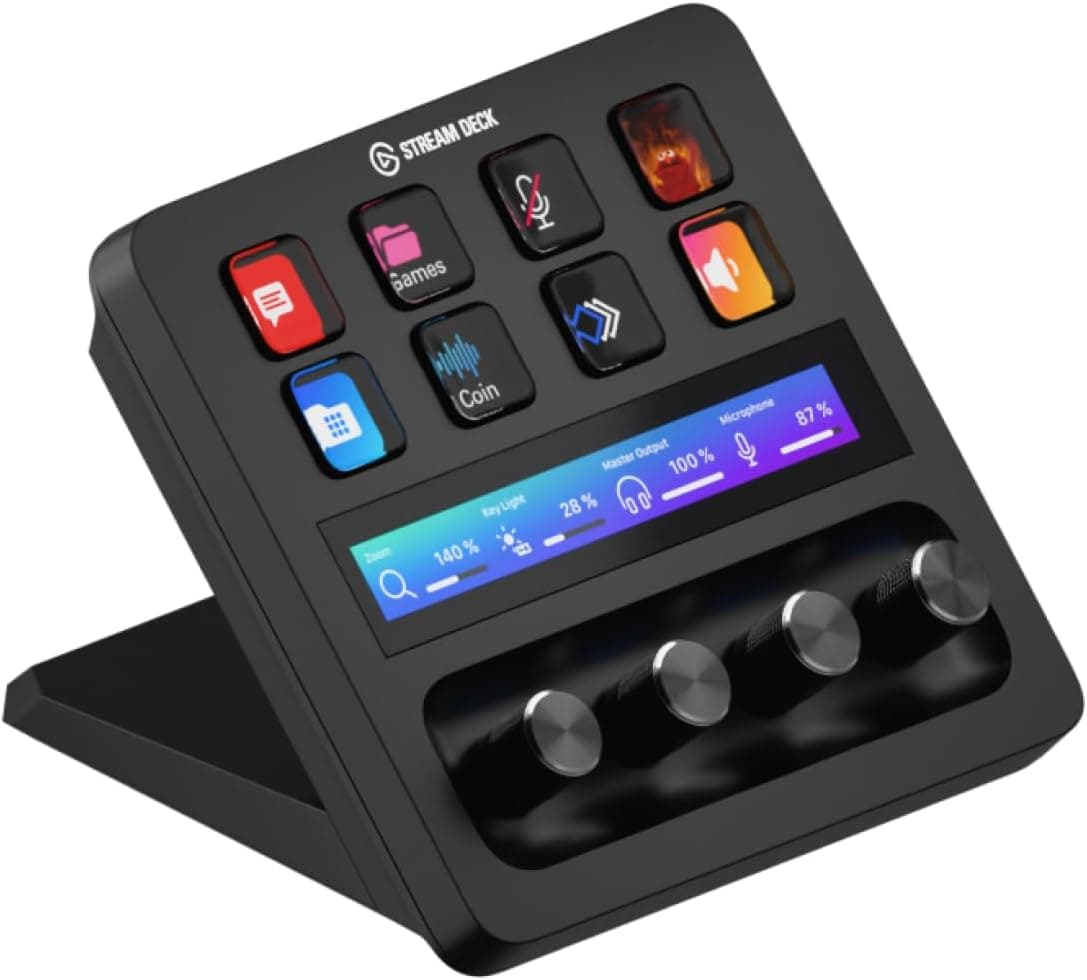
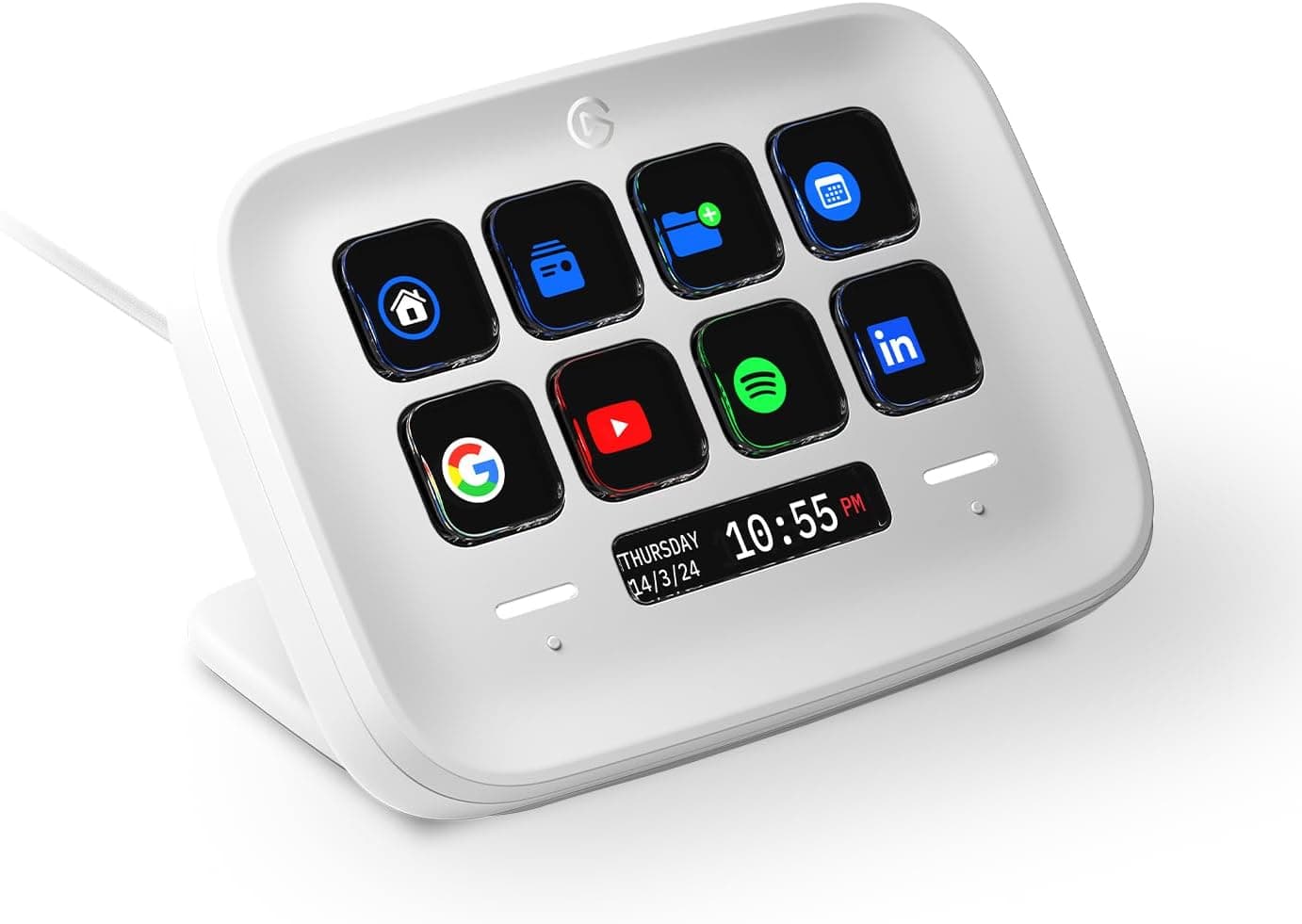
The Elgato Stream Deck Neo is a USB-C workflow controller with 8 customizable LCD keys and 2 touch points. The short verdict: if you want to move stream scene switching, mic mute, or Zoom/Teams camera toggles onto physical buttons, 8 keys is enough to pay for itself.
If you need more than ten actions visible at once, skip it and look at the MK.2 (15 keys) or XL (32 keys) instead.
For real numbers: as captured on 2026-05-28, Amazon.co.jp listed 1,162 reviews at 4.6 out of 5 stars (92% positive) — a strong score for a desk peripheral.
The unit measures 107×26×78 mm and weighs 210 g, small enough to live permanently behind a keyboard or under a second monitor.
Compatibility Guide
Connection is USB-C only, and supported systems are Windows 10/11 and macOS 11 or later. Unlike PC components, there are no socket, chipset, or PSU concerns here — what actually trips people up is software.
- The app is mandatory. The free Stream Deck app must be installed and running in the background. Close it and the keys stop working. This is not a plug-and-play macro keyboard.
- Port shape. The device side is USB-C, so if your PC only has spare USB-A ports you may need an adapter or an A-to-C cable. Check the bundled cable type on the product page.
- USB hubs. Bus-powered hubs and keyboard pass-through ports can cause flaky detection. If it drops out, plug directly into the PC or use a self-powered hub.
- macOS permissions. macOS requires Accessibility and, for some actions, Screen Recording permission before the deck can control other apps. If keys do nothing on first setup, check here first.
- Plugin coverage. OBS, Streamlabs, Zoom, Teams, Spotify, and Adobe apps are covered by plugins, but internal or niche business tools usually are not — you'll build those with hotkey sends, URL launches, and multi-actions.
The official note is equally simple: USB-C, Windows/Mac, requires the free Stream Deck app. Meet the OS and app requirements and it works.
Product Info
| Spec | Value |
|---|---|
| Customizable Keys | 8 |
| Touch Points | 2 |
| Dimensions (W×D×H) | 107×26×78 mm |
| Weight | 210 g |
| Connection Interface | USB-C |
| Supported OS | Windows 10/11, macOS 11+ |
Those numbers describe the product's character. At 107 mm wide and 210 g, it is smaller than a numpad yet heavy enough not to slide when you press a key — a detail that matters more in daily use than it sounds.
The two touch points default to page switching, which is the practical escape hatch on an 8-key model: with pages and folders you effectively get 8 keys × multiple pages. The trade-off is that anything past page one changes from "see it and press it" to "remember, switch, then press."
On price: the Amazon listing was ¥14,532 as captured on 2026-05-28, and an eBay listing showed $69.99 as captured on 2026-07-09.
Both are point-in-time snapshots that move with sales, exchange rates, and whether the unit is a parallel import — always check the live product page. Per the original listing, the Neo launched in 2024, ships with the unit, a USB-C cable, and a quick-start guide, and carries the standard 2-year manufacturer warranty.
How It Compares
Choosing within the Stream Deck line comes down to key count and whether you need dials.
| Model | Keys | Character | Best for |
|---|---|---|---|
| Stream Deck Mini | 6 | Smallest, cheapest | Trying the concept |
| Stream Deck Neo | 8 | 8 keys + 2 touch points | Core stream/meeting actions |
| Stream Deck MK.2 | 15 | The mainstream model | 10+ everyday actions |
| Stream Deck + | 8 + dials | Dials and touch strip | Volume, exposure, continuous values |
| Stream Deck XL | 32 | Maximum layout | Full production setups |
The test is simple: write down the buttons you press every day. If the list hits nine, buy the MK.2, not the Neo. If what you really want is to sweep a value up and down rather than toggle it, the answer is Stream Deck + and its dials.
The Neo fits people whose press-actions land around eight and who want to save desk space and money.
Getting the Most Out of It
The main reason people stop using one is setting it up without deciding what belongs on it. Build it in this order:
List only actions you do three or more times a day — mic mute, scene switch, joining a call, starting background music.
Prioritize things you can't remember shortcuts for. Mapping Ctrl+C to a key gains you nothing.
Set per-app profiles so the layout changes automatically between OBS and your editor.
This is how 8 keys stays sufficient. 4.
Use multi-actions to fold whole sequences (scene change → music → chat overlay) into a single press.
Best Use Cases
- Streamers and creators: scene switching, record start/stop, and mic mute move to hardware, so you stop hunting for windows mid-broadcast.
- Remote office workers: mute, camera toggle, canned text, and meeting links — eight keys covers the meeting workflow well.
- Smart home users: lights and plugs from the desk without reaching for a phone.
- Small-desk setups: 107 mm and 210 g means it can stay out permanently.
It is a poor fit if you already automate everything with keyboard macros or AutoHotkey, or if most of your work is turning values rather than pressing buttons.
Things to Check Before Buying
Eight keys fill up faster than you expect. Three scenes plus mute, record, music, and chat overlay is already seven.
Pages extend it indefinitely, but the whole point of hardware — glance and press — only applies to page one. If your must-have list is nine or more, the 15-key MK.2 will make you happier.
Don't dismiss the always-on app requirement. The Stream Deck app must stay resident and consumes memory continuously.
It's light, but not zero, so it's a poor match for very weak machines or setups where you avoid background apps. Keys occasionally stop working right after an OS update until the app is updated or permissions are re-granted.
Don't expect deep integration with internal tools. Official plugins cover well-known apps.
Custom business software means building hotkey or script actions yourself.
Key feel and screen visibility are personal. With so few keys, each one matters more, so check hands-on impressions or video reviews first.
Icon legibility can drop in bright, sunlit rooms.
Watch for listing mismatches. In the data used for this article, the price entry was labeled "Amazon US" yet the currency was Japanese yen (¥14,532) and the link pointed at Amazon.co.jp — label mismatches like this are common in automated listings.
The Stream Deck family also has confusingly similar names (Neo, Mini, MK.2, +, XL) plus parallel imports and color variants.
Listing metadata is sometimes wrong, so confirm key count and model from the product photo and title before ordering, and check who handles warranty support if the seller isn't Elgato.
FAQ
Q. Are 8 keys enough? A.
Yes, if your daily actions number eight or fewer. Past that you're paging, which costs you the instant-access advantage.
Count them first.
Q. Does it work without the app running?
A. No. The Stream Deck app must be resident; set it to launch at startup.
Q. Does it work the same on Mac? A.
macOS 11 and later are supported, but you must grant Accessibility (and sometimes Screen Recording) permission or the keys will do nothing.
Q. Neo or Stream Deck +? A.
Choose + if you adjust continuous values like volume or effect strength. Choose Neo if your work is toggles and scene switches.
Q. Can I use it for game macros? A.
Hotkey sends and app launches work fine, but some online games restrict automation in their terms of service — check the title's rules.
Q. How is it rated? A.
As captured on 2026-05-28, Amazon.co.jp showed 1,162 reviews at 4.6 out of 5 (92% positive) — a stable enough record that defect risk isn't a major worry.
Product Disclosure (Amazon)
- Manufacturer: Elgato
- Seller: e-zoa
- Fulfilled by: e-zoa
- ASIN: B0CVY4566H
- Note: This article covers a manufacturer-made product based on Amazon listing details.