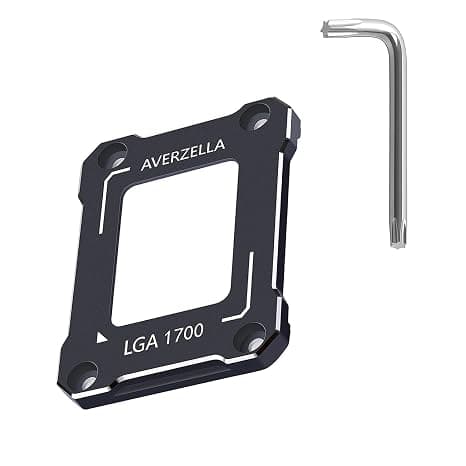
This article covers AVERZELLA Contact Frame for LGA1700 (12th/13th Gen).
Overview
The AVERZELLA Contact Frame is a retrofit kit designed for Intel LGA1700 sockets, compatible with both 12th Gen (Alder Lake) and 13th Gen (Raptor Lake) processors. Its primary purpose is to prevent CPU bending and IHS deformation caused by the high clamping force of CPU coolers. Made from CNC-machined aluminum, it supports both water and air cooling solutions. By replacing the stock Independent Loading Mechanism (ILM), this frame ensures better contact between the CPU IHS and the cooler base. This can lead to improved thermal performance and more consistent temperatures under load. It's a simple, low-cost upgrade for any LGA1700 build.
Compatibility Guide
This contact frame is exclusively designed for Intel LGA1700 motherboards. It works with all 12th and 13th Gen Core i5, i7, and i9 processors. The frame is compatible with virtually all CPU coolers, including large air towers and AIO liquid coolers, as it does not interfere with standard mounting mechanisms or backplates. Installation requires removing the motherboard from the case and detaching the stock ILM. You will need a T20 Torx screwdriver and a standard Phillips head screwdriver. It's a straightforward process, but care must be taken not to damage the CPU socket pins. We recommend consulting your motherboard manual before starting.
Product Info
The AVERZELLA Contact Frame is available exclusively through at a price of approximately ¥3,500. It is constructed from CNC-machined aluminum, offering a precise fit and long-term durability. The kit includes the frame itself and all necessary mounting hardware. Positioned as an entry-level to mid-range accessory, it offers a cost-effective solution for anyone concerned about CPU bending on LGA1700 platforms. It's a one-time purchase that can potentially extend the lifespan of your CPU and improve cooling efficiency.
Best Use Cases
Enthusiasts building a new LGA1700 system: Installing this frame during initial assembly is the easiest way to prevent CPU bending from day one. It's a proactive measure that costs little but can save headaches later. Overclockers and content creators pushing high loads: If you're running heavy workloads or overclocking, every degree matters. Better IHS contact can help maintain lower temperatures and more stable boost clocks. Users upgrading their CPU cooler: If you're already planning to swap your cooler, adding this frame at the same time is a no-brainer. The extra effort is minimal, and the potential thermal benefit is worthwhile. Not suitable for users on LGA1200, AM4, or AM5 platforms — this frame is LGA1700-specific.
Things to Consider
This product is a preventative measure, not a performance enhancer. While many users report temperature improvements of 3-5°C under load, results vary depending on your specific CPU, cooler, and mounting pressure. It will not fix a poorly performing cooler or a defective CPU. Installation involves modifying the motherboard's stock ILM, which voids Intel's warranty on the socket mechanism. While the risk of damage is low for careful users, it's important to proceed with caution. If you're not comfortable working inside your PC, consider having a professional install it. Competing products like Thermalright's LGA1700 contact frame offer similar functionality at a comparable price. The AVERZELLA frame stands out with its all-aluminum construction, which some users prefer for its rigidity and heat dissipation properties. ## FAQ
Q: Will this frame lower my CPU temperatures? A: Many users report a drop of 1-3°C at idle and 3-5°C under load. The improvement comes from better contact between the CPU IHS and cooler base. However, results are not guaranteed and depend on your specific setup. Q: Do I need any special tools for installation? A: Yes, you will need a T20 Torx screwdriver to remove the stock ILM. A standard Phillips head screwdriver is also required to remove the motherboard from the case. A magnetic screwdriver tray is helpful to keep small screws organized. Q: Does using this frame void my CPU warranty? A: Intel's warranty policy states that any modification to the CPU or socket may void coverage. Since this frame replaces the stock ILM, Intel could deny a warranty claim related to the socket. However, the CPU itself is rarely affected. Proceed at your own risk.