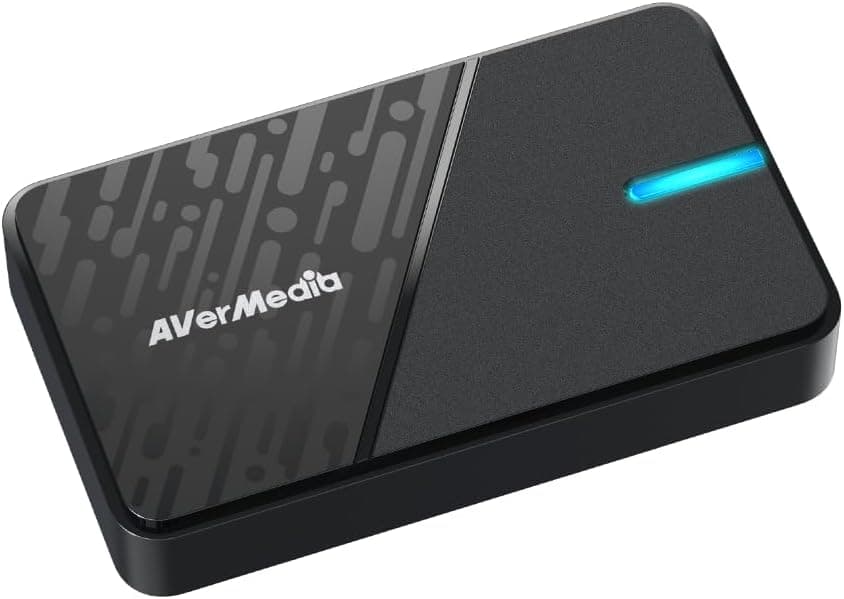
The AVerMedia StreamLine MINI+ GC311G2 (model DV1016) is an external HDMI capture unit aimed at people who want to start streaming without a steep learning curve. Its defining trait is asymmetry: it passes 2160p60 HDR, 1440p144 HDR or 1080p240 HDR straight through to your monitor, while sending a deliberately modest 1080p60 signal to your PC.
In other words, your own play experience is untouched, and the recording side is capped at "good enough."
Overview
The unit connects over USB 3.0 Type-C, measures 112.5 x 66.1 x 20.9 mm and weighs about 85 g — small enough to live in a laptop bag permanently.
Supported operating systems are Windows 10/11 and macOS (Apple M1 or Intel Core i7 and above). Video formats are NV12, YUY2 and MJPEG.
It sits at the entry-to-mid tier. On Amazon.co.jp it holds 4.1 out of 5 stars (roughly an 82% positive score) from 21 reviews as captured on 1 June 2026.
That is a decent score, but 21 is a small sample, so treat it as a hint rather than a verdict. This article leans on the published specs instead.
Compatibility Guide
Officially supported sources are PS5, PS4, Nintendo Switch, Xbox Series X, PCs, iPad and Android devices. With one HDMI 2.0 input and one HDMI 2.0 output, the standard wiring is: console to HDMI IN, HDMI OUT to your monitor or TV, and USB-C to a USB 3.0 port on your PC.
The PC port is where most people go wrong. A near-uncompressed 1080p60 stream needs USB 3.0 (5 Gbps) or better.
A USB 2.0 port looks identical but often results in the device not being detected, dropped frames, or wrong colours.
On a desktop, use a rear port wired directly to the motherboard rather than a front-panel header. The bundled cable is USB Type-C to Type-A, so a thin laptop with only Type-C ports needs an adapter or a separate C-to-C cable.
The other classic stumbling block is HDCP. A PS5 ships with HDCP enabled, and in that state your capture software shows a black screen.
Disabling HDCP in the PS5 settings lets games through, but protected content such as video streaming apps and Blu-ray playback still cannot be recorded. That is not a fault of this device — it applies to capture cards in general.
Read the passthrough figures carefully, too. Supporting 1440p144 or 1080p240 passthrough does not mean you can record at those rates.
The PC only ever receives 1080p60. Play at high refresh, record at 60 fps.
Product Info
In Japan the unit was listed at ¥11,200 on Amazon.co.jp as captured on 1 June 2026, and at ¥16,449 at a Rakuten marketplace shop as captured on 17 August 2026.
Prices vary by channel and capture cards are heavily discounted during sale periods, so always check the current price on the product page before buying. Units sold through the official Japanese distributor carry a 2-year warranty.
| Item | Value |
|---|---|
| Interface | USB 3.0 Type-C |
| Video I/O | HDMI 2.0 |
| Max passthrough | 2160p60 HDR / 1440p144 HDR / 1080p240 HDR |
| Max recording | 1080p60 |
| Video formats | NV12, YUY2, MJPEG |
| Dimensions | 112.5 x 66.1 x 20.9 mm |
| Weight | approx. 85 g |
| OS | Windows 10/11, macOS (Apple M1 / Intel Core i7+) |
The format list matters more in daily use than it looks. YUY2 is uncompressed and easier on image quality but consumes a lot of USB bandwidth.
MJPEG compresses on the device, easing USB load and often stabilising marginal setups, at the cost of some detail in fine textures and dark areas. NV12 sits between the two.
Since you can switch between all three in the OBS source properties, the practical first step when video stutters is to try MJPEG.
The box contains a USB Type-C to Type-A cable and a quick start guide — no HDMI cable. Given the wiring above, you need two HDMI cables, and both should be rated for HDMI 2.0 (18 Gbps) if you want 4K60 HDR passthrough.
Old budget cables tend to silently drop you to 4K30 or disable HDR.
Software and OBS Setup
The bundled Streaming Center software auto-detects the device and configures streaming to YouTube, Twitch, Facebook and other platforms, which genuinely lowers the barrier for a first stream. Per the vendor materials it is a Windows tool, so Mac users will effectively be using OBS Studio.
In OBS, add it as a Video Capture Device and set Resolution/FPS Type to Custom, explicitly choosing 1920x1080 at 60 fps. Left on Device Default, it can come in at 720p or 30 fps — the single most common reason people conclude the hardware is poor.
For audio, monitoring through OBS introduces a few hundred milliseconds of delay. Listen to game audio from the passthrough display and mute the OBS preview.
The same rule applies to video: always play while looking at the passthrough screen, never the preview.
How It Compares
Within AVerMedia's own range, if you want to actually record at 4K60 you should be looking at the GC553Pro or the LIVE GAMER EXTREME 3 class instead. If you want PC-free standalone recording, the Ez Recorder 330 family covers that, and the Live GENERATOR POCKET targets maximum portability.
From other brands, the Razer Ripsaw HD follows the same 4K passthrough plus 1080p60 recording formula and is the closest direct rival.
The decision rule is simple: if you publish to YouTube or Twitch and most of your viewers watch on phones or at 1080p, this is enough. If you plan to crop and zoom in edits, archive at 4K, or capture high-resolution desktop footage, buy a 4K-capable unit up front — it works out cheaper than replacing this one later.
Things to Check Before Buying
The headline compromise is the 1080p60 recording ceiling, and no software update will lift it. If your plan is "1080p now, 4K next year," this becomes a replacement purchase within a year or two.
It is not a future-proof choice.
Second, no HDMI cable is included. Budgeting only for the unit itself leaves you short by two cables.
If you intend to reuse older cables, verify first that they can carry 4K60 HDR.
PS5 owners should understand up front that disabling HDCP is mandatory, and that even then, streaming-app screens cannot be captured. This is not a device that records everything your console displays.
Also note that the metadata on an Amazon listing (manufacturer, model number, ASIN) occasionally mixes in details from a different product. At the time of writing the manufacturer field reads AVerMedia and is consistent with this article's subject, but please confirm with your own eyes that the product image and title say "StreamLine MINI+ GC311G2." Warranty handling also differs between parallel imports and official distributor stock, so check the seller name if the 2-year warranty matters to you.
Finally, keep the 21-review sample size in mind. A 4.1 average is respectable, but that many reviews cannot tell you much about long-term failure rates or unit-to-unit variation.
Best Use Cases
- First-time streamers — automated setup means you are unlikely to give up during configuration.
- PS5 and Switch players — record at 1080p60 while your own screen stays at 4K60 HDR, so nothing about your play session degrades.
- People who travel with their gear — at roughly 85 g and 112.5 x 66.1 x 20.9 mm it is trivial to carry to events or a friend's place.
- Camera-to-webcam users — an HDMI-out camera becomes a high-quality video-conference source.
It is a poor fit if you need 4K archives, multiple switchable inputs, or a Mac-centric workflow that relies on the bundled software.
FAQ
Q. Can it record in 4K60?
A. No. 4K60 HDR is passthrough only; the maximum resolution sent to your PC is 1080p60.
Q. My PS5 shows a black screen. Is it broken? A.
Almost certainly HDCP. Disable it in the PS5 settings.
Protected content such as video apps still will not capture.
Q. Is an HDMI cable included?
A. No — only a USB Type-C to Type-A cable and a quick start guide. You will need two HDMI cables.
Q. Will it work on a USB 2.0 port? A.
It is designed around USB 3.0 or faster.
On USB 2.0 expect detection failures or reduced frame rate and quality.
Q. Does it work on a Mac? A.
macOS (Apple M1 or Intel Core i7 and above) is supported, but Streaming Center is a Windows tool, so use OBS Studio instead.
Q. What if the video stutters or cuts out? A.
Move to a different USB 3.0 port (ideally a rear motherboard port), then switch the OBS video format from YUY2 to MJPEG to isolate the cause.
Product Disclosure (Amazon)
- Manufacturer: AVerMedia
- Seller: Amazon.co.jp
- Fulfilled by: Amazon.co.jp
- ASIN: B0F2TDRP22
- Note: This article covers a manufacturer-made product based on Amazon listing details.
![AVerMedia Live Gamer EXTREME 2 GC551 4Kパススルー対応 ゲームキャプチャーボックス Full HD 1080p 60fps usb3.1 Ultra-Low[Latency] [並行輸入品] (GC551)](/_next/image?url=https%3A%2F%2Fm.media-amazon.com%2Fimages%2FI%2F71rXj8Nn5-L._AC_SL1500_.jpg&w=1920&q=75)
![AVerMedia Ez Recorder 330 ER330 [PC不要]](/_next/image?url=https%3A%2F%2Fm.media-amazon.com%2Fimages%2FI%2F61CIZJ5HHpL._AC_SL1500_.jpg&w=1920&q=75)