This article covers ASUS Prime Pro AM4 AMD X570 ATX DDR4-SDRAM.
Overview
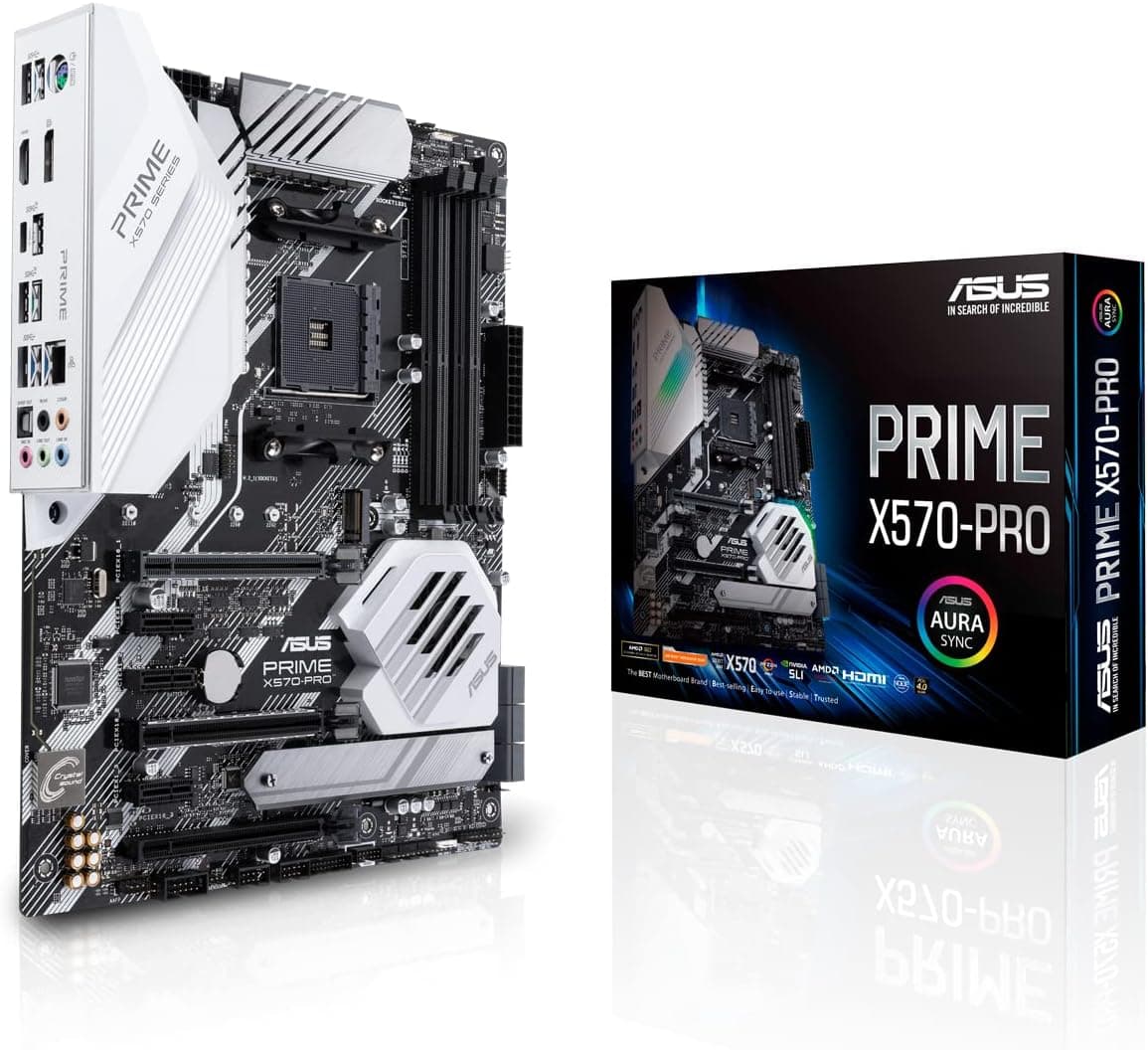
The ASUS Prime X570-Pro is an ATX motherboard built around the AMD X570 chipset and Socket AM4. It supports 2nd and 3rd generation AMD Ryzen processors (as well as Ryzen 5000 series after a BIOS update). Featuring a 12+2 phase DrMOS power stage with ProCool connectors, it delivers stable power for demanding workloads. The inclusion of PCIe 4.0 support means you can use the fastest graphics cards and NVMe SSDs without bottleneck. Positioned as a mid-high tier board, the Prime X570-Pro balances modern connectivity (dual M.2 with PCIe 4.0, USB 3.2 Gen2) with practical features like a large M.2 heatsink and Aura Sync RGB header. It is equally at home in a gaming rig or a content creation workstation, offering solid expandability without the premium price of flagship ROG boards.
Compatibility Guide
The Prime X570-Pro uses the AM4 socket and is compatible with AMD Ryzen 2000, 3000, and 5000 series CPUs. Memory support includes up to 128GB of DDR4 across four DIMM slots, with overclocking speeds beyond 4400 MHz when paired with compatible CPUs. The ATX form factor fits most mid-tower and full-tower cases. Expansion includes two PCIe 4.0 x16 slots (one from CPU, one from chipset) for multi-GPU setups, plus two PCIe 4.0 x1 slots and two legacy PCIe slots. There are two M.2 slots, both PCIe 4.0 x4; a dedicated heatsink covers the primary slot. Six SATA 6 Gbps ports handle additional storage, and the rear I/O offers USB 3.2 Gen2 Type-A and Type-C ports. Power is delivered via a 24-pin main connector plus an 8-pin and 4-pin EPS12V. For a typical build with a Ryzen 5 and mid-range GPU, a 650W PSU is sufficient; higher-spec configurations benefit from 750W or more.
Product Info
Launched in July 2019, the ASUS Prime X570-Pro sits in the mid-high end of the X570 motherboard lineup. It targets users who want the full PCIe 4.0 feature set of X570 but don't need the extreme VRM or networking found on ROG Crosshair boards. Key specs include 12+2 DrMOS power stages, dual PCIe 4.0 M.2, OptiMem memory trace layout, and Aura Sync RGB control. The warranty is 3 years. Pricing has settled to around $250-300 USD, making it a strong value for Ryzen 5 and 7 builds.
Best Use Cases
Gaming enthusiast — Ideal for building a 1440p gaming PC. Pair with a Ryzen 5 5600X and an RX 6800 or RTX 3070 to leverage PCIe 4.0 bandwidth. The VRM handles gaming loads without issue, though extreme overclocking may require a higher-end board. Content creator — The dual PCIe 4.0 M.2 slots enable fast scratch disks or RAID arrays for video editing. With a Ryzen 9 5900X and a capable GPU, Premiere Pro and DaVinci Resolve run smoothly. Note the chipset fan is always present; consider a B550 board if absolute quiet is paramount. Budget-conscious builder — If you find the Prime X570-Pro at a discount, it's a steal compared to newer X570S models. It offers all the core features without paying for WiFi or 2.5GbE if you don't need them.
Things to Consider
The X570 chipset has an active fan. While ASUS has tuned it to be quiet, under heavy sustained loads it can become audible. Builders seeking a completely silent PC may prefer a B550 or X570S board with passive chipset cooling. VRM thermals are good but not exceptional. For long-term all-core overclocking on a Ryzen 9 5950X, the 12+2 phase design can run warm; a case with good airflow helps. Competitors like the Gigabyte X570 Aorus Elite offer similar VRM at a slightly lower price. The board lacks integrated Wi-Fi and Bluetooth, so you will need to add a PCIe or USB adapter if wireless connectivity is required. This is typical for the Prime family but worth noting. ## FAQ
Q: Does this motherboard support Ryzen 5000 series out of the box? A: Not necessarily. A BIOS update to version 2606 or later is required. Since the board lacks USB BIOS Flashback, you will need a compatible CPU (e.g., Ryzen 3000 series) to perform the update. Q: Which M.2 slot has the heatsink? A: Only the primary M.2_1 slot (closest to the CPU socket) comes with a pre-installed heatsink. The secondary slot is bare, so consider adding a third-party heatsink for high-performance PCIe 4.0 SSDs. Q: Can I use this motherboard with an RTX 4090? A: Yes, the PCIe 4.0 x16 slot will work with any modern GPU, including the RTX 4090. However, the board's other PCIe slots may be blocked by large triple-slot cards. Ensure your case can accommodate the card's size and that your PSU provides enough power.
Product Disclosure (Amazon)
- Manufacturer: ASUS
- Seller: New Oriental Technology
- Fulfilled by: New Oriental Technology
- ASIN: B07TNMC2R4
- Note: This article covers a manufacturer-made product based on Amazon listing details.