Overview
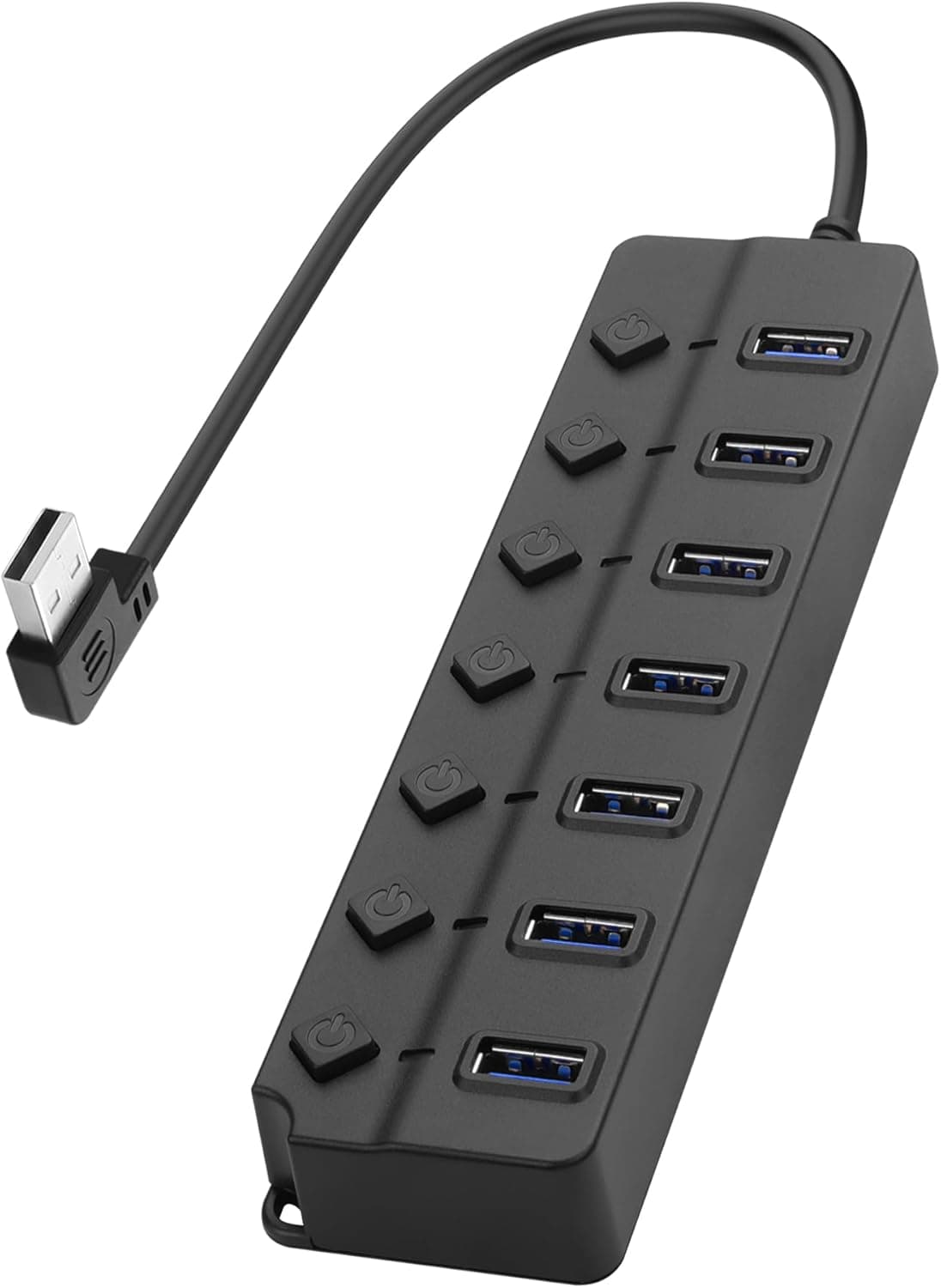
The YACSEJAO 90-Degree USB Hub Splitter turns one USB-A port on your host machine into seven USB 2.0 ports.
Two things separate it from the crowd: every one of the seven ports has its own LED-lit on/off switch, and the host-side plug is bent at 90 degrees. Those two details define what this hub is for.
It is not a speed product — it is for people who keep several devices permanently plugged in but want to cut power to them individually.
The short verdict: if you are corralling USB fans, LED lights, charging cradles, or a printer you use twice a month, this is genuinely pleasant to live with. If you bought it hoping to run an external SSD, a high-resolution webcam, or a capture device, you will hit the bandwidth wall immediately.
Get that line right and the hub earns its place.
Compatibility Guide
The interface is USB 2.0, with USB-A on both the host and device sides.
The cable is 0.3m, which tells you the design intent: this hub is meant to sit right next to the PC or behind a monitor, not to be pulled forward onto your desk.
If you need reach, plan on an extension cable or pick a different product. The right-angle host plug means the cable does not stick straight out of a rear panel, so you can keep the case pushed close to a wall.
Supported operating systems are Windows 11/10/8, macOS, and Linux 2.6.14 or later.
Operation is plug-and-play with no drivers to install — USB 2.0 hubs are a standard device class, so compatibility problems are rare.
Plugging it into a USB 3.x or USB4 port works fine through backward compatibility, but the speed stays at USB 2.0.
On a USB-C-only laptop you will need a separate USB-C to USB-A adapter.
Power is where real-world outcomes diverge. The hub has a DC5.5 x 2.1mm barrel jack rated for a 5V 4A (20W) supply, but the adapter is sold separately.
Without it, all seven ports share whatever the host USB port can deliver (the USB 2.0 spec allows 5V/500mA; some PCs supply a little more).
Mice, keyboards, and flash drives are fine. Portable HDDs, USB fans, heated USB gadgets, and phone charging all at once are not — you will see dropped connections or interrupted writes.
If it spins, glows, warms up, or charges, treat the 5V/4A adapter as a mandatory extra purchase.
As the compatibility note says, whether you need external power depends entirely on what you attach. When in doubt, buy the adapter up front.
Confirm 5V and the correct polarity (center-positive vs center-negative) before ordering — the wrong voltage can destroy the connected devices along with the hub.
Product Info
The key specifications:
| Item | Value |
|---|---|
| USB ports | 7 |
| Interface | USB 2.0 |
| Cable length | 0.3m |
| Connector type | USB-A (host) / USB-A (device) |
| External power port | DC5.5 x 2.1 (5V 4A, adapter sold separately) |
| LED indicator | Individual LED per port |
| Switch | Individual on/off switch per port |
| Supported OS | Windows 11/10/8, macOS, Linux 2.6.14+ |
| Plug and play | Yes (no drivers) |
The headline numbers are "7 ports" and "individual switches," but the 0.3m cable and the USB 2.0 generation are what actually shape daily use.
USB 2.0 tops out at 480Mbps in theory, roughly 30-40MB/s in practice as a rule of thumb — and that bandwidth is shared across all seven ports, so copying from a flash drive slows down anything else transferring at the same time.
On the other hand, mice, keyboards, gamepads, and USB audio input consume almost nothing, so filling all seven ports with those changes nothing you can feel.
On pricing: the listing showed ¥9,951 (tax included) as captured on 31 May 2026, and ¥9,921 (tax included) as captured on 27 August 2026. Both are prices at the time of capture and will move with sales and stock. Candidly, that is not cheap for a 7-port USB 2.0 hub.
Whether the per-port switches and the right-angle plug justify it is the whole decision; if you just want more ports, compare alternatives. Always check the current price on the product page before ordering.
The review score, captured 31 May 2026, was 3.7 out of 5 stars (74% favorable) across 5 reviews.
With a sample of five, that average carries almost no statistical weight — one 1-star review swings it substantially. Read the individual review text for which port and which device caused trouble; that is far more useful than the number itself.
Where Per-Port Switches Actually Pay Off
This is a benefit that spec sheets communicate poorly. It shows up when you:
- Reduce connector wear. USB-A connectors have a finite mating cycle rating. A device you were unplugging several times a day becomes a switch press instead.
- Avoid always-on power. USB lights, fans, humidifiers, and charging cradles can be cut individually without killing the rest.
- Troubleshoot faster. Toggle one port off and on to force a re-enumeration, without disturbing anything else. Hubs with a single master switch cannot do this.
- See status in the dark. Per-port LEDs show at a glance what is powered.
One important caveat: the switch is not a substitute for safe ejection. Flipping a port off mid-write is identical to yanking the cable, and it corrupts data.
Always eject storage devices through the OS first.
How It Compares
The three axes that matter are speed, port count, and how power is delivered. This hub trades speed away for port count and control: USB 2.0, seven ports, optional external power.
If an external SSD, an HDD, or a USB 3.0 card reader is anywhere in your plans, buy a USB 3.0 generation hub instead.
The 5Gbps ceiling translates into roughly a tenfold real-world gap, and it is not a difference you can unlearn. A USB 3.0 hub that ships with its AC adapter in the box also saves you the separate adapter hunt.
If everything you plan to plug in is a mouse, keyboard, dongle, or USB light, there is little reason to pay for USB 3.0.
Your real comparison is a cheaper 4-port USB 2.0 hub or a compact cable-integrated hub you can leave attached to a laptop.
Without the per-port switches, those are meaningfully cheaper. There are also self-powered USB-C hubs with individual switches, which suit a modern laptop better.
Best Use Cases
This hub is an easy recommendation if you are:
- Running several USB devices you do not want powered constantly — fans, lights, charging stands, an occasional printer or scanner, each controlled without unplugging.
- Keeping your PC tight against a wall or desk edge. The right-angle plug keeps cables from projecting straight out of the rear panel.
- Connecting many low-speed devices. Mice, keyboards, gamepads, dongles, MIDI controllers — fill all seven ports and nothing suffers.
- Frequently isolating device faults. Cutting power port by port makes diagnosis much quicker.
Things to Check Before Buying
The speed will never improve. Accept this first.
USB 2.0 means 480Mbps in theory, roughly 30-40MB/s in practice, shared across seven ports.
External SSDs, 4K or high-framerate webcams, capture devices, and large backup drives will disappoint here. Plug those directly into a USB 3.0-or-better port on the PC itself.
The AC adapter is sold separately. Even though the listing advertises 5V/4A support, budget as though the box contains no adapter.
If any of your devices need real power, that adapter is part of the true cost — and adding it can change how the total compares against rival hubs.
The 0.3m cable surprises people after purchase. It is not long enough to reach the front of a desk.
Plan to mount the hub behind the PC or monitor, or plan on an extension. The right-angle plug also has a fixed orientation, so depending on your port layout it may bend toward the inconvenient side — and on vertically stacked ports it can block a neighbor.
Watch out for mis-presses and forgotten switches. Seven ports means seven switches in a row, and hitting the wrong one is easy.
As noted above, storage devices must be ejected in the OS first or you risk data loss. Devices with heavy write activity are better off not on this hub at all.
Note that roughly ¥10,000 is on the high side for this class of product. The ¥9,951 / ¥9,921 figures above are both prices at the time of capture and real street pricing fluctuates.
Check the current price before ordering and compare it against USB 3.0 hubs in the same bracket.
One more thing about the Amazon listing itself: for products like this, the spec table and seller information on the page occasionally disagree with the physical item. Cross-check port count, cable length, and the presence of the external power jack against the product images and title.
If what arrives does not match the description, start the return before opening it.
FAQ
Q. Can I use an external HDD with it? A.
It will be recognized, but it is not recommended. Speed is capped at USB 2.0, and bus-powered HDDs may drop out from insufficient power.
If you must, pair it with a 5V/4A external supply.
Q. Can it charge a phone? A.
It will supply power, but a bus-powered USB 2.0 hub delivers little current, so charging is slow.
External power helps, but there is no fast-charging support. Use a dedicated charger.
Q. Is an AC adapter included? A.
Per the specifications, it is sold separately. You need a DC5.5 x 2.1mm, 5V 4A supply.
Verify the voltage and polarity before buying.
Q. Does switching a port off count as safely removing the device? A.
No. It is equivalent to pulling the cable.
Eject flash drives and external storage through the OS before flipping the switch.
Q. Will it work on a USB-C-only laptop? A.
Yes, with a USB-C to USB-A adapter. Remember that the adapter adds length to an already short 0.3m cable.
Q. Can all seven ports be used at once? A.
For low-speed peripherals, yes, without issue. Multiple simultaneous data transfers will slow each other down because the bandwidth is shared.
Connect external power if several devices draw meaningful current.
Product Disclosure (Amazon)
- Manufacturer: YACSEJAO
- Seller: JoLeap
- Fulfilled by: JoLeap
- ASIN: B0DN8ZZ6DW
- Note: This article covers a manufacturer-made product based on Amazon listing details.