This article covers the 【国内正規品】光学式 ゲーミングマウス SteelSeries Rival 100 white 62335 右利き用, based on its published specifications and listing data.
Overview
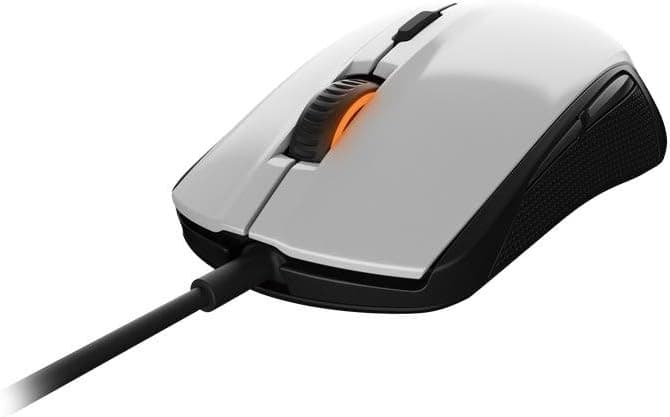
The SteelSeries Rival 100 White (model 62335) is a USB wired, entry-level gaming mouse shaped for right-handed users. The short answer: it is a good first gaming mouse or a spare/travel mouse, not a product meant to go head-to-head with today's ultralight FPS models.
The spec sheet lists a 4000 CPI optical sensor, 20G acceleration tolerance, SteelSeries switches rated for 30 million clicks, and 16.8 million color illumination.
There is data behind it too. On Amazon.co.jp it holds 4.3 out of 5 stars from 104 ratings, an 86% positive score (captured June 2026).
That is a stable result for an entry-class product and suggests no widespread design or reliability failure. Keep in mind that 104 ratings is a modest sample, so treat it as less statistically solid than a mainstream product with tens of thousands of reviews.
The Rival 100 line dates back to 2015, making it a long-running product. The flip side is that it lags newer generations exactly where mice have improved most in recent years: weight and sensor generation.
Bought with that understanding, it still delivers good value.
Compatibility Guide
Connection is USB wired only. There is no wireless, Bluetooth, or USB-C option, and the cable is not detachable.
Any PC, laptop, or console with a USB port recognizes it as a standard HID mouse with no driver installation, and it works across Windows, macOS, and Linux for basic left/right click, wheel, and side-button input.
Illumination colors, button remapping, and CPI step customization require the SteelSeries Engine software. This is where people actually get stuck, so note the following before buying.
- On Mac and Linux, configuration software support may not match Windows. The safest workflow is to configure once on a Windows machine, save to onboard memory, and use it elsewhere.
- On consoles, whether a mouse works depends on the title and the console's own input support. "Plugs in and is detected" is not the same as "works in game."
- Through a USB hub it generally works, but a cheap hub with unstable power can cause LED flicker or tracking hiccups. If something feels off, plug directly into a motherboard port first to isolate the cause.
| Item | Spec | What to weigh |
|---|---|---|
| Connection | USB wired | Consider a mouse bungee if cable drag bothers you |
| Max CPI | 4000 | Plenty for 1080p/1440p; may feel limited for fast 4K desktop work |
| Acceleration | 20G | Comfortably beyond normal gameplay motion |
| Click durability | 30 million | Several years of heavy daily clicking as a rough guide |
| Handedness | Right-handed ergonomic | Not for left-handed or ambidextrous preferences |
These are manufacturer figures. How it actually feels depends heavily on grip style (palm, claw, fingertip) and hand size, so checking the physical size in person is the fastest way to decide.
Product Info
Pricing was ¥7,700 on Amazon.co.jp as captured on 27 August 2026 (the same ASIN also showed ¥7,700 when captured on 1 June 2026).
Prices move often with stock and sales, so always check the current figure on the product page. Because this is a long-running model, new stock can thin out and prices can drift upward at times.
Separately, an eBay listing recorded $85.97 (captured 15 July 2026).
For an entry-class wired mouse that figure is an obvious order-of-magnitude outlier — likely import shipping, scarcity markup, or a data collection error. This article does not treat it as a real market price.
There is generally no reason to import this mouse; buying the domestic retail version is the sensible route.
The box includes only the mouse and a quick-start guide — no spare skates or extension cable. Warranty on the official domestic version is handled through the distributor, so confirm the warranty period and contact point on the listing you buy from (parallel-import units often lose domestic warranty coverage).
On reviews, as noted: 4.3/5 from 104 ratings, 86% positive (captured June 2026).
For an entry model that is a solid, stable score, and it reads as a product praised on the "well built for the money" axis.
How It Compares
There are many newer wired mice at this price. Three axes matter.
Weight. Modern gaming mice cluster in the 60–70g range.
The Rival 100 was not designed in the ultralight era, so it will feel heavy if you are coming from one. Conversely, if you dislike mice that feel too light to stop precisely, that extra mass is a feature.
Sensor. A 4000 CPI ceiling looks modest next to current 20,000–26,000 DPI parts.
But the CPI ceiling has almost nothing to do with real performance — most FPS players sit between 400 and 1600 CPI. 4000 is more than enough in practice, and choosing by the biggest number leads to bad decisions.
Shape. It is an asymmetric right-handed ergonomic shell on the smaller side.
Large hands palm-gripping it may find the pinky side runs out of mouse, while smaller hands and claw grips tend to fit well. This is the most individual-dependent factor.
In short: if lightness, wireless, or a latest-gen sensor top your list, look elsewhere. If you want a straightforward shape and a dependable wired connection cheaply, this still works.
Setup Tips
Do three things right after unboxing. First, lower the CPI to suit your game — leaving it high makes the cursor feel jumpy, which people often misread as a faulty sensor.
Second, turn off Enhance pointer precision (mouse acceleration) in Windows; that is essential to get honest sensor behavior. Third, use a mousepad — optical sensors are most consistent on cloth.
The 16.8 million color lighting is cosmetic, not functional.
Since the mouse is not battery powered there is no real cost to running it, but if it is too bright in a dark room, dim it or turn it off.
Best Use Cases
This mouse is an easy recommendation for:
- First-time gaming mouse buyers — you get onboard memory and CPI switching at a price where a mistake does not hurt.
- Right-handed claw or small palm grippers — the shape is straightforward and does not demand an unusual hold.
- Experienced players who want a spare or travel unit — wired means no charging or pairing, and it is an excellent known-good mouse for troubleshooting.
- People who dislike ultralight mice — a reasonable landing spot if the 50g trend never clicked for you.
- White-themed desk builds — white gaming mice are relatively scarce, which is a practical advantage here.
Before You Buy
This is the most important section. If any of the following applies, you will be happier with a different product.
Not recommended for competitive FPS players. This is a 2015 design; weight, cable flexibility, and sensor generation all trail current FPS-focused models.
If you are seriously chasing rank, a newer lightweight mouse in the same budget is the better call.
Left-handed and ambidextrous users should skip it. The right-handed ergonomic shell simply does not fit a left hand.
Large hands, take care. This is a smaller mouse.
Palm-gripping it with big hands can leave fingertips floating and the clicks feeling far away. Size is hard to judge from a spec table, so compare against a mouse you already own if you cannot try one.
Do not expect wireless. It is USB wired only, and the cable is fixed. It will not satisfy a cable-free desk goal.
Judge the price carefully. ¥7,700 as of August 2026 is not a bargain given the product's age and class.
Newer wired mice are within reach at the same budget, so if the price is running high, waiting is a rational move. And as noted, the high overseas marketplace listing ($85.97) should not be used as a reference price.
Watch the listing details. Store listings sometimes merge color variants, different model numbers, or different generations, so the displayed price or specs may not match the item you want.
Before ordering, confirm "white" and "62335" in the product images and title yourself. This series has color and revision variants, so skipping that check means finding out after delivery.
Check the warranty terms. Support differs between domestic retail units and parallel imports.
Reading the seller, fulfillment, and warranty lines before buying makes a big difference if you hit a defect.
FAQ
Q. Can I use it without installing software? A.
Yes. Plug it in and it works as a standard mouse.
You only need SteelSeries Engine for lighting colors, button remapping, and detailed CPI configuration.
Q. Is 4000 CPI enough? A.
For nearly everything, yes. Most FPS players use 400–1600 CPI, and a higher ceiling rarely helps.
You may want more only for fast cursor travel on a 4K desktop.
Q. Can left-handed users use it?
A. Physically yes, but it is not recommended — pick an ambidextrous shape instead.
Q. Does it work on a Mac? A.
Basic operation is fine. Configuration software support varies, so for detailed customization it is safest to write settings on a Windows machine first.
Q. How long do 30-million-click switches last? A.
It is a rated figure, but even at 10,000 clicks a day it points to years of use. Dust and unit variance matter in practice, so treat it as a reference, not a guarantee.
Q. Is it still worth buying today? A.
For a first mouse, a spare, or a white-themed build, yes. If you want front-line performance for competitive play, a newer generation at the same budget will satisfy you more.
Product Disclosure (Amazon)
- Manufacturer: SteelSeries
- Seller: TRINET【適格請求書発行事業者】
- Fulfilled by: Amazon
- ASIN: B015WKY1AW
- Note: This article covers a manufacturer-made product based on Amazon listing details.