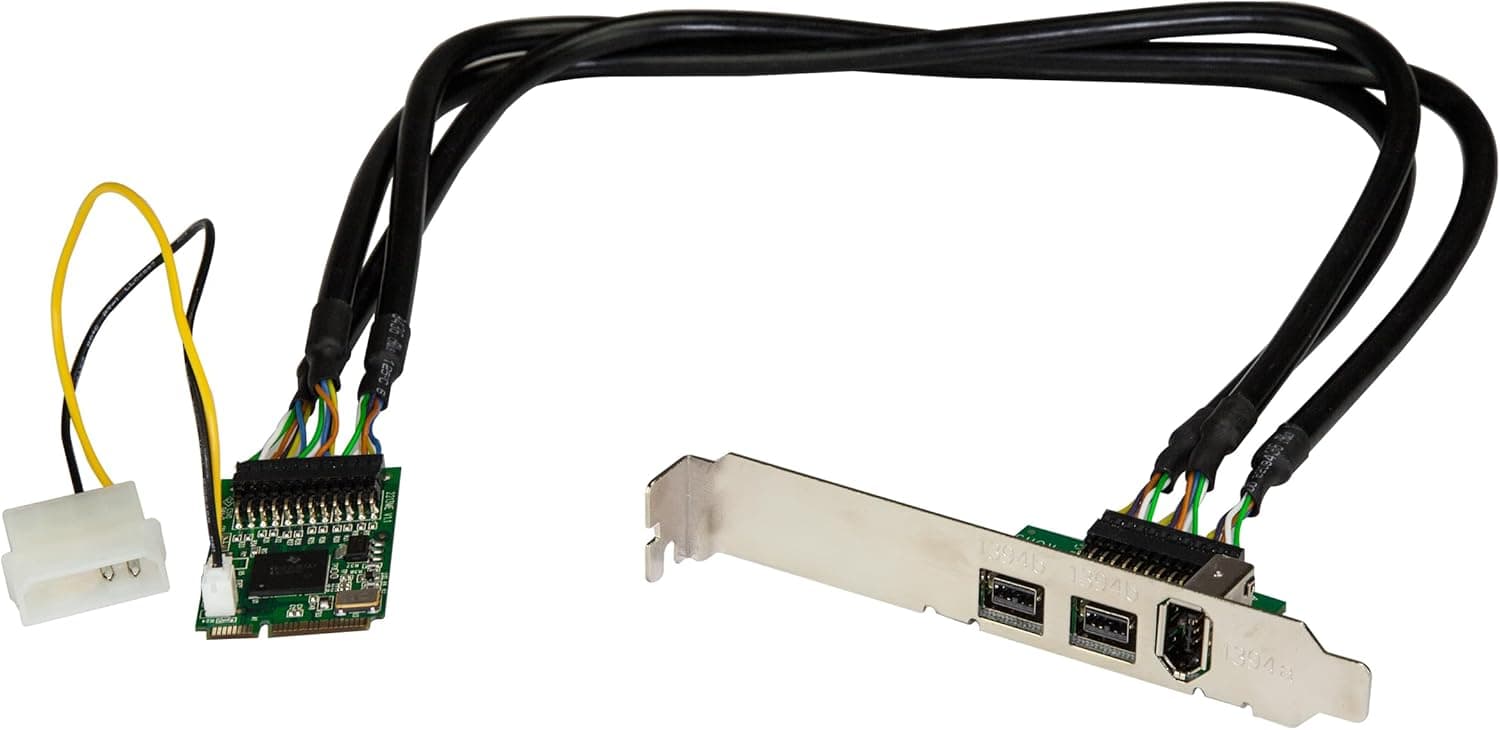
This article covers StarTech.com IEEE 1394b x2.
Overview
The StarTech.com MPEX1394B3 is a Mini PCI Express expansion card that adds FireWire connectivity to compact systems. It provides two FireWire 800 (IEEE 1394b) ports and one FireWire 400 (IEEE 1394a) port, supporting data transfer rates up to 800 Mbps. This card is designed for small-form-factor PCs, Mini-ITX builds, and embedded systems where a full-size PCI Express card won't fit. With plug-and-play and hot-swap support, it's a practical solution for connecting external storage, audio interfaces, and video capture devices to systems that lack native FireWire ports.
Connectivity & Compatibility
The MPEX1394B3 complies with PCI Express Mini Card specification 1.2 and installs into a full-size Mini PCIe slot. It's important to verify that your motherboard has an available full-size Mini PCIe slot, as half-size slots won't accommodate this card without an adapter. External connectivity includes two 9-pin FireWire 800 ports and one 6-pin FireWire 400 port. The FireWire 800 ports are backward compatible with IEEE 1394a-2000 and 1394-1995 standards, so legacy devices can be connected. For high-power FireWire peripherals, an optional external power connector can be added. Windows is the primary supported OS, with most systems recognizing the card using built-in drivers. However, it's wise to check StarTech.com's compatibility documentation before purchasing, especially if you plan to use the card with macOS or Linux.
Product Info
The StarTech.com MPEX1394B3 is a niche product that converts a Mini PCIe slot into three FireWire ports. It comes with a 2-year warranty and lifetime free technical support from the manufacturer. In the market, this card occupies a specialist position — it's one of the few Mini PCIe FireWire expansion options available. For users with compact systems that need FireWire connectivity, it's often the only practical choice. The package includes only the card itself. A low-profile bracket and external power cable are not included, so check your system's requirements before ordering.
Best Use Cases
- Mini-ITX and small-form-factor PC builders who need FireWire for audio interfaces or external drives. If your motherboard has a spare Mini PCIe slot, this card adds the ports you need without requiring a full-size PCIe slot. 2. Users with legacy FireWire peripherals — such as video cameras or capture devices — who want to keep using them with a modern PC. Since new motherboards rarely include FireWire, this card provides a bridge to older equipment. 3. Engineers and integrators working with embedded systems or industrial PCs that require FireWire device control. The card's compact size and hot-swap support make it suitable for deployment scenarios. If you don't own any FireWire devices, this card offers no benefit over USB or Thunderbolt alternatives. Also, if your PC lacks a Mini PCIe slot entirely, this product won't work for you.
Things to Consider
This card is exclusively for Mini PCIe slots — it cannot be installed in standard PCIe x1 or x16 slots found on most desktop motherboards. Before purchasing, confirm that your system has an available full-size Mini PCIe slot, as many laptops use theirs for Wi-Fi cards. Pay attention to connector types: the FireWire 800 ports use 9-pin connectors, while the FireWire 400 port uses a 6-pin connector. If your devices use 4-pin FireWire 400 cables, you'll need separate adapters. Driver support should be verified in advance. While Windows 10/11 typically recognizes the card with native drivers, macOS and Linux compatibility isn't guaranteed. Additionally, if you plan to use the optional external power feature, you'll need to source the appropriate power adapter separately. ## FAQ
Q: Can I install this card in a standard PCIe slot on a desktop PC? A: No. This card is designed exclusively for Mini PCIe slots. It won't physically fit into standard PCIe slots, so you need a motherboard with an available Mini PCIe slot. Q: Will my FireWire 400 devices work with this card? A: Yes. The FireWire 800 ports are backward compatible with IEEE 1394a-2000 and 1394-1995 standards. However, devices using 4-pin connectors will require a conversion adapter. Q: Can I use this card in a laptop? A: It's possible if your laptop has an available full-size Mini PCIe slot, but physical clearance may be an issue. Many laptops use their Mini PCIe slot for Wi-Fi, so check for an empty slot before purchasing.
Product Disclosure (Amazon)
- Manufacturer: スターテック(STARTECH.COM)
- Brand: StarTech.com(スターテック)
- Seller: Amazon US
- Fulfilled by: Amazon US
- Model: MPEX1394B3
- ASIN: B004NNYJ34
- Note: This article covers a manufacturer-made product based on Amazon listing details.