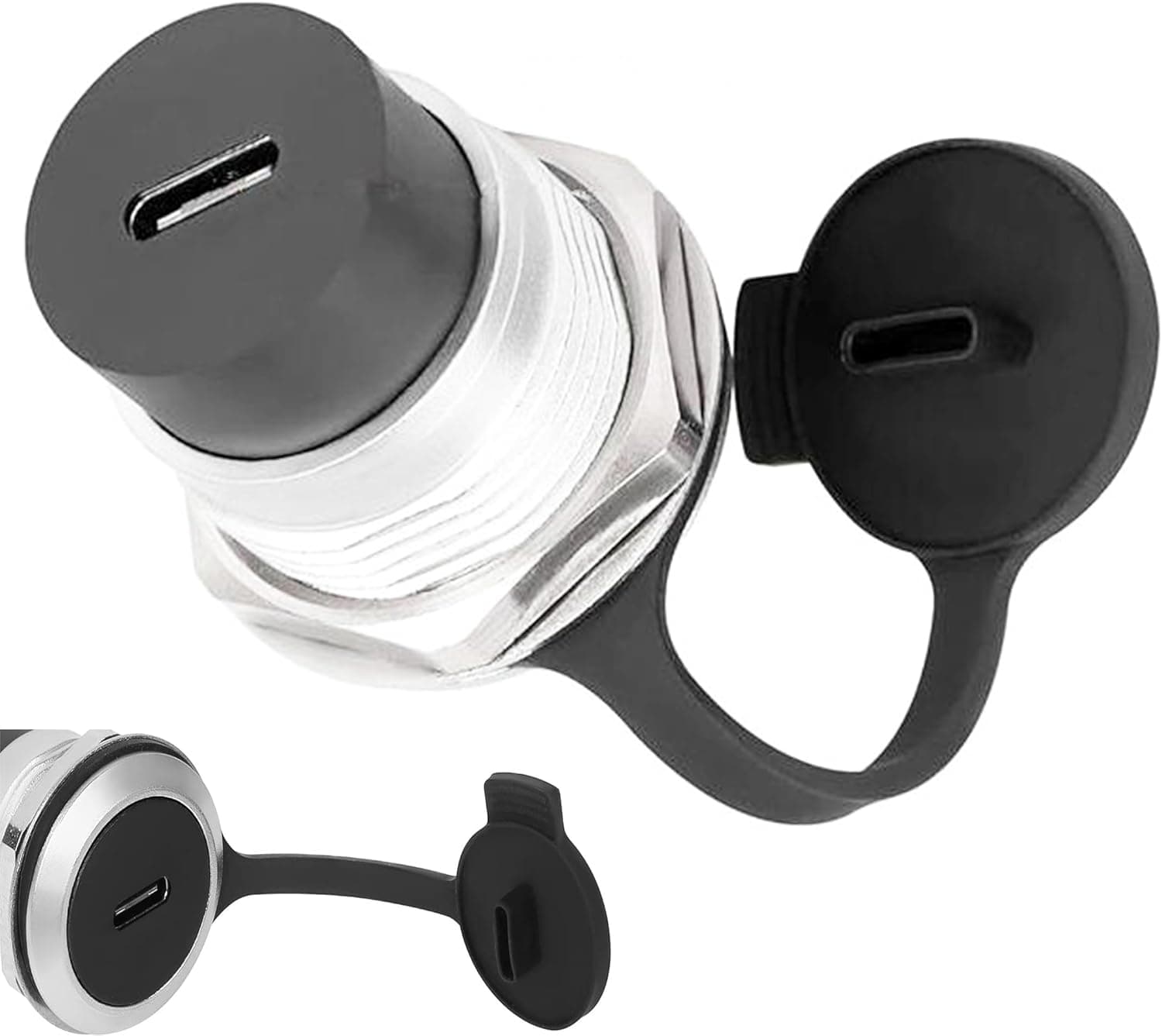
The SHANFEILU USB 3.1 Type-C screw-type recessed panel mount adapter is not a desktop dongle.
It exists so you can build a USB-C port permanently into a wall, an enclosure, or a rack panel. That changes what matters when you evaluate it, so this article focuses on the dimensional and protocol constraints you need to check before you drill anything.
Overview
This is a USB Type-C female-to-female coupler packaged as a panel mount part, secured with an M22×1.5 nut.
It is rated for USB 3.1 Gen2, with a claimed maximum of 10Gbps data transfer and 4K@60Hz video pass-through.
The finish is silver metallic, and a dust cap plus a lock washer are included.
It suits permanent integration into fixtures and interiors rather than temporary desk-side extension. Intended mounting targets include Type 86 panels, floor boxes, stage boxes, distribution frames, and wall boxes, with applications spanning KTV systems, stage audio, home theaters, cinemas, smart automation, and low-current engineering installations.
If you are not drilling a hole and fastening it to a panel, there is little reason to choose this part.
Compatibility Guide
Electrically it is simple. It works with any device that has a USB Type-C port — laptops, smartphones, tablets — and it is backward compatible with USB 3.0 and USB 2.0.
The coupler passes signals through rather than converting them, so only the capabilities both connected devices already support will work.
This is the most misunderstood point. The 10Gbps figure requires the host, the peripheral, and both cables on either side to be USB 3.1 Gen2.
Insert one USB 2.0 cable and the link drops to 480Mbps.
The same applies to 4K@60Hz: the host must support DisplayPort Alt Mode and the display must accept it. The coupler does not add video capability.
Physical fit comes down to three things. First, the φ23mm mounting hole — you need to be able to cut a clean round hole of that diameter.
Second, the M22×1.5 nut: if the panel is too thick, the threaded section may not engage, so check the thread length on the product page before mounting to thick metal.
Third, rear clearance. Even a recessed design needs room behind the panel for the connector and cable bend radius; too little depth and the cable kinks, which eventually causes breakage.
| Check | Value | If you skip it |
|---|---|---|
| Hole diameter | φ23mm | Too small won't fit; too large rattles |
| Nut | M22×1.5 | Thick panels may not let the nut engage |
| Standard | USB 3.1 Gen2 / 10Gbps | A Gen1 link caps you at 5Gbps |
| Video | 4K@60Hz | No DP Alt Mode host means no picture |
| Rear depth | Measure it | Kinked cable, intermittent contact |
No maximum wattage figure is provided in the available data. If you plan to pass high-power PD charging through it, confirm the supported wattage on the product page rather than assuming.
Installation Notes
The work is straightforward, but mistakes are not reversible. Measure panel thickness and rear depth first, then cut the φ23mm hole with a hole saw or step drill.
PVC and thin plastic panels crack easily, so run at low speed with a backing board.
Insert the body from the front, seat the lock washer, and tighten the nut. Skipping the washer in a vibrating environment lets the port rotate loose within months, twisting the internal wiring.
On stages, in vehicles, or near industrial machinery, always use it. Hand-tight plus a small additional turn is enough — over-torquing with tools risks damage.
Fit the dust cap when the port is idle. In dusty facilities this alone extends contact life meaningfully.
Attach it last so you don't lose the small part during installation.
Product Info
The specifications are: USB Type-C female-to-female connector, USB 3.1 Gen2, up to 10Gbps, 4K@60Hz video output, φ23mm mounting hole, M22×1.5 fastening nut, silver finish, with a dust cap and lock washer included.
That covers everything the install needs — no extra hardware to buy.
The listed price was ¥6,977 (tax included) as captured on 29 May 2026. Panel mount USB-C couplers are a low-volume category, so unit prices run higher than generic adapters, but roughly ¥7,000 makes clear this is not a budget purchase.
Prices move with sales, exchange rates, and stock, so check the current figure on the product page. The overseas marketplace listing has no fixed price and varies by seller.
The seller and fulfiller are both gg77store, and the ASIN is B0DB8T14HC. The manufacturer, SHANFEILU, matches the product covered here.
How to Read the Ratings
As captured on 29 May 2026, the product sits at 2.9 out of 5 stars across 5 reviews.
Honestly, five reviews guarantee almost nothing statistically — one negative entry moves that average by half a star. Concluding "2.9 means it's junk" is as wrong as dismissing the score entirely.
Still, a sub-3 average is a good reason to read the actual review text before buying. Typical complaints on parts like this are lower-than-expected speed (usually because a cable or device was Gen1), thread length not matching panel thickness, and unit-to-unit variation in connector retention.
The first two are spec misreadings you can avoid; the third is luck. For a permanent install in a hard-to-reach spot, buying a spare is a reasonable hedge.
Comparison With Alternatives
A desktop USB-C coupler and a panel mount coupler are different products despite the same connector. Desktop couplers cost a fraction as much and are fine for extending a cable on a desk, but they have no fastening mechanism, so wall mounting means tape or adhesive and the part shifts every time you plug in.
For permanent installation there is essentially no alternative to a panel mount part. The decision reduces to two questions: are you allowed to drill this surface, and will the installation stay in service for years?
If either answer is no, a cheap coupler or a short USB-C extension cable is the rational choice. If both are yes, the price is reasonable payment for a clean, durable result.
Best Use Cases
It fits retail counters, offices, and reception desks where you want a built-in USB-C port that matches the interior. It also suits home theaters and meeting rooms where cables should run inside the wall with only the connector face visible.
It is equally aimed at factories, medical sites, stages, and vehicles — anywhere dust and vibration threaten connection stability. The screw fastening, lock washer, and dust cap were designed for exactly those conditions.
For ordinary desk work where you just want a slightly longer cable, both the price and the installation effort are overkill.
Before You Buy
The biggest pitfall is expecting the adapter itself to make anything faster. Both 10Gbps and 4K@60Hz depend entirely on the devices and cables at each end.
If your existing setup tops out at USB 3.0, adding this coupler leaves you at 5Gbps.
Next, signal degradation. USB 3.1 Gen2 at 10Gbps is sensitive to signal quality, and inserting an extra connector pair is always a disadvantage compared with a direct connection.
With long cables on either side, the link may negotiate down or become unstable. Keep the cables short and explicitly Gen2-rated.
For long runs, an active optical cable is a more reliable answer than a coupler.
Remember that drilling is irreversible. Holes in rented walls, leased fixtures, or borrowed equipment become restoration liabilities.
Skipping the panel-thickness and rear-clearance measurements always comes back as a nut that won't engage or a cable that kinks.
Be cautious about power delivery. No wattage rating is documented in the available data, so verify the supported wattage and e-marker handling on the product page before running laptop-class PD charging through it.
Finally, a note on the listing itself. The price data for this product carried an "Amazon US" label while quoting a yen figure — a metadata inconsistency.
E-commerce listings are often assembled automatically, so seller names, regional labels, and related items can drift from reality. Confirm the product image, the title, and the connector shape (USB-C female to female) yourself, and watch for size or shape variations selectable within the same listing.
FAQ
Q. Will it really hit 10Gbps? A.
Only if the host, the peripheral, and both cables are all USB 3.1 Gen2.
Any Gen1 or USB 2.0 element in the chain sets the ceiling, and the extra connector pair makes conditions stricter than a direct link.
Q. Can I always use it for video? A.
It is specified for 4K@60Hz pass-through, but whether you get a picture depends on the host supporting DisplayPort Alt Mode. The coupler adds no video capability of its own.
Q. What tools does installation need? A.
A hole saw or step drill capable of a φ23mm hole. Reduce speed and use a backing board to avoid cracking the panel.
The included nut and lock washer handle the fastening.
Q. Can I charge through it? A.
USB-C power passes through, but no maximum wattage is documented. Confirm the supported wattage on the product page before using it for high-power PD charging.
Q. Should the 2.9-star rating scare me off? A.
With only 5 reviews, a single entry swings the average heavily. Read the review text to see whether complaints concern speed, dimensions, or unit variation, then decide.
For permanent installs, keeping a spare is sensible.
Product Disclosure (Amazon)
- Manufacturer: SHANFEILU
- Seller: gg77store
- Fulfilled by: gg77store
- ASIN: B0DB8T14HC
- Note: This article covers a manufacturer-made product based on Amazon listing details.