Overview
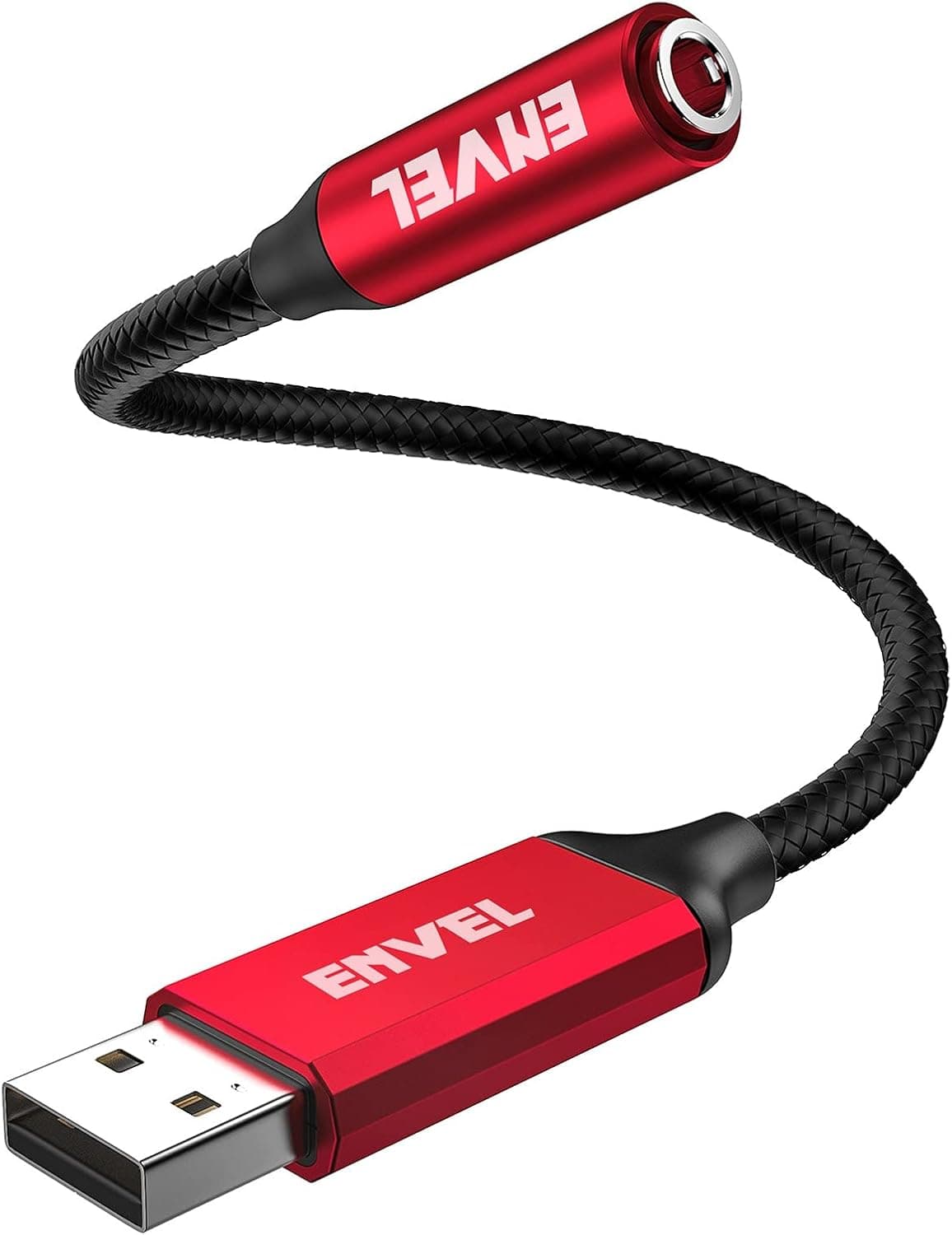
The ENVEL USB Audio Adapter (Senior Red) is an external sound card that turns a USB-A port into a 3.5mm 4-pole (TRRS) jack.
The conclusion first: this is a cheap fix for "my laptop or PS5 has no usable headset jack," not a device that improves sound quality. Getting that backwards is the single most common source of disappointment.
It sits firmly in the entry class. On Amazon.co.jp it was ¥999 as captured on 26 May 2026, with 5,177 reviews averaging 4.1 out of 5 stars (roughly an 82% score).
Both figures are snapshots from that capture date and move with sales and stock, so check the product page for current values. A 4.1 average is genuinely good for a sub-¥1,000 USB dongle, but it also means roughly one buyer in ten expected something else.
The later sections spell out exactly what.
The important detail is the built-in audio chip. This is not a passive wiring adapter — the operating system sees it as a separate sound device, so it bypasses your PC's onboard audio codec entirely.
That is what makes it useful when onboard sound has failed, or when only the built-in jack picks up noise.
Which Jobs It Fits
| Situation | Fit | Why |
|---|---|---|
| Adding a mic input to a laptop | Excellent | 4-pole TRRS carries the headset mic separately |
| PS4/PS5 voice chat | Excellent | Adds audio I/O from a USB port directly |
| Stopgap for a dead onboard sound chip | Excellent | Routes around the failed codec |
| Noise on the built-in jack | Good | May help if the cause is power-rail noise |
| Plain 3-pole headphones | OK | Works, but nothing here justifies the purchase |
| A standalone 3-pole microphone | No | Not supported |
| High-impedance studio headphones | No | Drive strength is not a selling point |
| Better audio quality or recording | No | That is DAC / audio-interface territory |
The value is concentrated in "create a port that isn't there," not "make sound better." If one of the top three rows describes you, ¥999 is well spent.
If a "No" row is your goal, budget for real gear instead.
Compatibility Guide
The connector is USB-A male; the output is a 3.5mm 4-pole TRRS female jack wired to the CTIA standard.
CTIA is the pin order used by nearly all smartphone-style headsets sold today, so a single-plug phone headset will work as-is.
Stated platform support covers Windows 10/11, macOS (including Apple Silicon), Linux, Android, Chrome OS, PlayStation 4 and PlayStation 5. All of these rely on the standard USB audio class driver, which is why no driver download exists or is needed.
The flip side is that devices without class-driver support simply will not work — the listing explicitly excludes PS3, TVs and car audio systems. "It has a USB port, so it should work" is an assumption that fails often with this product category.
The most common incompatibility is a 3-pole microphone. Standalone 3-pole mics and some older headsets are not recognised.
Pull your plug out and count the black insulating rings on the metal shaft: three rings means 4-pole and works; two rings means 3-pole and the mic will not. ENVEL lists a separate Black Pro model for 3-pole setups — it is a different model, not just a colour, so confirm the model name before ordering.
There are physical constraints too. Because the body plugs straight into USB-A, thin laptops and MacBooks with only USB-C need a hub or a C-to-A adapter.
Stacking adapters is a known source of instability with USB audio generally, so prefer a powered hub or a known-good adapter. Also, a body-mounted dongle takes all its strain at the connector root; if you plug and unplug often, running it off a short extension cable on your desk will outlast plugging it directly into the machine.
Setup Steps (Read This If There Is No Sound)
Plug-and-play still means the OS has to switch outputs. Work through this list:
- Windows 11/10: Settings → System → Sound. Confirm the USB device appears under both output and input, and select it in each. Some apps keep their own device setting that overrides the default.
- macOS: System Settings → Sound, then set Output and Input separately — they are independent choices.
- PS5: Settings → Sound → Audio Output for playback, and the microphone section for input. PS4 is essentially the same. It does not switch away from the controller jack automatically.
- Voice chat apps: Discord and in-game chat store their own device selections. Changing the OS default alone often leaves you inaudible.
Moving the dongle to a different USB port can make the OS treat it as a new device and reset your choices. Pick one port and stick with it.
Product Info
rmation
Published specs are stereo audio output, 4-pole TRRS (CTIA) microphone support, and platform support for Windows/macOS/Linux/Android/PS4/PS5. Sample rate, bit depth and output impedance are not given in the supplied data, so this article will not state them; check the product page if those numbers matter to you.
Pricing was ¥999 on Amazon.co.jp as captured on 26 May 2026.
The brand is ENVEL, sold by ENVEL JP and fulfilled by Amazon, ASIN B09244L9CJ. Two colours are listed, Senior Red and Black.
The box contains the adapter only — no extra cables — but since no driver is required, it works straight out of the package. ENVEL states a 12-month warranty from purchase covering initial defects and malfunctions.
One caveat on the data: the "Amazon US" pricing slot carries the same yen figure and an Amazon.co.jp link, so no independent overseas price was captured.
If you are buying from outside Japan, do not read ¥999 as your local price — check availability and cost in your own store.
Reviews stand at 5,177 with a 4.1-star average as of the 26 May 2026 capture.
That is a large sample for a sub-¥1,000 accessory, which makes the average more trustworthy than usual. Remember, though, that review volume proves it sells well, not that it sounds good.
How It Compares
This market splits into roughly three tiers: sub-¥1,000 dongle sound cards (where this product lives), ¥3,000–8,000 USB DACs, and audio interfaces above that.
Within the cheapest tier, nearly everything uses a generic USB audio chip, so you choose on stated platform support, 4-pole wiring and connector shape rather than sound. This model's explicit PS4/PS5 and CTIA 4-pole claims are what make it easy to pick.
Step up to the DAC tier and you get audibly more headroom and a lower noise floor — but only people chasing sound quality need that. Someone who just wants a port has little reason to spend three times more.
If your machine is USB-C only, a native USB-C audio adapter avoids one extra connection point and tends to be more stable than stacking a C-to-A adapter on top of this one. If you want a single dongle shared between a laptop and a console, standardising on USB-A and living with one adapter is a defensible trade-off.
Best Use Cases
The strongest match is laptop users on calls or in games. Modern thin laptops ship with one combo jack or none, which blocks using a headset mic as a separate input.
This adapter adds an independent output/input pair for ¥999.
Second is PS4/PS5 voice chat. The controller's headphone jack is convenient, but it drains the controller and rides a wireless link; plugging into the console's USB port directly is steadier.
Third is emergency duty on a desktop whose onboard audio has died. When only the motherboard's audio section fails, this restores sound without a board swap — an extremely cost-effective bridge until repair.
By the same logic, if the built-in jack has audible noise, changing the signal path can help, provided the cause is power-rail interference.
It is a poor fit for anyone chasing audio quality, driving high-impedance headphones, or recording for music or streaming. Those three belong to the USB DAC and audio interface tiers, not to a ¥999 dongle.
Things to Check Before Buying
Buying the wrong model is the biggest trap. Senior Red and Black are colours, but Black Pro is a distinct model with different handling of 3-pole setups.
Choosing on colour alone can leave you with something that does not match your headset. Count the insulating rings on your plug first — three rings, 4-pole, is what this one needs.
Sound will be different, not necessarily better. It may have less noise than your onboard audio, or more.
A ¥999 external chip carries no guarantee of beating a well-implemented onboard codec, and faint hiss or a modest volume ceiling are ordinary outcomes at this price. Whether you can live with that decides your satisfaction.
A USB port is not a guarantee of support. PS3, TVs and car head units are explicitly excluded.
Devices without USB audio class support will power the dongle and do nothing else. If your device is not on the list, assume it will not work.
The form factor is vulnerable to strain. All the leverage from a cable lands on one point at the connector root, so broken solder joints and intermittent contact are a known risk for this shape in general.
Avoid carrying the machine with it plugged in.
Listing metadata can disagree with itself. In the source data, the "Amazon US" slot holds a yen price with an Amazon.co.jp link — read literally, that is misleading.
The same kind of mismatch shows up in compatibility notes and colour/model options. Cross-check price, colour and model name against both the product images and the title before ordering; do not trust a single field.
Confirm warranty and price assumptions. The 12-month warranty assumes support through the channel you bought from, and third-party marketplace purchases can change that.
The ¥999 figure is from the 26 May 2026 capture — the article does not update itself, but the price does.
FAQ
Q. I plugged it in and there is no sound. Is it broken? A.
Check the OS output device first — Windows: Settings → System → Sound; macOS: System Settings → Sound. Select the new USB device for both output and input.
Apps frequently hold their own device selection, so check in-game and in-call audio settings too.
Q. The microphone is not detected. A.
If your plug is 3-pole (two insulating rings), the mic will not work with this adapter. You need a 4-pole (three rings) CTIA plug.
Older headsets and OMTP-wired models need a separate conversion adapter.
Q. Does it work on PS5? A.
Yes, PS5 is on the supported list. Plug it into a console USB port, then set Settings → Sound → Audio Output for playback and the microphone section for input.
It does not switch over from the controller jack automatically.
Q. Can I use it on a USB-C-only laptop? A.
Only through a USB hub or a C-to-A adapter, since the body is USB-A. Stacked adapters can be unstable, so a native USB-C audio adapter is worth considering instead.
Q. Will my audio sound better? A.
Not the point of this product. It adds a port; it does not upgrade fidelity.
If your built-in jack's noise comes from the power rail, changing paths may help — but ¥999 does not buy good sound. For quality, look at USB DACs or audio interfaces.
Q. Do I need drivers? A.
No. It runs on the standard USB audio class driver on Windows, macOS and Linux.
The trade-off is that devices without class-driver support (PS3, TVs, car systems) will not work at all.
Product Disclosure (Amazon)
- Manufacturer: ENVEL
- Seller: ENVEL JP
- Fulfilled by: Amazon
- ASIN: B09244L9CJ
- Note: This article covers a manufacturer-made product based on Amazon listing details.