Overview
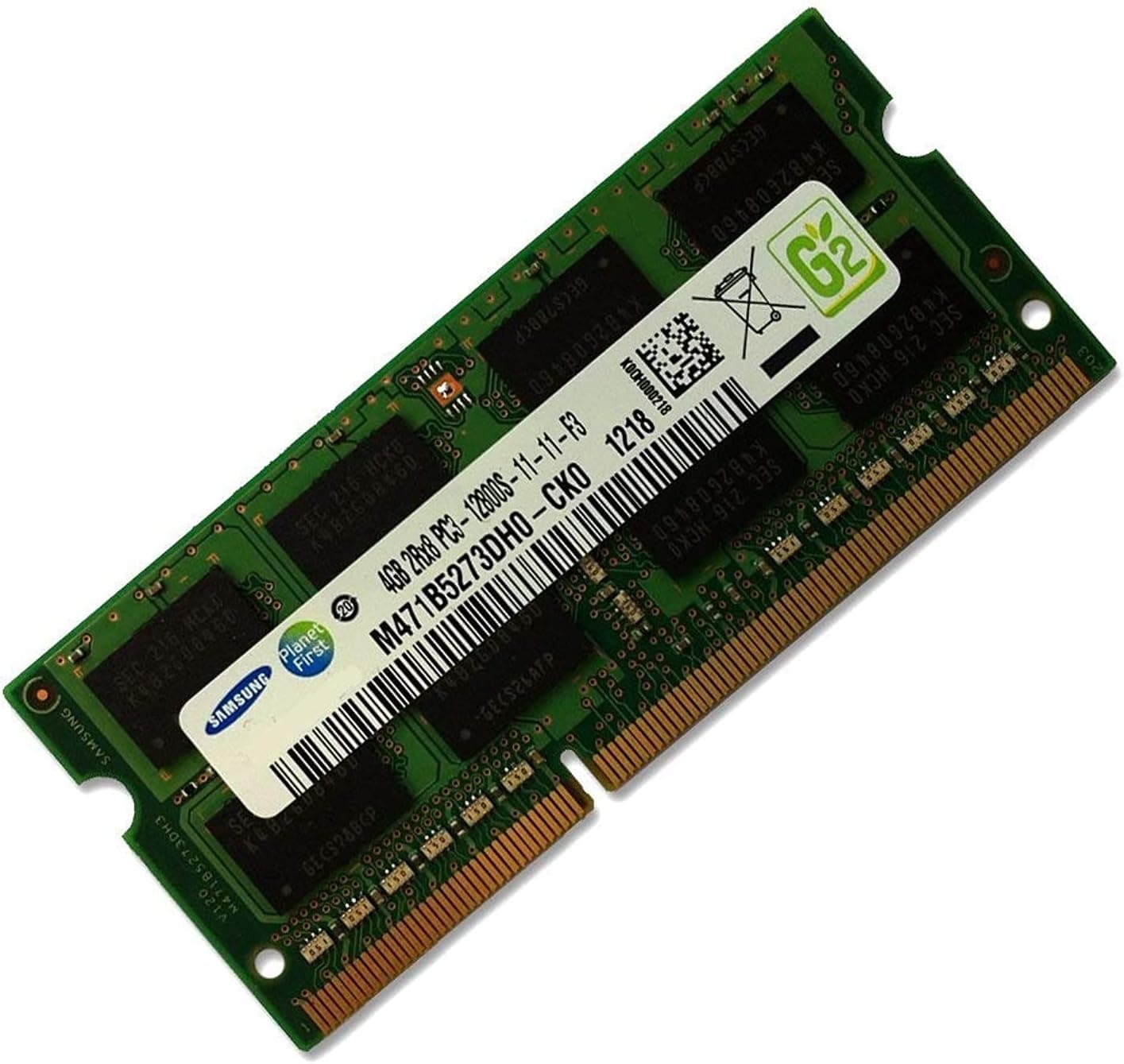
The Samsung 4GB DDR3-1600 (PC3-12800) SODIMM is a 204-pin notebook memory module. To be direct: this is not a part that makes a laptop fast.
It is a part that removes the artificial slowness caused by insufficient RAM on a DDR3-era machine. At roughly ¥2,399 as captured on 2026-05-27 (prices move; check the listing), it is a reasonable thing to try before replacing the whole laptop.
It runs at 1.5V on the DDR3 standard, and it comes from a company that manufactures its own memory chips.
On Amazon.co.jp it carries 4.5 out of 5 stars across 1,249 reviews (90% positive, captured 2026-05-27).
Read the pattern behind that score and it is mostly "cheap, installed, worked." The negative reports, correspondingly, cluster around voltage and standard mismatches — that is, insufficient checking before purchase.
That is why this article spends most of its length on compatibility.
The right buyer owns a DDR3-generation laptop from roughly 2010–2014 still running on 2GB or 4GB. It has no use in a new build, and none at all in a DDR4 or DDR5 machine.
Compatibility Guide
Memory upgrades fail for four reasons. Clear all four and "it won't fit" or "it won't boot" essentially cannot happen.
| Check | This module | How to verify |
|---|---|---|
| Form factor | SODIMM, 204-pin | Notebook only; not physically compatible with desktop DIMMs |
| Standard | DDR3-1600 (PC3-12800) | DDR2/DDR4 slots have different notch positions and won't accept it |
| Voltage | 1.5V | May not work in DDR3L (1.35V)-only systems |
| Systems | DOS/V notebooks | Confirm your model's max capacity and slot count first |
1. DDR3 versus DDR3L is the real hurdle. The two share a connector, so a 1.5V module physically seats in a DDR3L slot.
This is exactly why "it went in but won't POST" or "it boots but the RAM isn't detected" happens. Controllers designed for DDR3L often tolerate 1.5V modules, but the reverse is not guaranteed.
Thin ultrabooks and power-conscious Haswell-era notebooks are frequently DDR3L-only. Check your model's service manual or the manufacturer's spec page rather than trusting a marketplace listing.
2. Confirm maximum capacity and slot count. Some DDR3 laptops have one slot, some have two, and plenty cap out at 8GB total because of the CPU or chipset.
If you have a free second slot, this module is a pure addition. If there is only one slot, you are replacing what is already there — and if that is already 4GB, you gain nothing.
Skipping this check is how people end up saying "I upgraded and nothing changed."
3. Mixed speeds run at the slower clock. Add this DDR3-1600 module alongside an existing DDR3-1333 stick and both run at 1333.
That is correct behavior, not a fault. The clock difference is negligible next to the impact of simply having enough memory.
4. Matching capacities help. An existing 4GB plus this 4GB usually enables dual-channel operation, which also benefits integrated graphics.
Asymmetric pairs like 4GB + 8GB still work, but only the matched portion runs dual-channel.
Product Info
The listed price was ¥2,399 on Amazon.co.jp as captured 2026-05-27, and a marketplace listing on eBay US showed $15.00 as captured 2026-07-09.
Both are point-in-time figures. Memory of this vintage swings with used-market supply, so always check the current price on the listing itself.
DDR3 production has wound down, and per-gigabyte cost can be worse than newer standards.
Specifications: 4GB capacity, DDR3-1600 (PC3-12800), 1.5V operation, aimed at DOS/V notebooks.
CAS latency, rank configuration, and single- versus double-sided layout can vary between individual listings, so check the module photo and label if your system is fussy about such things.
The review count — 1,249 with a 4.5-star average as of 2026-05-27 — is high enough to reflect a real trend rather than a handful of lucky buyers.
A first-party chip manufacturer is also meaningful reassurance compared with unbranded bulk modules.
What an Upgrade Actually Changes
The benefit of more RAM is fewer trips to swap. When physical memory runs out, the OS pages to storage, and on a mechanical hard drive that becomes crippling latency.
Going from 2GB to 4GB, or 4GB to 8GB, visibly smooths tab switching and app switching for this reason alone.
What does not change is equally clear. CPU throughput, storage speed, and GPU performance are untouched.
If you are buying this hoping for faster video encoding or higher frame rates, you will be disappointed. Adding memory to a system that already has enough changes nothing at all.
An upgrade fixes a deficit; it does not stack on top.
For DDR3-era laptops, the best value is usually RAM plus an HDD-to-SSD swap together. If the budget allows both, the machine feels genuinely different.
If you add memory and it still feels sluggish, the bottleneck is almost certainly storage.
Installation Notes
The job is easy; static electricity and the retention clips are the only real risks. Power down, remove the battery (or fully shut down and unplug on sealed models), and open the memory hatch.
Ground yourself on bare metal, align the module notch with the slot key, insert at roughly 30 degrees until fully seated, then press it flat until both clips latch. Never force it in flat, and don't touch the gold contacts.
After booting, check the recognized capacity in Task Manager's Performance tab or System Information. If it reads low, the causes are an incompletely seated module, a chipset capacity ceiling, or a 32-bit OS (which can address only about 3.2GB).
Best Use Cases
- Anyone stretching a DDR3 laptop another year or two. At around ¥2,399 as of May 2026, deferring a replacement is easy to justify.
- Anyone with two slots and one of them empty. You keep the existing module and gain dual-channel operation — the best-value scenario by far.
- Secondary, test, or family machines. Systems that don't warrant real money but are too slow to tolerate.
- Buyers avoiding unbranded bulk RAM. A first-party module with 1,249 reviews at 4.5 stars (captured May 2026) is an easy first upgrade.
Things to Consider
4GB is not a 2026 baseline. With a dozen browser tabs, Office, and a chat client resident, even 8GB total is not generous.
The correct reason to buy this is to raise a total, not to land on 4GB. Adding it to an existing 4GB for 8GB total is the realistic case; buying it to reach 4GB total means accepting that memory pressure will likely remain.
Consider whether the machine deserves the investment. DDR3 laptops are over a decade old.
Batteries, hinges, keyboards, and storage are all approaching their limits at the same time. Spending ¥2,400 on RAM and another ¥5,000–8,000 on an SSD only to have the battery or board fail six months later is a common outcome.
If the chassis already feels tired, replacement may be cheaper overall.
Who should not buy this: owners of DDR3L-only systems; owners of DDR4/DDR5 laptops; anyone upgrading a desktop (wrong form factor entirely); and anyone hoping to make video editing or 3D gaming comfortable on DDR3-era hardware, where the CPU and GPU are the real limits.
A note on listing metadata. Modules like this are often sold by multiple third-party sellers on a shared product page, and the data gathered for this article showed inconsistent seller attribution (the same listing appearing under both domestic and overseas price slots at an identical price).
If the seller name, part number, or capacity on the page doesn't match what you expect, trust the product image, title, and seller identity over the registered metadata. Used, bulk, and parallel-import stock mixes freely in this category, so read the return and warranty terms before ordering.
Finally, handle it carefully. Memory is static-sensitive, and forcing a module in at an angle damages the slot clips or the PCB.
If you're not confident, a shop installation service is money well spent.
FAQ
Q. Can I use it in a DDR3L-only laptop? A.
Not recommended. It will physically seat because the connector is identical, but a system designed strictly for 1.35V may fail to POST or fail to detect it.
Check whether your model specifies DDR3 or DDR3L.
Q. Can I mix it with a different-speed module? A.
Generally yes; both will run at the slower clock. It works in most systems, but it isn't a manufacturer-validated pairing, so occasional incompatibility is possible.
Matched pairs are safest.
Q. Will it work in a desktop PC?
A. No. This is a 204-pin SODIMM; desktops use 240-pin DIMMs with a different physical shape.
Q. Will adding this give me 8GB? A.
Only if you have a free second slot and your model supports at least 8GB total. Single-slot machines require replacing the existing module, so the total stays at 4GB.
Q. Will games run better? A.
If stuttering came from memory pressure, yes. If the GPU or CPU is the limit, no.
Modern titles will not become playable on DDR3-era hardware through a RAM upgrade.
Q. Does it help on 32-bit Windows? A.
Barely. A 32-bit OS addresses only about 3.2GB, so anything above that is unused.
A 64-bit OS is a prerequisite.