Overview
The Redragon M818-STD is a wireless gaming mouse that pairs a 58 g ultralight shell with triple-mode connectivity (Bluetooth, 2.4 GHz, USB-C wired) at a sub-¥10,000 price point.
Its spec sheet lists a PixArt PAW3311 sensor rated up to 24,000 DPI, a 1,000 Hz polling rate, 75 hours of battery life, and six programmable buttons. The short version: this is a good fit for anyone who wants light weight and wireless flexibility and can live with the 1,000 Hz ceiling.
That also means it is not meant to be judged against current flagships built around 4,000 Hz or 8,000 Hz polling. On Amazon.co.jp it holds 4.2 out of 5 stars from 95 reviews (84% positive, as captured on 24 May 2026) — a small sample, but a steady one.
This article looks at what the spec numbers actually mean in daily use and where you end up compromising.
Spec Cheat Sheet
| Item | Value | What it means in practice |
|---|---|---|
| Weight | 58 g | Close to high-end ultralights in the low 50 g range |
| Sensor | PixArt PAW3311 | Mid-tier; more than adequate for normal gaming |
| Max DPI | 24,000 | Most players actually run 800–1,600 |
| Polling rate | 1,000 Hz | 1 ms theoretical interval; competitive flagships go 4,000 Hz+ |
| Connectivity | Bluetooth / 2.4 GHz / USB-C | 2.4 GHz for games, Bluetooth for desk work |
| Battery | 75 hours | Roughly three weeks at three hours a day |
| Buttons | 6 | Standard layout: two main, wheel, two side, DPI toggle |
The most misread figure here is max DPI. 24,000 is a ceiling, not a usable setting — almost nobody plays there.
At 1080p or 1440p, 800–1,600 DPI is the normal operating range, so treat the DPI number as a marketing spec. The two figures that genuinely drive your decision are the 58 g weight and the 1,000 Hz polling rate.
Compatibility Guide
The officially stated OS support is Windows and macOS, both plug-and-play with no driver installation required. The 2.4 GHz mode uses a bundled USB-A dongle, so a laptop or thin Mac with only USB-C ports will need an adapter or hub.
This is the single most common "found out after buying" issue with ultralight wireless mice in general.
Bluetooth is the fallback for machines where you cannot plug in a dongle, and it works with any Bluetooth-capable device, including tablets and secondary machines. By protocol design, though, Bluetooth trails a dedicated 2.4 GHz link in both latency and connection stability.
Plan on 2.4 GHz for shooters and Bluetooth for browsing and office work.
If your plan is to play competitive titles over Bluetooth only, that is a poor idea with any mouse, not just this one.
USB-C wired mode lets you charge while playing, so a dead battery mid-match is a recoverable problem rather than a session-ender. Over time, how stiff the bundled cable feels matters more than people expect; if it bothers you, a third-party paracord cable is an easy fix.
Support outside Windows and macOS (Linux, consoles, Android) is not officially documented, so check the product page first if that matters to you.
Product Info
The listed price on Amazon.co.jp was ¥9,208 as captured on 24 May 2026.
An eBay US listing showed $59.95 as captured on 1 June 2026.
Both move with sales, exchange rates, and sellers, so always confirm the current figure on the product page before buying. It is also worth weighing the seller itself, not just the number, since that determines how easy warranty and defect handling will be.
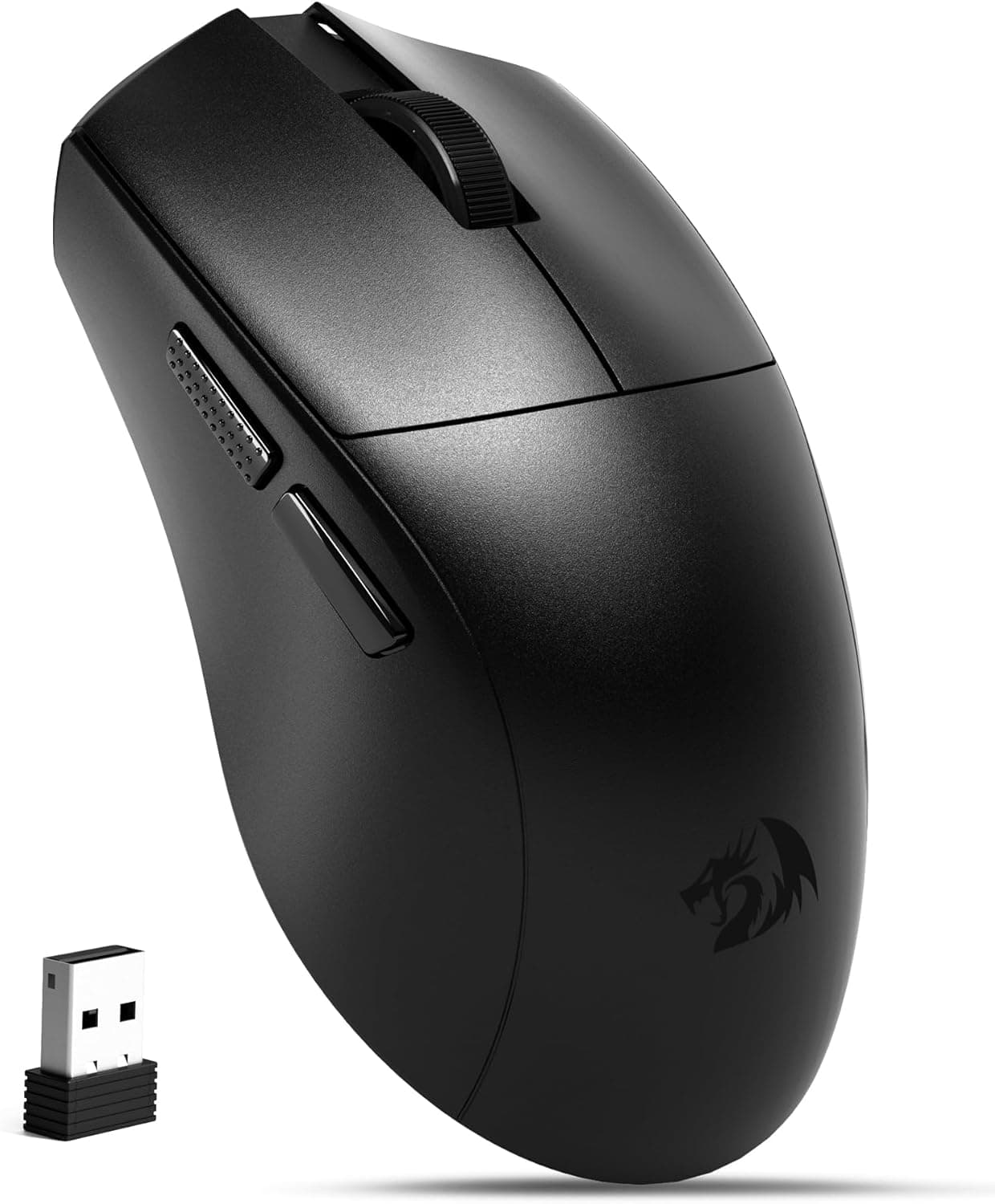
On the hardware side: black is the only color, there are six programmable buttons, and the rechargeable battery is rated at 75 hours. The box includes a USB-C charging cable, the 2.4 GHz dongle, and a manual.
A standard one-year manufacturer warranty is stated. Getting both a 58 g shell and three connection modes at this price is genuinely strong, and that combination is the whole value proposition.
Ratings sit at 4.2 out of 5 from 95 reviews (captured 24 May 2026).
That is a modest sample, so reading the low-star reviews yourself beats trusting the average. Ultralight mice tend to split opinion less on build quality than on how the shell fits a given hand, and a star rating cannot capture that fit.
How It Compares
The ultralight category also includes competition-focused models like the roughly 52 g Pulsar X2H Mini and the 54 g Razer Viper V3 Pro. Those ship with higher-tier sensors (PAW3395, Focus Pro 35K) and dongles that support 4,000 Hz or more, and they are priced accordingly.
With a mid-tier PAW3311 and a 1,000 Hz cap, the M818-STD sits one clear layer below.
Whether you feel that gap depends on you. If you are grinding ranked on a 240 Hz or 360 Hz display, you may perceive the difference between 1,000 Hz and 4,000 Hz cursor behavior.
If you play shooters casually on a 144 Hz panel, 1,000 Hz is entirely practical, and spending the difference on a better mousepad or monitor often changes your experience more than the mouse would.
There is one area where the M818-STD clearly wins: triple-mode connectivity including Bluetooth is exactly the feature competition-focused ultralights usually cut. If you want to buy one mouse and use it on both a gaming desktop and a work laptop, this configuration answers that need in a way the flagships often do not.
What Actually Matters in Use
The 58 g figure pays off less in raw flick speed than in fatigue after long sessions. Low-sensitivity players who move their whole arm feel the benefit most; high-sensitivity fingertip players often struggle to distinguish it from a 70 g mouse.
Look up the weight of your current mouse and work out how many grams you are actually dropping — it keeps expectations realistic.
Two underrated factors are the skates and the click feel. Because the body itself is so light, how the skates glide on your specific mousepad has an outsized effect on feel.
If the stock skates disappoint, aftermarket replacements can transform the mouse for far less than buying another one. Click and scroll feel are highly personal, so handling a similarly shaped mouse in a store first reduces the odds of regret.
Before You Buy
The main compromise is the 1,000 Hz polling ceiling. Recent flagships market 4,000 Hz and 8,000 Hz as headline features, so moving down from one of those may feel like a step back.
Coming from your first gaming mouse or a standard wired mouse, you are very unlikely to find 1,000 Hz limiting. This is precisely what the price gap buys, so decide up front whether you accept it.
The PAW3311 sensor is the other place cost was taken out. It is not a problem for everyday gaming, but expecting the tracking-speed and accuracy limits quoted for top-end sensors would be misplaced.
Likewise, do not buy this because of the 24,000 DPI figure — as noted above, that range is not a setting anyone actually uses.
Hand size and shell shape deserve real attention. Mice in the 58 g class get there through thin or perforated shells, and players with large hands who palm-grip often find them too small and unsupportive.
If your hand is 19 cm or longer and you palm-grip, check the physical dimensions on the product page before ordering. No spec sheet saves a mouse that does not fit your hand.
Finally, a word on listing data. For this product the price entry is labeled "Amazon US" while the link points to Amazon.co.jp — a labeling inconsistency in the collected data.
Shopping listings sometimes carry manufacturer names, model numbers, or accessory lists that do not match the actual product. Before ordering, confirm with your own eyes that the images, title, weight, and connection modes describe the M818-STD.
Variants with different model numbers can exist in the same series, so this check is worth the thirty seconds.
Best Use Cases
The strongest fit is someone who wants to try a serious lightweight wireless mouse for under ¥10,000. At 58 g it stands up next to far pricier models, which makes it a cost-effective way to find out whether ultralight suits you at all.
Learning that here and stepping up later is not wasted money.
Second, people who move between a desktop and a laptop. The three-tier setup — 2.4 GHz for games, Bluetooth on the go, USB-C wired when the battery dies — has real practical value if you want to own just one mouse.
With 75 hours of runtime, daily charging is not part of the routine.
Conversely, competitive players already accustomed to 4,000 Hz or higher, large-handed palm-grip users, and anyone who prioritizes deep profile management and polished software should look at higher-tier options instead.
FAQ
Q. Does a 1,000 Hz polling rate hurt me in FPS games? A.
On a typical 144 Hz display, from casual through semi-competitive play, there is effectively no practical shortfall. Only players on 240 Hz+ who are already used to high-polling-rate mice are likely to notice.
Q. Can I game over Bluetooth alone? A.
Fine for low-stakes titles, but use the bundled 2.4 GHz dongle for competitive shooters or fighting games.
Bluetooth is weaker on both latency and stability.
Q. Will it work on a laptop with no USB-A port?
A. Yes over Bluetooth. For 2.4 GHz you will need a USB-C adapter or a hub.
Q. Is 24,000 DPI a setting people actually use? A.
No. Most players stay between 800 and 1,600 DPI; the maximum is a headline spec, not a working configuration.
Q. Can I play while charging? A.
Yes. Switching to USB-C wired mode lets you charge and play at the same time, so a flat battery never ends a session.
Q. How long does the 75-hour battery really last? A.
At the rated figure, roughly three weeks at three hours a day. Actual runtime varies with lighting and which connection mode you use.
Product Disclosure (Amazon)
- Manufacturer: Redragon
- Seller: Takumido
- Fulfilled by: Takumido
- ASIN: B0FCLXCGXJ
- Note: This article covers a manufacturer-made product based on Amazon listing details.