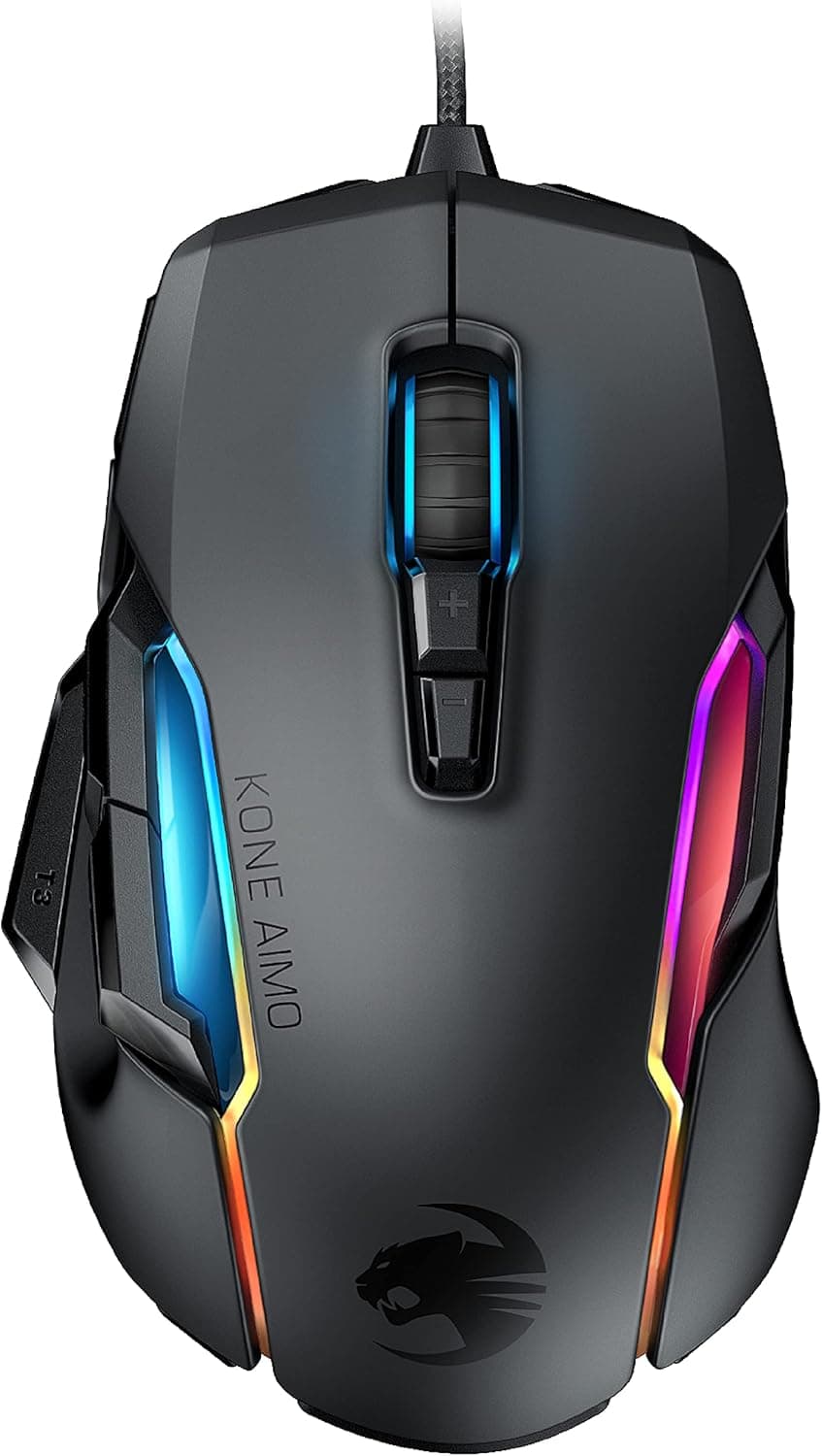
The ROCCAT Kone AIMO Remastered (model ROC-11-820-BK) competes on support, not on speed. At 130 g and 85 × 125 × 40 mm, it is the opposite of today's 50-60 g featherweights: a right-handed shell built for palm grip and for actually using 12 buttons.
If you have large hands, palm-grip, and lean on button binds, it still holds up. If you chase flick speed, it does not.
Overview
ROCCAT is a German peripheral maker, and Kone AIMO is its long-running ergonomic flagship line. This remastered version carries the proprietary Owl-Eye 16K optical sensor with tracking up to 16,000 DPI.
It launched in December 2019 and sits in the mid-to-high tier.
The large right-handed shell is tuned for palm grip rather than claw or fingertip. Twelve programmable buttons and AIMO full-color RGB lighting cover both function and looks, and 512 KB of onboard memory lets you store profiles on the mouse itself and carry them to another PC.
| Question | Answer |
|---|---|
| Weight | 130 g (more than double a lightweight mouse) |
| Size | 85 × 125 × 40 mm (large) |
| Sensor | Owl-Eye 16K optical, up to 16,000 DPI |
| Buttons | 12 programmable |
| Connection | Wired USB-A, ~1.8 m braided cable |
| Onboard memory | 512 KB |
| Amazon rating | 4.4 out of 5 (7,802 reviews, 88% positive) |
On paper, weight is the only visible weakness. Which means your buying decision comes down almost entirely to how you feel about 130 g.
What the Numbers Actually Say
As captured on 9 June 2026, Amazon.co.jp showed 7,802 reviews at 4.4 out of 5 (88% positive).
Above 7,000 reviews, early-batch variance no longer distorts the average, so the score is reasonably trustworthy. A 4.4 in this category usually means "real complaints, none fatal" — and here those complaints cluster around size and weight.
Two quieter specs matter more than the headline DPI: an ARM Cortex-M0 50 MHz MCU and 50 G maximum acceleration. The 50 G figure means the sensor holds up under wide, low-sensitivity swipes.
The 16,000 DPI ceiling, by contrast, is close to meaningless in practice — most players live between 800 and 3,200 DPI, and the ceiling only tells you there is headroom.
How It Compares
Placed next to current bestsellers, the positioning is clear. In an era of lightweight wireless mice, a 130 g wired mouse is the minority choice.
- Ultralight wireless (around 54 g, symmetrical) — built for flicks and fast direction changes in FPS. Less than half the weight here, and a fundamentally different design goal.
- Dedicated MMO mice (large side button clusters) — some offer more buttons. Twelve puts this model in the middle: not an MMO specialist, but generous for a general-purpose mouse.
- Similarly priced wired mid-range — sensor performance is comparable, but the thick shell and 512 KB profile storage remain genuine advantages.
Decide your grip first. Palm grip with a hand length around 18 cm or more makes this a straightforward candidate; under 17 cm, or claw grip, and a smaller model will serve you better.
Compatibility Guide
Connection is wired USB-A only. Supported systems are Windows 7 and later, macOS 10.11 and later, and Linux (with some feature limitations).
Full customization requires the ROCCAT Swarm software; basic mouse operation works plug-and-play.
Three practical snags come up. First, you need a USB-A port.
USB-C-only laptops need an adapter or hub, and cheap hubs with unstable power delivery can cause flaky lighting or polling — plug directly into the PC where possible.
Second, software generations. ROCCAT now sits under Turtle Beach, and the configuration software has been transitioning to a successor.
Check the manufacturer's product page for which utility supports your OS version before you buy. On macOS and Linux, features may be reduced or unavailable — but you can build a profile once on a Windows machine, write it to the 512 KB onboard memory, and carry those settings anywhere.
That makes the onboard storage a real insurance policy for multi-OS users.
Third, desk space. At 85 × 125 × 40 mm, the body will ride over the edge of a small mousepad, and shallow keyboard trays can run out of travel.
Low-sensitivity players should plan on a pad at least 35 cm wide. The ~1.8 m braided cable is long enough for a typical under-desk tower.
Product Info
As captured on 9 June 2026, the Amazon.co.jp listing (ASIN B07YCFZJN4) showed ¥9,813.
Prices move often with stock and sales, so check the current figure on the product page before buying — especially for an older model, where stock levels drive wide swings. Overseas marketplace listings (eBay and similar) vary per seller with no fixed price.
Key specs: ROCCAT Owl-Eye 16K optical sensor, 16,000 max DPI, 12 buttons, 512 KB onboard memory, ARM Cortex-M0 50 MHz MCU, 50 G max acceleration, 130 g weight, 85 × 125 × 40 mm, ~1.8 m cable, and AIMO full-color RGB lighting.
The standard warranty is two years, and the box contains only the mouse and a quick-start guide.
For just under ¥10,000, that combination of sensor, MCU and onboard memory is generous — few wired mice at this price include 512 KB of profile storage. Just remember the same budget now also buys lightweight wireless options.
Best Use Cases
The strongest fit is a right-handed palm-grip gamer with large hands who plays long sessions. The big shell supports the palm and wrist across a broad surface, so fatigue builds more slowly than with a light mouse held by the fingertips — noticeable in multi-hour MMO or RPG sessions.
Second, players who genuinely use many binds. Twelve programmable buttons map well to MMO skills, MOBA items, or shortcuts in video editing and CAD.
Profiles stored in 512 KB of onboard memory travel between home and office machines.
Third, low-sensitivity players who swipe wide. A sensor rated to 50 G plus the inertia of a heavier body helps you stop precisely where you aimed.
Weight is not only a drawback; for stopping accuracy it can help.
Finally, anyone who wants restraint in design. The matte finish and subdued RGB keep it from looking out of place on a work desk.
Things to Check Before Buying
The 130 g weight is the compromise. Mainstream FPS mice now sit at 50-70 g — less than half.
In competitive shooters that demand fast flicks and micro-corrections, that mass will cost you. "You'll get used to it" only covers accuracy; it does not close the physical gap in direction-change speed.
If competitive FPS is your main game, buy a lightweight model instead.
It also suits neither small hands nor claw grip. At 85 × 125 × 40 mm this is a large mouse, and if your hand cannot cover it, the shell's advantage turns into awkwardness.
Measure your palm length (wrist crease to middle fingertip) and treat roughly 18 cm as the threshold. Handling one in a store is better still.
Accept the cable up front. No latency and no battery are real wins, but cable management never goes away, and without a bungee the braided cable's tension can register as drag.
Since wireless is available at this price, "am I fine with wired?" is the first fork in the road.
Watch the software transition. Years after launch, the configuration utility's name and OS support may differ from what older articles describe.
If macros or lighting sync are the reason you're buying, confirm current support on the official page first.
One note on listing data. The price record we referenced was labeled "Amazon US" while the actual link and currency were Amazon Japan in yen.
Mismatches like this are common in automated listings, and manufacturer or model-number fields on shopping pages sometimes carry another product's data. Verify the product by image, title, and the model number ROC-11-820-BK before ordering.
FAQ
Q. Is 130 g too heavy? A.
For fast FPS aiming, yes. For relaxed palm-grip use, or when stopping precision matters most, the inertia works in your favor.
There are no adjustable weights, so treat 130 g as fixed.
Q. Do I need 16,000 DPI? A.
Practically never. Most players use 800-3,200 DPI; the ceiling only indicates headroom.
Don't compare mice on DPI alone.
Q. Does it work without software? A.
Clicks, wheel and cursor movement work plug-and-play. Remapping buttons, changing DPI stages and customizing lighting require the utility.
Q. Will it work on Mac or Linux? A.
As a mouse, yes (Windows 7+, macOS 10.11+, Linux).
Linux has some feature limits and utility support varies. Configure it on Windows and save to the 512 KB onboard memory to carry settings across systems.
Q. Can left-handed users use it? A.
The ergonomic shape is right-handed and awkward in the left hand. Left-handed users should choose a symmetrical model.
Q. What does it cost? A.
¥9,813 on Amazon.co.jp as captured on 9 June 2026, but pricing changes frequently — check the product page for the current figure.