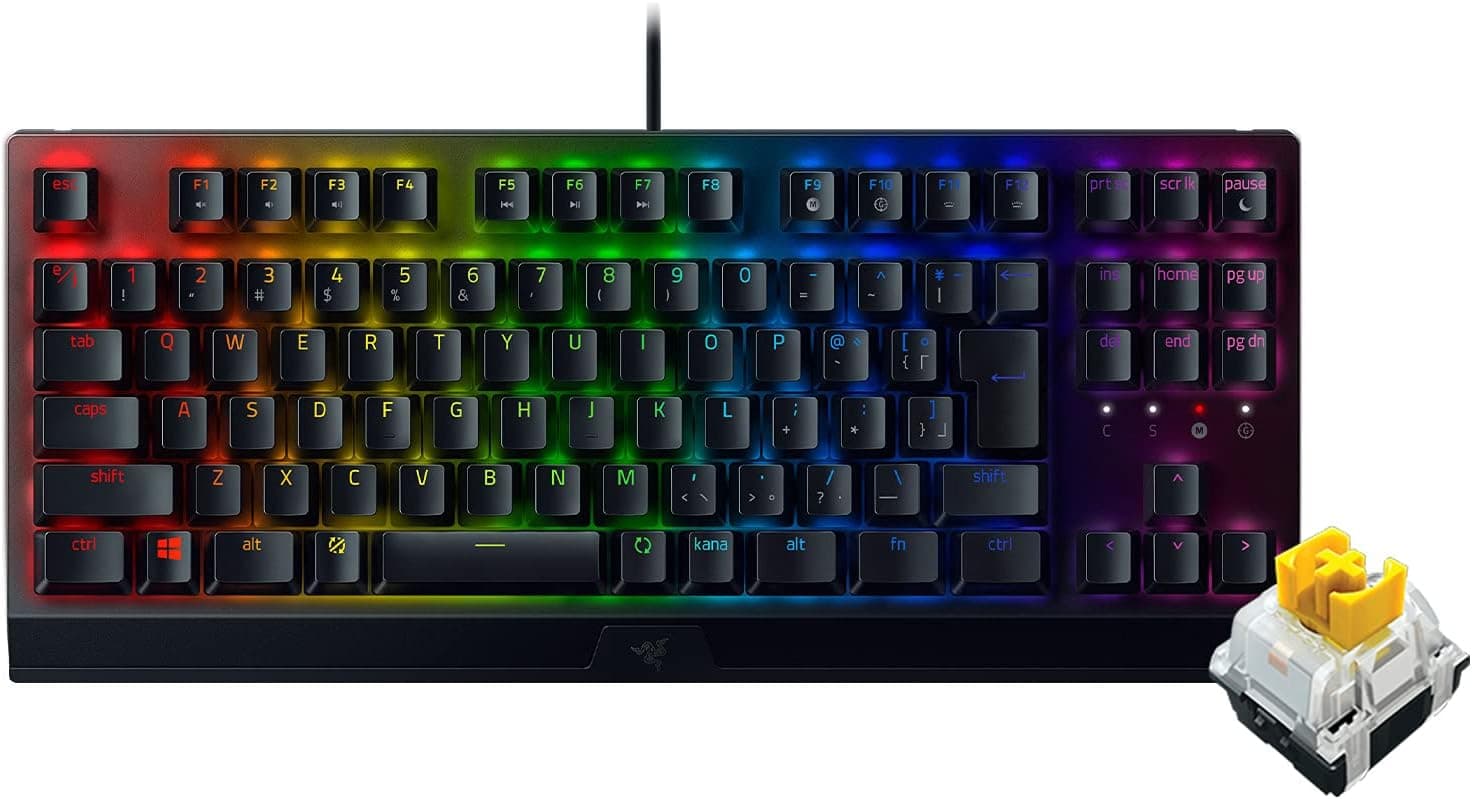
The Razer BlackWidow V3 Tenkeyless JP pairs a Japanese (JP) layout tenkeyless chassis with Razer Yellow linear, silenced mechanical switches. On Amazon.co.jp it holds 4.6 out of 5 stars across 1,111 reviews (92% positive), and the listed price was ¥11,980 as captured on 24 June 2026.
Below we go past the spec sheet into compatibility, competing options, and — most usefully — who should not buy it.
Overview
This is the numpad-free version of Razer's long-running BlackWidow line, packed into a 362 x 155 x 41 mm body. The Razer Yellow switch is linear, meaning there is no tactile bump partway through the press, and it includes a built-in dampener to cut noise.
The short verdict: it suits FPS and MOBA players who want more mouse room, and anyone typing late at night or in a shared space. It is the wrong pick if you enter numbers all day or if a crisp click is part of why you enjoy typing.
The top plate is aluminum, the keycaps are coated ABS designed to resist legend wear, and lighting is per-key Razer Chroma RGB. Switch life is rated at 80 million keystrokes.
At roughly 0.9 kg it is not a light TKL — that mass is there to keep the board planted during aggressive mouse movement, not to make it portable.
The Numbers in Context
| Item | Value | What it means |
|---|---|---|
| Switch | Razer Yellow (linear, silenced) | Smooth travel; good for rapid repeats and strafing |
| Layout | Tenkeyless, Japanese JP | Includes JP-specific conversion keys; not US ANSI |
| Dimensions | 362 x 155 x 41 mm | Roughly 8-10 cm narrower than a full-size board |
| Weight | approx. 0.9 kg | Heavy enough to stay put under fast mouse work |
| Polling rate | 1000 Hz | 1 ms intervals; competitive-grade |
| Rollover | N-key rollover | No dropped simultaneous inputs to worry about |
| Cable | USB-A, 1.8 m, non-detachable | Long enough for a floor-mounted PC; not replaceable |
| Durability | 80 million keystrokes | Upper-tier rating for a mechanical switch |
| Rating | 4.6 / 5 across 1,111 reviews (92%) | Large enough sample that the score is stable |
The sample size matters. A score built on a few dozen reviews swings easily with one bad batch; a 4.6 that survives past 1,111 reviews means the majority are genuinely satisfied.
The flip side of 92% positive is that close to one in ten buyers had a complaint — the likely sources are covered in the cautions section.
Compatibility Guide
Connection is wired USB-A only. On a thin laptop or mini PC with USB-C ports exclusively, you will need an adapter or a hub with a USB-A port.
Hubs work, but stacking a keyboard, a mouse, and per-key RGB on one weak bus-powered hub can make the lighting behave erratically. Plugging straight into the PC is the safer route.
Software support is clear-cut: full functionality — remapping, macros, detailed lighting, saved profiles — assumes Razer Synapse on Windows. On macOS and Linux the board works as a plain driver-free keyboard.
Mac users can absolutely type on it, but if RGB customization or macros were the reason for buying, that expectation will not be met. A JP-layout board on macOS may also need the keyboard type set correctly in system settings, or some symbol keys will land in the wrong place.
On physical fit: 155 mm deep and 41 mm tall (taller with the feet up) determines whether it clears a sliding keyboard tray. If you plan to add a wrist rest, budget around 200 mm of depth; no wrist rest is included.
The three-way cable channel underneath lets you route the cable left, center, or right, which helps on wall-facing desks and under monitor arms.
The single most important compatibility note is the JP layout. Key-binding guides written for US ANSI boards will not match on symbol keys, and anyone used to ANSI will need to adjust to the differently shaped Enter key and shorter spacebar.
Product Info
The Amazon.co.jp listing showed ¥11,980 as captured on 24 June 2026.
Keyboard pricing moves a lot with sales and coupons, so treat that figure strictly as a snapshot from that date and check the product page for the current price. The eBay entry is a search link with no fixed price, so if you compare imported units, verify the condition notes and — critically — whether the listing is JP or US layout.
That price sits mid-pack for mechanical keyboards. Against a ¥5,000-class entry board it clearly wins on chassis rigidity, the 80-million-keystroke switch rating, and per-key RGB.
Against boards above ¥20,000 it lacks hot-swap sockets, gasket mounting, and PBT keycaps. Its value proposition is a finished, durable, quiet product with mature software — not a platform to modify.
What linear means in practice: there is no feedback partway through the press. In games that reads as inputs registering cleanly; in long typing sessions some people bottom out harder and tire faster until they adapt.
And silenced does not mean silent — bottom-out noise and stabilizer rattle remain. If you need a board your headset mic will not pick up at all, a capacitive or low-profile design is a surer bet.
How It Compares
Within Razer, the newer BlackWidow V4 family also offers Yellow switches, adding dedicated macro keys, a wrist rest, and revised mounting. You choose the V3 TKL instead for its simplicity and its price.
If your goal is rapid trigger or adjustable actuation, you need the optical-analog Huntsman V3 Pro TKL class — the switches here are conventional on/off mechanical with a fixed actuation point, and that difference explains much of the price gap.
If modding is the point, hot-swap boards such as the Keychron Q series are the real competitor. Swapping switches and tuning acoustics is outside this board's scope; it ships as its final form.
Best Use Cases
The strongest fit is competitive FPS and MOBA play. Losing the numpad frees roughly 8-10 cm of desk width, so low-sensitivity players can make full turns without dragging the elbow.
The 1000 Hz polling rate and N-key rollover mean you never think about dropped inputs during fast combinations.
The second fit is the work-by-day, game-by-night user. Silenced linears pay off when someone else is asleep or when your typing lands on a video call.
Third, anyone committed to the Japanese layout: TKL plus JP is a narrower field than US ANSI, which alone keeps this board on the shortlist.
It is a poor fit for heavy numeric data entry, for people who want tactile or clicky feedback, for anyone who wants wireless, and for anyone who wants to swap switches over time. All four sit outside what this board was designed to do.
Things to Check Before Buying
The cable is not detachable. The 1.8 m USB-A cable is hard-wired, so a break at the strain relief cannot be fixed by swapping cables.
If you move the board often, plan the routing so the base of the cable never takes repeated bending. This is the clearest weakness versus later detachable USB-C models.
Calibrate your expectation of "silent." This is the most likely source of the complaints hiding behind that 92%.
Yellow switches remove the click, not the bottom-out thud or the stabilizer noise on the spacebar and Enter. Quiet for a mechanical is the accurate framing.
The keycaps are ABS. The coating resists legend wear, but ABS itself gradually develops shine where fingers land.
That is material behavior, not a defect. Swapping to PBT is an option, though JP-layout replacement sets are scarcer than ANSI ones — the long Enter key and short spacebar are often missing from generic kits.
RGB and macros require Windows. Without Synapse there is no lighting customization or macro recording, and that is not something you can work around after purchase.
Watch the listing itself. Retail pages sometimes show a store label that does not match the actual seller, and listing attributes can blend data from sibling models in the same series.
This product is Yellow switch, JP layout, tenkeyless. Confirm the switch color and layout from the product images and title before ordering — imported units can arrive in US layout.
FAQ
Q. Does it work on a Mac? A.
Yes, as a standard keyboard. Razer Synapse is Windows-only, so macros and detailed RGB control are unavailable, and you may need to set the keyboard type in macOS so JP symbol keys map correctly.
Q. Yellow or Green switches? A.
Yellow for quiet, smooth repeated presses; Green for tactile feedback and a satisfying click. In shared rooms or on calls, Yellow is the safer choice.
Q. Does it support rapid trigger or adjustable actuation? A.
No. These are conventional mechanical switches with a fixed actuation point.
For variable actuation, look at analog optical or magnetic switch models.
Q. Can I change the keycaps or switches? A.
Keycaps can be swapped within standard MX-stem compatibility, but you need a set that fits JP-specific key shapes. The switches are not hot-swappable.
Q. Is a wrist rest included? A.
No. At 41 mm tall it is a fairly thick board, so a separate wrist rest is worth adding for long sessions.
Q. When is the best time to buy? A.
The ¥11,980 figure is from 24 June 2026 and moves during sales. Peripherals commonly discount during major sale events, so if you are not in a hurry, check the current price on the product page first.
Product Disclosure (Amazon)
- Manufacturer: Razer(レイザー)
- Seller: Amazon.co.jp
- Fulfilled by: Amazon.co.jp
- ASIN: B0928YKTWS
- Note: This article covers a manufacturer-made product based on Amazon listing details.