Overview
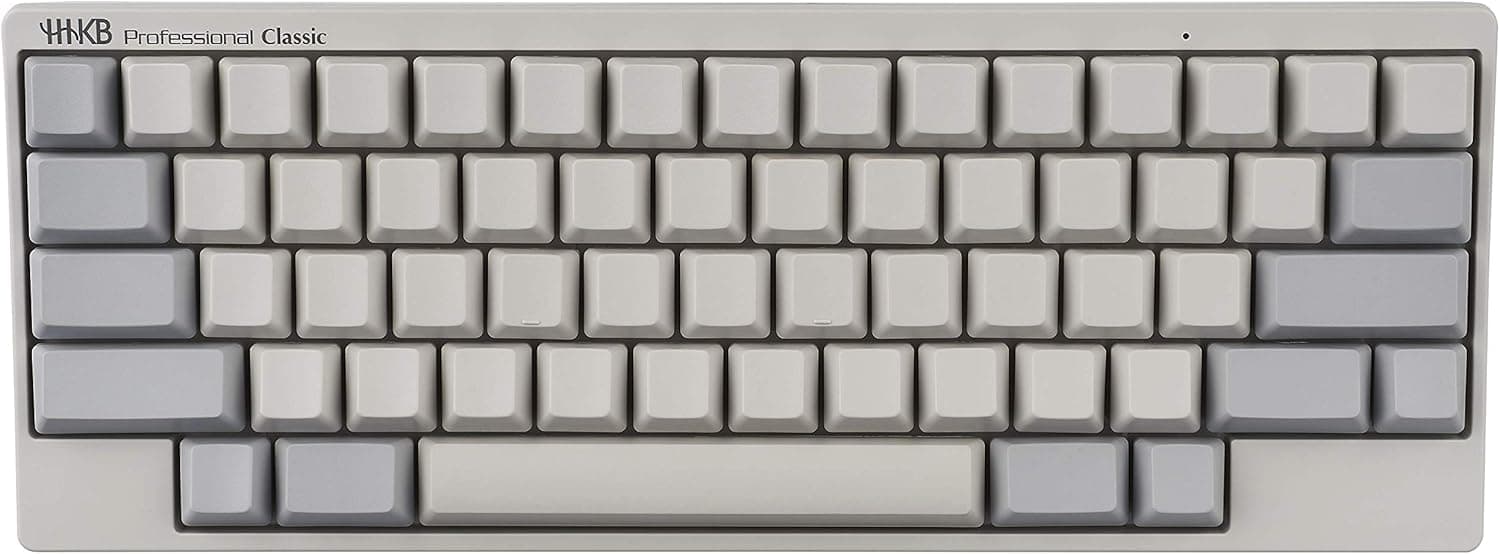
The PFU HHKB Professional Classic (blank keycaps, white, English layout) is a compact 60-key keyboard built around electrostatic capacitive switches. The short verdict: this is a tool for people whose touch typing is already complete, bought with a decade-long horizon in mind — not a general-purpose recommendation.
As captured on 2026-05-25, it holds 194 Amazon.co.jp reviews at 92% positive (4.6 out of 5), but that score reflects a self-selected audience rather than universal appeal.
The body measures 294 x 110 x 40 mm and weighs roughly 530g. That is about the width of an A4 sheet with half the depth.
The 530g figure is not light for a 60% board, and that matters in practice: the keyboard stays put while you type instead of sliding across the desk.
The defining feature is the electrostatic capacitive switch, which has no physical metal contact inside. Chattering caused by contact wear or oxidation is structurally unlikely, and key life is rated at over 50 million actuations.
Even at 10,000 keystrokes a day, that arithmetic runs past 10,000 days. Because keys register before bottoming out, your fingers stop absorbing impact on every stroke, which is why long sessions feel less punishing.
Compatibility Guide
Connectivity is a single USB Type-C port. There is no Bluetooth and no 2.4GHz wireless.
Supported operating systems are Windows, macOS, Linux, and Chrome OS, and the board enumerates as a standard HID keyboard, so no driver installation is needed. That also means it works in BIOS/UEFI screens and OS installers, where drivers have not loaded yet — a practical strength of wired HID devices.
Do not assume "any USB-C port will do." The cable is a detachable USB-C, but what you need depends on the port on your machine.
Desktops with only USB-A ports require a C-to-A cable or an adapter. Thin laptops with only USB-C ports will lose one port to the keyboard, so count your ports against power and display needs before buying.
Hubs generally work, but an underpowered bus-powered hub can cause flaky detection; plug directly into the machine to isolate the problem.
Physical fit matters too. A depth of 110 mm sits comfortably on keyboard trays and sliding shelves, but a board this small can also drift on a large desk — a desk mat is the practical fix.
Layout switching via the onboard DIP switches (Mac mode, Windows mode, swapping Ctrl and Caps) is a hardware feature and needs nothing installed on the PC. Free remapping of arbitrary keys and firmware updates, however, require PFU's official keymap tool, which is offered for Windows and macOS.
If you run Linux or Chrome OS exclusively, you may need to borrow a Windows or Mac machine to change your keymap — a real constraint worth knowing up front.
Product Info
As captured on 2026-05-25, Amazon.co.jp listed the keyboard at ¥25,000; an eBay US listing captured on 2026-06-01 showed $241.78.
Both are point-in-time snapshots and move with exchange rates, sales, and stock. Always check the product page for the current price.
In Japan, the mid-¥20,000s is a standard band for electrostatic capacitive boards — the entry point of the high-end tier.
| Item | Value |
|---|---|
| Switch type | Electrostatic capacitive |
| Layout | English (60%) |
| Keycap printing | Blank |
| Connection | USB Type-C (detachable cable) |
| Dimensions | 294 x 110 x 40 mm |
| Weight | approx. 530g |
| Supported OS | Windows / macOS / Linux / Chrome OS |
| Key life | 50 million+ actuations |
Two rows in that table reinforce each other: the 50-million-actuation rating and the blank keycaps. Printed legends can wear away over years of use; with no legends at all, one whole aging mechanism disappears.
A product designed for the long haul and a blank keycap set are a better match than they first appear.
Review data as captured on 2026-05-25: 194 reviews at 4.6/5, 92% positive.
That is a modest count next to mass-market boards with tens of thousands of reviews, but a solid sample for this price tier. The box contains only the keyboard and a USB Type-C cable — no wrist rest, no keycap puller.
Manufacturer warranty is one year.
How It Compares
Within electrostatic capacitive keyboards, Topre's REALFORCE line is the obvious comparison. Broadly, REALFORCE improves typing quality while keeping conventional layouts (full-size, TKL), whereas the HHKB redesigns the layout itself to minimize hand travel.
Neither is objectively better — but if you do not want to relearn a layout, the HHKB is the wrong purchase.
Against mechanical boards, the value proposition differs. Hot-swap gasket-mount boards and wireless 75% boards offer switch swaps, keycap swaps, and wireless connectivity at similar or lower prices.
The HHKB Professional Classic gives up almost all of that modularity in exchange for a finished typing feel and long-term stability out of the box. If tinkering is the appeal, a hot-swap board will satisfy you more.
Living With It: The Adjustment Period
A 60-key layout has no dedicated arrow keys and no function row; both live under the Fn layer. The arrows sit near the bottom right, and once learned, you move the cursor without leaving the home position.
Until then, you will be slower. Anecdotally, daily users report the friction fading within one to two weeks and speed returning to baseline in about a month.
Control sitting immediately left of A (where Caps Lock usually is) is a clear win for Emacs, Vim, and terminal-driven work. If you press Ctrl+C with the base of your little finger, expect a second adjustment hump.
The blank keycaps are, surprisingly, not the main obstacle — the letters come back quickly. Symbols are where you stall, because you hunt for the ones you rarely type.
Best Use Cases
- Programmers with complete touch typing — the Ctrl position and compact layout suit terminal-centric workflows and cut hand travel during long sessions.
- Writers and translators producing thousands of characters daily — non-bottoming-out actuation pays off in proportion to keystroke count.
- People who keep tools for a decade — a 50-million-actuation rating suits a buy-once mindset.
- Anyone wanting the mouse closer — at 294 mm wide, it lets you keep the mouse near your body and reduce shoulder abduction.
- Commuters — roughly 530g with a detachable cable travels between home and office reliably.
I would actively steer away: gamers (rapid-trigger, high-polling-rate boards fit better), heavy numeric-entry users who need a numpad, anyone wanting a wireless desk, and people just starting to explore keyboards. For that last group, a cheaper hot-swap board is a faster route to learning what you actually like.
Things to Consider
Before Buying
Blank keycaps are not an "advanced" badge — they are a fit question. Even confident typists hesitate on symbol keys.
Test yourself: can you type continuously for five minutes without glancing down? If not, the printed variant will make you happier.
You can train into blanks, but the lost productivity during training is a real cost.
Arrow keys and Delete are the hardest adjustment. If you live in spreadsheets or video editors that lean on arrow keys, the Fn-combination approach may grate more than you expect.
The top-right key area also behaves differently from a conventional layout, so accidental deletions are common early on.
No backlighting and no wireless. Working in a dim room plus blank keycaps means you genuinely cannot read your hands — assume a desk lamp.
And the wired-only design is not a compromise to negotiate; it is simply the specification.
The keymap tool assumes Windows or macOS. On a Linux-only setup, you are limited to what the onboard DIP switches can do.
Confirm before purchase that your desired customization fits within that range.
Try the switch feel if you possibly can. Electrostatic capacitive feels like neither membrane nor mechanical.
Written descriptions bottom out quickly, opinions split sharply, and this is a price tier where one minute on a demo unit at a store is worth the detour.
A note on listing metadata. The Amazon listing records the manufacturer as "HHKB" (the brand) rather than PFU, and the seller is a third-party shop.
Neither is inherently suspicious, but keyboards ship in many near-identical variants — blank vs printed, English vs Japanese layout, Classic vs HYBRID — and listing details do occasionally disagree with the title. Before ordering, confirm from the product images and title that you are buying the blank, English-layout Classic.
And treat any price you see as newer than the figures quoted here.
FAQ
Q. Do blank and printed models feel different to type on? A.
No. Both use the same electrostatic capacitive switches.
The only difference is the legends, though blanks avoid the cosmetic wear that printed caps can develop over years.
Q. Does it work properly on a Mac? A.
Yes. macOS is a supported OS and the board is recognized as a standard HID device.
Onboard DIP switches enable a Mac-oriented layout mode, though some Mac-specific keys require Fn combinations.
Q. Can I connect over Bluetooth? A.
No. This model is wired USB Type-C only.
If wireless is a requirement, look at wireless models in the series or other vendors.
Q. Will keys double-register (chatter)? A.
Electrostatic capacitive switches have no physical contacts, so chattering from contact wear is structurally unlikely. Key life is rated at over 50 million actuations.
Q. How do I switch Japanese input on and off? A.
As an English layout, it has no dedicated conversion keys. Most users assign a toggle through OS settings or a utility.
This trips up a lot of people on day one, so look up the procedure for your OS in advance.
Q. Is 530g too heavy to carry? A.
It is not light for a 60% board, but at 294 x 110 x 40 mm it fits in a bag easily. The weight mainly helps by keeping the board planted while you type.
Product Disclosure (Amazon)
- Manufacturer: HHKB
- Seller: Tomokein Shop
- Fulfilled by: Amazon
- ASIN: B082TZFYYZ
- Note: This article covers a manufacturer-made product based on Amazon listing details.