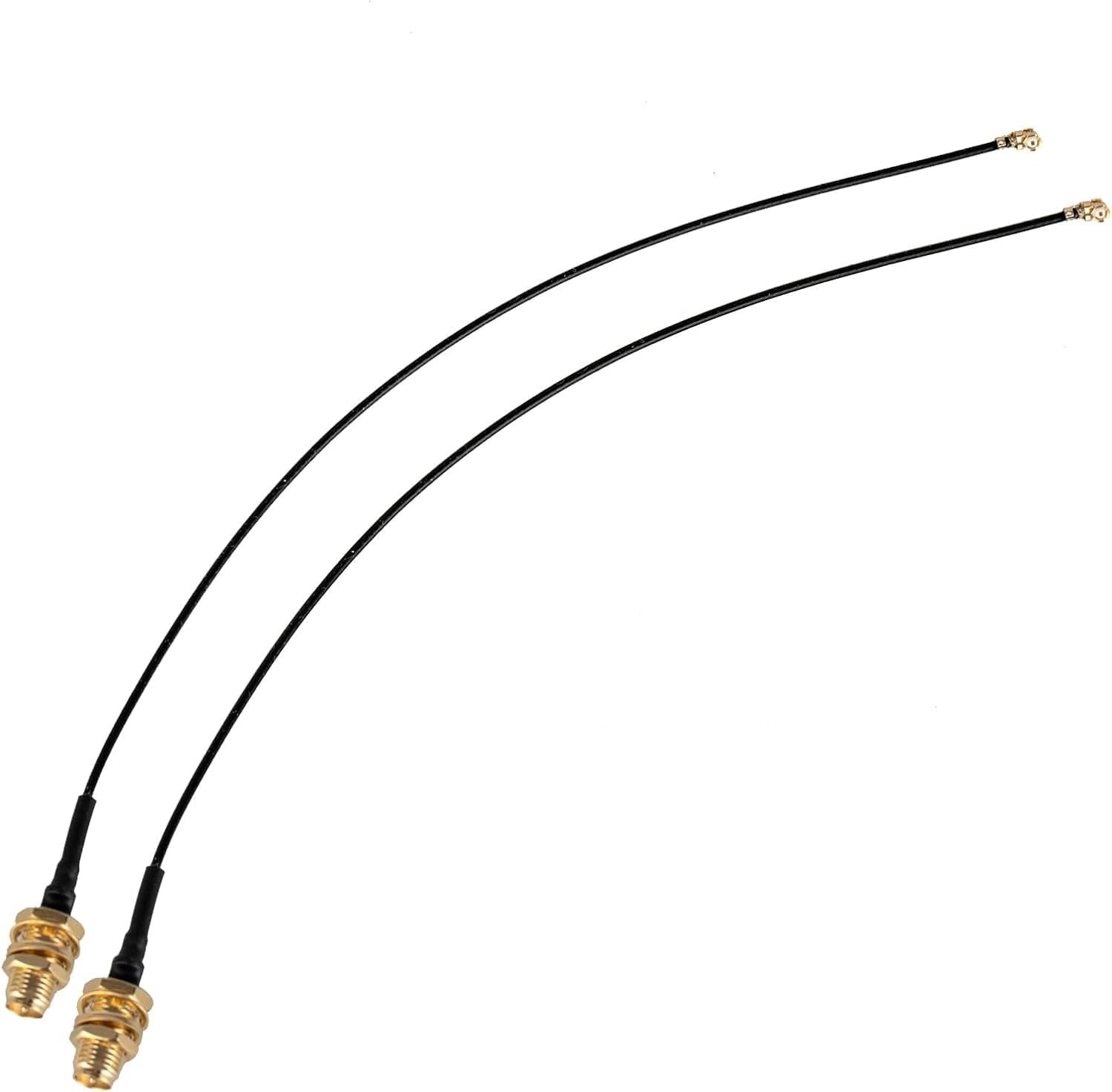
The QAREQU IPEX-1 (MHF-1) to RP-SMA female pigtail is not an antenna — it is the wiring that connects a Mini PCI-e wireless card's tiny antenna terminal to a standard RP-SMA connector you can mount outside the chassis. Each pack contains two 12-inch (about 30cm) cables, which matches the two antenna terminals found on a typical wireless card.
Overview
One end is a miniature IPEX-1 (MHF-1) connector; the other is RP-SMA female, the side with a center pin, which mates with the common RP-SMA male (center hole) external antenna. There are three main use cases: replacing short or broken internal antenna wiring in a laptop or small PC, routing antennas outside the case on a desktop build using a Mini PCI-e card, and upgrading to a high-gain antenna for better reception.
The listed specs are 50 ohm impedance, omnidirectional radiation, and 4.5g per cable.
50 ohm is the standard value for Wi-Fi and Bluetooth hardware, so it matches both the card and the antenna side. Amazon.co.jp reviews stood at 4.3 out of 5 from 6 ratings (86% positive) when the data was captured in June 2026 — a decent score, but six samples is far too small to draw conclusions from.
Compatibility Guide
The single biggest pitfall is the connector generation. As the compatibility notes state, this cable is only for Mini PCI-e wireless cards with IPEX-1 / MHF-1 connectors, and is not compatible with M.2 / NGFF / MHF-4.
| Check | This product | How to confirm |
|---|---|---|
| Card-side connector | IPEX-1 (MHF-1) | Squarish and relatively large; MHF-4 on M.2 cards is smaller |
| Card form factor | Mini PCI-e | Wide board, two screw points; M.2 is narrow with one screw |
| Antenna side | RP-SMA female (pin) | Pair with an RP-SMA male (hole) antenna |
| Length | ~30cm | Enough for an internal run plus a rear-panel exit |
| Impedance | 50Ω | Standard for Wi-Fi/Bluetooth |
The listing cites the Intel AX210HMW, BCM94352HMB, 7260, 6230 and 5300 as example cards. Note that the AX210 exists in both Mini PCI-e (HMW) and M.2 versions, so "it's an AX210, so it fits" is not a safe assumption — check the suffix and the physical board shape before ordering.
On the mechanical side, 30cm is usually plenty in a laptop, Mini-ITX or mid-tower build, but can come up short in a full tower with a long routing path. The RP-SMA end is nut-mounted, so you need a hole roughly 6mm across in the chassis, or a spare slot bracket drilled for antenna connectors.
Product Info
The Amazon listing showed ¥2,824 for the 2-pack as of the June 20, 2026 capture. Prices move, so check the product page for the current figure.
The eBay entry is only a search link with no captured price, so it cannot be used even as a reference point.
That works out to roughly ¥1,400 per cable, which is not the cheapest tier for a pigtail. Antenna wiring sits directly in the RF path, though, and poor cables add loss or have IPEX ends that deform after a few mating cycles.
Viewed as insurance against redoing the job, the price is reasonable. The exact coax gauge (1.13mm vs 1.37mm class) is not published; at 30cm the practical difference in loss is small either way.
Product Disclosure (Amazon)
- Manufacturer: QAREQU
- Seller: Amazon US
- Fulfilled by: Amazon US
- ASIN: B0CSSPJ8S2
- Note: This article covers a manufacturer-made product based on Amazon listing details.
Best Use Cases
- DIY builders with a Mini PCI-e wireless card who want antennas outside a metal case. This is where the gain is largest, since a metal enclosure blocks signal.
- Owners of laptops or industrial small PCs with broken internal antenna wiring, where an external antenna is the practical repair path.
- Anyone swapping an old card for an AX210HMW class part who wants to refresh the antenna side at the same time.
- Users who want a spare, since the pack includes two cables.
It is a poor fit if your card is M.2/NGFF (MHF-4), if a USB Wi-Fi adapter or plain Ethernet would solve the problem faster, or if you are not prepared to buy an antenna separately — none is included.
Alternatives
A USB Wi-Fi adapter needs no disassembly and includes its own antenna, but is bound by USB bandwidth and driver quality. Wired Ethernet is the most reliable answer whenever it is available.
This cable wins in one specific case: you want to keep the existing internal card and only move where the radio waves exit.
Before You Buy
1. Connector mismatch is the most common failure. IPEX-1 and MHF-4 look similar but are not interchangeable, and forcing one can destroy the card's terminal.
Inspect the socket with a magnifier first.
2. IPEX connectors are consumables. These snap-fit terminals tolerate only around a dozen mating cycles.
Decide the routing first and connect last; to remove, lift the connector body straight up with a proper tool rather than pulling the cable.
3. The antenna is sold separately, and polarity matters. RP-SMA female (pin) pairs with RP-SMA male (hole).
Plain SMA will thread on but the center conductors will not meet, giving you a link that enumerates yet barely transmits.
4. Keep expectations realistic. An extension does not amplify anything; the benefit comes from placing the antenna somewhere with a clearer path.
Through several thick walls, the improvement may be modest.
5. About the listing data. Accessory listings on Amazon sometimes carry incorrect or mixed-up manufacturer and compatibility data.
Nothing contradictory was found for ASIN B0CSSPJ8S2 under the QAREQU brand at the time of writing, but confirm three things from the images and title yourself before ordering: the IPEX-1 end shape, that the other end is RP-SMA female with a pin, and that two cables are included. Treat the price as a snapshot as well.
FAQ
Q. Can I use it on an M.2 Wi-Fi card? A.
No. M.2 cards use MHF-4, a different connector.
Look for a cable explicitly labeled MHF-4 to RP-SMA.
Q. Is an antenna included?
A. No — two cables only. You need an RP-SMA male (center hole) antenna.
Q. Is 30cm long enough? A.
Usually yes for laptops, Mini-ITX and mid-towers. In a full tower, measure your intended routing path with a piece of string first.
Q. Does the extension slow down my connection? A.
Coax loses signal with length, but at 30cm the effect is minimal and is normally outweighed by the better antenna position.
Q. Is a 4.3 rating from 6 reviews trustworthy? A.
The score is fine, but six samples prove little. Prioritize verifying the connector standard over brand reputation.
Q. Do I have to use both cables? A.
Not strictly, but wireless cards use two antennas for MIMO, so connecting only one lowers the achievable throughput.