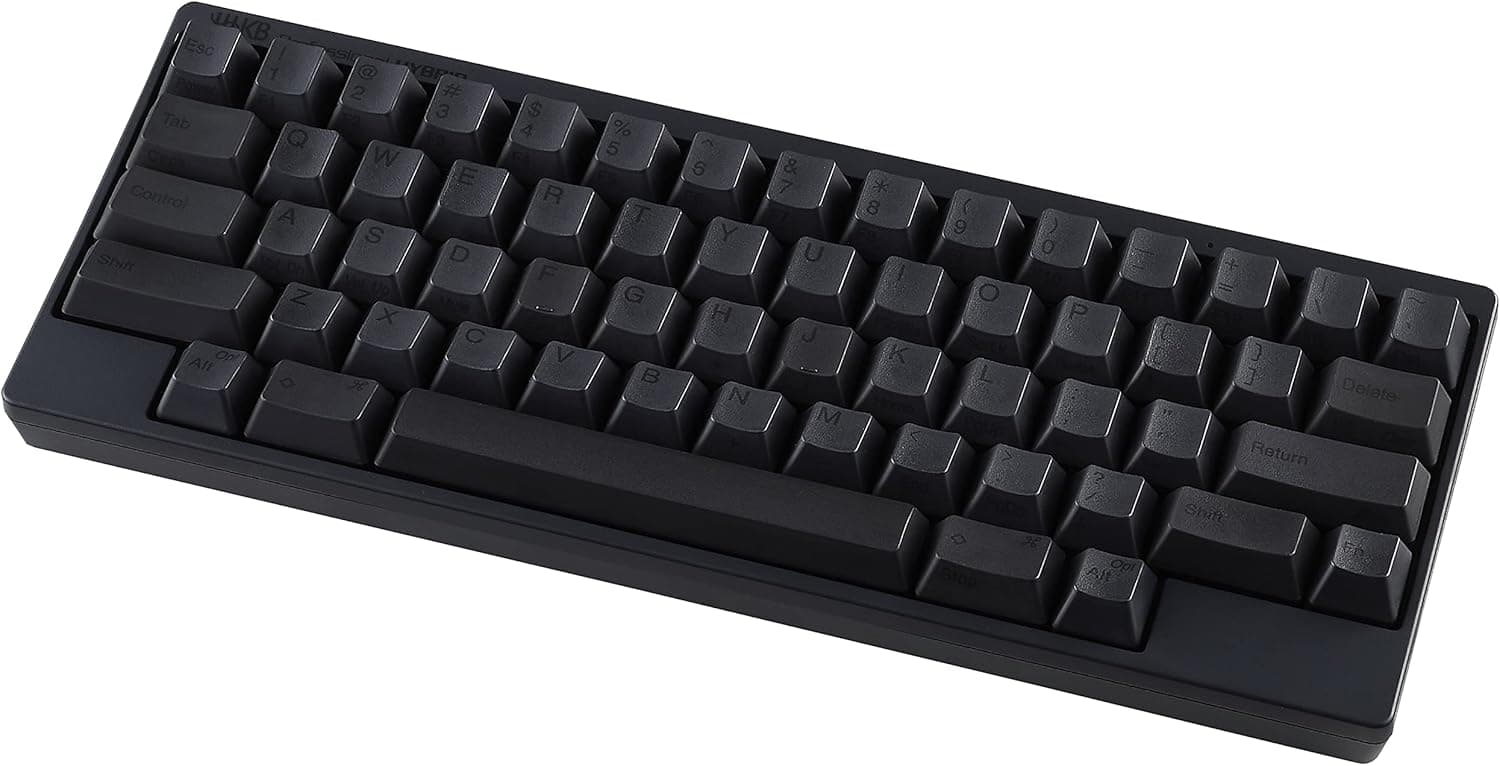
The PFU HHKB Professional HYBRID (US layout) pairs an aggressively minimal 60-key layout with electrostatic capacitive switches. This article goes past the spec sheet to the part that actually decides your purchase: who it suits, and what you have to give up.
Overview
The HHKB Professional HYBRID in US ASCII layout (60 keys) is a premium board aimed at people who type for a living. The short version: if you spend your day inside a terminal and an editor, it is outstanding.
If you reach for arrow keys or function keys by muscle memory, it is not for you.
The switches are electrostatic capacitive, meaning no metal contacts touch, which avoids chatter and is generally kind to longevity. The feel is not a mechanical click — keys sink smoothly under a light, uniform load.
That lightness is what reduces fatigue over long sessions, though people who bottom out hard often find it too light at first.
On Amazon.co.jp the board holds 4.6 out of 5 stars across 474 reviews (92% positive, captured May 2026).
Sustaining that score over that many reviews at this price tier says buyer expectations and product character mostly line up. It also means a minority bought it without understanding the layout — read the cautions below before ordering.
Compatibility Guide
Connectivity is dual: Bluetooth 5.0 and USB Type-C.
Bluetooth pairs up to four devices with key-combination switching. The USB-C connector is reversible.
No drivers are needed, and Windows, macOS, iOS and Android are all supported.
| Item | Value | What it means in use |
|---|---|---|
| Dimensions | 294 × 120 × 40 mm | About as wide as a 13-inch laptop; 120 mm depth makes laptop-on-top use just about viable |
| Weight | Approx. 530 g (no batteries) | Two AA cells add more; noticeable in a bag |
| Power | 2 × AA, approx. 3 months | No charging chore, but keep spares on hand |
| Height | 40 mm | Thick enough that a palm rest is effectively mandatory |
That 40 mm height is the thing that catches people moving from a low-profile laptop-style keyboard. Typing with floating wrists strains the forearms, so budget for a palm rest or a desk-height review at the same time.
Check the product page for details on the tilt feet.
Multi-pairing is convenient, but as with Bluetooth keyboards generally, the first keystroke or two after waking can be dropped. Bluetooth also does not work in a PC's BIOS/UEFI screen or recovery environment, so keep the USB-C cable available; wired mode works before the OS loads.
On iPad or Android, set the system keyboard layout to English (US). If the OS treats a US board as JIS, symbols such as @ and : land in the wrong places.
Product Info
The model launched in 2020, and its core configuration — capacitive switches, 60-key US layout, Bluetooth 5.0 plus USB Type-C — has not meaningfully changed since.
This is a long-lived product line, so the release year does not imply obsolescence.
Pricing depends heavily on when it was captured. On Amazon.co.jp it was ¥31,900 as captured on 29 May 2026, and ¥23,560 as captured on 27 August 2026 — over ¥8,000 of spread on the same listing.
If you are not in a hurry, watching the price for a while pays. An eBay US listing showed $383.33 captured on 8 July 2026, but that reflects export resale with shipping and fees on top and is not comparable to the domestic price.
All of these are point-in-time figures and move with sales and stock.
In the box are two AA batteries and a USB Type-C cable, with a one-year manufacturer warranty. Battery power divides opinion, but it means no built-in cell degrades into a forced replacement a few years out, and rechargeable AAs keep running costs low.
DIP switches on the underside handle Mac/Windows modes and some key swaps, and an official keymap tool is offered — check the official site for supported environments and the scope of what can be remapped.
How It Compares
A 60% gaming keyboard and the HHKB are aiming at different things.
- Feel: capacitive switches do not fit the linear/tactile mechanical taxonomy. If you want the fun of choosing switches, a hot-swap board will satisfy you more.
- Layout: most 60% boards keep ANSI positions and just delete keys. The HHKB moves Control to the Caps Lock position and places Delete unusually. The relearning cost here is clearly higher.
- Customization: the non-standard layout means off-the-shelf keycap sets often will not fit, and there is no lighting at all.
- Gaming: for FPS or action titles with heavy simultaneous input, a purpose-built gaming board is the straightforward choice. Treat the HHKB as a tool for text.
What Matters Day to Day
The real value is that your hands never leave the home row. Arrow keys live under Fn on the right-hand cluster, so cursor movement no longer sends your right hand off the edge of the board.
If you already use Emacs or Vim bindings, or shell shortcuts like Ctrl+A and Ctrl+E, having Control next to your little finger is the whole point.
The flip side is adaptation time. Most people type slower for the first week or two.
Whether you push through that is what decides if this board works for you — so do not adopt it the week before a deadline.
On noise: the standard model is quieter than a clicky mechanical, but it is not silent. If you share an office or type next to a sleeping household, compare it against the quieter Type-S variant.
Best Use Cases
The premium is easy to justify if you are:
- A professional writing code or prose for hours a day who wants less finger fatigue
- A CLI, Emacs or Vim user who leans on Control constantly — the Caps Lock position shines here
- Someone moving between PC, Mac, tablet and phone who wants one board for all of them, using the four-device pairing
- Someone who wants desk space back; a 294 mm footprint leaves room for large mouse sweeps
- Someone who carries a keyboard with their laptop and wants the same feel on the road
If your work centers on a numpad or function keys — accounting, CAD, video editing — this layout is not a sensible recommendation. Supplementing with a second keyboard works, but then a full-size board was the rational first choice.
Before You Buy
There are no physical arrow keys and no function row. This is the central trade-off.
F2 in Excel, F5 in a browser, arrow keys through a spreadsheet — all become Fn combinations. Knowing this intellectually is different from living it, so audit your actual daily key usage first.
The layout is non-standard and carries a switching cost. Control sits on Caps Lock, the top right is Delete rather than Backspace, and the backslash position differs from typical ANSI boards.
Alternating daily between a company laptop and the HHKB can leave you fluent in neither.
Do not count on keycap compatibility. Bottom-row key widths differ from common mechanical boards, so full aftermarket keycap sets often will not fit.
Buy something else if swapping caps is part of the appeal.
There is no backlight. If you cannot touch-type in the dark, plan on a desk lamp.
Battery death arrives without warning. Keep spare AAs, and pull the cells if you store the board for a long stretch to avoid leakage.
Prices swing a lot. As noted, the same Amazon listing showed ¥31,900 and ¥23,560 in different months.
Every price in this article is point-in-time; check the live listing. Parallel imports and overseas marketplace listings can diverge sharply from domestic pricing.
Listing metadata is sometimes wrong. Manufacturer, brand or model-number fields occasionally carry another product's data.
Before ordering, confirm from the images and title that you are getting the US (English) layout HYBRID. JIS-layout, blank-keycap and Type-S versions are often grouped under one listing, and picking the wrong variation changes what arrives.
FAQ
Q. Can I use it wired only? A.
Yes. Connect the USB Type-C cable and it works as a wired keyboard.
Wired mode is also required for pre-boot screens such as BIOS/UEFI.
Q. How long do the batteries last? A.
The spec cites roughly three months on two AA cells. Treat that as a guideline; usage and environment change it.
Q. Can I switch between Mac and Windows? A.
Yes. DIP switches on the underside change the operating mode, and Bluetooth multi-pairing registers up to four devices.
Q. Is it quiet?
A. Quieter than a clicky mechanical, but not silent. If low noise is the priority, compare it with the Type-S variant.
Q. Will I really be fine without arrow keys? A.
Fn combinations work well once learned, but expect one to two weeks of adjustment. If function keys or a numpad are part of your daily work, choose a different board.
Q. Can the keymap be changed? A.
An official keymap tool is provided. Check the official site for supported operating systems and the scope of remapping.
Product Disclosure (Amazon)
- Manufacturer: HHKB
- Seller: PFUダイレクト
- Fulfilled by: PFUダイレクト
- ASIN: B082TXR61K
- Note: This article covers a manufacturer-made product based on Amazon listing details.