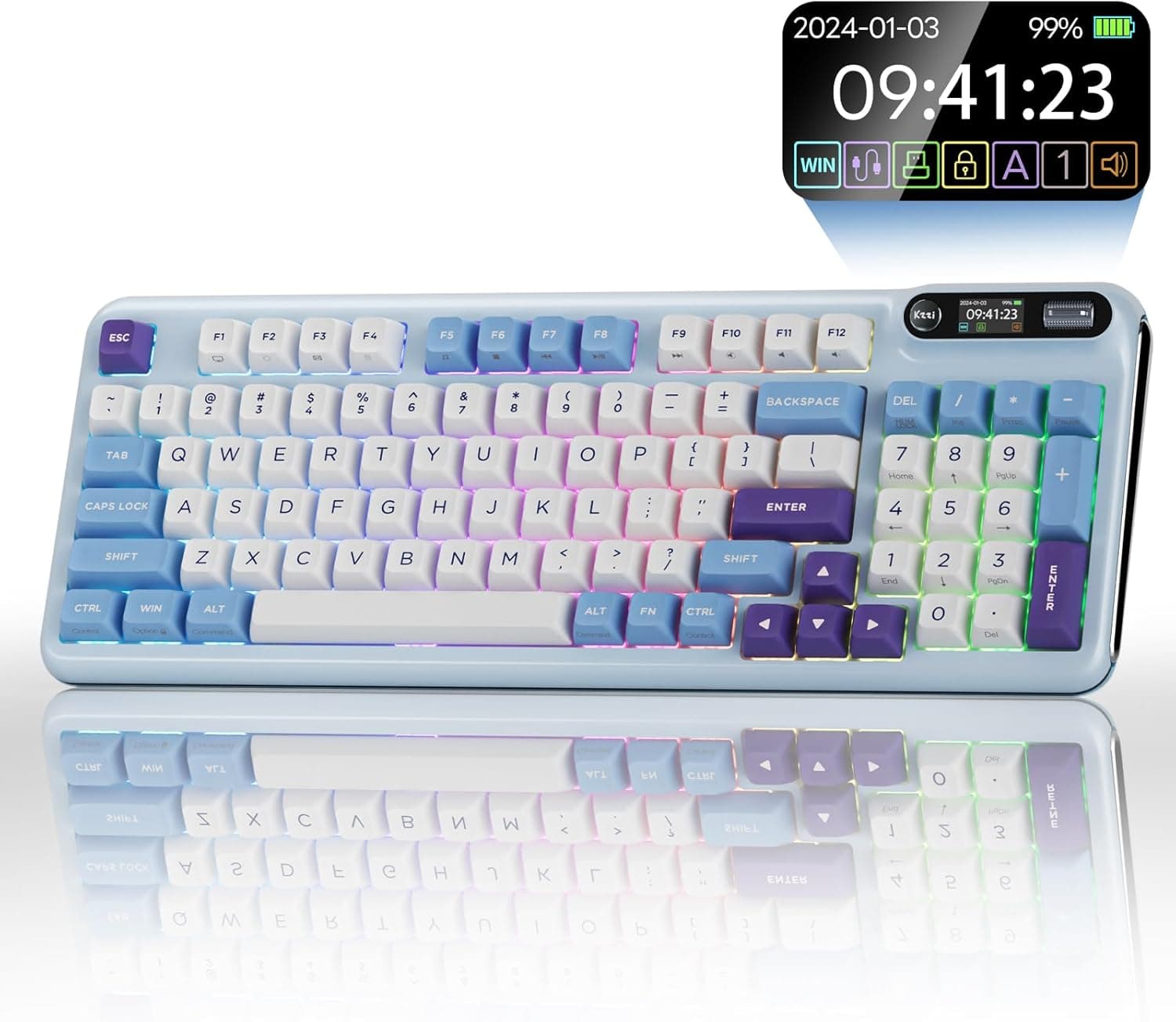
The KZZI Z98 is a wireless mechanical keyboard that keeps a numpad and dedicated arrow keys in a compact 90% (94-key) layout, then adds a smart display and a 3-way knob. This article works through the published specs and Amazon.co.jp listing data to explain where it fits, and where you have to compromise.
Overview
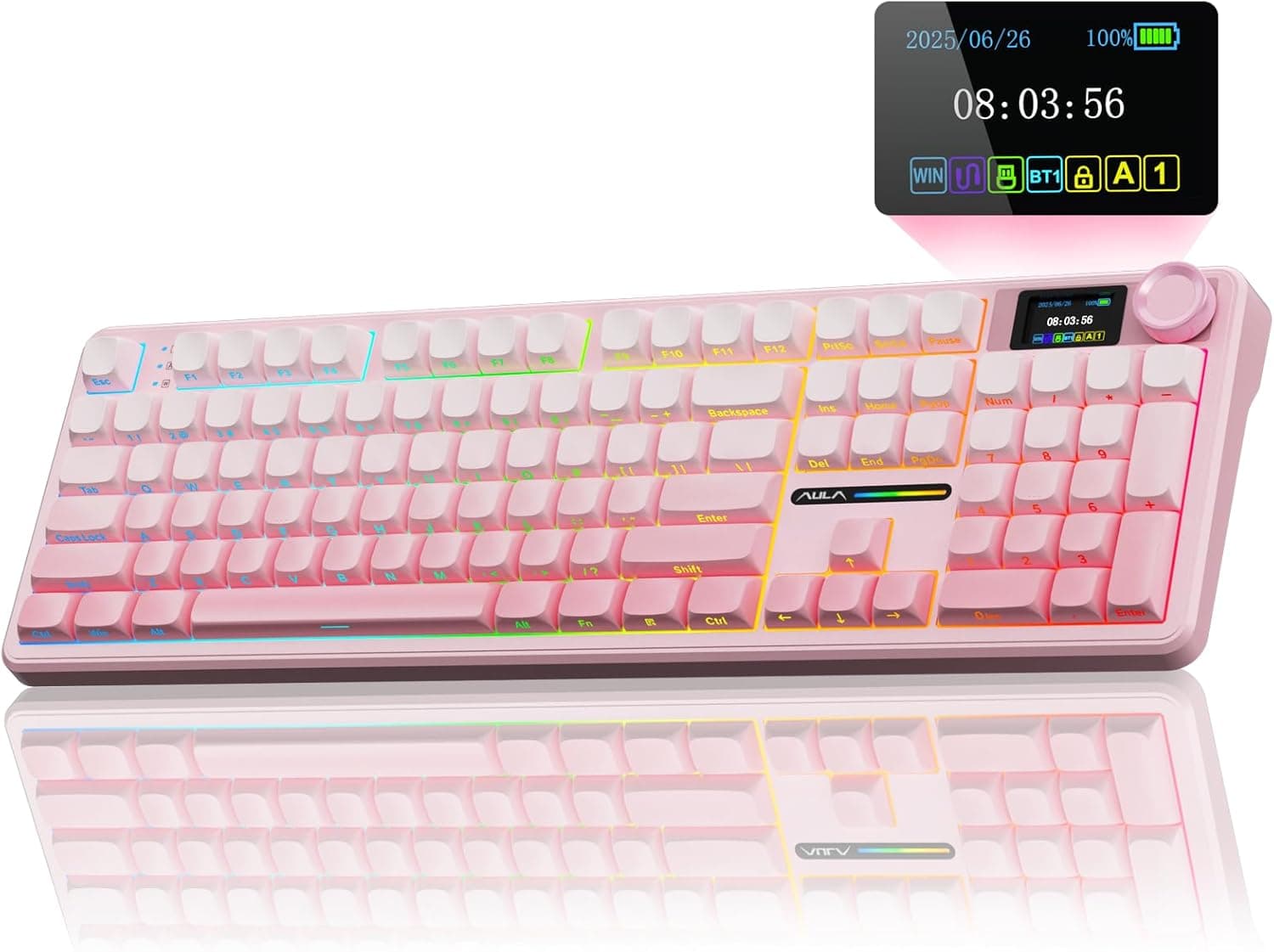
The Z98's character in one line: full-size functionality squeezed into a smaller footprint, on a chassis you can keep modifying afterwards. A 94-key 90% layout retains the numpad, arrow cluster and the Delete/Home block, but removes the empty space between key blocks.
Coming from a 104-key full-size board, your finger positions barely change.
The switches are factory-lubed linears, the keycaps are double-shot PBT, and the internals use a multi-layer design aimed at quieter typing. Hot-swap sockets (3-pin and 5-pin) let you change switches without soldering.
In other words, the board you unbox is a starting point, not a finished product.
It suits people who do spreadsheets, gaming and general work at one desk, and who see a keyboard as something to tinker with. If you want a fully resolved typing feel straight out of the box, the reasoning below explains why this is a weaker match.
What Choosing a 90% Layout Means
Layout is the one thing you cannot change later. Switches and keycaps are swappable; key count and key positions are not.
Decide this before you buy.
| Layout | Approx. keys | Numpad | Arrows | Typical use |
|---|---|---|---|---|
| Full-size | ~104 | Yes | Yes | Heavy numeric entry |
| 90% (this board) | 94 | Yes | Yes | Numbers plus gaming |
| TKL | ~87 | No | Yes | Mouse room first |
| 75% | ~82 | No | Yes (compressed) | Portability |
| 60% | ~61 | No | Fn layer | Minimal desk |
The 94-key count sits about ten keys below full-size, and what was removed is mostly the gaps between clusters rather than the keys themselves. That is the whole point of 90%: same functions, less width.
The trade-off is that keys sit closer together, so for the first few days you will mistype around Delete and PrintScreen. That fades with practice, but do not expect zero adjustment on day one.
If maximising mouse sweep matters most to you as an FPS player, a TKL is the more logical choice. 90% is specifically "compact for people who refuse to give up the numpad."
Compatibility Guide
The published compatibility notes state the keyboard works with essentially all major operating systems — Windows, macOS, iOS and Android. Connectivity is tri-mode: Bluetooth 5.0, 2.4GHz wireless, and USB-C wired, with up to five devices paired and switchable.
PCs, laptops, tablets, smart TVs and consoles such as Xbox are the intended targets.
What matters in daily use is that each mode has a different job:
- 2.4GHz (dongle) — the stronger wireless option for latency and stability. Make this your default for gaming. It costs you one USB port.
- Bluetooth 5.0 — for tablets, TVs and anything you cannot plug a dongle into. As a general rule, Bluetooth keyboards are not recognised in BIOS/UEFI or during OS installation, so keep a cable for that.
- USB-C wired — charging and input in one, and the most reliable way to isolate a problem when something misbehaves.
The 3750mAh battery is rated at up to 20 days with RGB off and roughly 5 days with RGB on. The lesson in that gap is that lighting, not capacity, decides your real charging interval.
At eight hours a day with the lights running bright, expect a weekly charge cycle. You can keep working over USB-C while charging, so nothing breaks — but buying on the strength of "20 days" alone will disappoint you.
For switches, any MX-compatible 3-pin or 5-pin switch should fit. Most retail linear, tactile and clicky switches follow that standard, so the market is wide open.
Optical and capacitive switches are not compatible, so check for the "MX compatible" wording before ordering.
Keycaps need more care. On a 90% layout, modifier widths — Shift, Backspace, Enter, spacebar — can differ from a standard ANSI full-size board, so a generic keycap set may leave a few keys unfitted.
If replacing keycaps is part of the plan, pick a set that lists compatible layouts or includes extra modifier sizes.
Product Info
Here are the published specifications. Nothing below is estimated or filled in on our side.
| Item | Value |
|---|---|
| Layout | 90% (94 keys) |
| Connectivity | Bluetooth 5.0 / 2.4GHz / USB-C |
| Battery capacity | 3750mAh |
| Switch type | Linear (factory lubed) |
| Keycap material | Double-shot PBT |
| Hot-swap | Yes (3-pin / 5-pin) |
The double-shot PBT keycap line deserves attention. PBT resists the oily shine that ABS develops and tends to settle the typing sound slightly lower.
Double-shot means the legends are formed from a second colour of plastic rather than printed, so they cannot wear off. Plenty of boards in this bracket skip both, so it is a real long-term difference.
Factory-lubed linears matter if you intend to use the board as shipped. Unlubed switches often feel scratchy and push owners into lubing them by hand; that step is already done here.
Combined with the multi-layer sound damping, the target is the "creamy" typing feel the marketing describes.
On price, the captured listing shows ¥20,039 as of 25 May 2026. Keyboard prices move constantly with sales and third-party sellers, and this article will not update itself, so always confirm the current price on the product page. Note also that this price entry is labelled "Amazon US" while the link points at Amazon.co.jp and the currency is Japanese yen.
The label comes from automated collection; the actual listing is on Amazon.co.jp.
The other entry is an eBay search page, not a specific offer.
Ratings stood at 4.7 out of 5 stars from 11 reviews as of 25 May 2026.
The score is high, but 11 reviews is far too small a sample. It cannot tell you anything about defect rates or long-term durability, so do not read it as proof of build quality.
A high score on a tiny sample often just reflects a self-selecting group of buyers.
The only listed accessory is a USB cable. Warranty terms vary by seller.
How Useful Are the Display and Knob, Really
The headline features need expectation management.
The knob is straightforwardly useful. Assigning volume to it removes the Fn-combo dance and lets you adjust levels mid-call or mid-game with one finger.
Three directions — clockwise, counter-clockwise and press — support an obvious mapping of volume plus mute. Among keyboard extras, a knob is one of the better value-for-space additions.
The display deserves a colder look. Given the size and viewing distance of a small panel sitting on a keyboard, realistic content is the clock, connection mode, battery level and simple animations.
If you genuinely want live CPU monitoring, a dedicated secondary screen or desktop software will serve you far better. What the panel can actually show depends on the bundled software, so verify the supported readouts on the product page if monitoring is your reason for buying.
The honest framing: buy it because the knob is practical and the display suits your desk aesthetic — not because you expect a monitoring dashboard.
How to Compare It With Rivals
Three axes make the decision quick:
- Can you give up the layout? If you do not need a numpad, TKL and 75% boards offer far more choice and better keycap compatibility.
Insisting on a numpad narrows the field considerably. 2.
Software maturity. Established brands generally lead on configuration software, OS coverage and long-term updates.
This is where newer brands most often fall short, and a thin review count gives you no way to check in advance. 3.
Do you actually plan to modify it? Hot-swap only pays off if you buy switches later.
If you never swap, you paid for a mechanism you will not use.
If all three land in the Z98's favour — numpad required, software compromises acceptable, switches chosen yourself — its position is clear. Miss even one and another layout or brand will likely satisfy you more.
Best Use Cases
- People who insist on a numpad and arrow keys but want desk width back. For anyone moving between spreadsheets and games at the same desk, 90% is the most rational compromise available.
- People who want to shape the typing feel later via switches and keycaps. Hot-swap sockets plus PBT caps form a sensible base for that kind of investment.
- Multi-device users. Five pairings and tri-mode connectivity pay off more the more machines share your desk.
- People who want fewer cables but a wired fallback. USB-C wired mode means a flaky wireless link never stops your work.
Things to Check Before Buying
This is the section that matters most. If any of the following describes you, look elsewhere.
Competitive FPS players should not make this their first choice. The published specs say nothing about polling rate or rapid trigger.
The high polling rates and analogue inputs that top esports boards advertise are simply not this product's battleground. For competitive wireless play, buy something that states its latency figures.
Do not over-read "silent." Multi-layer damping and linear switches do reduce noise, but a mechanical keyboard will never be quieter than a membrane or a dedicated silent model.
If you need near-silence for late-night calls, reconsider mechanical altogether.
Treat the 11-review sample as a genuine risk. Even at 4.7 stars, that count tells you nothing about defect rates, battery health after a year, or switch chatter over time.
Buying from a newer brand means accepting that uncertainty — which is exactly why you should check the return window and who handles the warranty (terms vary by seller) before ordering.
If keycaps are the plan, check layout compatibility first. As noted, 90% boards can use non-standard modifier widths.
Assuming "hot-swap means anything fits" and buying a generic set is a very common way to end up with leftover and missing keys.
Battery figures swing hard with usage. "Up to 20 days" is with RGB off; with lighting on it is about 5 days.
Buying it for the lighting and then resenting the charging cadence is an avoidable outcome.
Listing data does not always match the product. In this dataset the price entry is labelled "Amazon US" while linking to Amazon.co.jp — a small but real inconsistency.
Amazon listing fields are seller-entered, and model numbers, manufacturer names and accessory lists are wrong often enough to matter. Before ordering, confirm the product images, the title and the physical layout with your own eyes. That minute is well spent.
Do not assume a JIS layout. Overseas brands in this segment ship US (ANSI) layouts by default.
If you rely on Japanese input keys, confirm the layout marking before you order.
FAQ
Q. Does it work with macOS? A.
The compatibility notes list Windows, macOS, iOS and Android. What is less certain is whether the configuration software for remapping and lighting supports macOS — check the product page, since this class of keyboard often ships Windows-only software.
Q. Can I use any switch? A.
Any MX-compatible 3-pin or 5-pin switch should fit. Most retail mechanical switches qualify, but optical and capacitive types do not.
Look for the "MX compatible" wording when you buy.
Q. Will it work on a console? A.
Consoles such as Xbox are listed as supported. However, keyboard support varies title by title — the hardware recognising the board is meaningless if the game ignores keyboard input, so check the games you care about first.
Q. How long does the battery last? A.
The 3750mAh cell is rated at up to 20 days with RGB off and about 5 days with RGB on. It charges over USB-C and can be used wired while charging.
Q. Should I use 2.4GHz or Bluetooth? A.
Use the 2.4GHz dongle when responsiveness matters, and Bluetooth for tablets and TVs where a dongle is not an option.
Wireless modes typically fail in BIOS or during OS installation, so keep the USB-C cable within reach.
Q. What is in the box? A.
Published information lists a USB cable only. Assume you will need to source a keycap puller or spare switches separately.
Product Disclosure (Amazon)
- Manufacturer: KZZI
- Seller: eespd78
- Fulfilled by: eespd78
- ASIN: B0DP4C1KL4
- Note: This article covers a manufacturer-made product based on Amazon listing details.