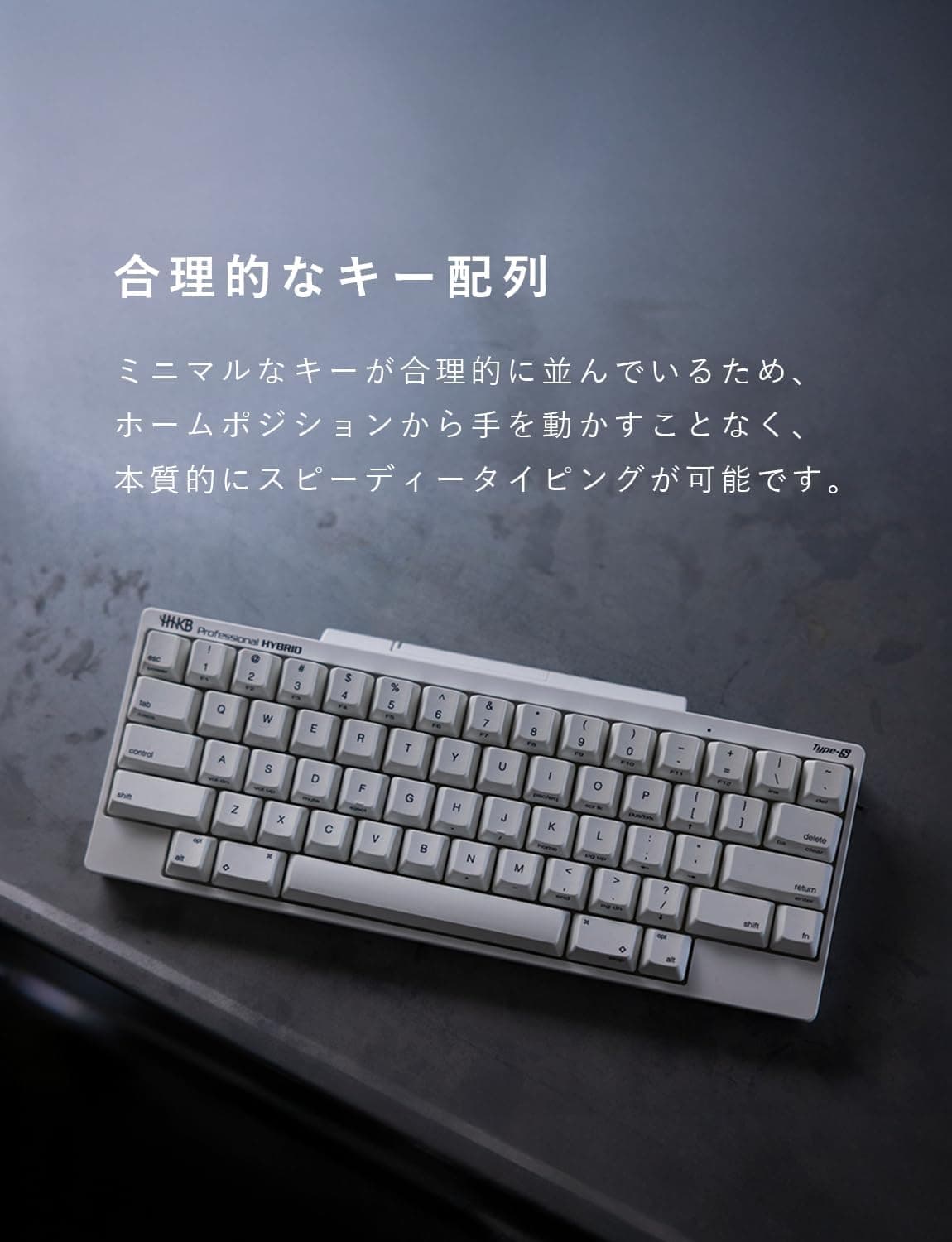
The PFU HHKB Professional HYBRID Type-S in Japanese layout (Charcoal) sits at the very top of the keyboard market: electrostatic capacitive switches, Bluetooth multipoint for up to four devices, and USB-C wired connectivity. This article goes beyond the spec sheet to answer the questions buyers actually have — why choose the Japanese layout over US, whether it will work in your setup, and what you have to accept in return.
Overview
The HHKB Professional HYBRID Type-S JP is a tool for people who type for a living. It is not a gaming keyboard and not an all-rounder.
It pays off most for programmers, writers, and engineers who spend hours a day on text entry and want to drive several devices from one board. If your day is spent on spreadsheets with a numpad, or you play competitive FPS titles, this is not where your money should go.
The switches are electrostatic capacitive. Because actuation is sensed through a change in capacitance rather than metal contacts touching, chatter is structurally unlikely and there is no contact wear.
You can type without bottoming out, which is where the speed comes from. The Type-S variant adds quieter operation and a slightly shallower, faster-feeling stroke than the standard model.
That acoustic difference is the single biggest reason to pick Type-S over the regular version if you work in a shared office or type during video calls.
The chassis measures 294 x 120 x 40 mm. At 294 mm wide it is roughly the long edge of an A4 sheet, so it slips into a bag alongside a laptop.
The 40 mm height is substantial by thin-keyboard standards, but that height is what buys the deep, comfortable stroke.
Why the Japanese Layout, and What Takes Getting Used To
HHKB is best known for its US layout, but this is the JP variant. The practical case for it is straightforward: the henkan/muhenkan keys drive Japanese IME input directly, the symbol legends match ordinary domestic keyboards, and it stays consistent with the JP-layout laptop your employer issued you.
If you use a JP-layout laptop daily, switching only your desk keyboard to US means stopping to hunt for symbols all day. Avoiding that cost is a legitimate reason to pick this model.
The HHKB conventions still take adjustment. Ctrl sits to the left of A, where Caps Lock normally lives.
There is no dedicated function row — F1 through F12 are Fn combinations. Delete and Backspace behave differently from a standard board.
Expect a few awkward days. Once it clicks, almost every operation happens without leaving the home row, and that is exactly why people stay with HHKB for years.
Note that the spec sheet lists 60 keys. The JP layout differs from the US layout in key composition, so check the key-layout photo on the product page before ordering.
Buying without looking at that image is the most common way people end up with a layout they did not expect.
Compatibility Guide
Supported operating systems are Windows, macOS, iOS, and Android. No special drivers are needed; the keyboard enumerates as a standard HID device over either USB-C or Bluetooth.
| Connection | Best for | Check first |
|---|---|---|
| Bluetooth | Switching between laptop, tablet, phone | That the host supports BT keyboards |
| USB-C wired | Desktop use, BIOS/UEFI, zero-fuss reliability | Whether your PC needs a USB-A adapter |
Three practical caveats matter. First, Bluetooth does not work before the OS boots — you cannot use it in BIOS/UEFI or during an OS install.
If you build or reinstall your own machines, plan on the bundled USB-C cable. If your PC has no USB-C port, budget for a USB-A to USB-C cable or adapter.
Second, modifier layouts differ between macOS and Windows. The keyboard has onboard keymap customization, so per-OS arrangements can be stored in the board itself, which makes cross-platform use genuinely practical.
Configuring it uses the manufacturer's keymap tool, so keep one wired-capable PC available for initial setup.
Third, physical placement. At 120 mm deep it fits narrow desks and keyboard trays easily, but no palm rest is included.
A 40 mm-tall keyboard sitting flat tends to angle your wrists upward, so if you type for hours, plan on buying a wrist rest separately.
Product Info
| Item | Value |
|---|---|
| Switch type | Electrostatic capacitive |
| Keys | 60 |
| Connectivity | Bluetooth / USB-C |
| Multipoint | Up to 4 devices |
| Layout | Japanese |
| Color | Charcoal (black) |
| Dimensions | 294 x 120 x 40 mm |
| Supported OS | Windows / macOS / iOS / Android |
As captured on 2026-05-28, Amazon.co.jp listed it at ¥36,850.
On the marketplace side, an eBay listing at $382.70 was captured on 2026-07-09.
Both are point-in-time figures and move with sales, stock, and exchange rates — always confirm the current price on the product page. Note that the pricing label reads "Amazon US" while the link points to Amazon.co.jp and the currency is JPY; read it as a domestic price.
Review data captured on 2026-05-28 shows 4.7 out of 5 stars, a 94% positive rate, across 2,785 reviews.
Gathering 2,785 reviews at a near-¥37,000 price point says a lot about how established this product is. The gap between 4.7 and 5.0 is mostly about layout adjustment, price, and the sparse bundle — matters of design philosophy rather than defects.
The box contains the keyboard and a USB-C cable. A one-year manufacturer warranty applies.
Beyond Amazon.co.jp, it is sold through PFU Direct and major electronics retailers.
Since the keymap tool and firmware updates come from the manufacturer, buying through official channels is the safer route for support.
How It Compares
At roughly ¥37,000 you have real alternatives. The deciding axis:
- You want to tune the feel yourself → a hot-swap custom board like the Keychron Q1. Swap switches until the weight and sound are exactly right. HHKB's capacitive switches cannot be swapped.
- Gaming input speed comes first → a magnetic (Hall effect) board with rapid trigger. Adjustable actuation is a clear advantage in FPS titles. HHKB is built for typing accuracy, not for that.
- Maximum portability by thinness → a slim scissor-switch wireless board. HHKB is 40 mm tall; it travels because it is small, not because it is thin.
- Quiet, long-session typing across several operating systems → this keyboard. There is almost nothing else that does exactly this.
Best Use Cases
The clearest fit is anyone whose job is typing: programmers, writers, translators, engineers. The capacitive switch lets you type without bottoming out, which lowers the impact reaching your fingertips and keeps fatigue from stacking up over a long day.
The Type-S quieting matters in real situations — taking notes during a call, working while the household sleeps, typing in a shared office.
The second fit is anyone juggling a desktop, a laptop, and a tablet. Register up to four devices and switch hosts with a key combination.
You stop needing a keyboard per device, your desk clears up, and every environment gives you the same typing feel. That consistency travels well for people who work from cafes and co-working spaces.
The third fit is anyone who does not want to leave the Japanese layout. If HHKB appeals but moving to US layout feels risky, or you must stay consistent with a company-issued JP laptop, this model minimizes the switching cost.
Before You Buy
There is no dedicated function row and no numpad. If you enter long columns of numbers or lean on F-key shortcuts in video editing, Fn combinations will be a genuine friction point.
"You'll get used to it" is not always true — for some workflows it never stops being awkward. Before buying, spend a day noticing how often you actually hit the function row and numpad.
The Ctrl position and Delete/Backspace conventions cause accidents when you alternate keyboards. Using a standard board at work and HHKB at home means your hands never fully commit to either, and typos increase on both for a while.
If you adopt HHKB, try to standardize on it.
Do not buy this for gaming. Chatter resistance and gaming advantage are different things.
There is no rapid trigger, no adjustable actuation point, and it is not marketed on n-key rollover performance. If gaming is the goal, the same budget buys a far better gaming keyboard.
Bluetooth cannot be used before the OS loads. Getting locked out of BIOS/UEFI is a common stumble.
Keep the USB-C cable within reach. On a permanent desk, running it wired also removes battery management from your routine entirely.
This is an expensive keyboard. ¥36,850 as captured on 2026-05-28 is enough to move a monitor or graphics card up a tier.
Decide first whether typing quality is worth that investment to you; if you cannot answer, try one in a store. The feel of a capacitive switch does not translate into text.
Read the listing details carefully. Listing metadata is registered automatically and can show a manufacturer name, model number, color, or layout that does not match the actual product.
This keyboard exists in Japanese and US layouts, charcoal and white, Type-S and standard — and they look alike. Confirm that both the product image and the title carry all three words: Japanese layout, Type-S, and HYBRID.
FAQ
Q. US layout or Japanese layout? A.
If the laptop you use daily is JP layout, choose JP. US layout moves the symbols, and alternating between the two slows you down.
If you have already standardized on US, this model is not for you.
Q. What is the difference between Type-S and the standard model? A.
Type-S is the quieter, faster-feeling variant. Pick Type-S if you type in shared spaces or during calls; pick the standard model if you enjoy the sound of the keys.
Q. Can I use it with both Mac and Windows? A.
Yes. Both are supported, and multipoint covers up to four devices.
Use the onboard keymap customization to store per-OS modifier arrangements.
Q. Is wired noticeably faster than Bluetooth? A.
Not for normal typing. But Bluetooth is unusable before the OS boots, so BIOS/UEFI work and OS installs require the cable.
Q. How is it rated? A.
As captured on 2026-05-28, Amazon.co.jp showed 2,785 reviews averaging 4.7 out of 5 stars — a 94% positive rate, unusually consistent for this price bracket.
Q. Do I need a palm rest?
A. At 40 mm tall, yes, if you type for hours. None is included, so budget for one separately.
Product Disclosure (Amazon)
- Manufacturer: HHKB
- Seller: PFUダイレクト
- Fulfilled by: PFUダイレクト
- ASIN: B082TSZ27D
- Note: This article covers a manufacturer-made product based on Amazon listing details.