Overview
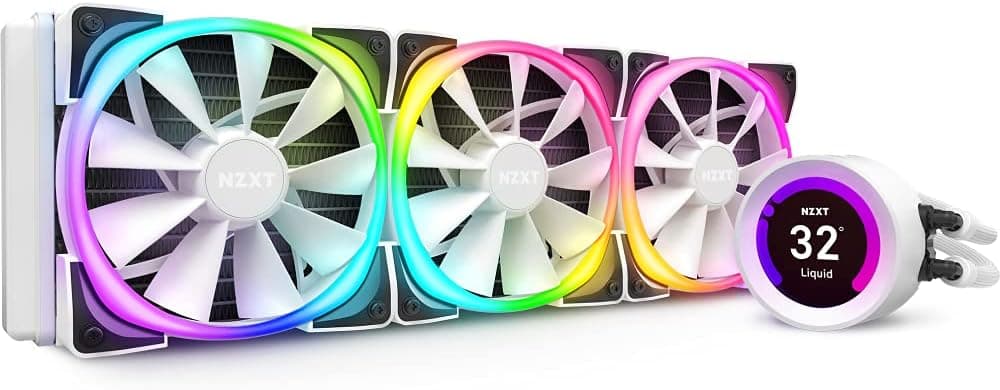
The NZXT KRAKEN Z73 White pairs a 360mm radiator with a 2.36-inch LCD mounted on the pump head.
The honest framing: this is not a cooler you buy for raw thermal performance, but one where adequate cooling is a given and the premium goes toward the display and the all-white aesthetic. Against similarly priced 360mm AIOs, temperature differences are modest; the LCD is what you are actually paying for.
Amazon shows 4.4 out of 5 stars across 6,175 reviews (roughly 88%, captured 2026-06-24).
With a sample that large, that rating suggests a product that simply works across a wide range of builds. Most disappointment tends to cluster not around cooling, but around software residency and case clearance — both covered below.
Compatibility Guide
Supported sockets are Intel LGA1700 / LGA1200 / LGA115x and AMD AM5 / AM4. Newer Intel LGA1851 and HEDT platforms such as Threadripper are not on that list, so treat them as out of scope unless NZXT's official compatibility chart says otherwise.
Physical fit is the real hurdle. The radiator is 394 × 120 × 27 mm, and three 120mm fans (typically 25–26mm thick) push the effective stack past 50mm.
A case spec sheet claiming "360mm radiator support" usually accounts only for the bare radiator. For a top mount, measure the gap to the VRM heatsink, the 8-pin EPS connector and the memory slots; for a front mount, check drive cages and cable routing.
| Item | Value | Easy to miss |
|---|---|---|
| Radiator | 394 × 120 × 27 mm | The 394mm length exceeds the mounting-hole span; check end clearance too |
| Fans | 120mm × 3 | Over 50mm with fans; watch tall RAM on top mounts |
| Sockets | LGA1700/1200/115x, AM5/AM4 | No LGA1851 or HEDT support |
| Fan power | 4-pin PWM | Confirm you have enough motherboard fan headers |
| Pump / LCD power | SATA | Needs one free SATA connector |
| Control | USB 2.0 internal header | Needs one free header — often contested with ARGB controllers |
Power requirements are trivial (3.6 W, effectively the pump), but the USB 2.0 internal header is not.
Mid-range boards often ship with only one or two, and AIOs, ARGB controllers and front-panel USB all compete for them. If yours are full, budget for an internal USB 2.0 hub.
Product Info
Key specs: a 394 × 120 × 27 mm radiator, three 120mm fans, 33 dB(A) noise, 52.44 CFM airflow, 3.6 W power draw, a 2.36-inch LCD, and a 6-year warranty.
The noise and airflow figures read as per-fan maximums rather than combined output, and PWM control means the cooler rarely runs at that level during normal use.
The Z73 belongs to NZXT's Kraken Z series and launched in 2020. In Japan, authorized-distributor stock carries a 6-year warranty, which is generous for an AIO.
That matters: a pump is a moving part, and coolant loss or pump noise over time is a real category risk, so warranty length is a legitimate factor when weighing an AIO against air cooling. The box includes three Aer P 120mm fans, Intel/AMD mounting kits, thermal paste and a USB cable.
On price, a caveat: the pricing data we collected contains a figure whose order of magnitude does not match this product class, which strongly suggests a collection error. We therefore do not quote a number here.
Around ¥40,000 was the rough street level at launch, but availability, exchange rates and sales move it significantly. Check the current price on the product page and compare sellers.
Competitive Comparison
Within the LCD-equipped 360mm AIO niche, the Corsair iCUE LINK H150i LCD and ASUS ROG Ryujin III are the direct rivals. The Kraken's edge is the maturity of NZXT CAM and the early availability of a white variant.
If you care only about thermals, thick-radiator designs such as the ARCTIC Liquid Freezer family generally win on value — remove the LCD from the equation and this cooler's advantage largely evaporates.
Step back further and the real competitor is air cooling. A dual-tower cooler like the Thermalright Peerless Assassin 120 SE handles Core i7 / Ryzen 7 class chips for a fraction of the cost.
A 360mm AIO earns its place with sustained Core i9 / Ryzen 9 loads, or when you want CPU heat exhausted straight out of the top of the case. Choosing it for looks is a valid reason — just make it a conscious one.
Real-World Use and Setup Tips
The LCD can show stills, GIFs or system stats, but its most genuinely useful mode is a live readout of CPU and liquid temperature. Liquid temp is the health indicator for any AIO: a few degrees above ambient at idle and high-40s °C under load is normal.
A steady climb over months points to a dust-clogged radiator or a degrading pump.
Two practical installation notes. Pump-head orientation is correctable in software, so route the tubing the way that fits your case and rotate the display afterward.
And mount the radiator so the tube fittings sit below its highest point — this keeps air out of the pump and reduces the odds of pump noise developing over time. That rule applies to AIOs generally, not just this one.
Best Use Cases
The primary buyer is someone building a white-themed system with the pump head visible through a side panel, where the LCD becomes a focal point. Second: anyone running a hot Core i9 / Ryzen 9 chip who wants CPU and liquid temperatures permanently in view.
Streamers who show off their hardware get real value here too. If your case sits closed under a desk and you never look inside, the LCD is worth close to nothing to you.
Things to Check Before Buying
Watch for mismatched listing data. The Amazon page we referenced lists a manufacturer name that does not match NZXT, so we have omitted that disclosure block from this article.
The price field likewise contained a figure that is implausible for this product class. Marketplace listings can carry wrong metadata, bundles or parallel imports.
Verify the product image, title, seller and fulfiller before ordering.
The LCD requires NZXT CAM running in the background. This is the single most common source of disappointment.
Close CAM and the display stops reporting, and granular fan/pump control goes with it. If you keep background software to a minimum or dislike account-based utilities, treat this as an ongoing cost.
Cooling still works from BIOS PWM control alone — but then an LCD model makes little sense.
"It fits" and "it fits comfortably" are different. Tall RAM heatspreaders and top-mounted 360mm radiators genuinely collide.
Check your case's stated clearance above the motherboard; under 55mm deserves caution. For mini-tower or cube builds, rule this cooler out from the start.
The LCD does not improve cooling. Temperatures are not meaningfully lower than a non-LCD Kraken or a rival 360mm AIO.
If cooling alone is the goal, a thick-radiator AIO or a high-end air cooler delivers more per yen.
AIOs are semi-consumable. Pumps are moving parts and can change tone or lose performance over years.
The 6-year warranty helps, but a failure means opening the system and replacing the whole loop. If you want zero maintenance risk, air cooling is the better fit.
FAQ
Q. Can I use it without NZXT CAM? A.
Yes, for cooling — fans run on motherboard PWM and the pump runs on SATA power. But configuring the LCD and tuning detailed fan curves requires CAM, so plan on keeping it resident if the display matters to you.
Q. Does it support LGA1851 (Core Ultra)? A.
The listed sockets are LGA1700/1200/115x and AM5/AM4; LGA1851 is not among them. Check NZXT's official compatibility chart for a mounting kit before buying.
Q. Is 33 dB(A) quiet? A.
Read that as a near-maximum-RPM figure for a single fan. Everyday loads run far quieter under PWM.
Pump noise, however, is present regardless of fan speed — if silence is the priority, air cooling wins.
Q. My USB 2.0 headers are all used. What now? A.
An internal USB 2.0 hub is the standard fix.
Without a free header you cannot control the LCD, so count your headers before ordering.
Q. Do I need a separate AM5 bracket? A.
AM5 is on the supported list, so retail units include the required hardware. Used or parallel-import units may be missing accessories — check the listing.
Q. Is the 6-year warranty reliable? A.
In Japan the long warranty applies to authorized-distributor stock. Parallel imports and private sellers may fall outside domestic coverage, so confirm the sales channel if warranty matters.
![NZXT H510 Elite 前面+側面ガラスパネル RGB LED発光&ファン制御機能搭載 [ White & Black ] CA-H510E-W1](/_next/image?url=https%3A%2F%2Fm.media-amazon.com%2Fimages%2FI%2F61eFTi%2B5rpL._AC_SL1500_.jpg&w=1920&q=75)