Overview
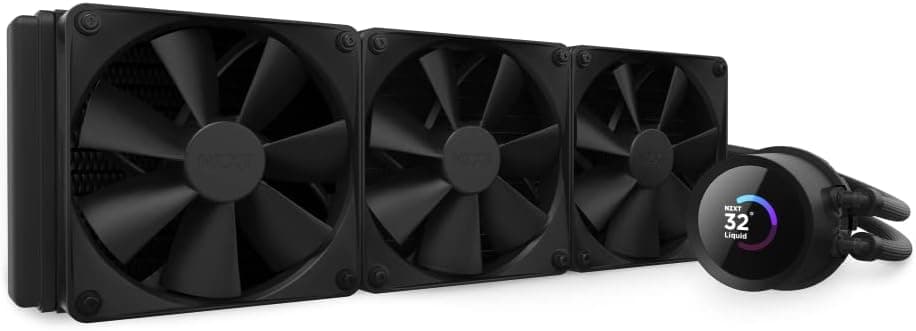
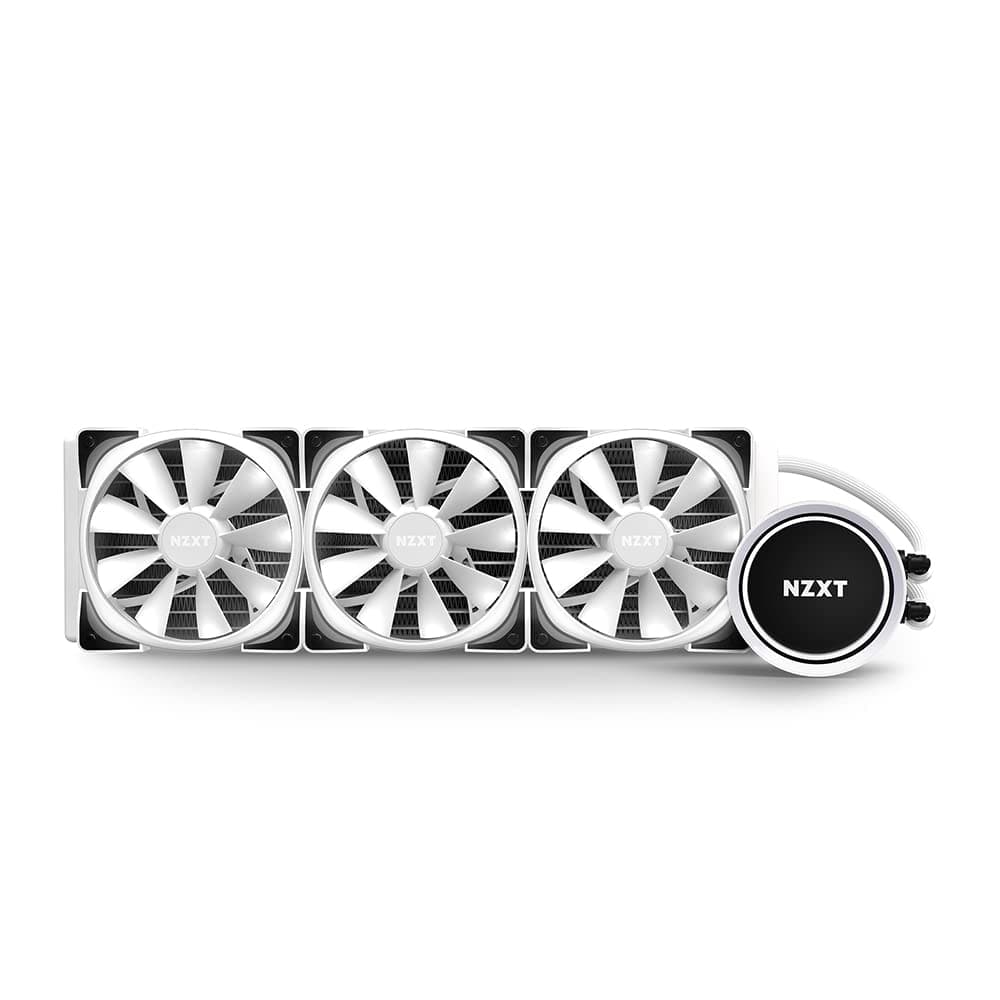
The NZXT Kraken X73 RGB White is a 360mm all-in-one CPU liquid cooler that combines striking Infinity Mirror aesthetics with high-performance cooling. It features three Aer RGB V2 fans with fluid dynamic bearings, offering quiet operation and durable reliability.
The pump head uses an enlarged Infinity Mirror LED design, controllable via NZXT CAM software. With broad socket compatibility including Intel LGA1700/1200/115x/2066 and AMD AM5/AM4/sTRX4/TR4, it suits a wide range of modern CPUs.
The honest framing: this is not a cooler you buy purely for raw thermal numbers. It is for builders who want a visually coherent NZXT ecosystem and pick up 360mm-class cooling along the way.
On Amazon.co.jp it holds 4.3 out of 5 stars across 62 reviews (captured May 2026) — a solid, if not enormous, sample for an AIO.
If absolute cooling per yen is your only metric, thicker-radiator utility AIOs or a high-end dual-tower air cooler will often match or beat it. Understanding that a meaningful share of this product's value sits in the pump aesthetics and unified CAM control will keep your expectations aligned after purchase.
Connectivity & Compatibility
The Kraken X73 RGB connects via SATA power for the pump, PWM fan headers for the Aer fans, and a proprietary NZXT RGB connector for lighting control. It supports Intel LGA1700, LGA1200, LGA115x, LGA2066, and AMD AM5, AM4, sTRX4, TR4 sockets.
Note that socket support on any AIO ultimately depends on which brackets ship in the box, so verify the included-accessories list before buying if you are targeting LGA1700 or AM5.
The 360mm radiator (397×120×27mm) requires a case with three 120mm fan mounts, typically on the top or front. The most common mistake is assuming "has a 360mm mount" means "it fits." Three dimensions actually decide it:
| Check | Value | What to verify |
|---|---|---|
| Radiator length | 397mm | Clearance along the top/front panel |
| Radiator thickness | 27mm | Plus 25mm fans = ~52mm total |
| Pump height | 47.4mm | Side panel and cable clearance |
At 27mm the radiator is on the slim side, and with fans the stack lands around 52mm. That thinness is a practical advantage in top-mount installs, where thick radiators tend to collide with VRM heatsinks or tall heat-spreader memory.
The 47.4mm pump height fits most ATX cases without interference.
In compact or shallow chassis, however, the gap between the glass panel and the pump top gets tight fast. Case spec sheets usually quote a CPU cooler height limit for air coolers, so budget pump height plus tube bend radius separately.
Mount orientation also changes results. As a general rule, front intake feeds the radiator cool outside air and lowers CPU temperature, but pushes warmed air over the GPU.
Top exhaust does the opposite. With a hot high-end GPU, top exhaust is usually the saner default; if you are chasing the last few degrees on the CPU, front intake wins.
On the power side, you need one free SATA power connector for the pump. Plan that cable run before you mount anything.
Cooling and Noise in Practice
A 1800 RPM maximum and a 33 dBA noise rating are typical for this class. What matters is that the quoted figure represents a specific operating condition — in daily use, a relaxed fan curve holding roughly 1000 RPM gives a far better noise-to-temperature balance.
The whole point of 360mm of surface area is that you can trade fan speed for radiator size, which benefits quiet-build owners most.
The Aer RGB V2 fans use fluid dynamic bearings, generally favored over sleeve bearings for longevity and low noise. That said, across AIOs in general, pump noise tends to become noticeable before fan noise does.
Pump speed is adjustable in CAM, so if you hear it in a quiet room, try a load-linked or mid-speed profile instead of running it pinned at maximum.
One expectation to set: modern high-end CPUs boost until they hit a thermal or power ceiling. Upgrading to a 360mm AIO often will not show a dramatic drop in reported temperature.
Instead, the benefit appears as higher sustained clocks at the same temperature, or the same performance at lower fan speed. A flat temperature reading is not evidence the cooler is doing nothing.
How It Compares
Within the 360mm class, designs diverge. Performance-first coolers add radiator thickness and a VRM fan.
Screen-equipped models sell information display. The Kraken's Infinity Mirror does neither — it produces an optical sense of depth rather than text or images, aiming for restraint over spectacle.
The white finish matters too: matching white radiators and fans are genuinely harder to source, so a coordinated white kit has real value.
Against high-end dual-tower air coolers, this loses on pure cost-efficiency. The reasons to still choose an AIO are memory clearance, less mechanical load hanging off the motherboard, and a cleaner interior.
Shift the decision axis from "cooling power" to "layout and appearance" and this product's position becomes clear.
Product Info
Launched in 2021, the NZXT Kraken X73 RGB White is a high-tier all-in-one CPU liquid cooler. It targets enthusiasts needing robust thermal management for high-TDP processors (300W+).
The market positioning is premium, justified by the large 360mm radiator, three RGB fans, and the Infinity Mirror pump head. NZXT CAM software provides comprehensive control over fan curves, pump speed, and RGB lighting.
The package includes the cooler assembly, mounting hardware for supported sockets, and a quick-start guide.
| Spec | Value |
|---|---|
| Radiator size | 360mm (397 × 120 × 27mm) |
| Fan size | 120mm × 3 |
| Max fan speed | 1800 RPM |
| Noise level | 33 dBA |
| Pump height | 47.4mm |
User rating stands at 4.3 out of 5 from 62 reviews on Amazon.co.jp (captured May 2026).
With a sample that size, individual review text about brackets, pump noise, and CAM behavior is more informative than the average score itself — those are the three areas where AIO opinions split.
On price, a caveat: the domestic listing price captured in May 2026 is an order of magnitude away from the normal street price for a 360mm AIO, which points to a data mismatch or a reseller listing. This article therefore does not quote a domestic figure.
Prices fluctuate significantly — check the product page for the current price.
Product Disclosure (Amazon)
- Manufacturer: NZXT
- Seller: New Oriental Technology
- Fulfilled by: New Oriental Technology
- ASIN: B0983347T1
- Note: This article covers a manufacturer-made product based on Amazon listing details.
Installation Notes
The workable order is: mount the radiator, swap the pump bracket, seat the pump on the CPU, then route cables. The usual stumbles:
- Mount the radiator first. Doing it in reverse tugs the tubing and skews pump contact.
- Use the correct screw length. Over-long screws can pierce radiator fins and cause a leak. This is the one irreversible step.
- Set the pump logo orientation before torquing down. It rotates, but redoing it later is tedious.
- Plan the SATA and RGB cable paths early. Cases with thin rear channels make retrofitting them painful.
Tighten in a diagonal pattern, a little at a time. Uneven torque tilts the coldplate and can cost several degrees.
Best Use Cases
- High-performance gaming or workstation builds where a Core i9 or Ryzen 9 needs sustained cooling. Long encodes and renders benefit most from radiator headroom.
- Enthusiasts who prioritize aesthetics and want a cohesive RGB ecosystem integrated with NZXT components — especially in white builds, where matched parts are hard to find.
- Users who require quiet operation — fluid dynamic bearings and the low 33 dBA rating suit recording setups or late-night sessions where a mic sits near the case.
- Existing NZXT owners who would rather manage lighting and fan curves in one application than run several vendor utilities.
Before You Buy
Start with the price. The domestic price captured from this listing diverges sharply from typical 360mm AIO street pricing.
Marketplace sellers and thin stock periods can produce extreme figures. Confirm the seller and amount at purchase, and skip listings far off the market rate.
Listing metadata (seller, fulfiller, model number) can also be wrong, so verify from the product image and title that you are buying the white Kraken X73 before ordering.
Then measure your case. A "360mm compatible" label does not guarantee a 397mm radiator clears the PSU shroud or front drive cage.
In front-mount installs, confirm the ~52mm radiator-plus-fan stack does not foul the motherboard edge or cabling.
Account for its age. This is a 2021 product, so bundled mounting hardware for the newest sockets may vary by production batch.
If you are building on LGA1700 or AM5, verify the accessory list or ask the seller. Skipping that check is how build day stalls.
Note the proprietary RGB. Pump and fan lighting use NZXT's own connector; wiring it into a motherboard ARGB header for third-party control is not the intended path.
If unifying all lighting under your motherboard's software matters, or if a resident utility bothers you, that is the compromise here.
Who should skip it: (1) anyone quietly cooling a mid-range CPU — a dual-tower air cooler is cheaper with fewer failure points; (2) anyone indifferent to looks, since much of the premium sits in the design and software; (3) anyone wanting a decade of zero-maintenance service, as a pump is a moving part; (4) small-case owners — 397mm is longer than it sounds.
Finally, calibrate expectations on temperature. As noted, modern high-end CPUs boost into their thermal ceiling, so the gain shows up as clocks and acoustics rather than a lower number on screen.
FAQ
Q. Will it fit any case labeled 360mm compatible? A.
Not necessarily. Check clearance for a 397mm length and a ~52mm fan-plus-radiator stack against memory, VRM heatsinks, and the PSU shroud.
Look for a "max radiator thickness" figure in the case spec sheet.
Q. Will the 47.4mm pump hit the side panel? A.
In a standard ATX case, no. But case cooler-height limits are written for air coolers, so in narrow chassis measure the actual clearance above the socket.
Q. Is CAM software required? A.
Cooling itself runs on motherboard power and PWM control. Detailed pump speed and RGB configuration are designed around CAM, so plan on installing it to use the feature set.
Q. Can I swap in third-party fans? A.
Physically yes — it is a standard 120mm × 3 layout. You lose Aer RGB V2 lighting and unified control through NZXT's connector, so treat it as a noise-first compromise.
Q. Do LGA1700 or AM5 need extra parts? A.
Both are listed as supported, but bracket contents can differ by batch. Confirm the included-accessories list before purchase.
Q. How long does an AIO last? A.
Design life varies by product, so no firm figure applies. The pump is the common wear item; treat a change in pump noise as a replacement signal, and check warranty terms on the product page.
![CoolerMaster MasterLiquid Core II 240 Black ARGB X6G2 デュアルチャンバーポンプ採用「MasterLiquid Core II X6G2」シリーズ240mm水冷CPUクーラー ブラックモデル [MLW-D24M-A18PA-J1]](/_next/image?url=https%3A%2F%2Fm.media-amazon.com%2Fimages%2FI%2F514IPj3XBjL._SX466_.jpg&w=1920&q=75)