Overview
The Logitech MX Keys Wireless Keyboard is a premium productivity keyboard designed for professionals who prioritize typing comfort and efficiency. The short version: this is a board for people who type all day and move between several computers quietly.
It is not a gaming keyboard and not a travel keyboard. On Amazon.co.jp it holds 4.6 out of 5 stars — a 92% positive score across 927 reviews as captured on 30 May 2026 — which is a solid, stable rating for a keyboard.
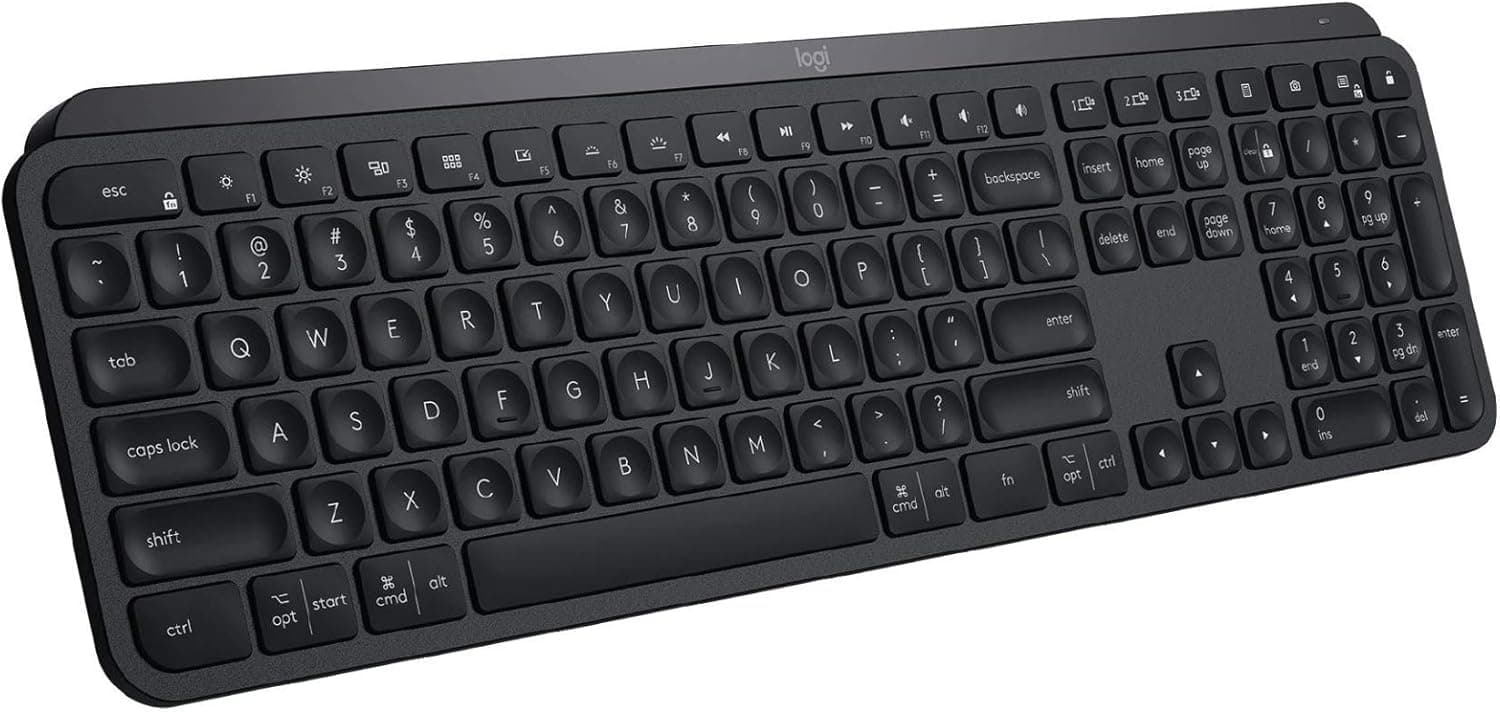
Perfect Stroke keys use a spherical dish shape that fits your fingertips, delivering stable, quiet, and responsive keystrokes. The keyboard automatically illuminates keys as your hands approach and adjusts brightness to ambient lighting.
With Bluetooth Low Energy and the included Logitech Unifying receiver, you can connect and switch between up to three devices seamlessly.
Typing Feel and Backlight in Practice
Perfect Stroke is a scissor-style mechanism — think of a laptop keyboard made thicker, heavier and far more stable. The short travel means less finger movement and none of the bottoming-out impact of a mechanical board.
The flip side is real: if you are hoping for the deep, cushioned press of a 45g capacitive board or a linear mechanical switch, you will be disappointed. This is a structural difference, not a matter of taste, so try one in person if you can.
The backlight fires on proximity and scales with ambient light. It is genuinely convenient, but the battery figures tell the real story: up to 10 days with backlighting on versus up to 5 months with it off — a 15x difference.
Treat the backlight as a dark-room feature rather than an always-on one. In a bright office, switching it off from day one and settling into a five-month charge cycle is the practical choice.
Compatibility Guide
The MX Keys supports both Bluetooth and the Logitech Unifying USB receiver, covering Windows 10/11, macOS 12 or later, Linux, Chrome OS, iOS and Android. It pairs with up to three devices via dedicated Easy-Switch keys.
Here are the actual prerequisites:
| Item | Requirement | Where people get caught |
|---|---|---|
| Unifying receiver | One free USB-A port | USB-C-only laptops need a hub or adapter |
| Bluetooth | Bluetooth 4.0 or later | Older desktops may have no built-in radio |
| Logitech Flow | A compatible MX mouse (sold separately) | Flow does not work with the keyboard alone |
| Desk space | 430.2 × 131.6 × 20.5 mm | 43 cm wide; check shallow desks and keyboard trays |
The most common physical mismatch is size, not software. A 430.2 mm width is standard for a full-size board with a numpad, but once you add mouse travel you really want about 70 cm of usable desk width.
Moving here from a 60% or 75% board pushes your mouse further out, opens your shoulder, and can leave you more fatigued rather than less. If you rarely use a numpad, that is the deciding factor.
Weight is 810 g including the battery. It is thin at 20.5 mm, but carrying a near-kilogram metal-topped keyboard daily is not realistic.
For portable use, look elsewhere.
Flow enables drag-and-drop file transfer and cross-computer copy-paste between PCs on the same network — but it requires a compatible Logitech MX mouse, sold separately. Buying the keyboard for Flow alone is one of the most common mistakes with this product.
Product Info
First released in 2019 and still widely available, the MX Keys sits in the upper-mid range of Logitech's wireless lineup — a premium office and creative tool rather than a gaming peripheral. The box includes the keyboard, a 1.5 m USB-C charging cable, and a Logitech Unifying receiver.
Standard manufacturer warranty is one year. It comes in Black (model 920-009295, covered here) and Pale Gray.
Key specifications: 104-key full-size layout with numeric keypad, dual connectivity via Bluetooth Low Energy and the Unifying receiver, auto-dimming backlight that can be turned off manually, USB-C charging, 810 g weight, and 430.2 × 131.6 × 20.5 mm dimensions.
Battery life is up to 10 days backlit, up to 5 months unlit.
Pricing needs care. The listing captured for this article showed ¥28,140 on 30 May 2026 and ¥27,327 on 27 August 2026.
However, this product's long-standing street price has been roughly ¥14,000–¥16,000 in Japan and about $99.99 USD internationally, and an overseas marketplace listing showed $73.99 as of 8 July 2026.
The ¥27,000-plus figures most likely reflect a third-party reseller's pricing rather than the manufacturer's. All of these are point-in-time captures and move with sales and seller changes — check the current price and the seller on the product page before buying.
Competitive Comparison
The verdict changes depending on what you compare it against. Three axes matter:
- Pure typing feel: capacitive boards. A 45g capacitive keyboard such as a REALFORCE beats it on keystroke quality outright — but it is wired, large, expensive, and offers no multi-device switching.
- Customization: hot-swap mechanicals. Boards like the Keychron C1 assume you will swap switches and keycaps. The MX Keys assumes nothing of the sort; what you unbox is the final form.
- Wireless full-size: 98-key mechanicals. If you can live with the noise and thickness, they often win on price-to-performance.
Where the MX Keys clearly wins: quietness, thinness, the polish of three-device switching, and chassis rigidity. Where it can lose to any of the above: absolute typing pleasure, customization, and price.
Decide your priority first.
Best Use Cases
- Office and remote workers: quiet keys and low fatigue over long document and email sessions. Multi-device pairing suits anyone bouncing between a work laptop and a desktop, and the low noise floor is a real advantage on video calls.
- Multi-device power users: ideal if you juggle a MacBook, a Windows PC and a tablet. With a compatible MX mouse, Flow smooths cross-machine workflows.
- Comfort-first typists: a refined, low-profile, quiet alternative to mechanical boards — good for shared offices and quiet homes.
- Heavy number entry: the 104-key full-size layout with numpad fits accounting, data entry and spreadsheet work.
Things to Check Before Buying
Price first. The captured prices (¥28,140 on 30 May 2026; ¥27,327 on 27 August 2026) are roughly double this product's long-standing street level of about ¥14,000–¥16,000.
The listing is sold and shipped by a third-party seller, so the figure may reflect reseller pricing rather than regular retail. The same ASIN can differ in price, warranty handling and accessory condition depending on the seller — verify the seller field and whether manufacturer warranty applies.
Listing metadata (model number, color, bundled items) is also occasionally wrong, so confirm from the images and title that you are actually buying the MX Keys (920-009295).
Second, the key mechanism. This is not a mechanical keyboard.
Travel is short, switches cannot be swapped, and keycap replacement is not practical. "Quiet and low-fatigue" and "fun to type on" are separate scales; if you want the latter, this is the wrong board.
Third, size and weight. 430.2 mm wide and 810 g means desk-bound.
For daily transport to a cafe or coworking space, or on a narrow desk where mouse room is tight, a compact model is more comfortable.
Fourth, the receiver port. The Unifying receiver needs USB-A, so USB-C-only ultrabooks and MacBooks require a hub.
Bluetooth sidesteps that, but it will not type in BIOS/UEFI screens or during a fresh OS install where the Bluetooth stack is not running. If you do that work often, keep one USB-A port available.
Fifth, backlight logistics. Up to 10 days means a weekly charge habit.
Charging is over USB-C, but if you plan to leave a cable attached permanently, the wireless design loses much of its point. Decide up front whether you are a backlight-off, five-month person or a weekly-charge person.
Sixth, mixed Windows/Mac legends. The board supports both, but the key legends carry both OS markings.
If you want clean Mac-only legends, check the product page for a Mac-specific variant.
FAQ
Q. How many devices can it connect to? A.
Three, switched instantly with the Easy-Switch keys. A common setup is one Windows PC, one Mac, and one tablet.
Q. How long does the battery last? A.
Rated at up to 10 days with backlighting on and up to 5 months with it off. Real-world life varies with brightness and ambient light; plan on a weekly charge if you use the backlight.
Charging is USB-C.
Q. Bluetooth or the receiver? A.
If you have a spare USB-A port, the Unifying receiver tends to be more stable and works in low-level environments like BIOS screens. Use Bluetooth to keep ports free or to connect phones and tablets.
You can use both and switch between them.
Q. Does Flow work with just the keyboard? A.
No. A compatible Logitech MX mouse (sold separately) is required for cross-PC copy-paste and file transfer.
Q. Can I game on it? A.
Casual play is fine, but it is not suited to competitive FPS or rhythm games. A wireless scissor-switch board is not designed around low latency and rapid repeated presses.
For gaming, choose a wired mechanical.
Q. What is the review score? A.
On the referenced Amazon.co.jp listing it was 4.6 out of 5 (927 reviews, 92% positive) as captured on 30 May 2026.
Both figures change over time — check the product page for current numbers.
Product Disclosure (Amazon)
- Manufacturer: Logitech
- Seller: ジュリア本店
- Fulfilled by: ジュリア本店
- ASIN: B07XD3VS62
- Note: This article covers a manufacturer-made product based on Amazon listing details.