Overview
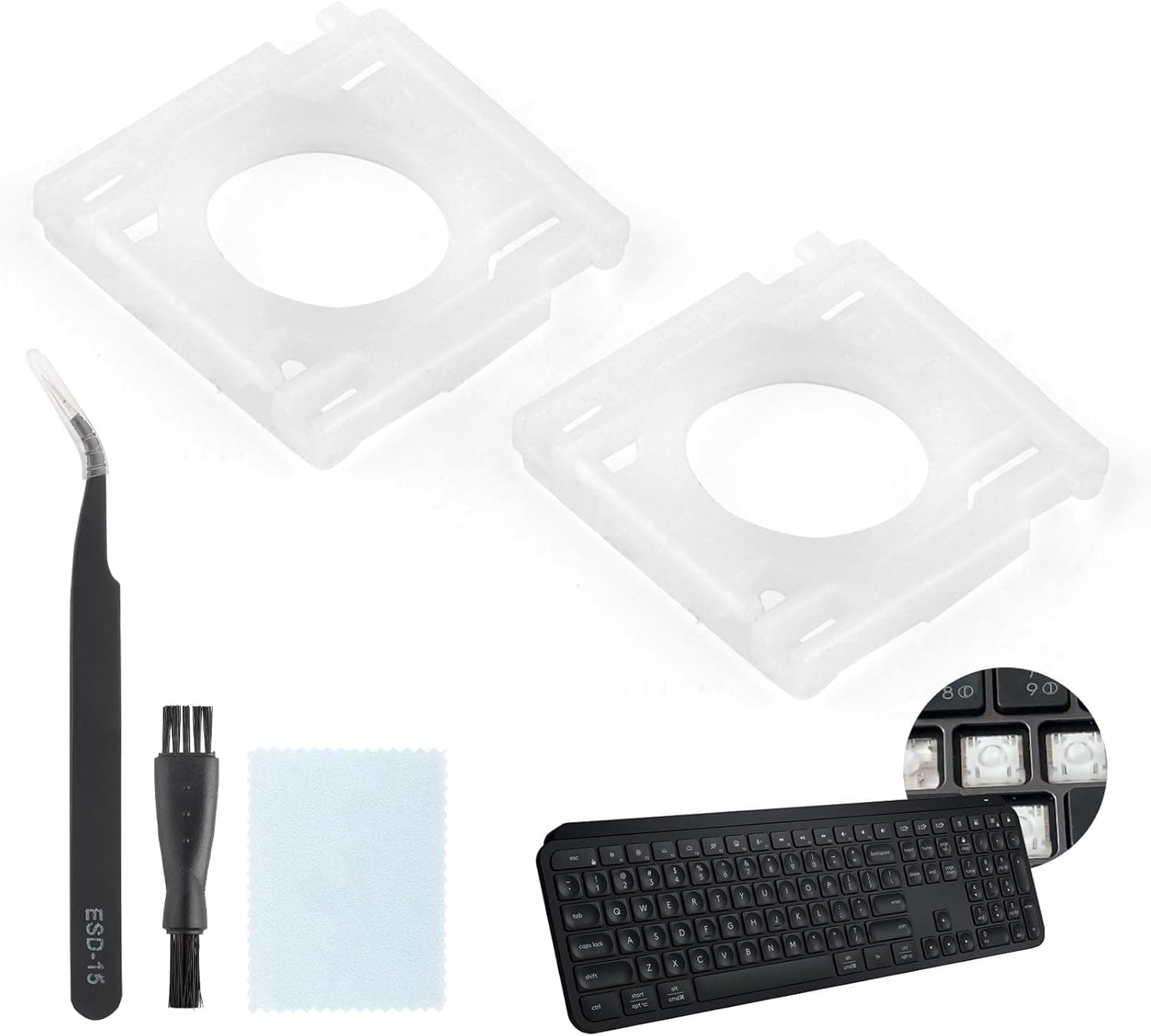
This is a repair part: a pair of hinge (scissor) clips that hold a keycap onto a Logitech MX Keys, plus one installation tool. No keyboard and no keycaps are included.
It exists to solve one narrow problem — a keycap that has come loose or fallen off — without replacing the whole keyboard.
The MX Keys is well regarded for its quiet, low-profile typing feel, but like all scissor-switch keyboards it has a known weak point: the small plastic hinge tabs can snap when a keycap is pried off at an angle or knocked. The material is plastic, and a cracked hinge cannot realistically be glued back to working strength, so swapping the part is the practical fix.
On Amazon.co.jp the listing showed 14 reviews at 4.3 out of 5 (86% positive) as captured in June 2026.
That rating is fine, but the sample is small — treat this as a niche repair part that works when it fits, not as a broadly proven standard accessory.
Compatibility Guide
The stated fit is "square keys on the Logitech MX Keys only." This is the single most important thing to check before ordering, because an MX Keys layout mixes several structurally different key types.
| Key type | Fits this part? | What to check |
|---|---|---|
| Letter / number / symbol square keys | Yes — the intended use | Hinge tab shape matches |
| Spacebar | Very likely not | Uses a stabilizer bar |
| Enter / Shift / Backspace | Very likely not | Wide keys have reinforcement |
| Function row / numpad | Verify first | Sizes can vary by unit |
Wide keys and the spacebar do not use the same hinge as a square key. Ordering this kit when the broken key is the spacebar is the most common purchasing mistake here.
There are also MX Keys variants such as the MX Keys S and MX Keys Mini. Similar looks do not guarantee identical key-unit dimensions, so confirm your exact model on the underside label and match it against the listing.
If you cannot confirm it, ask the seller before ordering.
Installation itself is not hard. Use the included tool to lift the keycap as vertically as you can, remove the broken hinge, seat the new hinge on the mounting tabs, then press the keycap down evenly from the centre.
The key discipline is not yanking: pulling hard at an angle can break the mount on the keyboard itself, and once that happens a new hinge will not help.
Product Info
The listed price on Amazon.co.jp was ¥3,499 as captured on 7 June 2026.
Prices move often and this article will not, so check the product page for the current figure. The eBay entry is a search link only, with no fixed price shown.
Whether ¥3,499 is good value depends on your situation. Against the cost of a replacement MX Keys it is clearly cheaper, and extending the life of a working keyboard is sensible.
But you are getting two plastic clips and a simple tool, which is not cheap per part. If three or more hinges are broken you need multiple packs, and the gap versus a new keyboard narrows quickly.
The spec sheet is short: compatible with the Logitech MX Keys (square keys only), contents of two hinge clips plus one tool, plastic construction. It is a third-party part, not an official Logitech component, so do not expect factory-grade durability or official support.
Warranty terms vary by seller — check the return conditions before ordering.
Best Use Cases
The ideal buyer has one or two square keycaps that wobble or have fallen off while the keyboard still types perfectly. If the only failure is mechanical retention, this is the fastest and cheapest fix available.
Typical symptoms: the key registers when pressed but rattles, or the keycap will not stay seated.
The second good fit is someone who bought a used or refurbished MX Keys. Worn units often have tired hinges, and a small part can restore a near-new feel.
If the used price plus parts still beats a new unit, the maths works.
Third, it suits people comfortable with fine work. If you have handled tweezers or a plastic opener and can visually check tab engagement as you seat the part, this is a low-risk job.
If fiddly small parts frustrate you, skip it.
Things to Check Before Buying
If the key does not register, this part will not fix it. A hinge is a mechanical retainer, not an electrical contact.
Keys that produce no input, or several keys failing at once, point to the rubber dome, membrane sheet, or the board underneath. Diagnose "wobbly" versus "dead" before you order.
If the mount is broken, the part is useless. Aggressive prying can chip the mounting tabs on the keyboard itself.
With the old hinge removed, inspect all four small tabs on the chassis side — if any are missing, a new hinge will not lock in.
Third-party tolerances vary. Because this is not an OEM part, tab thickness and clearance may differ slightly, so the key can fit yet feel marginally different from its neighbours.
On a frequently used key that difference is noticeable. If you need a perfect restoration, a replacement keyboard is the surer route.
Listing metadata does not always match reality. Even here, the marketplace label and the actual storefront region and currency do not line up cleanly.
Repair parts like this often have thin listings, vague model coverage, or photos from a different model. Before ordering, compare the product images, title, and your own key shape to confirm you are buying the right item.
If hinges keep breaking, it is time to replace the keyboard. A unit shedding one hinge after another likely has plastic that has gone brittle with age.
Buying parts repeatedly costs more than moving to a keyboard designed to be serviced.
Repair or Replace?
The decision comes down to how many keys broke and why. One or two, with a clear physical cause — snagged, dropped, pried during cleaning — favours repair.
Multiple failures with no obvious cause suggests age-related degradation, where repair only buys time.
If you replace, the useful criterion is serviceability. Hot-swappable mechanical keyboards let you change a switch without tools, and their keycaps follow common standards, so spares are easy to find.
Typing feel is a matter of taste, but on repairability they beat scissor-switch designs outright.
FAQ
Q. My spacebar came off. Will this fix it? A.
Assume no. The stated fit is square keys only, and wide keys use a stabilizer with different parts.
Q. The key presses but types nothing. Will a new hinge help? A.
No. The hinge only holds the cap; input comes from the contact layer.
Look at repair or replacement instead.
Q. Two clips come in the pack — is one wasted if only one key broke? A.
Yes, but a spare is genuinely useful, since hinges can crack during installation.
Q. Is this an official Logitech part? A.
No, it is a third-party compatible part with no official support. Warranty depends entirely on the seller.
Q. Do I need special tools?
A. No — one installation tool is included. Tweezers make alignment easier.
Q. What does it cost?
A. ¥3,499 on Amazon.co.jp as captured on 7 June 2026. Prices change often, so verify on the product page.