Overview
The Keychron V1 is a wired mechanical keyboard that has become a popular entry point into the custom keyboard hobby. The short verdict: it fits people who want to choose their own switches and key layout without soldering, but aren't ready to spend on a full custom kit.
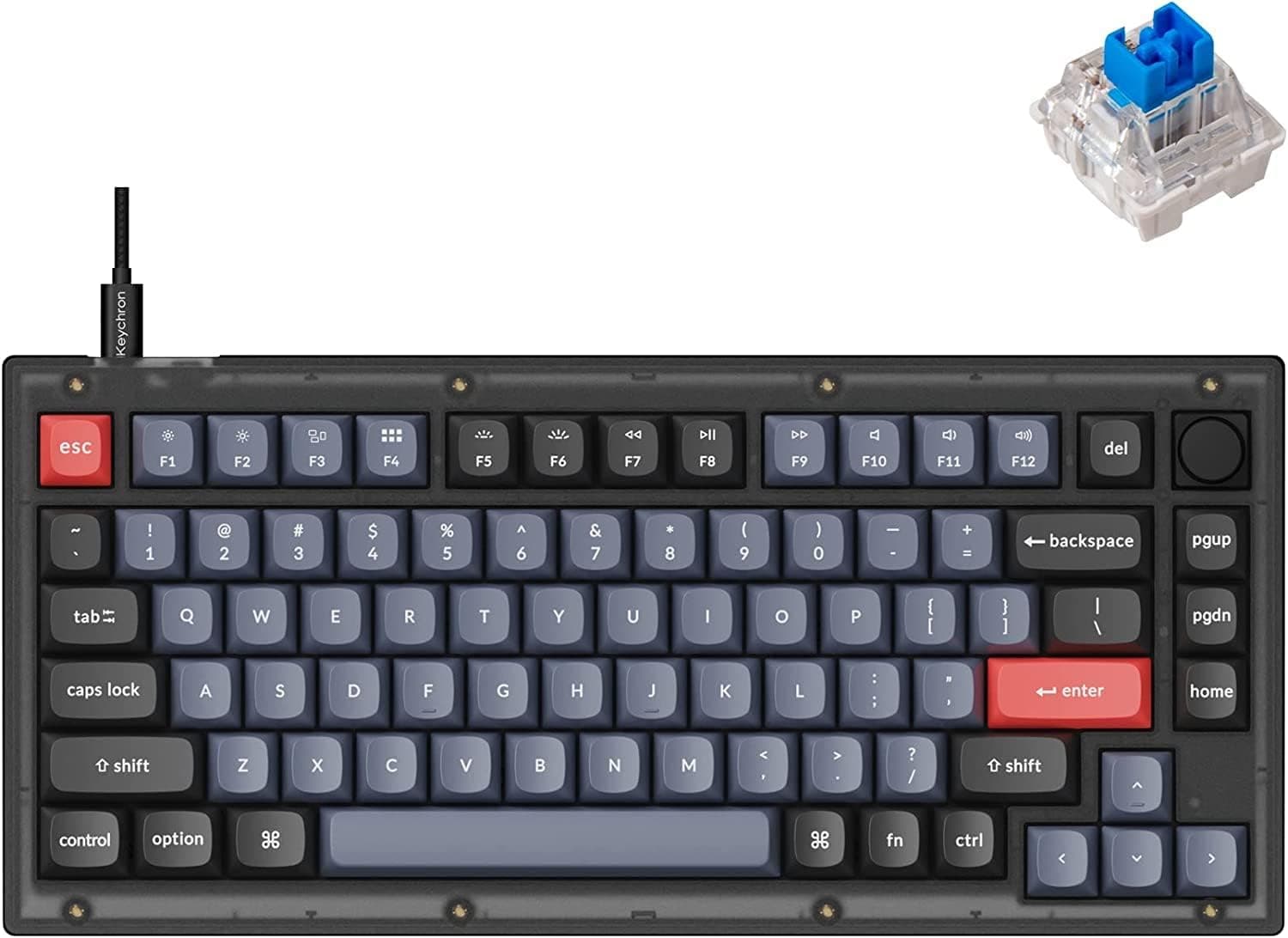
It uses a compact 75% layout (81 keys) that saves desk space while keeping dedicated function keys and arrow keys.
This is the knob version, with a rotary encoder in the top right for volume — and, via VIA, for scrolling, zooming, or app switching instead. It ships with Keychron K Pro hot-swappable switches; the listed configuration is the clicky blue variant.
The frosted black translucent case shows off the PCB and RGB lighting.
Amazon.co.jp listed 18 reviews averaging 4.2 out of 5 stars (about 84% positive) as captured on 28 May 2026.
That is a small sample, so read the review text against your own use case rather than trusting the average alone.
Reading the Specs
| Spec | Value | What it means in practice |
|---|---|---|
| Layout | 75% (81 keys) | No numpad, but F-row, arrows and Del remain — easy to move to from full size |
| Connectivity | USB-C wired | One cable, no battery or pairing issues; poor for portability |
| Switches | Keychron K Pro (hot-swap) | Don't like the feel? Swap switches instead of the keyboard |
| Keycaps | Doubleshot PBT | Legends don't wear off and the surface resists shine over years |
| Backlight | RGB LED | Diffuses visibly through the translucent case |
| Programmable | QMK/VIA | Settings live on the board — no background software needed |
| OS | Windows / macOS | Standard Keychron dual-platform handling |
The doubleshot PBT caps and the hot-swap sockets are what really matter here. Shiny keycaps and disliked switches are the two most common reasons people replace a mechanical keyboard, and the V1 addresses both at a price where many rivals still ship ABS caps and soldered switches.
Compatibility Guide
The official note reads: compatible with most 3-pin and 5-pin MX-style switches; wired USB-C only, no Bluetooth. Here is what that means when you actually build it.
Switches. Both 3-pin (plate-mount) and 5-pin (PCB-mount) MX switches drop in, so you never have to clip legs off 5-pin switches the way you do on 3-pin-only boards.
However, low-profile, optical and magnetic (Hall effect) switches are not MX-compatible and will not fit. If you are shopping for rapid trigger, this is the wrong board.
Connection and OS. USB-C wired only — no Bluetooth, no 2.4GHz dongle.
Multi-device switching and tablet or phone use are simply out of scope. If wireless is a requirement, look at Keychron's K series instead.
Windows and macOS are both supported; check the product page for exactly which Mac modifier keycaps are in the box, as bundle contents can vary.
QMK/VIA setup. VIA remaps keys from a browser or desktop app, and the result is written to the keyboard's own memory.
Plug it into another machine and your layout comes with it. That is the decisive difference from gaming keyboards whose macros only work while their driver is running — useful on locked-down work machines where you cannot install software.
Desk footprint. A 75% layout is narrower than TKL and packs keys with almost no gaps.
If your work involves heavy numeric entry, expect to pair it with an external numpad.
Product Info
The Keychron V1 launched around 2022 and sits in the mid-range as the plastic-cased, budget counterpart to Keychron's machined-aluminium Q series. The Amazon.co.jp listing showed ¥14,344 including tax as captured on 28 May 2026.
Prices move constantly with stock and sales, so confirm the current figure on the product page before buying. The package includes a USB-C cable, keycap puller, switch puller and spare spacers.
The marketplace reference price attached to this listing is an order of magnitude away from what this product class costs, which strongly suggests it was scraped from a different item or a reseller. We have deliberately not quoted it in this article.
As noted, the review base is 18 ratings at 4.2 stars.
For a board that has been on sale for years, that modest count suggests the V1 is not a mass-market hit but a deliberate choice by people who went looking for it.
How It Compares
Keychron's own Q1 uses a machined aluminium case with a gasket mount and beats the V1 on acoustics and heft — at a higher price and considerably more weight. If you are still testing whether the custom keyboard hobby is for you, the V1's plastic case is enough.
If you already own several mechanical boards and care about sound signature, buying into the Q series directly usually works out cheaper in the end.
Against gaming-oriented 75% boards with wireless or rapid trigger, the V1 does not compete on input speed. There is no 8000Hz polling or adjustable actuation; the trade is freedom to choose your own switches and keymap.
For competitive FPS this is not the optimal pick. For typing all day, its priorities line up better.
Best Use Cases
This keyboard is ideal for anyone entering the custom keyboard world for the first time. Hot-swap sockets mean no soldering, so you can try a feel and change your mind — if clicky blues turn out to be wrong, linear reds or silent tactiles are a few thousand yen away.
That reversibility is the real beginner benefit.
Concretely, it suits:
- Power users who want programmable keymaps. QMK/VIA layers put arrows and shortcuts under your home position.
- Creators who can bind the knob to zoom or scrubbing in an editing timeline.
- People with tight desks who still refuse to give up function and arrow keys — 75% exists exactly for that compromise.
- Anyone who considers wired a feature. No battery, no pairing, nothing to charge on a stationary desk.
Before You Buy
The most common surprise is the lack of Bluetooth. Keychron built its name on wireless K series boards, so buyers reasonably assume any Keychron is wireless — the V series is not.
If you need to pair with an iPad, a phone, or switch between machines, rule this out now.
Clicky blue switches are louder than most people expect. The sound is satisfying but it carries clearly into video-call microphones and makes late-night typing antisocial in a shared room.
Office use depends entirely on your neighbours. The remedy is hot-swap: fit silent switches instead.
Just budget for 81 replacement switches — a meaningful fraction of the keyboard's own price — before you commit.
Adapting to 75% takes a few days. Losing the numpad is expected, but Del and PgUp/PgDn compressed into a single right-hand column is where the mistyping happens.
Spreadsheet-heavy work feels the missing numpad more than you would guess.
This is a board built to be modified. Out of the box it is a starting point, not a finished product; stabiliser tuning and foam mods are where it comes alive.
If you want peak feel straight from the box with no work, a finished-product brand will satisfy you more.
Finally, on listing accuracy: the price label and the actual currency shown on this listing disagree in places, and the marketplace comparison price is far outside this product's class. Amazon listing metadata is sometimes wrong, so verify the product images, title and — critically — the variation you select (knob or no knob, switch type, layout).
The V1 often sells knob and non-knob versions and multiple switch types on one page, and picking the wrong one is the costliest mistake here.
FAQ
Q. Can it connect wirelessly?
A. No. USB-C wired only. Look at Keychron's K series if you need wireless.
Q. Will my existing switches fit? A.
Any MX-compatible 3-pin or 5-pin switch drops in without soldering. Low-profile, optical and magnetic (Hall effect) switches do not fit.
Q. Can I make it quieter? A.
Swapping to silent switches is the most effective step. Adding case foam and lubing the stabilisers are the usual follow-ups.
Q. Do I need software running for my remaps to work? A.
No. VIA writes the layout to the keyboard itself, so it follows you to any computer.
Q. Does it work on a Mac? A.
Yes, Windows and macOS are both supported. Check the product page for the exact Mac keycaps included, as bundles vary by batch.
Q. Is it usable for numeric data entry?
A. Usable but not comfortable. Plan on an external numpad if you type numbers all day.
Product Disclosure (Amazon)
- Manufacturer: Keychron
- Seller: SUPERKOPEK
- Fulfilled by: SUPERKOPEK
- ASIN: B0C1RL6ZZP
- Note: This article covers a manufacturer-made product based on Amazon listing details.