Overview
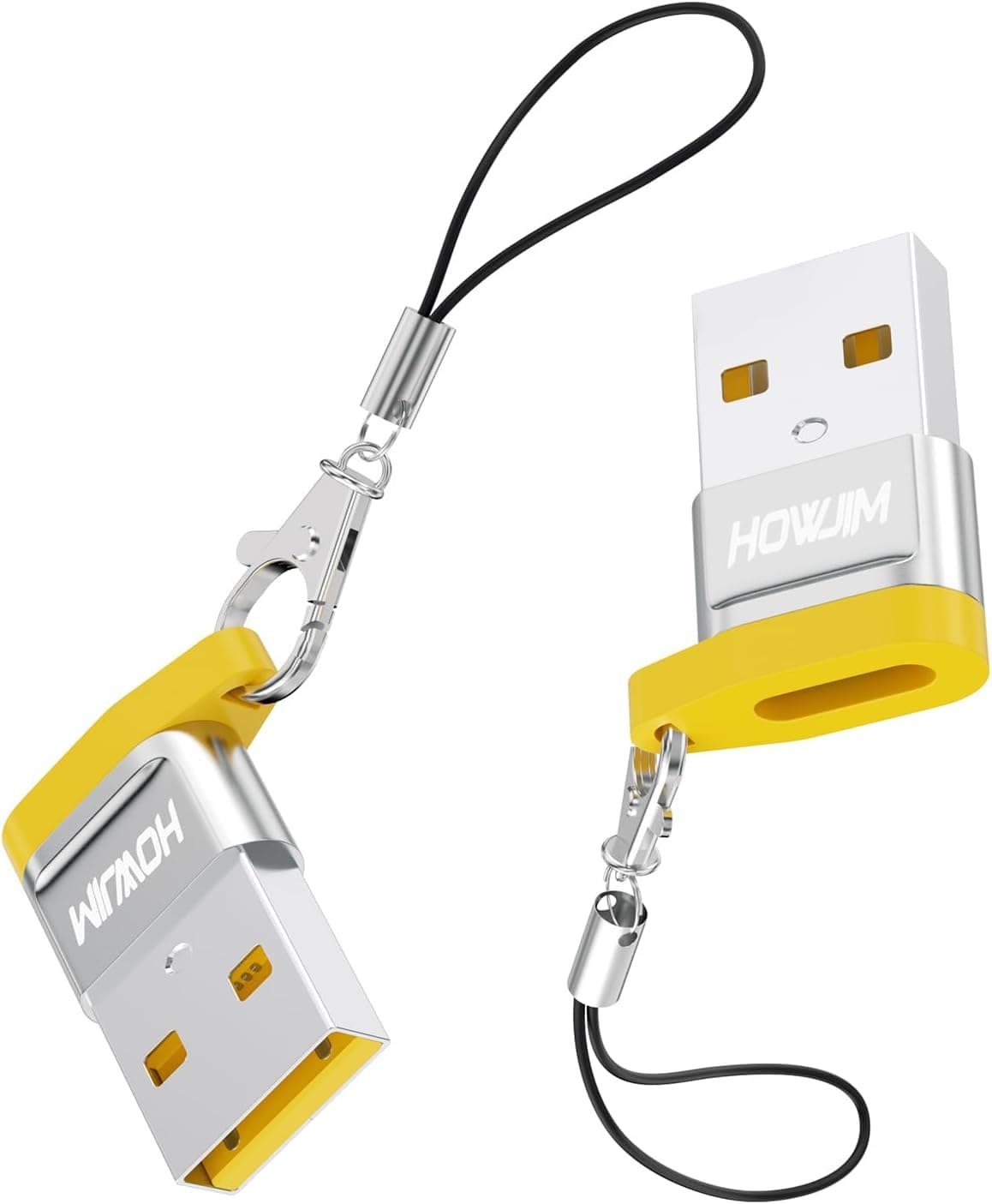
The HOWJIM USB C Adapter 2-Pack is a tiny passive adapter with a USB-C female port on one end and a USB-A male plug on the other. It is USB 2.0 compliant (480Mbps), the connector is rated 3A (20V), the shell is aluminum alloy, and each unit measures just 23×18×7mm.
The package contains two adapters and two anti-loss lanyards.
The short version: this exists to solve one problem — you have a USB-C cable, but the only port available is USB-A. Desktop front panels, car chargers, power banks, and hotel or meeting-room chargers will keep shipping USB-A for years.
This adapter lets your USB-C cable use them. That is the whole job.
If you buy it expecting video output or fast storage transfers, you will be disappointed.
As of the data capture (May 2026), the Amazon.co.jp listing showed 6 reviews at 4.5 stars (roughly 90% positive).
That is a fine number, but six reviews is statistically meaningless — two unlucky units would move the average dramatically. For small adapters like this, unit variance and contact reliability are essentially the whole quality story, so do not lean on the rating as your main buying signal.
Compatibility Guide
Compatibility here comes down to one question: which side is the host? The device you plug the USB-A male end into is the host — it supplies power and controls the link.
| Use case | Verdict | Notes |
|---|---|---|
| Charge a USB-C device from a USB-A port using a USB-C cable | Primary use | Power delivered depends entirely on the host USB-A port |
| Data transfer between a USB-A host and a USB-C device | Works, USB 2.0 speed | 480Mbps ceiling; no USB 3.x speeds |
| Connect a USB-C SSD to a USB-A port | Works, but slow | Real-world throughput tops out near 40MB/s |
| Video output (DisplayPort Alt Mode / HDMI) | Not supported | Passive adapter with no conversion circuitry |
| Full Thunderbolt performance | Not supported | Falls back to USB 2.0 operation |
Speed deserves emphasis. 480Mbps is a theoretical figure; expect roughly 30–40MB/s in practice.
A 1GB file takes about half a minute. Fine for documents and a handful of photos, clearly inadequate for video footage or SSD backups.
That is the trade-off you accept at this price point.
On power, do not read "3A (20V)" as "charges at 60W." That is the connector's rating, not what will flow.
A typical PC USB-A port supplies 5V at 0.5–0.9A; even a fast-charge wall adapter usually lands around 5V/2.4A.
The built-in 56kΩ resistor is the part that tells a USB-C device "this is a legacy USB supply, don't draw more than the default." A cheap adapter with the wrong resistor value — or none at all — can let a device demand too much current and damage the host.
HOWJIM specifying 56kΩ is a genuine point in its favor.
A word on OTG. The listing mentions OTG support, but plugging a USB flash drive or mouse into a phone does not work with this connector orientation (USB-C female / USB-A male). That use case needs the opposite adapter: USB-C male / USB-A female.
Try it the wrong way and you end up with two USB-A male plugs facing each other. Confirm the orientation before you buy — getting this backwards is by far the most common mistake with these adapters.
There is no meaningful OS compatibility list. This is a passive shape converter: no drivers, no configuration.
Windows, macOS, Linux, Android, and USB-C iPhones all work, provided the host and device support the link itself.
Product Info
Core specs: USB-C female to USB-A male, USB 2.0, 480Mbps data, 3A (20V) connector rating, aluminum alloy housing, 23×18×7mm, silver, 56kΩ protection resistor, two adapters and two lanyards in the box.
The aluminum shell is not just cosmetic — it spreads heat across the body better than the plastic housings common at this price.
Those 23×18×7mm matter practically. At 7mm thick it rarely blocks neighboring ports on a crowded rear I/O panel.
But small also means that once a thick USB-C cable hangs off it, all that leverage lands on the port. Fine on a desktop that never moves; avoid leaving it plugged into a laptop you toss in a bag.
The included lanyards are a sensible answer to how easy something this small is to lose.
Pricing needs a caveat. The captured data lists ¥6,300 on Amazon (captured 26 May 2026) and $13.51 on eBay (captured 10 July 2026).
¥6,300 for a two-pack of passive USB 2.0 adapters is out of line with the product class, and most likely a collection error, so this article does not treat it as the product's price.
Check the listing for the current figure before buying — prices in this category move constantly, and any number in an article is a snapshot at best.
Both the seller and the shipper are そのだや, and warranty handling goes through them rather than the manufacturer. For an item at this price, return shipping can easily cost more than a replacement — another quiet argument for the two-pack as built-in redundancy.
How It Compares
USB-C-to-USB-A adapters differ along exactly two axes: speed and orientation.
If you need speed, USB 3.1 Gen2 (10Gbps) adapters are a separate category and the right choice for external SSDs or docks.
If your needs stop at charging plus a mouse, keyboard, or flash drive, paying extra for 10Gbps buys you nothing. In practice, USB 2.0 is enough far more often than spec sheets suggest.
On orientation: this product (C female / A male) and the phone-side adapter (C male / A female) serve opposite purposes, and a C-female-to-C-female coupler is a third shape entirely. Work out what is actually missing between your cable and your device before ordering.
Brands like HOWJIM are also harder to read than established peripheral makers on long-term supply and support. If you need to buy the same part repeatedly or equip a whole office, a stable brand usually costs less in the end.
Best Use Cases
- You standardized on USB-C cables, but USB-A ports are still everywhere you go. Car chargers, power banks, desktop front panels, hotel chargers — one adapter beats buying another cable.
- You want one at the desk and one in the bag. With a single unit, it will always be in the other place. That is what the two-pack is for.
- You want an always-with-you fallback. 23×18×7mm plus a lanyard is designed for exactly this: clipped to keys or a bag.
- Your workload is charging and low-speed data only. Mice, keyboards, flash drives, and controllers never come close to the USB 2.0 ceiling.
Before You Buy
1. The orientation is the whole decision. This is USB-C female / USB-A male.
If your goal is "plug a USB stick into my phone," you need the opposite adapter. The word OTG in a listing refers to a phone's ability to act as host — it does not change a connector's shape.
Check the product photos of both ends.
2. Speed is capped at USB 2.0. It does not matter if your device is USB 3.2 or Thunderbolt; passing through this adapter drops it to 480Mbps.
Not suitable for SSD backups, bulk photo imports, or moving video files. "Why is this so slow?" is often answered by the adapter.
3. Do not expect fast charging. 3A (20V) is a connector rating; actual power comes from the host USB-A port.
USB PD negotiation requires USB-C on both ends, so charging through this adapter is slow-and-steady by nature.
4. Leaving it permanently plugged in stresses the port. Small as it is, a thick USB-C cable hanging off it concentrates leverage on the host connector.
Plug it in when you need it, especially on portable gear.
5. Watch for listing inconsistencies. As noted, the captured ¥6,300 does not fit this product class.
Amazon listings in this category also sometimes carry a manufacturer name, model number, or description fragment belonging to a different product. Since you will open the same page, verify the price, the connector shape, and the box contents against the product images and title, not just the spec text — variation pickers on these listings make it easy to order the wrong shape.
6. Six reviews is thin evidence. A high percentage over a tiny sample tells you little, and failures in adapters like this tend to surface months later as intermittent contact — long after early reviews are written.
Treat the second unit as your warranty.
FAQ
Q. Can I connect a USB flash drive to my iPhone 15 or Android phone with this? A.
Not with this orientation (USB-C female / USB-A male). You need a USB-C male / USB-A female adapter for that.
Q. Will my external SSD run at full speed? A.
No. USB 2.0 caps it at 480Mbps, roughly 30–40MB/s in practice.
Choose a 10Gbps-rated adapter if speed matters.
Q. Can I drive a monitor through it? A.
No. DisplayPort Alt Mode and HDMI output are not supported; this is a passive shape converter only.
Q. What is the 56kΩ resistor for? A.
It signals a USB-C device that the supply is legacy USB and to limit current to the default level. Adapters lacking it can let devices over-draw and damage the host.
Q. Do I need drivers? A.
No. It works on Windows, macOS, Linux, and Android as-is.
If a device is not detected, suspect the cable or the port rather than the adapter.
Q. Who handles warranty? A.
The seller and shipper, そのだや. Terms are not manufacturer-direct, so confirm them on the listing at purchase time.
Product Disclosure (Amazon)
- Manufacturer: HOWJIM
- Seller: そのだや
- Fulfilled by: そのだや
- ASIN: B0DBLQ8KVM
- Note: This article covers a manufacturer-made product based on Amazon listing details.