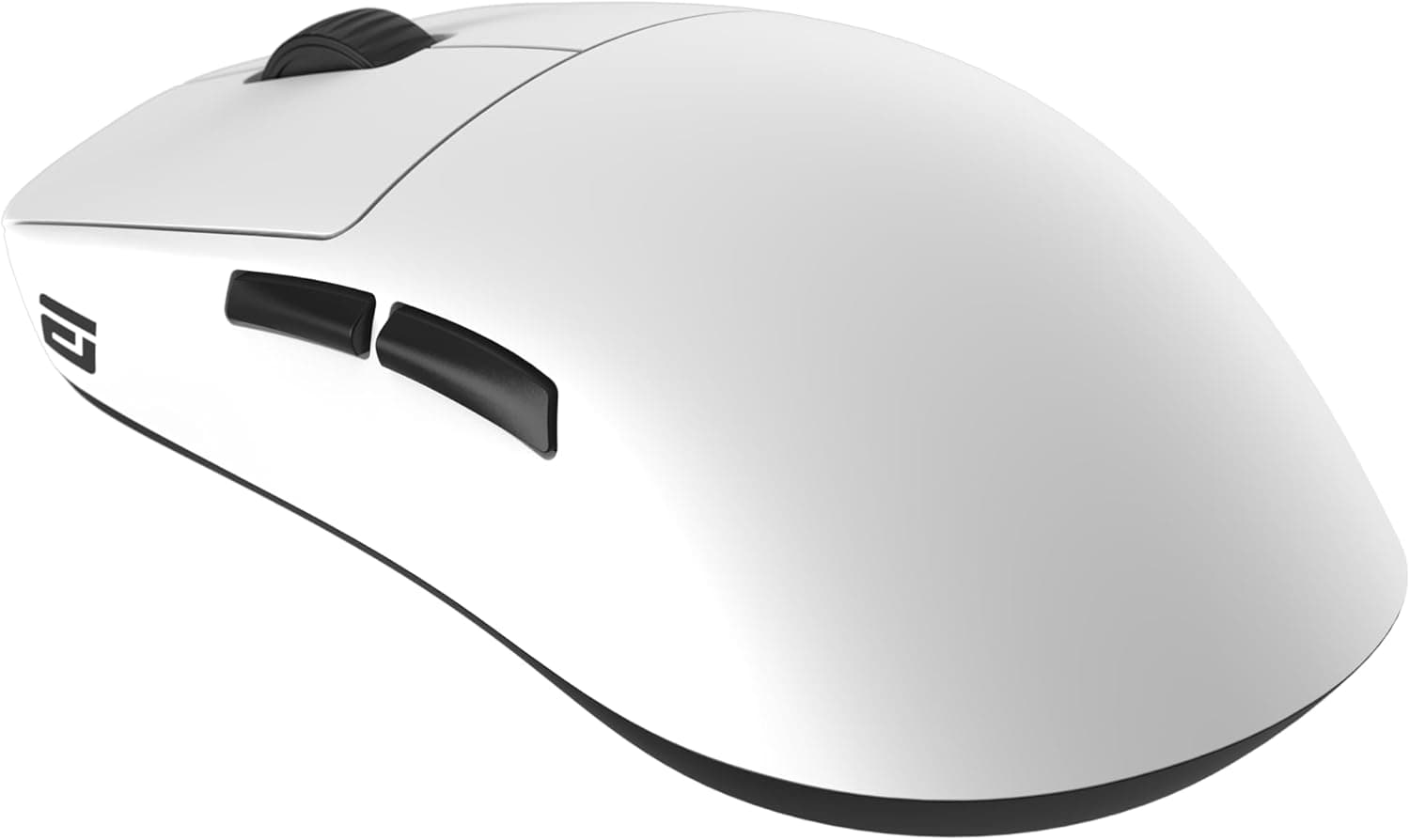
This article takes a closer look at the Endgame Gear OP1we Wireless Gaming Mouse in White (EGG-OP1WE-WHT), based on its published specifications and listing data.
Overview
The OP1we pairs a 58.5g body with Kailh GO optical main switches over a 2.4GHz wireless link.
Its priorities are clear: weight and click quality, not RGB spectacle, extra buttons, or macro suites. It is a competitive-focused mouse that spends its budget where fast aim actually benefits.
On Amazon.co.jp it holds 4.3 out of 5 stars from 107 reviews as captured in late May 2026 — roughly an 86% favorable score.
That is not a mass-market bestseller distribution; it reads more like a product chosen by people who already know what they want from a lightweight mouse, and who are happy with it.
The other practical strength is the wired fallback. When the battery dies, you plug in the bundled cable and keep playing as a wired mouse.
The worst moment in wireless gaming becomes a minor inconvenience instead of a lost match.
Compatibility Guide
There are two connection paths: 2.4GHz wireless and wired USB.
Supported operating systems are listed as Windows 10 or later and macOS, with no driver installation required for basic operation. On the PC side you need exactly one free USB port for the dongle.
The things that actually trip people up are physical:
| Check | Detail | Watch out for |
|---|---|---|
| USB port | One port occupied by the 2.4GHz dongle | Mini PCs and laptops with full ports may need a hub |
| Dongle storage | Storage bay on the bottom of the mouse | Convenient for travel — but it obviously won't connect while stored |
| Cable | USB Type-A to Micro USB (upward connector) | PC side is Type-A; a Type-C-only setup needs an adapter |
| Surface | Mousepad and skates | On a light mouse, pad friction dominates the feel |
The upward-angled connector is a sensible choice for a wireless mouse used in wired mode: it keeps the cable tip from dragging on the pad. Note, though, that the mouse-side port is Micro USB.
If your desk has standardized on USB Type-C, this is one more odd cable to keep track of.
As general advice, the 2.4GHz band is susceptible to interference from Wi-Fi routers and USB 3.0 devices.
If the connection feels inconsistent with the dongle plugged into a rear port, move it to the front of the desk with an extension cable — that fixes most cases.
Product Info
| Item | Value |
|---|---|
| Weight | 58.5g |
| Main switch | Kailh GO optical (80 million clicks) |
| Side switch | Kailh GM 2.0 (20 million clicks) |
| Connection | 2.4GHz wireless / wired USB |
| Cable | USB Type-A to Micro USB (upward connector) |
| Supported OS | Windows 10 or later, macOS |
The switch layout deserves attention. Main buttons are optical and rated for 80 million clicks; side buttons are mechanical Kailh GM 2.0 rated for 20 million.
Optical switches are structurally resistant to the contact wear that causes unintended double-clicks, which matters most in genres with high click volume. Durability expectations, however, are simply different between the main and side buttons.
On pricing: ¥10,834 on Amazon.co.jp as captured at the end of May 2026, and ¥15,334 at Rakuten (Shop and and) as captured in August 2026.
Both are point-in-time figures that move with sales and stock. A gap of over 4,000 yen between captures is itself a good argument for checking several stores before ordering.
The eBay entry has no fixed price because it points to a search of individual listings.
The mouse launched in November 2023 and sits in the mid-to-high tier. The box includes the mouse, USB dongle, USB cable, and a quick start guide, with a standard 2-year warranty (registration may be required).
How It Compares
Lightweight wireless is a crowded category now, and sub-50g claims are no longer rare. At 58.5g the OP1we is comfortably light but not a record holder.
If your shortlist is sorted purely by grams, other options exist.
Its real differentiator is the switch and the operational safety net rather than the weight number. An 80-million-click optical rating on the main buttons is strong for this price bracket, and instant wired fallback is genuine insurance for anyone who does not keep a spare mouse.
What it is not built for is a spec-sheet shootout on DPI or feature count. The specification data available here lists no sensor model, no maximum DPI, no polling rate, and no battery life, so this article will not assert any of them.
Check the manufacturer's product page if those numbers drive your decision.
Best Use Cases
The best fit is FPS and TPS players using lower sensitivity and large arm movements. At 58.5g there is little inertia to fight during flicks and micro-corrections, and fatigue over long sessions drops noticeably.
RTS and MOBA players who click constantly are the second strong fit. Optical main switches remove the most common failure mode of an aging mouse, which stretches the replacement cycle for heavy users.
Third: anyone who wants wireless but hates battery anxiety. For LAN events or long streams where stopping is not an option, dropping to wired with a single cable is a meaningful practical advantage.
Before You Buy
This is the important part. First, the OP1we is not a feature mouse.
If you are planning MMO macro work, heavy multi-button productivity use, or switching between several PCs, look elsewhere. The listed connectivity is 2.4GHz and wired only — Bluetooth is not mentioned, so do not buy it expecting wireless multi-device pairing.
Second, the cable is Micro USB. If your peripherals are all USB Type-C, this is a one-off cable you have to store.
Lose it and you lose the wired fallback that is arguably the product's best feature, so give it a fixed home in your desk.
Third, battery life, sensor model, maximum DPI, and polling rate are absent from the data available here. If those matter to your comparison, this article alone is not enough to decide — verify current specifications on the manufacturer or retailer page.
Filling in unlisted numbers by assumption is the single most common way people end up disappointed with a gaming mouse.
Hand size is worth checking too. Competitive lightweight mice tend toward compact shapes, and users with large hands who palm-grip may find it small.
Try one in a store if you can, or confirm the return policy before ordering.
Finally, about the listings themselves. Even in this dataset, the same product showed a large price gap between stores at different capture times, and the store labels were not consistent.
Online product pages sometimes carry incorrect registration data or bundle different variants (wired versions, other colors) under one page. Before checkout, confirm from the images and title that you are buying the OP1we wireless in white, EGG-OP1WE-WHT.
FAQ
Q. How long does the battery last? A.
The specification data referenced here does not state a battery life figure. Check the manufacturer's product page; real-world runtime on this class of mouse varies widely with settings.
Q. Can it connect over Bluetooth? A.
The listed connection methods are 2.4GHz wireless and wired USB.
Bluetooth is not listed, so avoid buying it for a Bluetooth-based setup.
Q. Do I have to stop playing when the battery runs out? A.
No. Plug in the bundled USB cable and keep going in wired mode.
The upward-angled connector helps keep the cable off the pad.
Q. Does it work on a Mac? A.
macOS is included in the supported OS list and basic operation is described as driver-free. Support for detailed customization via configuration software depends on your environment, so verify if you need it.
Q. I'm worried about losing the dongle while traveling. A.
There is a dongle storage bay on the bottom of the mouse. Use it when moving.
Conversely, if the mouse won't connect wirelessly, check that bay first.
Q. Are the side buttons as durable as the main buttons? A.
No. Main buttons are Kailh GO optical rated at 80 million clicks; side buttons are Kailh GM 2.0 rated at 20 million.
If you lean on the side buttons heavily, plan around the lower figure.

![Logitech ロジテック G502 LIGHTSPEED ワイヤレスゲーミングマウスブラック [並行輸入品]](/_next/image?url=https%3A%2F%2Fm.media-amazon.com%2Fimages%2FI%2F613ieTi2alL._AC_SL1500_.jpg&w=1920&q=75)